Skip to content

The Force Field Podcast
  • Home
  • News
    • Blogs
    • Rick Rant
  • Podcast
  • Forums
  • About Us
    • FAQs
    • Advertise With Us!
    • Contact Us
    • Press Room
  • Resources
    • Free Publications
    • Media Center
  • Home
  • News
    • Blogs
    • Rick Rant
  • Podcast
  • Forums
  • About Us
    • FAQs
    • Advertise With Us!
    • Contact Us
    • Press Room
  • Resources
    • Free Publications
    • Media Center

a

Seeking Computer Technicians To Interview

November 15, 2011 by Rick

Authors: Bryce Whitty

I am going to be interviewing fellow computer technicians via email so people can hear their stories, be inspired by them and learn something new.

What questions would you like me to ask them beyond the typical “Who you are and how did you start”? You can leave a comment below. (Or hit reply if you are reading this via Email)

If you consider yourself successful, whether a single guy in his bedroom always keeping busy, or someone with a shop and multiple employees, I would love to interview you via email. Shoot an email to tips@technibble.com, tell me a little bit about yourself, what about yourself you believe would be interesting to your fellow techies and I’ll get in touch with you.

Last but not least, if you know someone you would really love to have interviewed, send me their details to tips@technibble.com and I’ll do what I can.


© Technibble – A Resource for Computer Technicians to start or improve their Computer Business
To get started with your own computer business, check out our Computer Business Kit. Seeking Computer Technicians To Interview

image image

image

Read more:

Categories News Feeds Tags a, and, computer, to, you Leave a comment

How To Perform a Perfect BackUp Reinstall with Apple Time Machine

November 14, 2011 by Rick

Authors: Bryce Whitty

Guest Post by Marco Rodi: Marco Rodi owns an IT Engineering university degree. He has his own computer repair business (OrdiRodi) that mainly does Apple Support.

So you receive a call from a client saying “My hard drive just crashed!!” or “I just bought a new Mac and I need to transfer all my information” or even “I want to clear my hard drive and do a clean installation”.

As a professional, you need to know exactly what to do to perform a perfect backup and reinstall. You don’t want to lose a client’s files or preferences. The client wants to have the exact same thing as before: their beautiful Mac, up and running again. They do not want to call you back and say: “Hey! I don’t have my music in my iTunes anymore!”, “Where are my bookmarks?” or “How come my icons are smaller?”.

Here are the steps to perform a perfect backup and reinstall on OSX using Time Machine.

CommitCRM


First of all, you need to backup everything. With Apple it’s easy.
There is a built in application called Time Machine and you simply need to plug an empty external drive into the computer (Yes, it must be empty because it will wipe everything on it), and activate Time Machine.

To activate Time Machine, simply open your System Preferences. And click on the Time Machine icon.
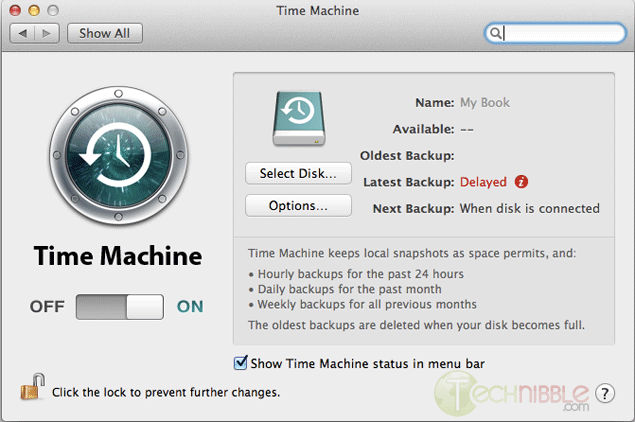
Click on “Select Disk”.
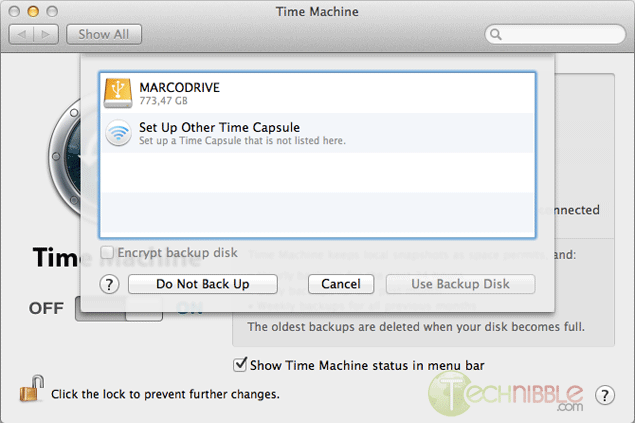
Choose your external drive and click on “Use Backup Disk”.

Time Machine will copy everything (OS, Software, Files, and Preferences) to the external hard drive. So when you will reinstall the OS, you can restore everything from that backup.

Once everything is backed up, we need to clear and format the new hard drive. To do so, you need to have a copy of the OS that you need to install (Snow Leopard or Lion). It can be on either CD or USB, it does not matter.

Shutdown the computer and insert your bootable device into the client’s Mac.

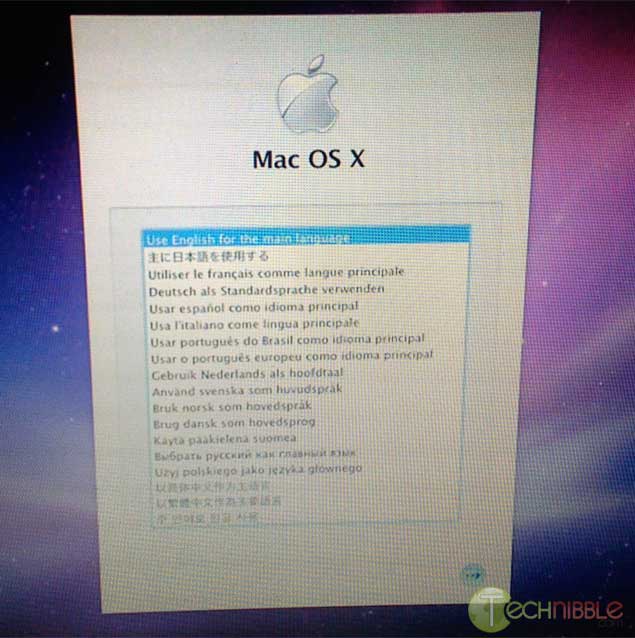
Boot the Mac while holding the “Option” key (ALT key if you are using a non-Apple keyboard). You will arrive on a window where you can choose a bootable device. Please choose your OS Installation (Either CD or USB).

You will then arrive at this window. Choose the language you want and press enter.
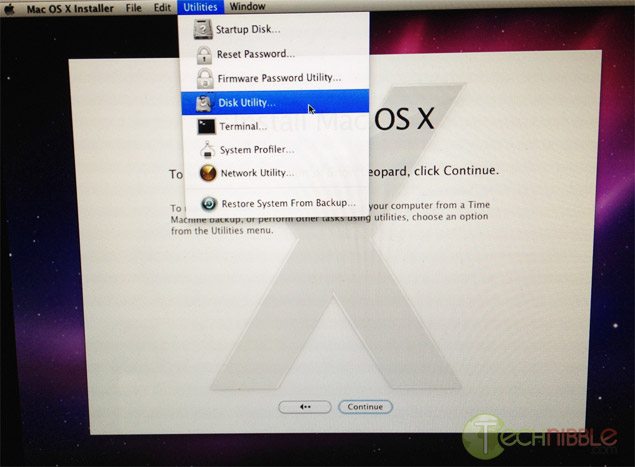
Click on Utilities and choose Disk Utility.
Select the drive you want to format to the left.
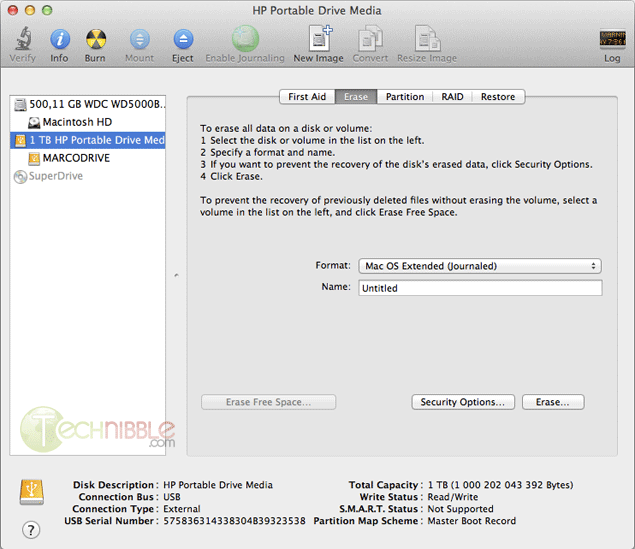
On the Erase Tab, use the “Format” Dropdown and choose “Mac OS Extended (Journaled)”.

Name your Hard Drive

Click the Erase Button.

It will then take some time to format the hard drive.

Once this is completed, you can close the Disk Utility window and start the installation. It will install the OS on your new hard drive.
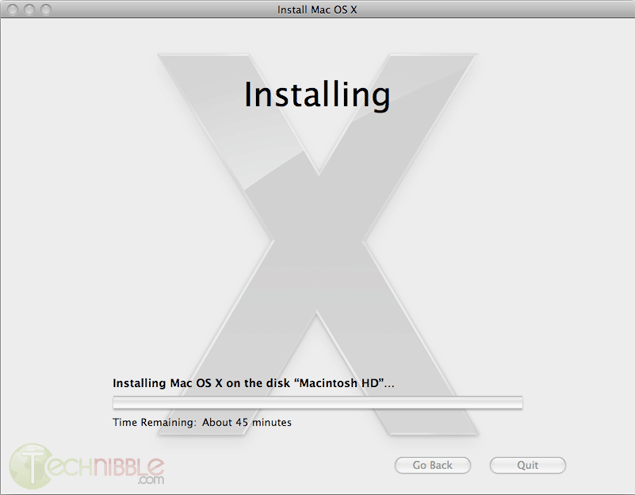
Once the installation is complete, it will reboot and it will start from your newly installed OS.

At the beginning, it will ask you if you want to transfer your information.
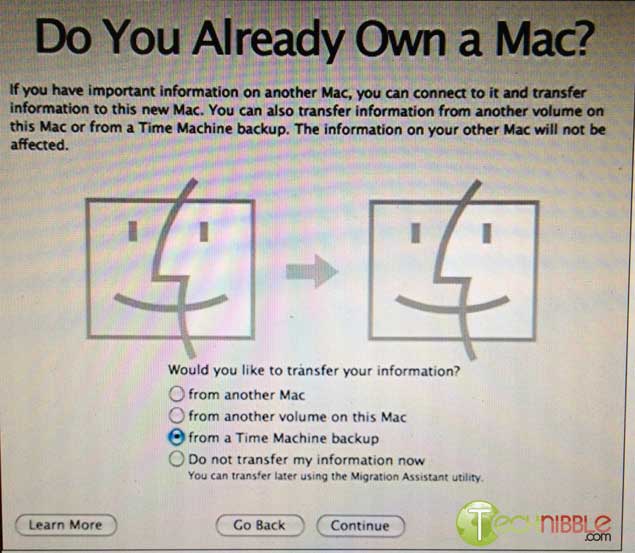
Plug your external device with the Time Machine backup and select “from a Time Machine backup” at the “Do You Already Own a Mac?” stage.

It will transfer all the files and settings that Time Machine made a backup of back onto the Mac.

So that is it. You can let your client test the computer and confirm that everything is back to normal.

© Technibble – A Resource for Computer Technicians to start or improve their Computer Business
To get started with your own computer business, check out our Computer Business Kit. How To Perform a Perfect BackUp & Reinstall with Apple Time Machine

image image

0 0

Read more:

Categories News Feeds Tags a, and, the, to, you Leave a comment

Google+ Pages for Computer Businesses – What You Need To Know

November 10, 2011 by Rick

Authors: Bryce Whitty

There is no doubt that social networking is here to stay. While some Computer Technicians may consider it just a new buzz word, other technicians are using it as their primary source of advertising. Google+ is newest major player in the social network game.

After several months, Google finally announced Google+ pages for local businesses, groups, brands and organisations. If you are familiar with Facebook pages, this is basically the Google+ equivalent. In this article, I’ll tell you why you should look into Google+ Pages and what you need to know before you claim your page.

CommitCRM

Why You Should Care

Google+ Pages, like Facebook Pages allows you to have a two way conversation with your clients. If they follow your page, your updates appear in their stream. This is an incredibly cheap way to advertise your business through discounts, specials and generally being on the front of your clients mind.

What If You Already Have a Google+ Account For Your Business?

I know of many Computer Businesses who have already have Google+ accounts for their business. However, it is actually against Google+’s terms to have a Google+ profile for a business. The account must be for an individual. The Google team will suspend accounts that break this rule.

From the Google+ Help Pages:
Your profile and name must represent one individual.
Google+ does not support profiles for couples or groups of people. Additionally, you cannot create a profile for a non-person entity such as a pet or business.

Violation examples: Jones Family, Jeremy & Mel Mason, Vegas the Dog, Brooklyn Bagels, Northern California Conservation Society

Google does plan to allow Google+ Business Profiles in time, but don’t hold your breath plus your account could get banned in the mean time.
If you have already done this, you can change your businesses Google+ account back to an individual (typically yourself). You can do this by going to your Google+ profile, click the “Edit Profile” button that is on the top right. Click on the name displayed up the top of the profile page. From there, you can type in a legitimate first name and last name. Then press save.

What You Need to Know Before You Claim Your Google+ Page

  • Contests, Sweepstakes, Offers, Coupons and Other Promotions From Your Page
    In Google+’s content and promotion policies page, it disallows you from running contests, sweepstakes, offers, coupons and other promotions DIRECTLY on your Google+ page. You may however, link to a separate site (such as your actual businesses site or blog) that contains the promotion.

    You may not run contests, sweepstakes, offers, coupons or other such promotions (“Promotion”) directly on your Google+ Page. You may display a link on your Google+ Page to a separate site where your Promotion is hosted so long as you (and not Google) are solely responsible for your Promotion and for compliance with all applicable federal, state and local laws, rules and regulations in the jurisdiction(s) where your Promotion is offered or promoted. Your Promotion must not be run or conducted in a way which conflicts with the +1 Button Policies, Google+ Privacy Policy or Google+ Pages Additional Terms of Service. Google has the right to remove your Promotion content from Google+ Page for any reason.

  • Linking your Personal Account To Your Business Page
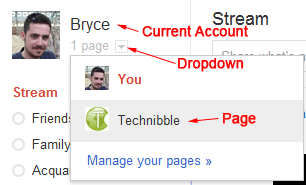
    When you visit the Create Page link and create a page, the page will be associated with the account that is currently logged in. To access your page from your account, there will be a drop down next to your name saying “1 Page”. Make sure you are logged into the account you want to associate the page with. Unlike Facebook pages, you cannot currently add any additional administrators to your account.
  • Be Careful When Switching Between Linked Accounts
    When using a Google+ account or page, it is not always obvious which one you are currently using. You will want to double check every time you are about to post something as you will probably not want to send a personal message out to all your clients and vice versa.

Beautify Your G+ URL

Once you create a G+ page, you will find that its URL is pretty long. For example, Technibbles G+ page URL is: https://plus.google.com/b/111951375001480014041/
Obviously, you don’t want to have write that long URL on any advertising so you can shorten it with a G+ specific URL shortner. I recommend gplus.to

Using gplus.to, I can change Technibbles page URL to http://gplus.to/technibble

So What Now?

  • If you are new to Google Plus, you can signup here (under your own, non-business name): https://plus.google.com
  • Once you have done that, you can create a page for your business here: https://plus.google.com/pages/create
  • If you like, add Technibble’s page to your Circles: http://gplus.to/technibble

© Technibble – A Resource for Computer Technicians to start or improve their Computer Business
To get started with your own computer business, check out our Computer Business Kit. Google+ Pages for Computer Businesses – What You Need To Know

image image

image

Read more:

Categories News Feeds Tags a, the, to, you, your Leave a comment

A Peek At Other Computer Technicians Workbenches #3

October 28, 2011 by Rick

Authors: Bryce Whitty

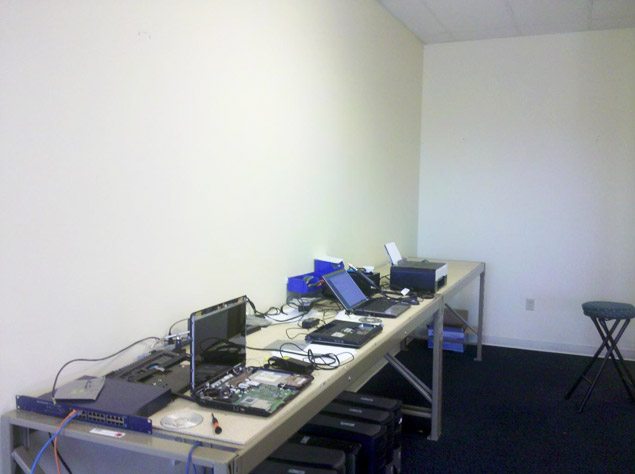
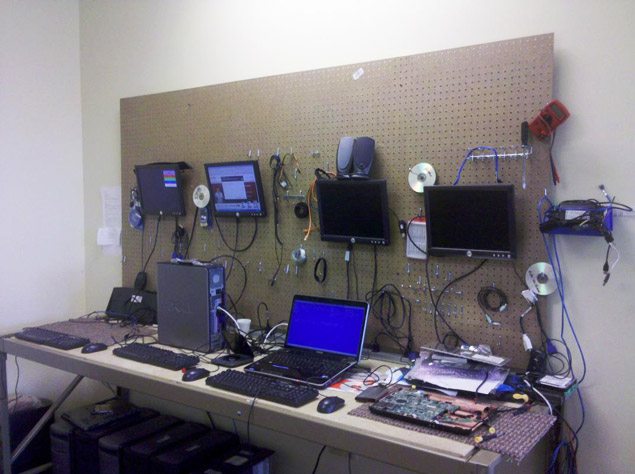
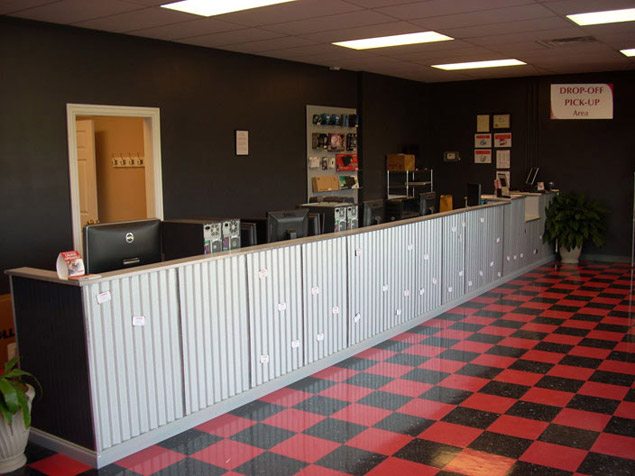
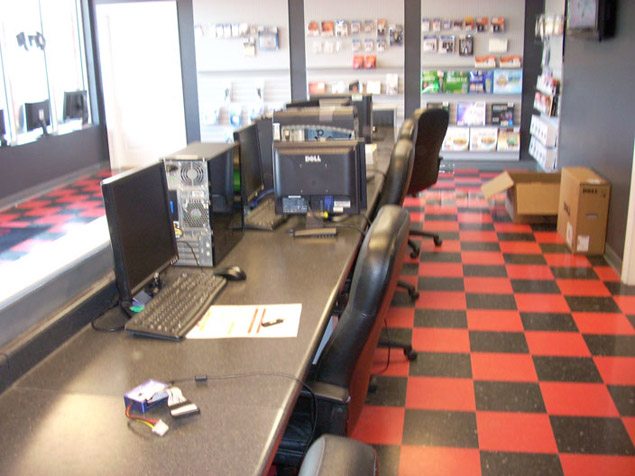
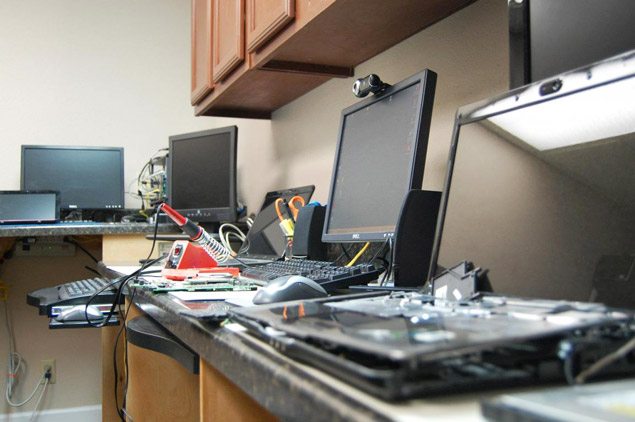
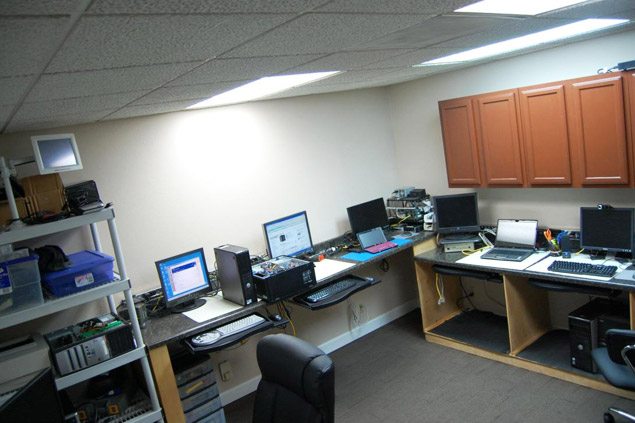
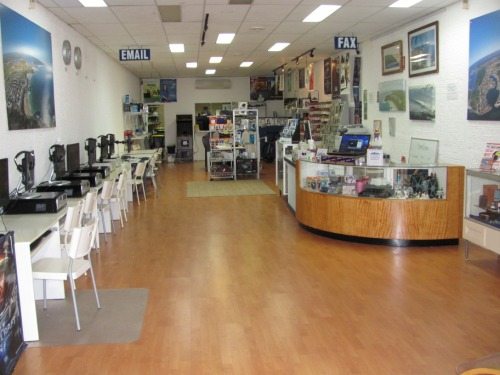
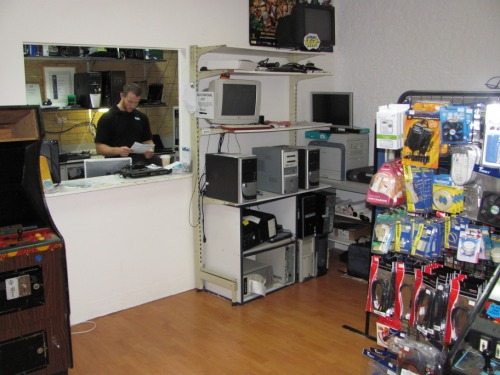
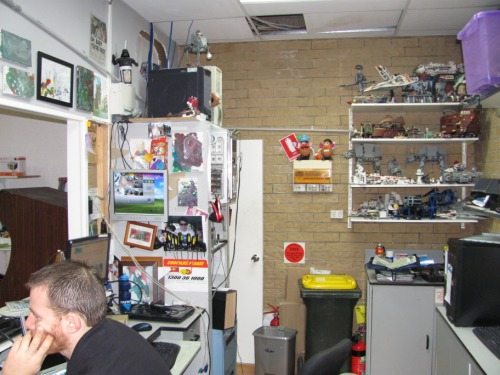
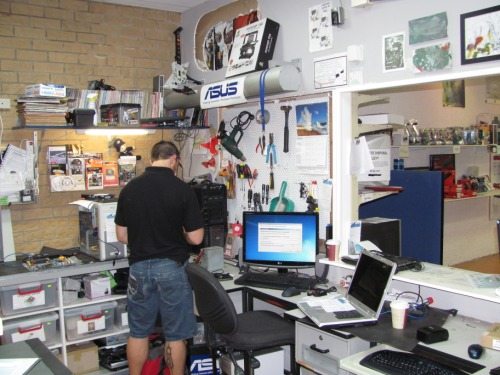
A work bench is something that most Computer Technicians will need and checking out other Computer Technicians workbenches is a great way to get inspiration for our own setups. Even if you have already completed your own workbench, it is nice to see how other technicians are doing it. We haven’t done one of these in a while (#1, #2) so it is time for #3 in our Computer Technicians workbenches series.

A Peek At Other Computer Technicians Workbenches #3


anth


Cain929

This is a few pictures of our shop… And yes before you ask that is the same stuff they use on metal roof tops. We cut it down and made it the front of the counter, the added benefit is that we put magnet backs on our cards and people just take them when they want them.. People love the fact they can see us working on their computers.


Fixedathome.com

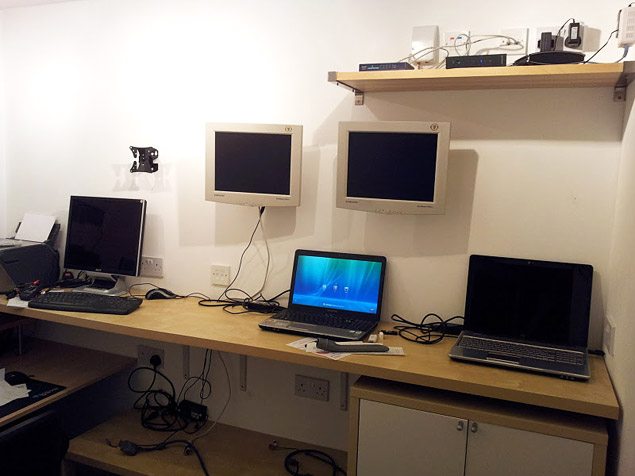
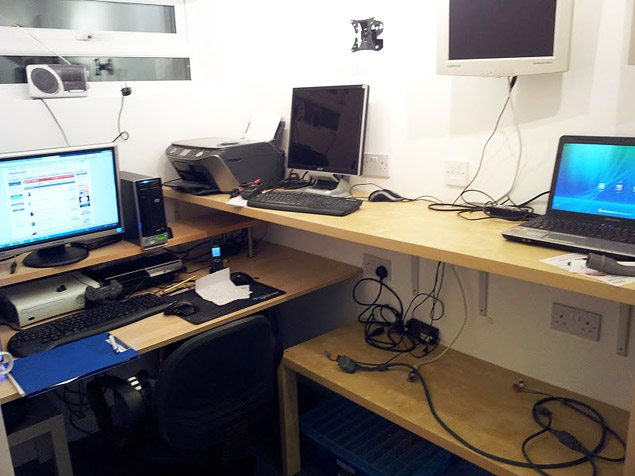
I’ve always worked out of a spare bedroom in my house but 4 months ago my 2nd child was born and it was decided by my wife and I that the office should be given to my older son and turned back into a bedroom and the youngest have the older sons current bedroom.

In my garden I have a brick outhouse that has been used as a shed. It’s not the biggest space in the world (10 foot x 6 foot) but as the majority of my work is carried out on site I don’t need a huge area so I decided to have it converted to an office.

Before:


After:


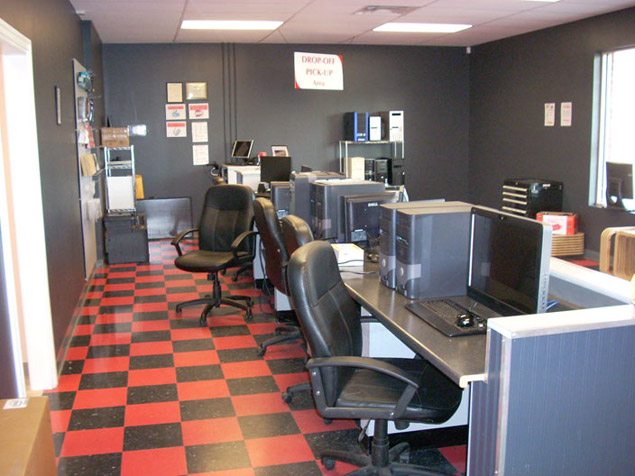
Local Circuit

Moved to a new location this year, built it all the cabinets and benches, and put up some new signage. Getting ready to launch a new website at the end of the month as well.
0 0
1 1
2 2


Rob

3 3
4 4
5 5
6 6
7 7


If you would like to see more workbenches, check out our past articles:
A Peek At Other Computer Technicians Workbenches #1
A Peek At Other Computer Technicians Workbenches #2

A special thank you to all those who sent in pictures if their workbenches. If you would like to show off your own setup, please send the pictures to tips[at]technibble.com

© Technibble – A Resource for Computer Technicians to start or improve their Computer Business
To get started with your own computer business, check out our Computer Business Kit. A Peek At Other Computer Technicians Workbenches #3

8 8 9 9

0 0

Read more:

Categories News Feeds Tags a, and, computer, the, to Leave a comment

Ask The Readers: The One Piece of Advice You Wish You Could Have Told Your Past Self

October 18, 2011 by Rick

Authors: Bryce Whitty

Everyone has that one main piece of advice that changed their life/business that they wish they knew when they were first starting out. So, I want to ask the readers, What is that one piece of advice you wish you could have told your past self as a Tech/Business Owner?

CommitCRM


I’ll start. For me it is to never stop learning and never stop improving.
In any business it takes time for you to establish your systems and eventually you’ll reach a point where things will start to run really smoothly. You have a steady amount of clients and you can handle just about any problems that come your way. All you need to do is repeat this process to continue making money.

In my early years I got into a fairly comfortable position and as a result I wasn’t working ON my business, only IN my business keeping the wheels turning. A year or two went by and I started to improve my existing systems such as slipstreaming my Windows CDs, experimenting with different forms of advertising and tweaking my existing advertising.

With just a few simple tweaks I started making significantly more money by either working faster (allowing me to take on more jobs) or my advertising being more effective. Which made me wonder how much more money I was leaving on the table, so I continued improving and haven’t stopped since. I just wish I had done it sooner since there was a fair bit of money I missed out on by not improving earlier.

So, whats the one piece of advice you wish you could have told your past self?

For those of you reading this via email or RSS reader, head over to the site and drop us a comment. I would love to hear your piece of advice.

© Technibble – A Resource for Computer Technicians to start or improve their Computer Business
To get started with your own computer business, check out our Computer Business Kit. Ask The Readers: The One Piece of Advice You Wish You Could Have Told Your Past Self

image image

image

Read more:

Categories News Feeds Tags a, i, of, to, you Leave a comment

Linux For The Rest of Us

August 30, 2011 by Rick

Authors: Bryce Whitty

Linux is something that isn’t going away any time soon. Servers use it, Smart Phones use it and even devices like TiVo use it. In fact, we should be seeing much more of it in the future as Linux acceptance increases. In the computer repair world, Computer Technicians are using Linux builds to remove viruses, resize partitions and recover data. Many computer technicians are also installing lightweight Linux builds to give old computers a new lease of life. It pays to know at least a little bit of Linux in the computer repair world.

Steve Mclaughlin (aka DoorToDoor Geek), a regular on the Podnutz show has created a series of Linux training videos videos called “Linux For The Rest Of Us” to help people learn the basics of the Linux flavor “Ubuntu”. These high definition videos (720p) are designed for the new Linux users.

Linux For The Rest of Us

<\/span>
  Whats In It? Title Description Installing Ubuntu Downloading, burning to a CD Basic Operation An overview of Ubuntu’s features The Ubuntu "Me Menu" A built in tool to manage social networks such as Twitter and Facebook System Testing Test compatibility such as video/sound and entering/exiting sleep mode Software Center Updates and installing software First to Install Installing software you will probably need like Java, audio codes etc.. Option Install Installing commonly used software like Skype, Thunderbird etc. Install Chrome Installing Chrome and how to set it to automatically update Install LibreOffice Installing LibreOffice and running commands to install it Install/Uninstall Display hardware information with command line and other software Installing Blobs Introduction to "Blobs" Ubuntu One An overview of Ubuntu One which is a Dropbox-esque service Keyring Using Keyring which is a built in system similar to iOS’s Keychain Compbiz Cool visual effects with Compbiz Create Network Shares Setting up network shares with Samba To Network Shares Accessing Windows or Samba shares from Ubuntu ISO Burn Create ISO burning or ripping a CD to an ISO using built in software k3b Using k3b which is a CD/DVD/Bluray/ISO advanced editing tool. DeVeDe Using DeVeDe, a tool design for Transcoding/Ripping DVD video gParted Using gParted, a partitioning tool PiTiVi Using PiTiVi which is a video editor similar to Windows Movie Marke RhythmBox Using Rhythm Box, a music player The videos also have some Technician specific content: Title Description Installing on VMs Installing Ubuntu on a Virtual Machine Data Recovery Recovering data with the tool TestDisk Removing Viruses Removing viruses using Linux Who Is It For? If you have been using a Linux build like Ubuntu or Mint as your main operating system, you probably wont get much out of these videos. However, if you are a Windows user and have either no experience with Ubuntu or had a little look once or twice, then this is for you. In my own case, I have been trying various Linux builds for 10 years and I know my way around the command line due to the dedicated servers I have managed over the years – Technibble being one of them. However, when it comes to the modern builds with a highly polished GUI like Ubuntu, I dont know all the features that come installed. Also, I often dont know the name of the Linux equivalent of my commonly used Windows applications. I mean, I get them installed, install various packages but still feel a bit like a duck out of water. For example, lets say I want to have the cool visual effects that I have seen in various Ubuntu videos. Where do I look for that? Video properties? Desktop properties? Stephen covers this in detail using the software “Compbiz”. Its nice to have someone unassuming guiding you through the basics rather than telling you to RTFM. What I liked about these Linux videos is although it isnt hard to install something like Ubuntu, Stephen tells you what options choose and tells you why you would want to choose it. Its the side information and why things are done a certain way that I found lots of value in as a Ubuntu newbie. The videos take you from a simply installing Ubuntu and then not knowing what to do, to setting up a really solid operating system with all the features you would want. They are a huge kick start for getting into the Linux world which will save you a ton of time. Price The product normally sells for $59.95 but due to the size of Technibbles readership, I was able to get Technibble readers 20% OFF so the price is now $47.95 using the link below.
If you think about the price in terms of using this new found knowledge to make money by selling older (but still capable machines) to your clients, its a no brainer. Check it Out Here, Watch some of the Sample Videos   © Technibble – A Resource for Computer Technicians to start or improve their Computer Business
To get started with your own computer business, check out our Computer Business Kit. Linux For The Rest of Us image image image

Read more:

Categories News Feeds Tags a, and, of, the, to Leave a comment

Changes at Technibble

August 27, 2011 by Rick

Authors: Bryce Whitty

Technibble has a new design! We have been working for quite some time to make a design that is clean, functional but still feels like Technibble. If you follow us via some other means other than visiting the front page, come check us out.
It was designed with an emphasis on making the content easy to read and look good at the same time.

Changes at Technibble

<\/span> Avatars in Comments Previously when people wanted to reply to someone via comment they had to use @Someuser. Technibble now supports threaded comments so you can reply to someone and your post shows up before theirs. Also, we also support avatars next to your comment so you can include your company logo or a picture of yourself if you want. The avatars are provided by Gravatar so if you want to use a picture, sign up to Gravatar and use the same email address when commenting here as you did when signing up to Gravatar. Social Media and a Favor We are focusing on social media more and I have a favor to ask of our readers. If Technibble has helped you in your business, please share Technibble’s content by pressing the social media icons below the articles you like for whatever services you use. In most cases its only 1 or 2 mouse clicks to Tweet, Like or +1 Technibble’s content but it would make a world of difference for us. If you have any comments, suggestions or constructive criticism for our design, please leave us a comment below. © Technibble – A Resource for Computer Technicians to start or improve their Computer Business
To get started with your own computer business, check out our Computer Business Kit. Changes at Technibble image image image

Read more:

Categories News Feeds Tags a, or, the, to, you Leave a comment

D7 – Computer Repair Multi Tool

July 18, 2011 by Rick

Authors: Bryce Whitty

D7 is a small, portable application designed to aid in many computer repair related tasks and provide a uniform procedure for technicians to follow by automation.

D7 has multiple functions such as being an interface to quickly go to various system areas such as the system file checker. It also contains many fixes for common Windows problems such as repairing Internet Explorer, Repair Permissions, PIO/DMA mode fix, Repair Windows Update and more. It also contains a good collection of Windows tweaks.

D7 is much more than just a glorified front end to run tweaks and scripts though, it can also be used for automation in its Maintenance and Malware areas. Simply tick the tasks you want it to do such as Delete Temp Files, Empty Recycle Bin, Run CCLeaner and Defraggler and it will do these tasks automatically. You can also add your own applications for it to run automatically one after another such as various virus scanners for example. Take a look at the screenshots below to see its full functionality.

This application requires third party applications to make use of its full functionality. D7 is free for personal and commercial use and it was also created by a Technibble forum member.

Warning: This is a technicians tool and not designed for end users. This application can do damage to a system if used incorrectly. Use at your own risk. Additionally, due to the registry editing and file manipulation nature of this application, some antivirus products may detect this as a virus. These are false positives.

CommitCRM

Screenshots:

Download:
Download from Official Site – 3.2mb

© Technibble – A Resource for Computer Technicians to start or improve their Computer Business
To get started with your own computer business, check out our Computer Business Kit. D7 – Computer Repair Multi Tool

image image

image

Read more:

Categories News Feeds Tags a, and, for, it, to Leave a comment

SkyAngel Wireless Router Emulators – Emulate the Router Admin to Assist with Phone Support

July 11, 2011 by Rick

Authors: Bryce Whitty

This repair tool of the week isn’t a application, but instead a website. “SkyAngel Wireless Router Emulators & Guides” is a website that stores copies of the admin webpage area of various wireless routers.
The site includes the admin areas of brands such as Linksys, Netgear, D-Link, Belkin, TrendNet, Draytek, ActionTec and Apple. The main benefit of this is during phone support when you are helping a client with their router. It will significantly help you give directions to your client when you can actually see what your client is seeing. In most cases, Technicians would use some remote support software to see what their client is seeing but unfortunately in most cases where you need the client to go into their router settings, its because there are connectivity issues.

On each brand tab, the site has a list of the most common router model numbers of that brand. However, the real gold is when you click the “All” link as there are a huge amount of model numbers here.
While changing settings in the admin areas wont do anything, you can navigate around the webmin as if it was the real thing.

The website also has a collection of modem admin areas as well.

SkyAngel Wireless Router Emulators  Emulate the Router Admin to Assist with Phone Support

Screenshots


Website:
You can find the website here: http://skyangel.wikidot.com/emulators

© Technibble – A Resource for Computer Technicians to start or improve their Computer Business
To get started with your own computer business, check out our Computer Business Kit. SkyAngel Wireless Router Emulators – Emulate the Router Admin to Assist with Phone Support

image image

image

Read more:

Categories News Feeds Tags a, of, Router, the, you Leave a comment

VA Awards 14 Major Technology Contracts – Setting the Stage for Long-term IT Solutions to Serve Veterans

July 5, 2011 by Rick

Authors: Mitalis

Read more

Categories News Feeds Tags a, and, of, the, to Leave a comment
Older posts
Newer posts
← Previous Page1 … Page5 Page6 Page7 … Page10 Next →

Pages

  • About The Force Field
  • Advertise with us!
  • Contact Us
  • Posting Rules
  • Privacy Policy
  • Subscribe!
  • Terms of Use
  • Welcome
    • News Feeds

Subscribe to Podcast

Apple PodcastsAndroidby EmailRSSMore Subscribe Options

Archives

  • February 2015
  • January 2015
  • June 2014
  • May 2014
  • March 2014
  • February 2014
  • January 2014
  • November 2013
  • September 2013
  • June 2013
  • April 2013
  • March 2013
  • January 2013
  • November 2012
  • October 2012
  • September 2012
  • August 2012
  • July 2012
  • June 2012
  • May 2012
  • April 2012
  • March 2012
  • February 2012
  • January 2012
  • December 2011
  • November 2011
  • October 2011
  • September 2011
  • August 2011
  • July 2011
  • June 2011
  • May 2011
  • April 2011
  • March 2011
  • February 2011
  • January 2011
  • December 2010
  • November 2010
  • October 2010
  • September 2010
  • August 2010
  • July 2010
  • June 2010
  • May 2010
  • April 2010
  • March 2010
  • February 2010
  • January 2010
  • December 2009
  • November 2009
  • October 2009
  • September 2009
  • August 2009
  • July 2009
  • June 2009
  • May 2009
  • April 2009
  • March 2009
  • February 2009
  • January 2009
  • December 2008
  • November 2008
  • October 2008
  • September 2008
  • August 2008
  • July 2008
  • June 2008
  • May 2008
  • April 2008
  • March 2008
  • February 2008
  • January 2008
  • December 2007
  • November 2007
  • October 2007
  • September 2007
  • August 2007
  • May 2007
  • April 2007
  • January 2007
  • December 2006
  • November 2006
  • October 2006

Show Call-In Line

Skype Me™!

or call 407-278-5698 from any landline phone!

Get it On Your Phone!

Listen to Stitcher

Recent Posts

  • TFF-71 – How To Limit Liability In Your IT Business
  • TFF-70 – Customers Who Scam
  • The Force Field to carry LIVE coverage of CES 2015
  • Add Your Company!
  • TFF Episode 69 concludes interview with Computer Business book author

Recognition

Member Tech Podcast Network

[Valid RSS]

2013 Top 100 Podcast Badges

podcast 100

podcast 100

podcast 100

podcast 100

© 2026 theforcefield.net. All Rights Reserved. theforcefield.net™, The Force Field dot Net™ and The Force Field with Rick Savoia™ are trademarks of Savoia Media.