
Authors: Bryce Whitty
There is no doubt that social networking is here to stay. While some Computer Technicians may consider it just a new buzz word, other technicians are using it as their primary source of advertising. Google+ is newest major player in the social network game.
After several months, Google finally announced Google+ pages for local businesses, groups, brands and organisations. If you are familiar with Facebook pages, this is basically the Google+ equivalent. In this article, I’ll tell you why you should look into Google+ Pages and what you need to know before you claim your page.

Why You Should Care
Google+ Pages, like Facebook Pages allows you to have a two way conversation with your clients. If they follow your page, your updates appear in their stream. This is an incredibly cheap way to advertise your business through discounts, specials and generally being on the front of your clients mind.
What If You Already Have a Google+ Account For Your Business?
I know of many Computer Businesses who have already have Google+ accounts for their business. However, it is actually against Google+’s terms to have a Google+ profile for a business. The account must be for an individual. The Google team will suspend accounts that break this rule.
From the Google+ Help Pages:
Your profile and name must represent one individual.
Google+ does not support profiles for couples or groups of people. Additionally, you cannot create a profile for a non-person entity such as a pet or business.Violation examples: Jones Family, Jeremy & Mel Mason, Vegas the Dog, Brooklyn Bagels, Northern California Conservation Society
Google does plan to allow Google+ Business Profiles in time, but don’t hold your breath plus your account could get banned in the mean time.
If you have already done this, you can change your businesses Google+ account back to an individual (typically yourself). You can do this by going to your Google+ profile, click the “Edit Profile” button that is on the top right. Click on the name displayed up the top of the profile page. From there, you can type in a legitimate first name and last name. Then press save.
What You Need to Know Before You Claim Your Google+ Page
- Contests, Sweepstakes, Offers, Coupons and Other Promotions From Your Page
In Google+’s content and promotion policies page, it disallows you from running contests, sweepstakes, offers, coupons and other promotions DIRECTLY on your Google+ page. You may however, link to a separate site (such as your actual businesses site or blog) that contains the promotion.
You may not run contests, sweepstakes, offers, coupons or other such promotions (“Promotion”) directly on your Google+ Page. You may display a link on your Google+ Page to a separate site where your Promotion is hosted so long as you (and not Google) are solely responsible for your Promotion and for compliance with all applicable federal, state and local laws, rules and regulations in the jurisdiction(s) where your Promotion is offered or promoted. Your Promotion must not be run or conducted in a way which conflicts with the +1 Button Policies, Google+ Privacy Policy or Google+ Pages Additional Terms of Service. Google has the right to remove your Promotion content from Google+ Page for any reason.
- Linking your Personal Account To Your Business Page
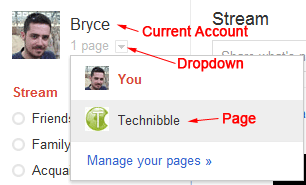 When you visit the Create Page link and create a page, the page will be associated with the account that is currently logged in. To access your page from your account, there will be a drop down next to your name saying “1 Page”. Make sure you are logged into the account you want to associate the page with. Unlike Facebook pages, you cannot currently add any additional administrators to your account.
 - Be Careful When Switching Between Linked Accounts
When using a Google+ account or page, it is not always obvious which one you are currently using. You will want to double check every time you are about to post something as you will probably not want to send a personal message out to all your clients and vice versa.
Beautify Your G+ URL
Once you create a G+ page, you will find that its URL is pretty long. For example, Technibbles G+ page URL is: https://plus.google.com/b/111951375001480014041/
Obviously, you don’t want to have write that long URL on any advertising so you can shorten it with a G+ specific URL shortner. I recommend gplus.to
Using gplus.to, I can change Technibbles page URL to http://gplus.to/technibble
So What Now?
- If you are new to Google Plus, you can signup here (under your own, non-business name): https://plus.google.com
- Once you have done that, you can create a page for your business here: https://plus.google.com/pages/create
- If you like, add Technibble’s page to your Circles: http://gplus.to/technibble
© Technibble – A Resource for Computer Technicians to start or improve their Computer Business
To get started with your own computer business, check out our Computer Business Kit. Google+ Pages for Computer Businesses – What You Need To Know