Episode 58 – ScreenConnect Part 1

Today we are going to talk with a professional from a company offering a self-hosted remote support solution that not only helps you service your customers, it can also be customized to promote your brand.

TechPodcasts Promo Tag :10
Intro 1:17
Billboard 1:14

News and Comment segment 5:22
Microsoft officially ended mainstream support of Windows Vista April 10.

Apple released a removal tool April 13 to get rid of the Flashback malware.

MakeUseOf is offering a FREE e-book called Computer Inside Your Computer: How To Use VirtualBox.

Western Digital is shipping its Scorpio Blue 2.5 inch hard drive.

ZDNet claims a new report from OnForce indicates that improvements in the economy may be a mixed bag for the IT industry.

Commercial Break 2:00
The Computer Business Kit

Intro to Topic 2:18
Today we’re going to talk with Jeff Bishop of Elsinore Technologies. We’ll learn about a remote support system called ScreenConnect. We’ll find out what makes it different and unique from other remote access products, some of the features and technical applications of the software and how you can integrate it into your own IT support services.

Interview with Jeff Bishop 18:59

Part 2 Teaser :32

Wrap up and Close :46

Comments, questions or suggestions? Send them in to comments@theforcefield.net or post them in The Force Field Forums. Feedback on this topic will be read by the host and included in future episodes of the show. Visit us at http://www.theforcefield.net!

©2012 Savoia Computer. All rights reserved.


Episode 58 – ScreenConnect Part 1

Today we are going to talk with a professional from a company offering a self-hosted remote support solution that not only helps you service your customers, it can also be customized to promote your brand.

TechPodcasts Promo Tag :10
Intro 1:17
Billboard 1:14

News and Comment segment 5:22
Microsoft officially ended mainstream support of Windows Vista April 10.

Apple released a removal tool April 13 to get rid of the Flashback malware.

MakeUseOf is offering a FREE e-book called Computer Inside Your Computer: How To Use VirtualBox.

Western Digital is shipping its Scorpio Blue 2.5 inch hard drive.

ZDNet claims a new report from OnForce indicates that improvements in the economy may be a mixed bag for the IT industry.

Commercial Break 2:00
The Computer Business Kit

Intro to Topic 2:18
Today we’re going to talk with Jeff Bishop of Elsinore Technologies. We’ll learn about a remote support system called ScreenConnect. We’ll find out what makes it different and unique from other remote access products, some of the features and technical applications of the software and how you can integrate it into your own IT support services.

Interview with Jeff Bishop 18:59

Part 2 Teaser :32

Wrap up and Close :46

Comments, questions or suggestions? Send them in to comments@theforcefield.net or post them in The Force Field Forums. Feedback on this topic will be read by the host and included in future episodes of the show. Visit us at http://www.theforcefield.net!

©2012 Savoia Computer. All rights reserved.

Using an iPad in the Computer Repair Business

Authors: Guest Writer

Guest post by Craig Lloyd:
The iPad is a great device for computer technicians to carry around while out in the field. It’s a small and portable, yet powerful machine capable of assisting computer technicians with their work. Here are just four ways that computer techs can take advantage of Apple’s tablet.

1. Organizing Client Information

A great iPad app that’s specifically targeted towards computer technicians is called iFix. It’s an app that aims to ensure that repair orders and client data stay organized and can be easily and quickly accessed. You’re able to add specific information about each client including info about their computer, a list of their service orders, status of said service orders, and a history of past repairs for each client. The app also has a handy search feature where you can quickly look up a specific client or bit of information in a very short amount of time. Essentially, every text field in the app is searchable.

The only drawback of iFix is multi-user support and the lack of database backup options. The developer said that these features are being worked, but that was a year ago, so just be aware of this if these features are important to you.

If iFix isn’t measuring up to your needs, an alternative is an app called mHelpdesk. It accomplishes some of the same features that iFix achieves and it can even schedule and sync appointments with your Google Calendar, as well as the ability to create and email invoices in PDF format. It even has a pretty comprehensive billing system of sorts that allows you to create estimates, email invoices, and record payments.

CommitCRM is another great piece of software geared toward computer technicians that keeps track of clients. While it doesn’t have a dedicated app for iPad, it has a feature-packed web interface that can be accessed through the web browser on the iPad. Just like other popular CRMs, CommitCRM is widely-used, so the community support is undeniable. However, it’s not free (or cheap), but a 30-day trial is available for anyone who wants to give it a try before diving deep.

2. Easily Accepting Credit Card Payments

The iPad is a great device to use as a register of sorts that you can use to accept credit card payments. You can hook up a Square credit card reader to it and begin taking credit card payments from clients right away. It’s an easier – and possibly cheaper option than having to open up a merchant account at a bank and purchase bulky processing equipment. There’s no cost to get started using Square – just a small transaction fee of 2.75% for every swipe.

If Square specifically doesn’t seem like your cup of tea, other options for easily accepting credit card payments via an iOS or Android device include PayPal Here and Intuit’s GoPayment, both of which have awesome competing features.

3. Remote Support

There are many remote support applications available. LogMeIn Ignition is just one option that’s wildly popular, but I find TeamViewer’s iPad app to be dead-easy to use. You simply enter in the TeamViewer ID and password for the computer you want to access and you’re controlling the desktop remotely within seconds. And just in the case the client is rather computer-illiterate, installing TeamViewer on a client’s machine is very simple and doesn’t involve multiple, confusing steps. They even have a standalone version that can simply be launched right after being downloaded — no installation required.

4. Inventory

Something that we all kind of loathe nowadays is doing inventory. However, the Computer Inventory iPad app can makes things a little easier. It allows you to manage your entire business’s inventory all the way down to what software is installed on which computers. It can also act as a more minimalistic CRM of sorts — being able to keep track of the type of machine a client has, as well as what software they have installed, that way you don’t have to keep asking them every time they report a problem to you. The app also allows you to export your lists to XML and email formats to send and store them accordingly.

Are you using an iPad app in your computer business that we didnt mention here? Let us know! Drop us a comment.

Guest post by Craig Lloyd. Craig has been tinkering with computers for over eight years and is CompTIA A+ certified. For the past three years, he’s been writing about and sharing his love of technology at various websites across the internet.

© Technibble – A Resource for Computer Technicians to start or improve their Computer Business
To get started with your own computer business, check out our Computer Business Kit.


image

Read more:

Accepting Credit Cards Onsite – PayPal Here vs. Square

Authors: Guest Writer

Guest Post by Craig Lloyd:
Not too long ago, going through the process of being able to accept credit card payments for small computer businesses was probably a daunting task for most. You would have to set up a merchant account and then buy expensive processing equipment. However, with the introduction of Square in 2009, the days of easy credit card payments are finally here, and PayPal just recently launched their own version, called PayPal Here, to take on Square. These services allow computer businesses to easily accept credit card payments through iOS and Android devices.

Both Square and PayPal Here have their own separate advantages, but are also so similar that it can be difficult to decide which one is best for your computer business. Let’s have a look at the two services and see which one would be ideal for you.

First off, Square and PayPal Here both charge a transaction fee for credit card swipes. Square charges a 2.75% fee, while PayPal Here charges a slightly lower 2.70% fee. The difference is very minute at first, but it can add up over time if you plan on bringing in a lot of transactions.

If, for any reason, you must manually enter in credit card transactions (if you don’t have the card reader for instance), both Square and PayPal charge a 3.5% + $0.15 fee per transaction. There’s also a $1,000 weekly deposit limit with manual entries. If you go over $1,000 for any given 7-day period, anything over the $1,000 will be held for 30 days before they’re released to your bank account.

However, there will be very few instances where you would manually enter in credit card details. Both Square and PayPal Here offer their readers for free with free shipping, and the accompanying app is free as well.

Customer service is obviously a huge factor when it comes to choosing a product or service. PayPal Here is promising to have both phone and online support 24/7, but since the service is just launching, it will be a little while before we find out just how good that support will be. As for Square, it hasn’t fared so well in the customer service department. Many Square customers have complained about the lack of live and easy-to-reach support. Only time will tell to see if PayPal eithers suffers the same fate or rises above.

Both Square and PayPal Here are great services and there’s nothing about either that would be an extreme deal breaker (unless you’re using Android, for which PayPal Here doesn’t support just yet). However, if you’ve been a loyal PayPal user for some time, choosing PayPal Here would be a good bet, since you’ll already have a wealth of features at your disposal. Plus, PayPal Here offers the ability to accept paper checks using your camera as a scanner of sorts.

If you’re going into it as a complete mobile-payment virgin, Square’s simple user interface makes the product really easy to use and they even have a separate app for the iPad that turns it into a full-fledged, easy-to-use register.

Whatever you choose, may your business flourish with the greatness of mobile-payment technology and let us know how it works out for you when you finally take the dive into the mobile payment pool.

Guest post by Craig Lloyd. Craig has been tinkering with computers for over eight years and is CompTIA A+ certified. For the past three years, he’s been writing about and sharing his love of technology at various websites across the internet.

© Technibble – A Resource for Computer Technicians to start or improve their Computer Business
To get started with your own computer business, check out our Computer Business Kit.
image

Read more:

Ultra Virus Killer – Malware Removal and System Repair Multi-Tool

Authors: Bryce Whitty

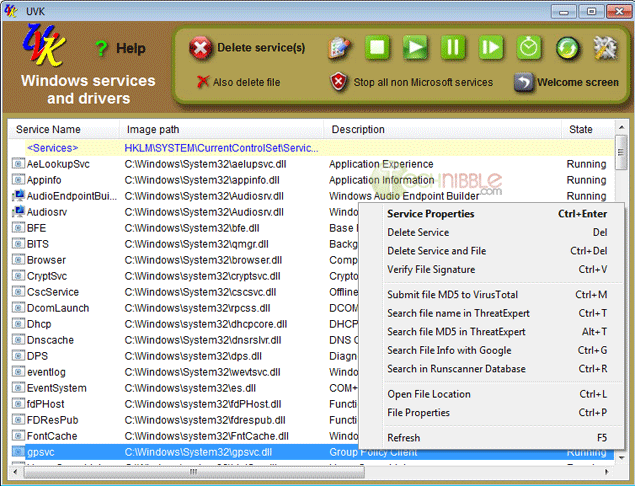
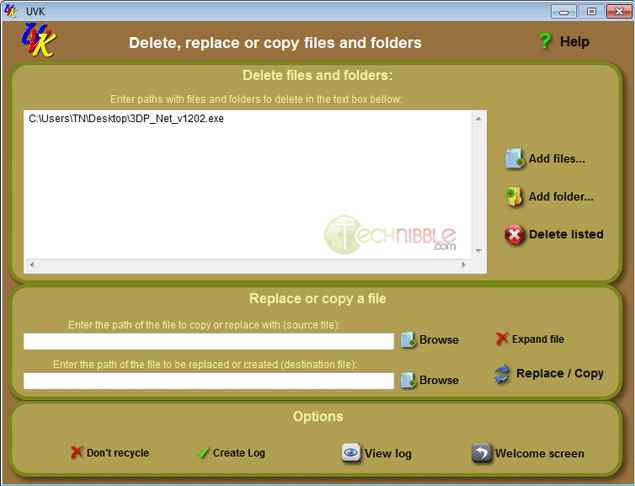
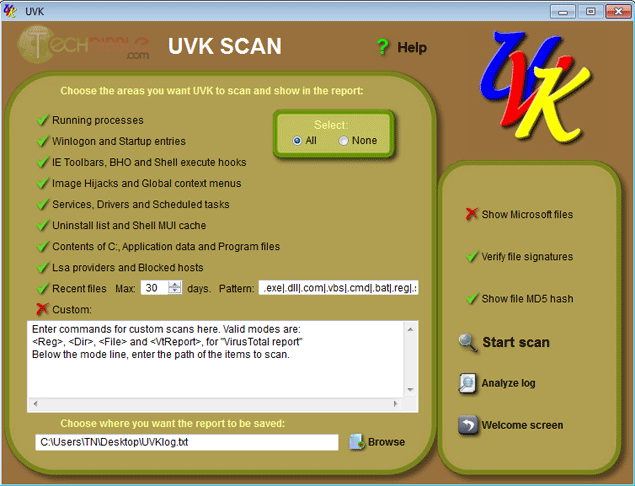
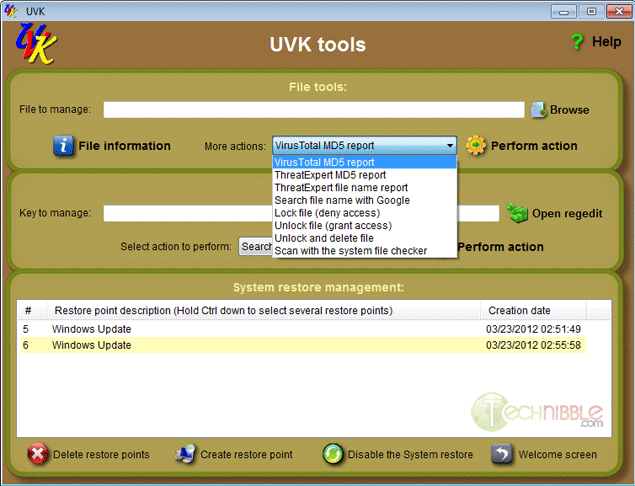
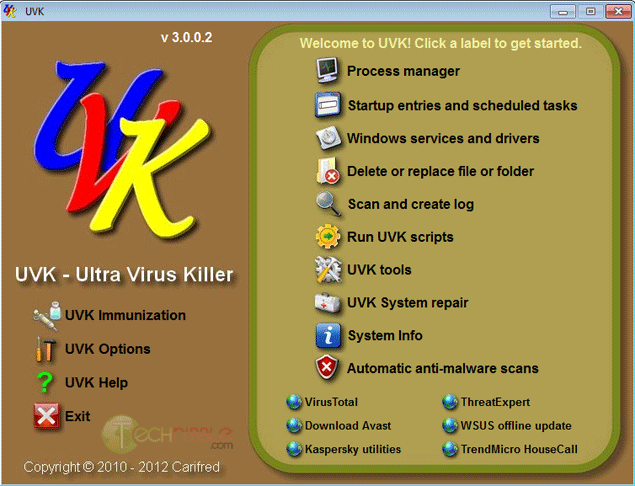
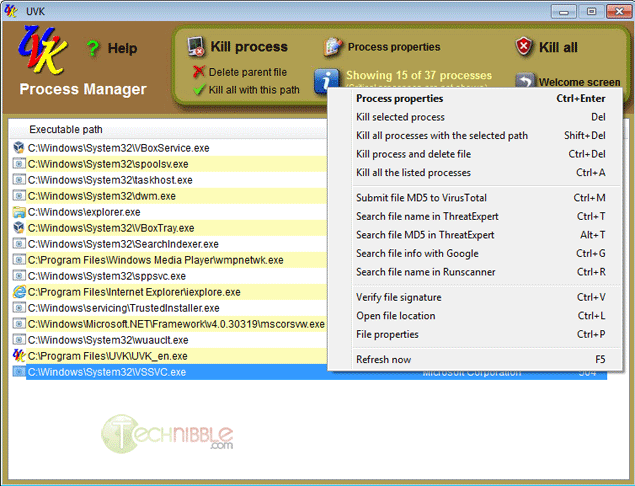
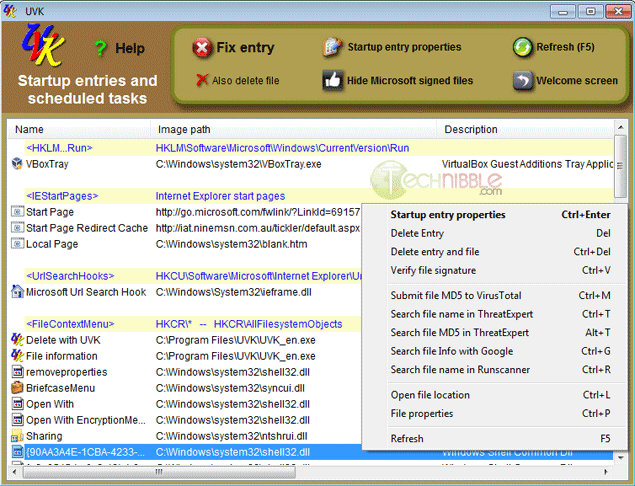
Ultra Virus Killer, also known as UVK, is a free and portable application designed to help users detect and remove malware. UVK acts as a swiss army knife of malware removal as it contains similar functionality to a range of computer technician software use such as Process Explorer, Autoruns, Unlocker, Windows Repair and more.

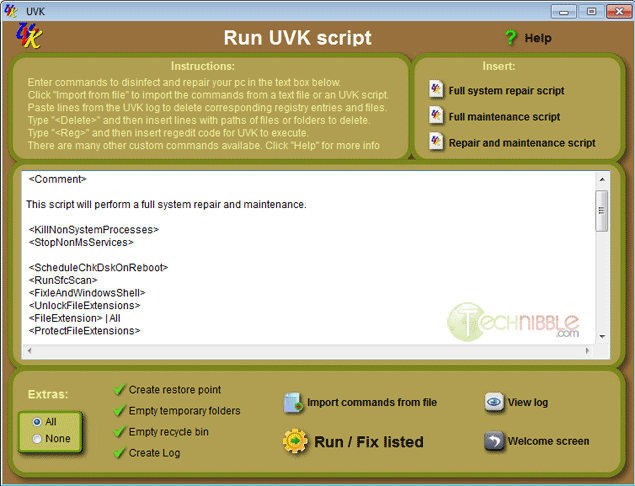
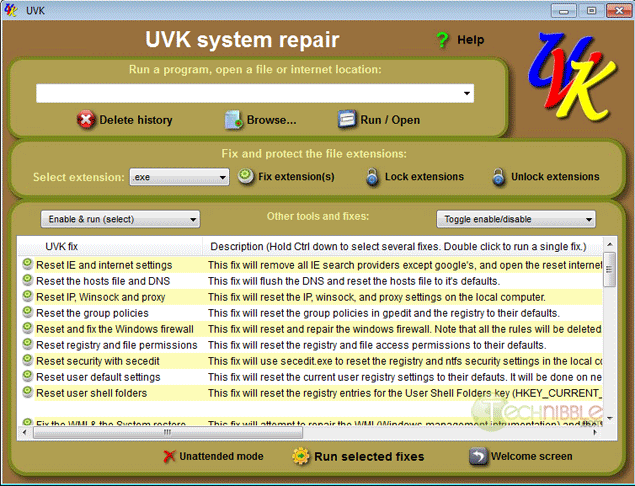
The strength of this application is not just its ability to help you remove the offending malware, but repair the damaged Windows install afterwards. For example, the application allows you to create scripts that will reset the hosts file and DNS, Reset IE, Reset Group Policy, Fix .exe extensions and much more.

While I was researching UVK, I discovered that the creator of UVK is a Technibble forum regular with some sizeable threads about it.

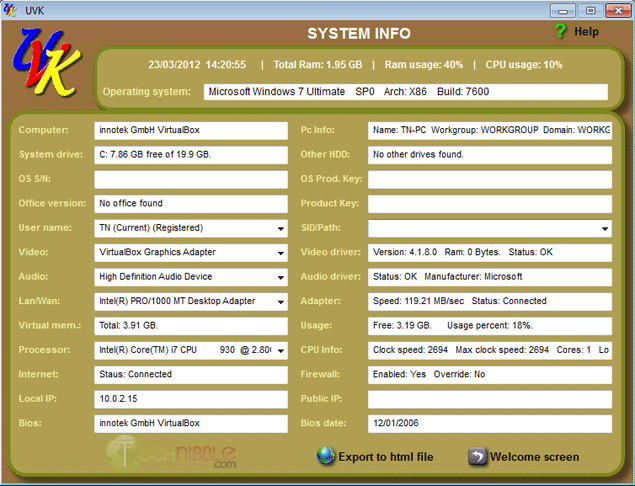
UVK has too many features to list here so be sure to check out the screenshots.

Screenshots

Ultra Virus Killer Front Page


Ultra Virus Killer Process Explorer


Ultra Virus Killer Startup Entries


Ultra Virus Killer Windows Services and Drivers


Ultra Virus Killer Delete Replace Files


Ultra Virus Killer Scan


Ultra Virus Killer Script


Ultra Virus Killer Tool


Ultra Virus Killer System Repair


Ultra Virus Killer System Information


Ultra Virus Killer Process Explorer 0 0


Downloads:

Download from Official Site – 5.3mb

More Information

© Technibble – A Resource for Computer Technicians to start or improve their Computer Business
To get started with your own computer business, check out our Computer Business Kit.
Ultra Virus Killer Process Explorer 3 3

Read more:

3DP Net – Auto Detects and Installs Network Drivers

Authors: Bryce Whitty

As Computer Technicians, one of the most important things for us to do after we install a fresh copy of Windows is to get the operating system online so we can install the appropriate drivers. Unfortunately, there is sometimes a catch 22 where we cant get the operating system online because we dont have the network driver, and we cant get the driver because we cant get online.

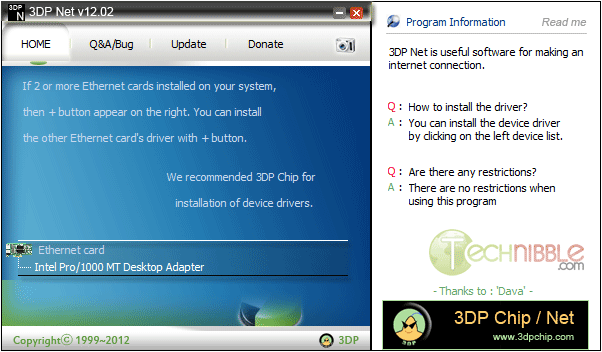
This is where 3DP Net comes in handy. 3DP Net is a freeware application that will either install the correct network card driver or a generic one allowing you to get online and download the appropriate drivers.

While other driver installing options exist like Driverpacks.net, some technicians prefer to only install the very latest drivers from the manufacturers website and only need a simple network driver. 3D PNet is a small, simple package to achieve that.

Screenshot


Downloads:

Download from Softpedia.com – 46mb

More Information

Special thanks to forum member MobileTechie for recommending this one.

© Technibble – A Resource for Computer Technicians to start or improve their Computer Business
To get started with your own computer business, check out our Computer Business Kit.
image

Read more:

Business Resource Directory Description

This is The Force Field IT Business Resources Directory. Some directory listings may be available to the public, however the majority of them are accessible to members only. If few categories or listings appear on a page, you may not be logged in. You must be a registered member to access these areas of the directory, however membership is free to qualified IT service professionals and vendors.

Telaid

Telaid offers core competencies in IT, AV, security and managed services and claims to be “100% focused on Multi-Site Enterprise Clients”. Technicians are apparently referred to on the site as “partners”. The company has offices in Madison, WI., Denver, Chicago, Los Angeles and Old Lyme, CT. It is rumored the company may not be financially stable although this has not been confirmed.

Contact:
Telaid
13 West Main Street
P.O. Box 711
Niantic, CT 06357
Phone: 860-739-4461
Fax: 860-739-9913
Web Site: http://www.telaid.com
Technician sign-up form: http://www.telaid.com/partners.html

Episode 57 – ACRBO Magazine

Today we’ll talk with an IT service provider who launched a new publication for computer business owners and find out how you can subscribe to it FREE.

TechPodcasts Promo Tag :10
Intro 1:18
Billboard :48

News and Comment segment 4:19
AMD signed a deal to acquire SeaMicro.

Google upset privacy groups after it instituted new changes to its privacy policy.

Global Knowledge is offering a FREE white paper called 77 Features For Windows 7 That Every IT Professional Should Know About.

Microsoft released the Windows 8 Consumer Preview February 29.

OnForce is now testing an android version of its mobile iPhone app for IT service providers. For a demo, watch the video.

Commercial Break 2:00
The Computer Business Kit

Intro to Topic 1:58
Today we’re going to talk with Daniel Hand of The Association of Computer Repair Business Owners. We will learn about his organization, discover a new trade publication he launched for computer repair business owners called ACRBO Magazine and find out how you can get it FREE.

Interview with Daniel Hand 15:12

Wrap up and Close :46

Comments, questions or suggestions? Send them in to comments@theforcefield.net or post them in The Force Field Forums. Feedback on this topic will be read by the host and included in future episodes of the show. Visit us at http://www.theforcefield.net!

©2012 Savoia Computer. All rights reserved.

Episode 57 – ACRBO Magazine

Today we’ll talk with an IT service provider who launched a new publication for computer business owners and find out how you can subscribe to it FREE.

TechPodcasts Promo Tag :10
Intro 1:18
Billboard :48

News and Comment segment 4:19
AMD signed a deal to acquire SeaMicro.

Google upset privacy groups after it instituted new changes to its privacy policy.

Global Knowledge is offering a FREE white paper called 77 Features For Windows 7 That Every IT Professional Should Know About.

Microsoft released the Windows 8 Consumer Preview February 29.

OnForce is now testing an android version of its mobile iPhone app for IT service providers. For a demo, watch the video.

Commercial Break 2:00
The Computer Business Kit

Intro to Topic 1:58
Today we’re going to talk with Daniel Hand of The Association of Computer Repair Business Owners. We will learn about his organization, discover a new trade publication he launched for computer repair business owners called ACRBO Magazine and find out how you can get it FREE.

Interview with Daniel Hand 15:12

Wrap up and Close :46

Comments, questions or suggestions? Send them in to comments@theforcefield.net or post them in The Force Field Forums. Feedback on this topic will be read by the host and included in future episodes of the show. Visit us at http://www.theforcefield.net!

©2012 Savoia Computer. All rights reserved.