Authors: Bill
Cash flow and access to capital is a critical small business issue. OnForce is actively helping the IT entrepreneur with this issue.

Authors: Bill
Cash flow and access to capital is a critical small business issue. OnForce is actively helping the IT entrepreneur with this issue.
Authors: Derrick Wlodarz
Tackling any topic related to rates is likely one of the most debatable areas to touch with a ten foot pole. Technicians are stoutly protective of their pricing structures when the discussion comes up. However, I’m admittedly adventurous in this realm and believe that the more open we are with effective ways to address travel costs, the better we can serve our customers in settings fees that are appropriate for both sides. I took a chance to address proper self-worth valuation when it comes to pricing a little while back, but let’s see if we can tackle travel costs this time around.
My goal here is not to say that my methodology is necessarily better; it works for my computer repair company FireLogic and I’m open to sharing it fully with fellow techs. The overarching goal with this article is to merely establish a friendly debate on all of the available methods for charging on travel, and weighing the pros/cons of each. There is no single method or rate that fits all technicians. We’re all disparate in our own ways: serving different communities, working with different customers, and operating within distinct socioeconomic regions.
The Technibble forums are generally host to some interesting discussion on travel fees and how to determine them. A few particular threads hosted some great insight like this one, a thread related to call out charges, and this discussion on how to charge for visits that are out of area. I’m going to admittedly pull a mixture of ideas from various forum postings below to give people an idea of what various techs have concocted to meet this growing need. Let’s take a look at the different ways you can charge your own customers for travel time.
I’ll cover this one first since this is how FireLogic handles travel costs. I like this model because it’s simple for a customer to understand and doesn’t require any extensive tracking/recording besides time. My view is that if someone is willing to pay for us to travel out to visit them, a flat hourly travel rate properly compensates the tech that needs to make the trip and covers gas expenses. Our travel rate is currently $20USD/hr (about 1/4 of what our hourly onsite rate is) and has proven to be a happy medium for our customers and techs. We do not charge for return travel, as the notion goes that the next customer being visited will pick up the subsequent trip as their visit charge. Some forum goers admit to charging their full hourly rate for travel, which is understandable depending on your situation. Do your research before establishing anything, but for the Park Ridge and suburban Chicago area (USA) this system has been very successful for us with little customer pushback.
This is an roundabout to charging outright travel fees or an hourly trip rate. In this method, you notify your customer that they will be paying, for example, a one hour minimum of service for the visit. More than a few techs on the forums prefer this approach as it keeps travel fees out of the customer’s sight, and also cuts back on excessive abuse of onsite labor for small tasks. From the consensus I could gather, it seems that rural techs tend to like this method as travel fees are frowned upon in such locales but customers take positively to this approach. I don’t think it would be a bad idea to use a hybrid approach of a travel rate with an onsite minimum. Again, your circumstances and competition’s methods will have a big bearing on your own attitude towards this model.
Yet another way to charge for travel is to create a graduated, or staggered, trip charge schedule that is based upon the number of miles from your home base to the customer location. The benefit of this model is that it directly segregates shorter trips from longer ones, and gives the customer an easy way to estimate their final total. However, the downside is that if traffic catches a technician, even a short 4 mile trip in an urban area could turn out to take just as much, if not more time, than a 10 mile journey in the countryside. I personally frown upon this model since I service the suburban Park Ridge region of Chicago, and traffic can be dicey depending on time of day and the direction of a customer location. For rural techs, this may be more appealing.
A similar method as the staggered model above, but this one ties exact mileage or distance traveled to a standardized rate “per mile” or “per kilometer.” For the United States, I have heard of many techs tie their rate to correlate directly with the mileage rate used by the federal government. As with the staggered method, I don’t believe it fully takes into account the time spent traveling to a customer in busy, traffic-drenched areas. But for techs that want a simpler, streamlined way to present their travel rates to customers, this is about as clean cut as it gets. Tying your travel rate to the same as the government uses cuts down on arguments from clients because you can merely point them to the higher authority for why you charge what you do.
My company uses this notion for how our prices are set. For our case, it’s not directly to take into account travel costs. We differentiate hourly rates moreso because of the simple fact that when I am onsite, I am dedicated solely to that single customer. I cannot multi-task in any way like one can do in-shop or from their home office. For this reason, a different price is justified. But some techs claim that merely forgoing a separate travel fee and charging an inflated 20-30% of their regular rate is effective. The benefit is that you can mask your travel costs to the customer. The downside is that such a massive difference in rate may sway more customers than you wish to use your services at the “discounted” rate and stick to remote support or the like. Good or bad, it’s up to you to decide how this may work out.
Whichever method you ultimately decide to use, remember that doing some competitive analysis is always key to a rate structure that customers will be open to. You don’t want to blindly change your travel fee methodology without sniffing around to see what your local techs are charging, and how they are structuring their fees. Systems that may work well for rural areas are not always suitable for urban areas as I described above. Do your homework, reach out to some customers for their feelings, and make an informed decision. How you publicly account for travel expenses using any of the methods above may be just as important as what amount you charge a customer.
Feel free to post your own ideas or comments on what you think is the best way to charge for travel. What works? What doesn’t? Let us know!
© Technibble – A Resource for Computer Technicians to start or improve their Computer Business
To get started with your own computer business, check out our Computer Business Kit.
Today we are going to conclude our discussion with a professional from a company offering a self-hosted remote support solution and find out how we can customize this remote support software to help our own businesses become more profitable.
TechPodcasts Promo Tag :10
Intro 1:18
Billboard :37
News and Comment segment 6:54
The US International Trade Commission ordered an import ban on Motorola Mobility products with Android May 18th.
VIPRE Antivirus is offering a Free 30 Day Trial Download of VIPRE Antivirus Business Software.
The Force Field Episode 58 featured a commentary on a ZDNet article called OnForce: Improving economy might not be helping IT industry. After the episode was released, the author added a direct link to the original report that was cited as the source of the data presented in the article. The assessment of the report in The Force Field show commentary was correct.
Commercial Break 2:00
The Computer Business Kit
Intro to Topic 1:37
Today we’re going to continue our discussion with Jeff Bishop of Elsinore Technologies and learn more about a remote support system called ScreenConnect. We’ll discuss the difference between the tools used for remote support and managed services, the advantages of using self hosted support software over a hosted, subscription based service, and how customizing and branding a remote support tool can add a whole new dimension to the marketing and promotion of your IT business.
Interview with Jeff Bishop 25:07
Wrap up and Close :46
Comments, questions or suggestions? Send them in to comments@theforcefield.net or post them in The Force Field Forums. Feedback on this topic will be read by the host and included in future episodes of the show. Visit us at http://www.theforcefield.net!
©2012 Savoia Computer. All rights reserved.
Today we are going to conclude our discussion with a professional from a company offering a self-hosted remote support solution and find out how we can customize this remote support software to help our own businesses become more profitable.
TechPodcasts Promo Tag :10
Intro 1:18
Billboard :37
News and Comment segment 6:54
The US International Trade Commission ordered an import ban on Motorola Mobility products with Android May 18th.
VIPRE Antivirus is offering a Free 30 Day Trial Download of VIPRE Antivirus Business Software.
The Force Field Episode 58 featured a commentary on a ZDNet article called OnForce: Improving economy might not be helping IT industry. After the episode was released, the author added a direct link to the original report that was cited as the source of the data presented in the article. The assessment of the report in The Force Field show commentary was correct.
Commercial Break 2:00
The Computer Business Kit
Intro to Topic 1:37
Today we’re going to continue our discussion with Jeff Bishop of Elsinore Technologies and learn more about a remote support system called ScreenConnect. We’ll discuss the difference between the tools used for remote support and managed services, the advantages of using self hosted support software over a hosted, subscription based service, and how customizing and branding a remote support tool can add a whole new dimension to the marketing and promotion of your IT business.
Interview with Jeff Bishop 25:07
Wrap up and Close :46
Comments, questions or suggestions? Send them in to comments@theforcefield.net or post them in The Force Field Forums. Feedback on this topic will be read by the host and included in future episodes of the show. Visit us at http://www.theforcefield.net!
©2012 Savoia Computer. All rights reserved.
Podcast: Play in new window | Download (Duration: 38:30 — 35.3MB) | Embed
Subscribe! Apple Podcasts | Email | RSS | More
Authors: Bryce Whitty
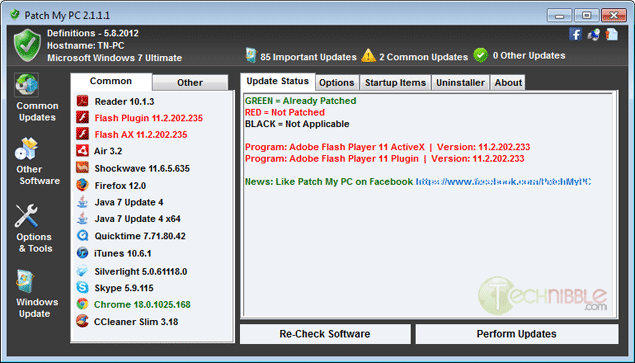
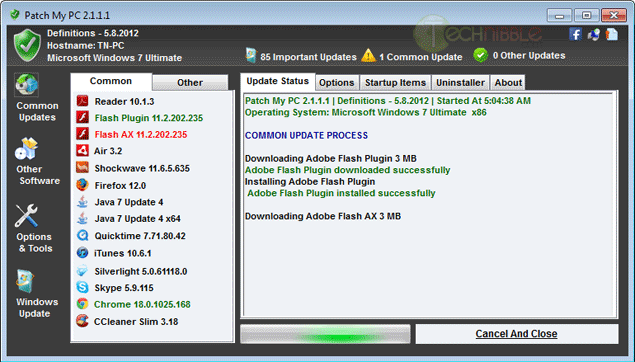
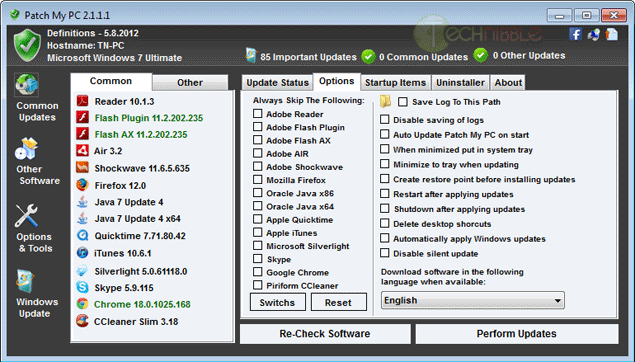
In today’s world, we are seeing malware writers focusing on weaknesses in third party applications such as Flash and Java rather than just targeting the operating system. Patch My PC is designed to help secure a machine against the vulnerabilities of having outdated third party software installed. Patch My PC is a small, portable and freeware application that will scan for outdated third party software and update them automatically. Some of the common software it will check include Adobe Reader, Adobe Flash, Adobe Air, Mozilla Firefox, Oracle Java, Apple QuickTime, Apple iTunes, Skype, Chrome, Microsoft Updates and much more.
Download from Official Site – 344kb
© Technibble – A Resource for Computer Technicians to start or improve their Computer Business
To get started with your own computer business, check out our Computer Business Kit.
Authors: Bryce Whitty
Unless you have been living under a rock for the past few years, you have surely heard of Craigslist.org. If you haven’t, Craigslist is a network of online communities featuring free online classified advertisements. It allows you to post advertisements offering your computer repair services and essentially gain clients for free.
Some Computer Technicians love Craigslist and say that they have acquired their best clients from there while others wont go anywhere near it. It definitely has a bad reputation thanks to the $5 per hour technicians that advertise there but dont let that deter you as it can definitely help your business.
In this article, I’ll show you how to form an effective Craigslist ad and keep it visible.
Before we go any further, while posting on Craigslist is free (and who doesnt like free advertising right?), it does take time. Whether it is worth it or not will depend on your situation.
If you have time but not much money, Craigslist can be a fantastic source of clients. If you stay pretty busy with your existing clients then it may not be worth it. If you are just starting your business then you definitely shouldnt pass up the opportunity to gain some initial clients.
If you live in other countries where Craigslist isnt as popular like the UK or Australia, you can substitute Craigslist.org with Gumtree.co.uk or Gumtree.com.au
The key to creating a great ad is to make it to be able to be read quickly and be keyword rich but still human readable. You might consider something like this:
*** YourTown Computer Repair ***
Honest, Secure and Reliable
Over X Years of Experience
Reasonable Rates
Services Include: Virus Removal, Desktop & Laptops, Hardware & Software Repair, Networking
Call XXX XXX-XXXX
Your Name
This is an effective ad because it can be scanned by the reader. You need to get your point across quickly as the customer may be looking at 10 other ads and they often they will not bother to read huge blocks of text.
While this ad is very short, it says a lot more than what was actually written. Let me break it down line by line so you understand why these words were chosen allowing you to create your own ad.
Keep in mind that the client will also be judging you based on your phone call. You can tell a lot about someone with only 30 seconds on the phone.
Do you answer with “X Computer Services. How may I help you?” or with a sleepy “Hello?”
Do you sound educated or speak in slang?
Answering the phone like a professional will help separate you from the technicians who are only doing work for pizza money.
Depending on your location, the Craigslist listings can move fast. You could post your ad at 9am in the morning and it could be be pushed off the bottom of the page by 10am. The way to stay at the top of the page is to post your ad multiple times throughout the day. Having said that, Craigslist frowns upon duplicate postings so in order to post your ad multiple times a day you need to change the ad slightly. You can do this by moving the lines around, maybe even test out a few completely different ads to see which one is the most effective.
If you post your ad to the Craigslist pages of large cities, your ad may drop off the page too fast. Consider posting to the Craiglist pages of the smaller surrounding towns.
If your ad is still getting pushed off the page quickly, there are more extreme methods such as posting from a handful of different Craigslist accounts with each of them posting a few times a day.
© Technibble – A Resource for Computer Technicians to start or improve their Computer Business
To get started with your own computer business, check out our Computer Business Kit.
Authors: Diana
Guest Blog: Scott Epple, OnForce Product Manager We’re living in pretty exciting times. Most of us carry around small computers with us everywhere we go. The same computing power that used to take up the size of a large room, now fits handily in our pockets. Smartphones are connecting us to the people and places […]
Authors: Bryce Whitty
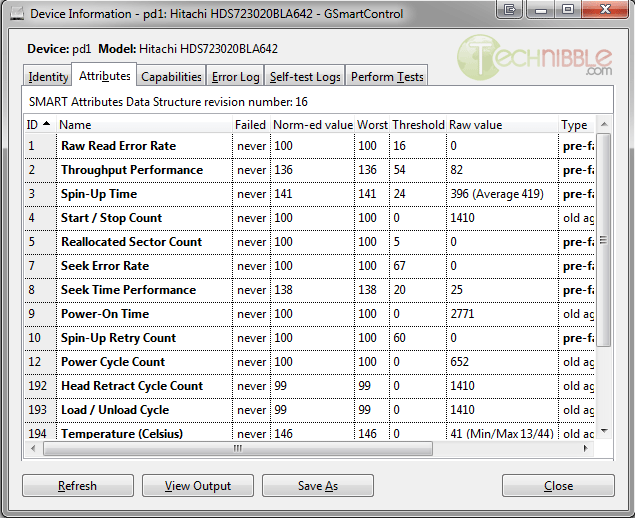
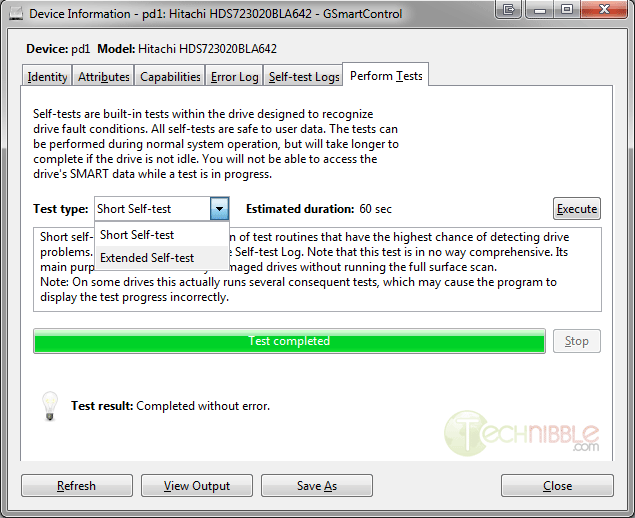
GSmartControl is an open source and portable application for identifying, monitoring and testing hard drives. GSmartControl differs from applications like CrystalDiskInfo because GSmartControl monitors the SMART data and runs tests, whereas CrystalDiskInfo just monitors the SMART data. The reason why you would want to actually test a hard drive rather than just monitoring its SMART data is because unless a hard drive has quite a few bad sectors, it probably wont trigger any warnings or alarms.
GSmartControl is capable of running the SMART Short self-test of 60 seconds and the Extended self-test which can take many hours depending on the size of the hard drive. The short diagnostic test will look for major issues but will often miss any smaller issues present. The Extended test is always recommended to test a hard drive if you have the time for it such as the machine being in your workshop.
GSmartControl runs on Windows, OSX, FreeBSD and a variety of Linux flavors including live CDs.

Download from Official Site – 6.44mb
© Technibble – A Resource for Computer Technicians to start or improve their Computer Business
To get started with your own computer business, check out our Computer Business Kit.
Authors: Bryce Whitty
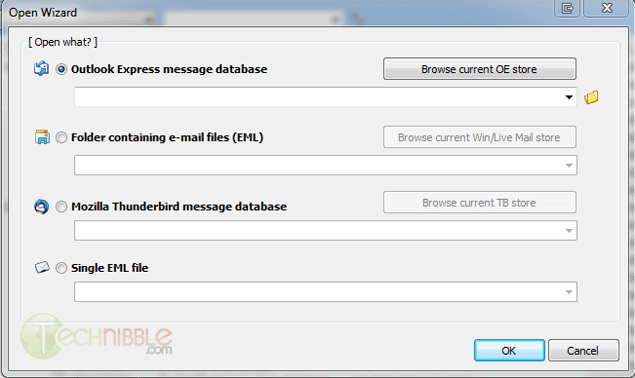
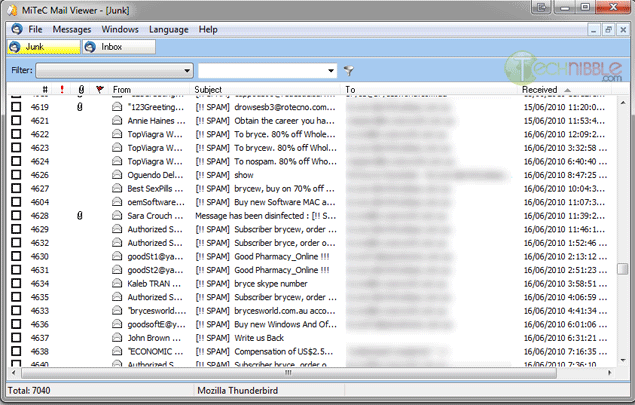
Mail Viewer is a free and portable application to view standalone Outlook Express, Windows Live Mail and Thunderbird databases. By standalone, I mean it will display a list of the emails contained in the databases without actually setting up the email client the file belongs to. Mail Viewer allows you to view most of what you can in an ordinary email client such as view single emails, attachments and HTML preview. It also features powerful search and filtering capabilities to find specific emails inside the databases.
I recently used this application when my father needed to reference an old email from 2007. We always keep backups but it was around this time he migrated from Outlook Express to Mozilla Thunderbird, so I wasn’t sure which database this email from 2007 was in. I also had backups of the backups from various periods so I had to look in many different backup versions to find it. While it isnt too hard to setup the old database in the new application, it would have been quite time consuming to search through all of the old backup versions. Mail Viewer was perfect for this situation and is definitely worth adding to your toolkit.
Mail Viewer is free for both private and commercial users.
Download from Official Site – 1.37mb
© Technibble – A Resource for Computer Technicians to start or improve their Computer Business
To get started with your own computer business, check out our Computer Business Kit.
Authors: Bryce Whitty
Utilman.exe is a built in Windows application that is designed to allow the user to configure Accessibility options such as the Magnifier, High Contrast Theme, Narrator and On Screen Keyboard before they log onto the system.
This was designed to help people who are hard of sight, hearing or mobility to log onto Windows themselves without the need of outside help. Its a great feature for disabled people but it opens up a security hole that we can take advantage of to bypass Windows logons.
Bypassing the Windows logon comes in handy if our clients have forgotten their logon password, their user profiles were corrupted or malware was interfering with the system before login.
This works because the user can trigger Utilman by pressing Windows Key + U before Windows logon. This will load up the Utilman.exe executable which resides in the Windows\System32 directory. If you swap the Utilman.exe file with something else like cmd.exe, you have access to the command prompt running SYSTEM privileges. SYSTEM is an account with the highest possible privileges on Windows which similar to the root account on Unix systems.
Here are the step by step instruction on how to do this.
WARNING:
You can do a lot of damage to a system if you dont know what you are doing. Technibble accepts no responsibility if something goes wrong.
First of all, we will need a way to access the file system to swap out Utilman.exe with something else like cmd.exe. There are a few ways to achieve this:
In this example we will be using the Windows 7 DVD. To begin, boot from your Windows 7 DVD and when you reach the first screen asking about the language, currency and keyboard format, Click Next.
On the next page, down in the lower left hand side, click on the “Repair your computer” link.
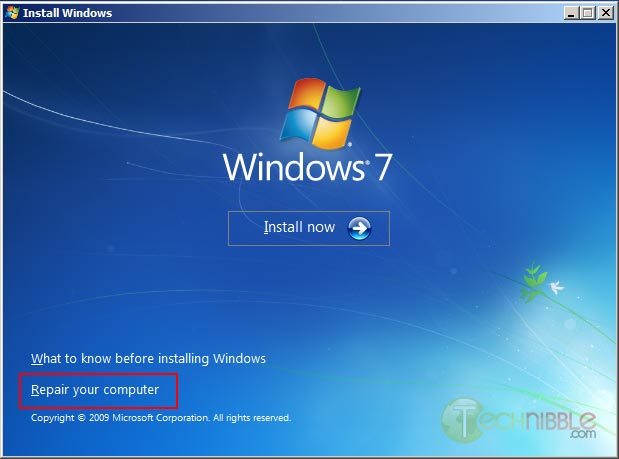
Next, select the “Use recovery tools that can help fix problems starting Windows. Select an operating system to repair” option, choose an operating system from the list and Click Next.
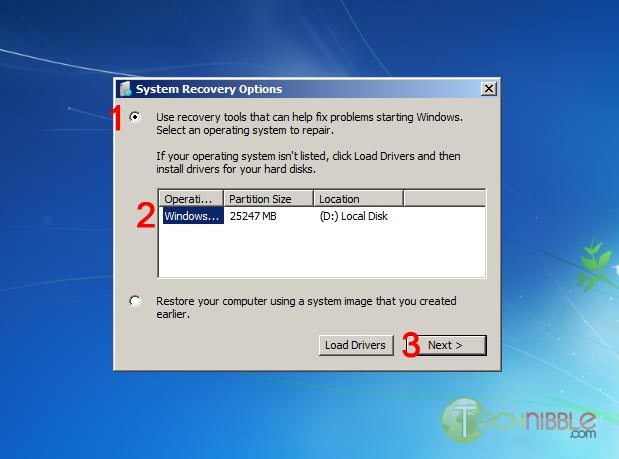
You will now have an option to “Choose a recovery tool”. Select Command Prompt.
You should now have a Command Prompt Window open. Type in the following commands:
C:\
 cd windows\system32
 ren utilman.exe utilman.exe.bak
 copy cmd.exe utilman.exe
This will navigate to the system32 directory, rename utilman.exe to utilman.exe.bak, make a copy of cmd.exe and name it utilman.exe.
Remove the DVD and reboot the system.
Once the computer boots up normally, press the key combination Windows Key + U and you should get a Command Prompt. If the Command Prompt doesnt appear, press Alt+Tab as the Command Prompt may appear behind the Logon screen. From here, you can run many (if not all) of the commands you can normally use in Command Prompt.
WARNING:
If you reset a users account password. This will permanently lose access to the users encrypted files. Be sure to back these up.
To reset an existing users password, we need type the text below. In this example, we will be changing JohnDoe’s password to “hunter2″.
net user JohnDoe hunter2
You should be able to log in with this new password straight away.
If you dont know what the username on the system actually is, you can see a list of the users by typing:
net user
To create a new user account in the Command Prompt (Username: NewGuy. Password: abc123), and add them to the Administrators usergroup type:
net user NewGuy abc123 /add
 net localgroup Administrators NewGuy /add
Again, you should be able to login straight away with this new account.
To restore utilman.exe, in the Command Prompt type in:
C:
 cd windows\system32
 del utilman.exe
 ren utilman.exe.bak utilman.exe
Then reboot the system.
To remove the new user account you just created earlier, type in:
net user NewGuy /delete
That’s all there is to it.
Thanks to MobileTechie for mentioning this trick.
© Technibble – A Resource for Computer Technicians to start or improve their Computer Business
To get started with your own computer business, check out our Computer Business Kit.