Authors: Guest Writer
Guest Post by Ric Chapman.
I think I’m somewhat safe in saying that Windows Phone 7 arrived late to the game and is still very much the underdog in today’s smartphone market. But whilst Microsoft are busy playing catch up their hard work is slowly paying off as it starts to carve its place among the Android, iPhone and Blackberry competition. Its ease of use and excellent integration into the Microsoft ecosystem is what’s starting to make it popular among home, business and now the technical community alike.
Having said that there’s still a bumpy ride ahead, at the time of this writing there are only 45,000 apps in the market place compared to Apple’s 500,000! When the phone was released, Technician apps were practically non-existent. I know, I was there, eagerly looking for what I could use out in the field. I didn’t find much, and what I did find didn’t work.. at all. But thankfully today is a much different story and I bring you the apps that I’m using on an almost daily basis as a Computer Technician.
Lync 2010
 Lync 2010 arrives on time as promised and is an excellent app for staying in touch with colleagues, clients and family whilst on the move. Although it integrates nicely with the OS it would have been nice to see something similar to the Messenger integration deployed with Mango, but I’m just nit-picking. It’s a great app and although the app is free, you do require access to a Lync server. Mine comes courtesy of Office365, it just works and works well.
Price: FREE – Lync server required
Link
My Home Server
 I absolutely love this app and is a must for anyone who owns their own or installs and maintains home servers for their clients. You can connect to any Home Server whilst you’re on the move allowing you to check important notifications, disk space, access files and manage user accounts including user creation and password resets. If your clients are happy for you to have access you can monitor and provide basic support from wherever you are at a touch of a button.
Price: FREE
Link
My Business Server
 Almost identical to the My Home Server app with a focus on Microsoft Small Business Server Essentials only, would have been nice to have seen this for the SBS Standard but perhaps something will arrive later down the line. The SBS Essentials edition is the server of choice for my small business clients and as a support app is indispensable. The Live Tile only adds to my excitement by providing an instant indication of available disk space and the number of important / critical alerts you have pending right on the phones home screen.
Price: FREE
Link
Sky Wallet
 Sky Wallet is a powerful password management app and I would be lost without it especially as clients are increasingly becoming reliant on their support techs for remembering their account details. Where Sky Wallet shines is its integration with SkyDrive, your details are synced and encrypted on your SkyDrive storage. If you need to reset your phone, you needn’t worry about losing the data. Secondly there’s a desktop companion app which comes included with this app allowing you to access your passwords directly from your PC avoiding the need to move back and forth between your desktop and phone.
Price: £2.99 / $3.99
Trial Available: Yes
Link
Flashlight 7
 The flashlight tool is a very easily overlooked app and I’ve simply lost count on how much I’ve used this, I often find myself under a dimly lit desk or a dark comms cupboard. As I’m always carrying my phone, it makes sense not to be carrying a torch. There is a large array of flashlight apps which offer a variety of features so do shop around.
Price: FREE
Link
Subnet Calculator
 Any technician working with medium and larger businesses should already know how to do this sort of thing without a calculator. But who would want to? We all work to a schedule and unless you can do this sort of thing in your head in less than 10 seconds then you might as well reach for your pocket. There are plenty of calculators out there, this one works great and has the added bonus of being free.
Price: FREE
Link
Connect Anything
 The title of the app can be a little misleading and is simply a reference tool. I specifically use it for the Ethernet Pinout information when making up my own network cables.
Price: FREE
Link
Remote Desktop
 Whilst there are plenty of remote desktop tools out there this is by far my favourite, not the cheapest but the one I generally get the best performance from overall. Most of these apps come with free trials and I’d recommend you try them before making a final decision.
Price: £4.99 / $5.99
Link
Amazon Kindle
 Being a Kindle fan I downloaded this app the moment it became available and whilst I do read for pleasure, a lot of my reading also involves tech or reference books. Whilst not strictly a technical tool it can be a great informational tool avoiding the need carry the large books that plague most students and technicians. A quick and easy EBook reader on the go.
Price: FREE
Link
Network Tools
0 0A small collection of network connectivity tools providing ping tests, tcp port connection tests, http and https connectivity tests as well as the ability to save a selection of URI’s for periodic checking, useful if you’re wanting to check the health of multiple web sites quickly. It’s absolutely free if you don’t mind the adverts which are not intrusive.
Price: FREE with ads or £2.29/$2.99 for the ad free version
Link
The SSH Client
1 1A very simple and free SSH client that works brilliantly, the paid version comes with telnet support and a ton of customisation and configuration settings.
Price: FREE or £2.49/$3.49 for the PRO version
Link
IP Camera Viewer
2 2I find these are quite popular tools among the tech community so I’ve included my favourite, originally acquired to keep an eye on my home office as I struggled to find anything that I was certain I had left on my desk. Turns out wife likes to clean my desk …. a lot. IP based cameras provide an excellent option for security and this app extends their use allowing you to keep an eye on things whilst on the move.
Price: FREE
Link
As mentioned previously, the Windows Phone integration with Bing and the Live services are what helps this phone stand out among its peers and may play a large part in its future success. The following items are not apps but integrated features within the OS that work exceptionally well and can prove invaluable whilst out in the field.
Office Hub
The Office hub provides excellent mobile office apps including Word, Excel, PowerPoint and the ever popular OneNote. I live in OneNote and much prefer this to carrying around a notebook and pencil, an excellent note taking app regardless of your situation.
Maps
Finding new addresses is always a daunting task but Bing Maps makes the whole process a lot easier, I did have concerns about how it would stand up against Google Maps on other smartphones but I needn’t have worried. If you have a phone holder in the car it even serves well as (very temporary) sat-nav replacement provided that there is decent data coverage of course. Mileage is presented to the user but is not recorded so I use OneNote to take down mileage and the phones multi-tasking features make it easy to flick between the two apps.
Office 365
Microsofts cloud based service Office 365 was made for Windows Phone, whether you need an Exchange based email service, SharePoint file access then you simply cannot go wrong. Email access is powerful and SharePoint makes easy work of file collaboration with colleagues and clients. Office 365 is beyond the scope of this article but I do urge you to check it out.
SkyDrive
Cloud based file access with SkyDrive is simple and easy and was a missing key feature in the original release. I now store all my client notes and access them from the cloud whilst onsite where necessary using the free SkyDrive service.
Bing – Local Scout
Nowhere near home or the office? Need that coffee to see you through the next appointment? Then the local scout integrated with the Bing Search app is what you need. Food/Drink located and mapped in a couple of moments … a true techy life saver.
45,000 apps compared to 500,000 is quite a small number and Microsoft has some way to go before it’s covering all our technical needs. There’s no news on an official DropBox app (although there are plenty of alternative third party DropBox apps available) and presently there’s no word on how Skype will integrate with the phone. But I sense these things and other much needed apps are not too far away. 45,000 whilst comparatively small is still too large for one tech to cover so if there’s anything I’ve missed that you feel deserves a mention then please comment and let us know.
Guest Post by Ric Chapman: Ric has been in the IT support business for 12 years driven by his love of tech and passion to help others. Ric carries several certifications from both Microsoft and CompTIA and worked in a myriad of support environments, that experience he now puts into developing his own IT consultancy business.
© Technibble – A Resource for Computer Technicians to start or improve their Computer Business
To get started with your own computer business, check out our Computer Business Kit. 17 Useful Windows Phone Tools For Computer Technicians
5 5



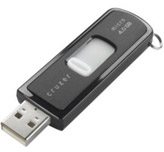 Usually, when your client’s computer won’t boot into the OS the CD drive won’t work. Either a CD will be stuck inside and you can’t eject it, or you can’t insert a new CD as the system won’t recognize it. This is why I always bring a Bootable USB drive with either Snow Leopard of Lion on it. When you insert it in your client’s computer, you can hold the “Option” key (ALT key if you are using a non-Apple keyboard) while you boot the Mac and select your USB drive. To create this USB Key, you need your original Lion installation file or your Snow Leopard CD and use the Disk Utility application on your Mac. (
 I always bring the Snow Leopard CD. Sometimes you won’t need a USB drive as CD Drive will work just fine. If you install this version on your client’s Mac, you do not need a serial number.
 No matter what I do on my client’s computers, I always use the Dust Blower at the end of the job. It adds a professional touch to it and usually the client has never removed the dust. Here in Montreal, I always buy the DustOff Original Duster. You can buy a 10 pack of those for just $12.99.
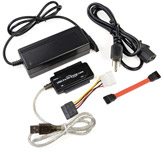 This will let you repair your client hard drive directly from your computer. You remove the hard drive from your client’s computer, plug it into this device, and access it via usb from your machine. This tool is good to repair disk permissions, backup files and to completely clear a hard drive. It works perfectly on both Mac and Pc. You can buy this one here:
 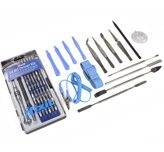 When you try to open your client’s Apple Computer and either change the RAM, remove the hard drive or change the motherboard, you will always have to deal with an unusual screw. Apple does it on purpose so nobody can open/fix their machine except them. You really need to bring all the tools necessary to remove all the pieces for your needs. I use this set of tool created by ifixit:
 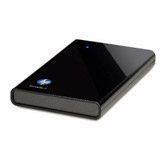 I bring my pocket 1TB external hard drive for backup. (model no. WDBACZ0010BBK-NESN). Usually your client won’t have another drive to back up his files. I like this HP drive because it is Mac/PC compatible and it supports USB 3.
 The iMac is the most difficult machine in the world to change its hard drive. Why? Because you have to remove the huge front glass. The only way of doing it is with suction cups. I only bring those if my clients have a problem with an iMac.
 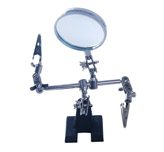 I usually use this on Macbook’s problems. When you have to change the trackpad, keyboard, motherboard etc.
 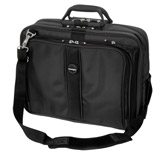 I can easily fit all of those things in this bag. I also always bring my 15” Macbook pro in it.