Smartphone Applications For Computer Technicians Pt2 – Android

Authors: Bryce Whitty

Last week we listed some iPhone applications that are useful to Computer Technicans, this week we are listing some Techie applications for Android based smartphones.

OnTheJob Management
OnTheJob Management is a tool to help you organise your data by Job. When you view a job it will show you who you are supposed to visit, to fix what, where, when and allows you to enter some notes. OnTheJob Management seamlessly intergrates with your contacts, calendar events and SMS messages. However, it does not have any finances/invoices etc..
OnTheJob Management – Free


WiFi Analyzer
WiFi Analyzer is a wireless network scanning tool that works by listing the wireless access points in range and provides a graphical representation of which wireless channel each of them operates. With this knowledge, you can set your wireless channel to the one with the least interference.
Wifi Analyzer – Free


Teamviewer
Teamviewer is a remote support program that allows you to control computers remotely.
Teamviewer – Free for non-commercial use


LogMeIn Ignition
Teamviewer is a remote support program that allows you to control computers remotely.
LogMeIn Ignition – $29.99


AndroidVNC
AndroidVNC is an open source remote desktop problem. It can connect to most VNC servers including TightVNC, RealVNC on Windows and Linux as well as Apple Remote Desktop on OSX.
AndroidVNC – Free


ConnectBot
ConnectBot is a powerful open-source secure shell (SSH) client. It can manage simultaneous SSH sessions, create secure tunnels, and copy/paste between other applications.
ConnectBot – Free


ES File Explorer
ES File Explorer is a free file manager, app manager and task killer that has the ability to explore both the phone and a PC shares on the network.
ES File Explorer – Free


Dell Service Tag Scanner
If you are working with Dells a lot this is a great tool. This application allows you to scan or enter a service tag to fetch the warranty information for a Dell service.
Dell Service Tag Scanner – Free


PDANet
PDANet allows you to use your Android phone like a 3G modem. It does not require a tether phone plan and you can connect it to your computer via USB or Bluetooth
PDANet – Free limits secure sites. Paid is $15.95


1 VPN
0 01 VPN allows you to connect to VPNs in 1 click by saving VPN usernames and passwords. You can also use its Tasker/Local Plugin feature to connect to VPNs automatically. The application supports PPTP, L2TP, L2TP/IPSec CRT.
1 VPN – $3.61


Dropbox
1 1Sync your files between your computer and mobile device and open them using your favorite Android applications.
Dropbox – Free


Square
2 2Square allows you to Accept credit cards on your Android device with no contract, monthly fees, or merchant account required. Every user receives a free Square credit card reader in the mail.
Square – Free


Newegg Mobile
3 3The Newegg Mobile application allows Android users to search, shop, read reviews and make purchases on Newegg.com. Excellent for those onsite price checks.
Newegg Mobile – Free


Tapatalk
4 4Tapatalk is an application that allows you to read certain forums as a native application. Its faster and more phone friendly that the full sized pages of forums or even some mobile versions. The Technibble forums supports Tapatalk (see pictures here) and it is well worth the money.
Tapatalk – $2.96

A big thank you to the Technibble forum members who suggested these Android applications. If you know of other great applications for the Android that you think should be here, drop us a comment.

© Technibble – A Resource for Computer Technicians to start or improve their computer business
To get started with your own computer business, check out our Computer Business Kit. Smartphone Applications For Computer Technicians Pt2 – Android

7 7

Read more:

Smartphone Applications For Computer Technicians Pt1 – iPhone/iPad

Authors: Bryce Whitty

Smartphones are very quickly becoming an important business tool and they are absolutely ideal for the onsite Computer Technician. In this article, I would like to share with you some iPhone applications that Computer Technicians use in their businesses.

If you have a Blackberry, Android or Windows 7 based smartphone, please list the applications that you make heavy use of (and the device you are using) in the comments below and I will include them in the next Smartphone app article.

Teamviewer
I always had wondered how good a remote desktop application could be on an iPhone with its small screen. I tried out the free version for use on my own machines and found the speed to be very impressive. I was testing it on an iPhone 3G which is one of the older iPhones over the 3G network which can also be slow. I was really impressed with how well it ran. It is free for personal use but you need to pay for the Pro version if you are using it to support any clients.

TeamViewer – Free Version (personal use only)
TeamViewer Pro – $99.99

iPad Versions:
TeamViewer HD – Free Version (personal use only)
TeamViewer Pro HD – $139.99

LogMeIn Ignition
LogMeIn Ignition allows you to directly control one or more of your computers anywhere. It has a different interface to Teamviewer but they both work great on an old iPhone 3G over the 3G network.
LogMeIn Ignition – $29.99

iSSH
iSSH is effectively several clients in one, containing functionality for ssh/telnet/raw connections, an X11 server and VNC tunneling. iSSH supports multiple, simultaneous connections with more complete terminal compatibility, more configurable macro and key options and an intuitive UI.
iSSH – $9.99


TripCubby
Computer Technicians do a large amount of driving going onsite and use up a lot of petrol. Luckily, the petrol that you use to get to your clients house would be considered a business expense so you can you can get a tax deduction or reimbursement. Trip Cubby is an application designed for anyone who needs to track mileage for tax reasons. It was designed with IRS compliance in mind and allows you to export the information as a CSV file via email.
Trip Cubby – $4.99


Squareup
I mentioned Squareup on Technibble a while ago when I wrote about accepting credit cards. Squareup is a service that allows you to accept credit card payments onsite by turning your iPhone/iPad into a credit card reader thanks to a small attachment.
Square – Free (for the application, not to signup)

Scany
Scany is a powerful multifunctional networking instrument for finding connected devices, looking up detailed device information, network troubleshooting, scanning ports, testing network security and firewalls.
Scany offers lots of useful tools in addition to its primary feature of scanning your Wi-Fi, LAN or any other network and providing detailed information about any device connected to it, its domain and network names, addresses and vendor. Scany also includes a whole set of networking utilities such as ping, traceroute, remote wake (WOL), Whois, Geo IP and shows information about active network connections along with the external IP address of your router.
Scany – $0.99


BSOD: Stop Codes
BSOD: Stop Codes is an application that provides indexed information on Microsoft Windows (blue screen) stop codes. This application allows you to lookup common stop codes that can be found on the MSDN web site provided by Microsoft without the need for an active cellular data or wifi network.
BSOD: Stop Codes – Free


Dropbox
Dropbox is an incredibly useful and powerful service that allows you to sync files between computers and devices. Dropbox is so well known that many other applications also allow you to syncronize the data made in that application with your Dropbox account.
You can create a free Dropbox account here.
Dropbox – Free


Aplayer
Aplayer is an application designed to allow the user to view their IP based security cameras from their iPhone. I have heard of some Computer Technicians using it to keep an eye on their technicians in the shop while they are onsite.
Aplayer – Free


Newegg
0 0The application Newegg is exactly what you expect it would be, Newegg for the iPhone.
The application provides you with an iPhone optimized layout of the website which is great for onsite price checks.
Newegg – Free


Amazon
1 1Just like the Newegg application, its Amazon for the iPhone. Again, great for quick onsite price checks.
Amazon – Free


Run Your Client Management Software
Dont forget, many Client Management solutions also have web option which allows you to access it on a mobile device. CommitCRM is a desktop application but also runs a web server allowing you to access it via the internet. mHelpDesk has a native iPhone application and ShopManager is a web based application so you can also access that via you mobile browser. You can also make a shortcut link to your CRM appear on the main page of the iPhone.

If you believe I missed any great iPhone applications for Technicians that are worth a mention, please leave us a comment. If you have a Blackberry, Android or Windows 7 based smartphone, please list the applications that you make heavy use of (and the device you are using) in the comments below and I will include them in the next Smartphone app article.

© Technibble – A Resource for Computer Technicians to start or improve their computer business
To get started with your own computer business, check out our Computer Business Kit. Smartphone Applications For Computer Technicians Pt1 – iPhone/iPad

4 4

Read more:

The Cheapest Laptop Screw Management System – That Works Great!

Authors: Bryce Whitty

One of our Technibble forum members shared with us a fantastic way to organize screws when disassembling a laptop. The need to organize laptop screws comes from the fact that there are many screws with many different sizes and lengths depending on which part it came from. Getting the laptop apart isnt the problem, but knowing which type of screw went where when putting it back together is. Its incredibly frustrating to have left over screws when you put the laptop back together again and then trying to figure out where it came from.
This is one Technibble members solution to the problem.

Aaron from Aarons PC Support said:
I have tried different screw management techniques and nothing has been as cheap, fast, and perfect as this. I have never had extra screws or mix-ups during re-assembly. In this example this HP laptop has a broken DC power jack which will require the laptop to be taken apart completely.

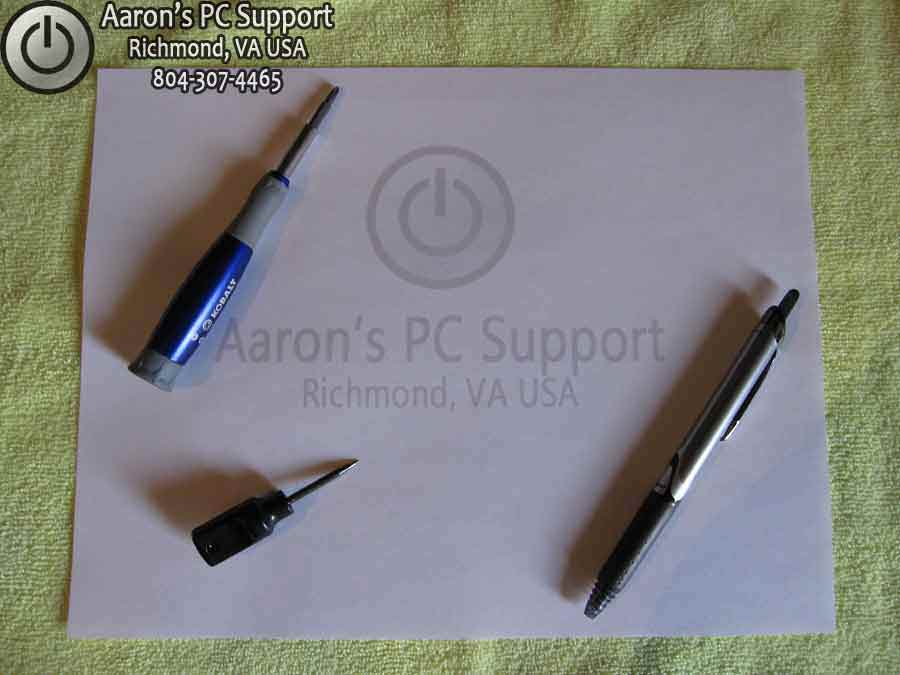
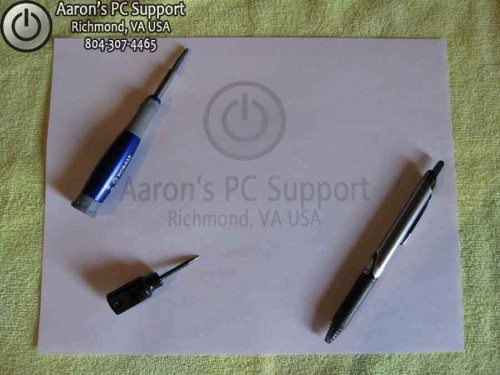
First, you will need a plain sheet of 8.5 x 11 paper, a towel (microfiber prefered, or other soft top as not to scratch laptop lid), a pen, screwdriver, and a small Awe.


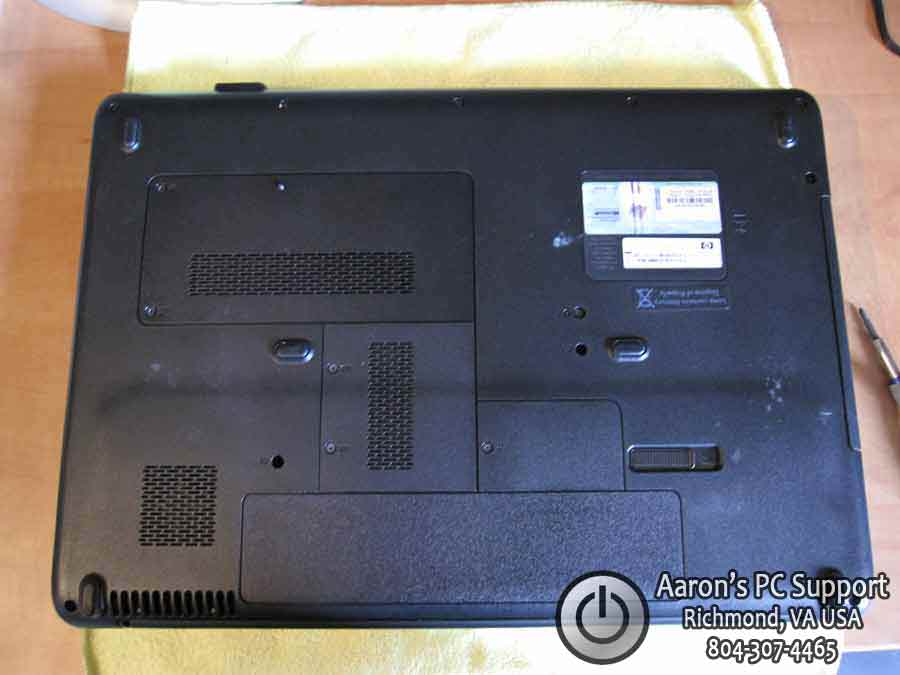
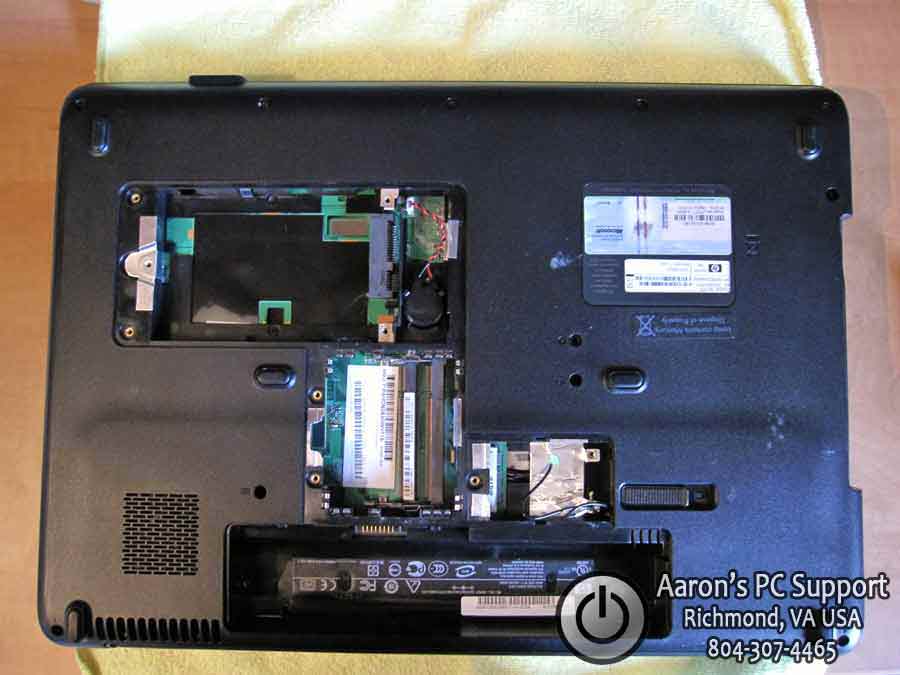
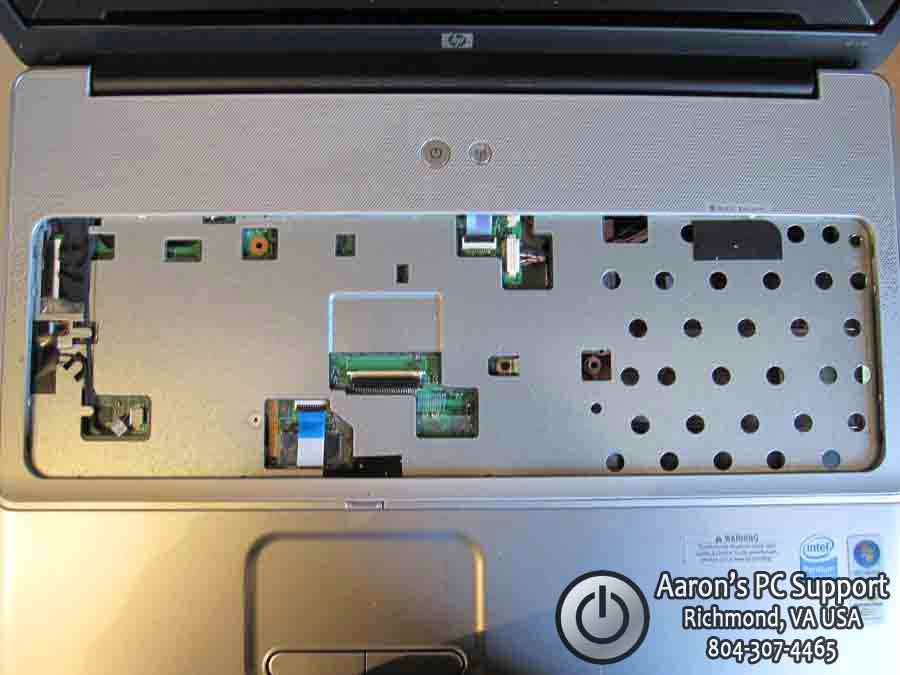
Next, we need to remove all of the covers and hardware from the bottom of the laptop. This will expose all screws that may be hidden. Be sure to place all of your parts into or on an anti-static bag of some sort.


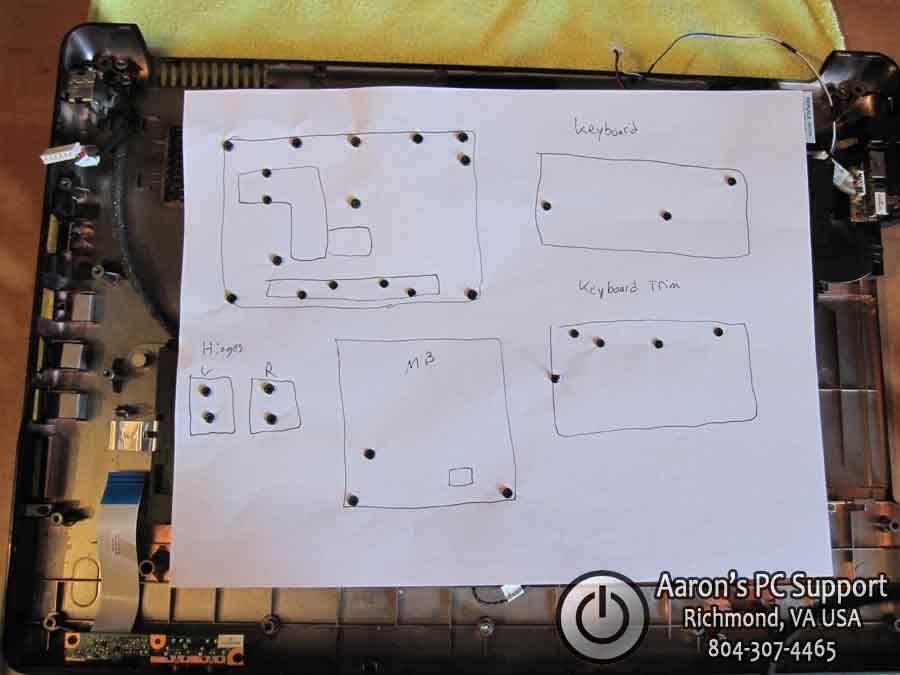
Now we can see all of the screws that need to be removed. Start by taking your blank piece of paper and drawing a rough outline of the bottom of the laptop. I like to draw basic features such as the battery bay, cover locations, as to give a orientation reference as we move along.


Now punch holes into the paper where you have screws drawn. It is important to punch the holes with an Awe or something similar. Not punching a small hole, and then inserting the screw will rip the paper, and the paper will not hold the screws tightly.. which means you will probably lose one. To make punching real easy: place the rough outline paper on a towel, then punch. We don’t need any bloody fingers.


Next, remove all of the screws and punch them into the oppropriate spots on the paper.


Here, you can see the paper is upside down, and all of the screws are held securely in place.


Now we flip the laptop over, right-side-up, and remove the keyboard and keyboard trim ring to reveal some more screws. So I draw another simple sketch and punch some more holes. I also punch holes for the LCD hinge screws as well.


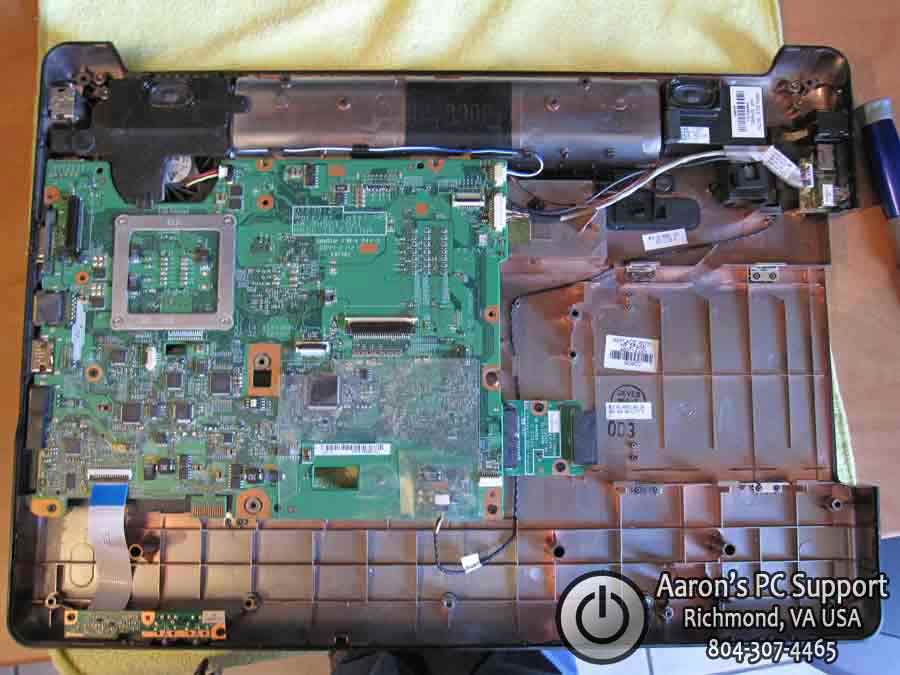
Now we can remove the top cover of the laptop to reveal the motherboard and some more cabling. Now is a good time to draw a diagram of the motherboard, punch, and remove and place the screws in the paper.


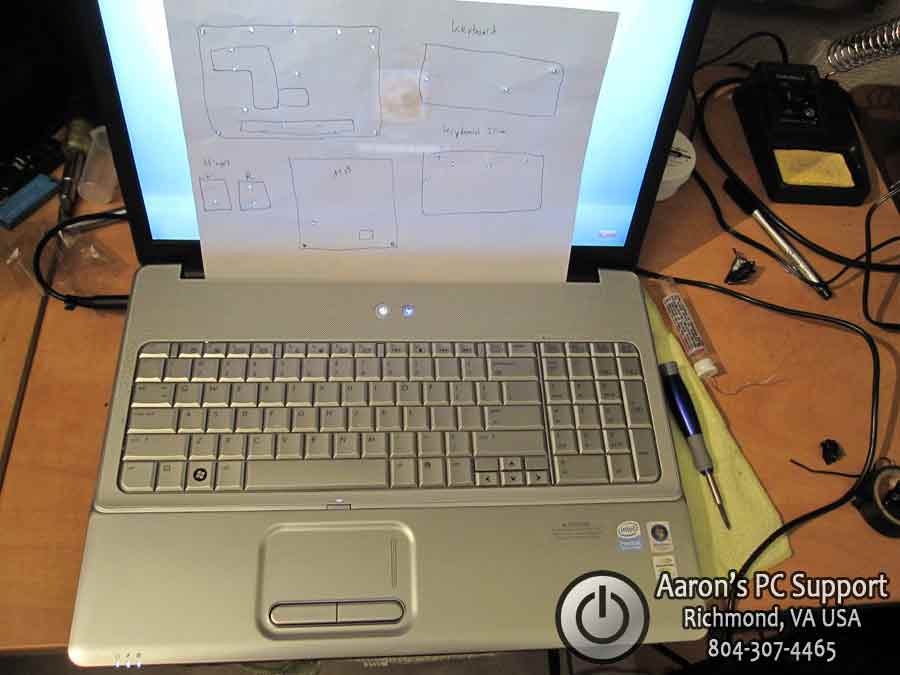
Now it is easy to reassemble the laptop and place the screws into the correct positions… another job well done!

0 0


I hope this helps some of you out there using pill bottles and other methods that “lump” together a bunch of screws that may be slightly longer/shorter or fat/skinny. If your repairs didn’t go as planned, you still have your paper so you can disassemble the laptop again if needed.

Special thanks to Aaron of Aaron’s PC Support for sending this in. Aaron’s PC Support is an affordable computer repair shop with over 20 years of experience. Aaron’s PC Support provides alternative low-cost computer repair services for Central Virginia; Richmond VA, Chesterfield VA, Midlothian VA, Chester VA, and Henrico VA.

If you want to learn how to repair laptops including how to disassemble them, check out Podnutz’s Laptop Repair Videos.

© Technibble – A Resource for Computer Technicians to start or improve their computer business
To get started with your own computer business, check out our Computer Business Kit. The Cheapest Laptop Screw Management System – That Works Great!

3 3

Read more:

10 Simple Steps to Get Started With Social Media

Authors: Bryce Whitty

Guest Post by Lisa Hendrickson, Owner of Call That Girl. Lisa has published her proven social media strategies in her latest eBook, "Call That Girl’s Guide to Social Media". Lisa has been a featured writer for Technibble in 2010 and is a contributor in the Business and Marketing forums.

Everyone is talking about social media lately and the craze doesn’t seem to be going away. If you’re not utilizing it in your business marketing plan, you might feel like you’re behind the times. Many people who are not using it, don’t know how to even get started. As it is one of the top marketing strategies I use for my business, I found it to be easy to learn, affordable and not something I needed to outsource. You can do it yourself and start seeing results in one day by following these 5 starter steps and these 5 action steps.

1.) Collect your contacts emails. Go through all of your emails, client databases, email accounts and create a generic list. An excel spreadsheet will work fine or use notepad.

2.) Create a LinkedIn profile (http://www.linkedin.com). It’s recommended you use your real name for your profile, not your business name. Fill your profile with your credentials and as much information as you are comfortable sharing. Most people on LinkedIn share most of their career highlights, past positions and skill sets. Of course there is more to using LinkedIn than just creating a profile, but this is a good start.

3.) If you have a website, add a blog page or sign up for a free blog like http://www.blogger.com.

4.) Start an email marketing program. Many popular email marketing companies have free 30 or 60 day trials. For 2011, I am using Constant Contact.

5.) Upload the emails you just collected to your email marketing program and LinkedIn profile. You will need a few contacts to build your network and to have people to send your email newsletter to.

Those are the 5 easy steps to get going, here is your action list.

1.) Write a blog about a simple value-add tip you know of about your industry that others would enjoy learning about. (Example: Tips for buying a new computer).

2.) Create a newsletter with a welcome message, a blog tip (the one you just blogged about) and offer a coupon or discount for services. Be sure to write a short paragraph about the blog and then in the newsletter, put in a hyperlink to the blog to encourage folks to go to your website or blog to finish reading the story. Remember to track the analytics of the newsletter.

3.) Join your local city and state groups on Linkedin. After you join these groups, be sure to introduce yourself to the group. After you have done that, post your blog link “Tips on buying a new computer” in a new discussion. A tip for being effective on LinkedIn is to make sure that your discussion is not pushy or gives the appearance of spamming the group. Try to peak the interest of the members with hopes they read it and remember your discussion later for if they need your services. It’s a good idea to use your professional signature with all discussion postings.

4.) Invite members of those discussion groups to your LinkedIn network. (These are all potential new clients as everyone on LinkedIn has a computer available to them). Many of the people in these groups have the potential to be commercial clients and of course, they are all residential clients.

5.) Attend local face to face networking events. Many of your LinkedIn groups will have free or low cost events. Be sure to watch for those and attend. Meet as many people as you can and when you get home, invite them to your LinkedIn network and add to your email marketing. Meeting new people in person is a very important factor to winning big with social media.

I hope these 10 steps will help you get started with social media. If you would like to learn more, my latest eBook will help you with step by step instructions.

Good luck!
– Lisa

© Technibble – A Resource for Computer Technicians to start or improve their computer business
To get started with your own computer business, check out our Computer Business Kit. 10 Simple Steps to Get Started With Social Media

image

Read more:

New Year 2011

The Association is pleased to begin the New Year with over 1,300 members and a membership base that continues to grow. We currently have members in about a dozen different countries.

2010 was a very good year for the Association not only due to the increase in membership but also with bringing in quite a few Preferred Vendors to the Association for the members to select from. Some marketing companies were brought in along with a few online backup solutions for our members.

We’veRead More…

Read more:

Giving Your Business The Best Possible Start In 2011

Authors: Bryce Whitty

A new year is upon us and most people have an idea of what they want to get done this year. For us Computer Technicians it might be to make more money, get more clients or spend more time with family. Whatever you are after, here are some ways to give 2011 a great start:

Set Your 2011 Goals
I dont really believe in New Year Resolutions because they tend to be broken. However, I do believe in setting measurable and achievable goals. The trick to reaching your business goals is to not only write down what the goal is, but to break it down into smaller bullet points with steps you need to take in order to achieve them. For example, your goal for 2011 might be to move your business away from doing break/fix residential work and moving towards maintenance work for businesses.
Its a good goal to have but its not very useful if you dont plan on how you are going to achieve it. It needs to be broken down into little bites that you can get done in a few days. Here is an example:

GOAL: Move my business from mostly residential clients to commercial clients
Decide on the maintenance plans:

  • Look at competitors plans
  • Ask the Technibble forums what they think of your plans (price, what you are offering, could anything come back and bite me?)

Software:

  • Try 30-day trials of various remote monitoring software
  • Purchase one of them and learn the ins-and-outs of it on your own machines
  • Setup your monitoring hardware and software in your workshop. Test it by creating problems on a test machine

Get Advertising Material Made:

  • Gather a handful of competitors advertising material, find parts on each one that you think looks great and make your own unique material based off the best parts
  • Find a graphic designer
  • Print off a very small amount

Prospects:

  • Decide on which businesses in your area you would liketo have as clients and rank them into A, B and C “grades” of desirability
  • Approach your “C grade” list of potential clients and try to sell the maintenance contracts to them. They will come up with questions that need to be answered in your advertising. This is why we wanted a small print run
  • Perfect your marketing pitch and material by approaching more C grade potential clients until many of them start signing up
  • Pitch the material that you perfected with your C grade clients to your more desirable A and B grade clients

The goal “Move my business from mostly residential clients to commercial clients” sounds like a huge task. However, if you write down your goals like this, they suddenly seem very doable.

Clean Up Your Business and Processes

  • Go through all of the stock you have and determine whether you need to throw any of it out, donate it or put it on eBay it if it could still be useful to someone. You may be surprised to find something in the back of your shelves that you really need to move before it loses too much value
  • Check that your backup systems are working
  • Get your inbox in order. Delete any old and unread emails (Friends Facebook status updates etc..). The same holds true to your work area. Remove the clutter and start the new year with a fresh start

Look At Your Finances

  • Is there anything better you could be doing with your earnings like putting it in a high interest bank account or reinvesting it back into the business?
  • Look at your bank statements and see if there are any paid services that you no longer use
  • Look at the current plans of your utilities like internet and phones. Its very likely that they have come out with a better deal than the one you are currently on, but they just dont tell you

Other quick ideas are updating your passwords, checking your answering machine message to see if the information is still current and testing your websites links.

Feel free to leave a comment with any ideas that I may have missed.

© Technibble – A Resource for Computer Technicians to start or improve their computer business
To get started with your own computer business, check out our Computer Business Kit. Giving Your Business The Best Possible Start In 2011

image

Read more:

5 Easy Services to Accept Credit Cards as a Computer Technician

Authors: Bryce Whitty

Accepting Credit Cards seems to be a question that is frequently asked on the Technibble forums. The members of our great community often chime in and mention the credit card service they are using. I have compiled this information into one easy to read post.
There are many other services out there, but these are some of the options that Technibble members are actually using.

Keep in mind, these are fast, easy and convienient ways to start accepting credit card payments but if you are doing a large amount of credit card payments (say, $75,000+ per annum) then it may be cheaper to talk to a bank as their fees are lower in the higher turnover areas. For everyone else, here are some good options to get setup quickly and cheaply:
 
Paypal – http://www.paypal.comSupports Many Countries
Paypal is by far one of the quickest and easiest ways to start accepting credit cards. However, it isnt the cheapest.

A great way to start accepting credit card payments onsite is to create a Paypal button either on your on your main site, or on a hidden mobile friendly page. To set this up:

  • Log into Paypal, click the “Merchant Services” tab up the top
  • Click “Buy Now buttons” on the right hand side under the “Website Payments” heading
  • On the “Create Paypal payment button” page, choose “Buy Now” as the button type, make the item name something like “YourBusinessName Payment” and leave the item ID and price empty. You will need to set the currency though.
  • You can leave everything else as the default and click “Create Button”. Take the code given to you and place it on your website or a mobile friendly page (that may have this button as the only thing on it so it loads quickly on your phone).

Their fees and pricing can be found here.


ProPay – http://www.propay.com – USA & Canada
ProPay seems to get the most mentions on the forums. They have no setup fee but there is a small annual fee. They have no monthly minimums or long-term contracts.

They allow you and your clients to pay via Phone where you enter the credit card number on the keypad.
They also offer an iPhone attachment for free (you pay $14 shipping though) that turns your iPhone 3G or 3GS into a mobile credit card terminal which would allow you to take credit card payments while onsite. If you dont own an iPhone 3G or 3GS, they also have a mobile web interface where you can enter in credit card numbers through your phones web browser.

One thing worth mentioning is that some technicians who make use of ProPay had to pay a $1000 reserve because they deem “Computer Repair, Web and Graphic Design” as high risk. I dont know whether this will apply to all computer technicans or the decision was based off other factors specific to the members on the forums. However, one technician managed to get the reserve down to $500 because he was using the ProPay card reader.

Their fees and pricing can be found here.


Intuit – http://payments.intuit.com – USA & Canada (Canada only some features)
Intuit, the makers of Quickbooks got a few mentions on the forums. They offer an iPhone credit card reading attachment, a bluetooth card reader for non-iPhone devices and a bluetooth card reader with printer, also for non-iPhone devices. You can make payments via their web page or download an application that works for many smart phones including the iPhone, Blackberry, HTC, Palm and more.

There is a monthly service fee of $12.95 but no monthly minimums or setup fees.
Their fees and pricing can be found here. (click the pricing tab)


Squareup – http://www.squareup.com – USA
I was thinking of giving Squareup a miss because some people had questioned their reliability because they are very new on the scene. However, after asking around on the Technibble forums and the Technibble twitter, it seems a lot of technicians are making use of it. If you do over $1000 in credit card payments within the span of 7 days, the money will be held for thirty days and then put in your account.

Squareup offer a free card reader that plugs into your Apple device (iPad, iPhone, iPod Touch) or your Android OS phone (Motorola, HTC, Samsung etc..)

Their fees and pricing can be found here (goto the ¢ tab).


Tyro – http://www.tyro.com – Australia
Tyro is an Australian based company that provide credit card terminals for shops, mobile based terminals that make use of GPRS while you are onsite and a web interface for everything else. With Tyro, it appears you need to pay for the terminals which are $520 for the ethernet version, $680 for the WIFI version and $780 for the GPRS model. Tyro is more expensive than the super cheap and easy startups that exist in the USA, but in Australia there isnt a whole lot of choice.

Their fees and pricing can be found here.


I tried to find some recommended options for our UK readers. However, all of the UK technicians I asked on our forums and twitter said they just use Paypal. If you know of some great UK services for accepting credit cards, please leave a comment below.

© Technibble – A Resource for Computer Technicians to start or improve their computer business
To get started with your own computer business, check out our Computer Business Kit. 5 Easy Services to Accept Credit Cards as a Computer Technician

image

Read more:

Top 5 Ways To Get Backlinks To Your Business Website

Authors: Bryce Whitty

Guest Post by Bryan Vest: Bryan Vest is a web developer/SEO specialist who enjoys writing articles to help make techs websites succeed.

Search engines often use the number of links a website has from other sites as a major factor in your page ranking. Even Google’s description of their PageRank system says that, “Google interprets a link from page A to page B as a vote, by page A, for page B”.

Now before you start rushing out to spam as many links as you possibly can on every blog and forum you can possibly find, you need to know that not all links are created equal. For example, lets say you own a computer repair website. A link from another computer repair website will hold more weight with Google than a link from a home improvement website.

There are other contributing factors to the weight of a link, but we will start off with the basics. Now here are the top 5 ways to get backlinks. There are definitely way more ways out there you just have to be creative, but this will be the main 5 you will see just about everywhere.

5. Blog Comments and Forum Signatures – There are a lot of “SEO experts” and web developers that believe that blog comments and Forum Signatures are the best way to get backlinks. However, these are beneficial, but “spam commenting” is not the way to go. If you can’t add something valuable to the blog post, or offer a different point of view, don’t comment. This will get you more damage than good in the end. A good way to get high quality backlinks from blogs without putting your link actually in the post is to put your name as the keyword you are targeting and your URL as the website. For example, I am currently working on a new site targeting “Temecula Web Design” here would be a good way to get a backlink that bloggers will approve of.

As you can see it will give you a nice link back to your site without causing the blog to look like its filled with spam.

4. Directory Links – Submitting your site to directories can help you. However, like blog comments not all directories are created equal. Some directories (paid or not paid) can give you a high quality backlinks (DMOZ, Yahoo, and Business.com). For free directories you will want to make sure that more than just the home page of the directory is indexed, and that the directory has been around for at least one year if you are interested in a high quality link. The common misconception is that Google ranks websites as a whole when in fact it ranks web pages. Knowing this if you submit your site and end up on page 200 with no ranking then that link will count for almost nothing.

3. Reciprocal Links – Partnering with sites that are directly related to the subject of your site can help you. The idea here is “You scratch my back, I will scratch your back”. This is when another site links to your site while you link to theirs. This however should be used in moderation. If you have to many reciprocal links, especially if they are not directly related to your site, can actually do more damage than good. This method may require some work since not a lot webmasters are willing to link to their competition. However, if you can find sites related that are not in direct competition with your site you can hit a gold mine of links.

2. Article Posts – Article posting has huge potential to launch your site to the top of Google in the event that one of your articles gets posted on a popular site. A popular way is to contact bloggers related to your subject and ask them if they would publish an article (with your anchor text backlinks). This will actually receive a great response because to bloggers well written and unique content is what they are all about. With some time this method could be like finding oil in your back yard. Not only will you have a link on the site you wrote the article for, but there are a lot of blogs out there that just copy content from other blogs. Generally those webmasters are to lazy to remove the backlinks giving you even more links from other sites. I myself have seen a high quality article go from 1 backlink to 12 in 1 month. The best part is that the sites you get those from are all relevant to your targeted keyword as well.

1. Blog With Quality Unique Contents – It is a well known fact that Google loves blogs! If your content is truly unique and well written you will naturally receive backlinks from other sites. This is the liquid gold of backlinking. Now this method requires the most work and will take the most time, but if you do it right and spend some time on it you can easily get 20 to 30 backlinks from a well written blog post. There links are almost always on relevant websites to since they are coming from webmasters that find your information useful to their viewers as well. Over time you will naturally receive high quality backlinks boosting you to the top of Google ranks with ease.

Guest Post by Bryan Vest of Temecula Web Design

© Technibble – A Resource for Computer Technicians to start or improve their computer business
To get started with your own computer business, check out our Computer Business Kit. Top 5 Ways To Get Backlinks To Your Business Website

image

Read more: