Finding The Right Keywords For Your Computer Businesses Website

Authors: Bryce Whitty

Guest Post by Bryan Vest: Bryan Vest is a web developer/SEO specialist who enjoys writing articles to help make techs websites succeed.

As you all know sometimes finding the right keywords to target can be one of the hardest parts of SEO. With proper keyword research you can find keywords with low competition to bring you high quality local traffic. In this article, I would like to show you some methods to properly research keywords to target for your SEO campaign. This is by no chance the only ways, but these are very easy and great methods to look for keywords to target.

Now we all would like to jump right out there and target the short tail keywords like "Computer Repair"(673,000 unique searches) and "Virus Removal" (550,000 unique searches), but the competition on those keywords are very high and let’s face it without a very high SEO budget a small town Computer Repair shop doesn’t stand a chance. Another thing you have to think about is how much of this traffic is areas you actually can support. So the perfect keywords to target would be something that is low competition and focused on your supported area.

Now that we have the basics covered let’s begin with the process itself.I will be using local major cities in my area for the example. We will start with the just about universal tool for researching keywords, Google Adwords Keyword Tool. What would be better to use in getting to know the exact amount of hits your computer repair site can receive than a tool made by Google itself? Now follow the link https://adwords.google.com/select/KeywordToolExternal. This form should be very simple and easy to follow for just about everyone. You type the keywords you want to research in the "Word or phrase" box one line at a time. You may put your website in the website box, but for the sake of research you won’t want to since this will just pull keywords from your site. A good way to start your research is by typing in local cities you support followed by computer repair. In my case those major cities would be Temecula and Murrieta. Now just fill out the captcha and press search.
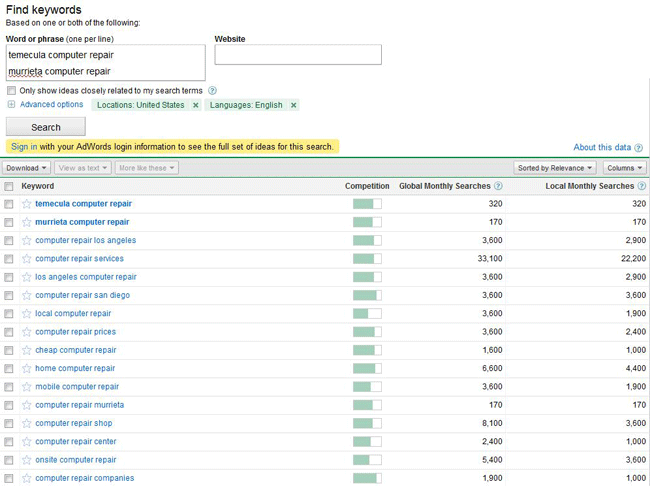
You will immediately see a list of keywords populate the bottom of the screen as seen above. As you can see in my case the searches "Temecula computer repair" brings in about 320 searches a month while “Murrieta computer repair” brings in about 170 unique searches. These would be good keywords to target since just imagine the work you could get if you had the combined 490 clicks to your site a month.

Now you have found 2 keywords you would like to target your next step is to find the competitiveness of the keywords. You may notice the competition bar as shown above.Just completely ignore this! You will find very noncompetitive keywords showing competition of way above 75% while highly competitive keywords ranking in the 30%. Now what we are going to do to find the competitiveness of the keyword is actually look at the competition! Click on the keywords to bring up the searches in a new tab.
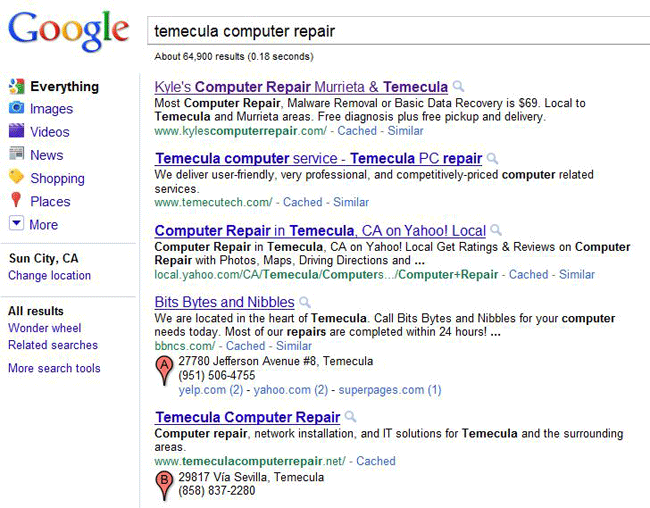
Here you can see who is ranking for the keyword in question. Right off the bat you can tell this keyword is not very competitive as the Yahoo Local page is ranking 3rd! To properly assess the competition I always look at where I want to be. You always want to be number 1 so we will look at "Kyle’s Computer Repair". I will not be posting a picture of the design since this is a live site and it’s really has nothing to do with keyword research. Moving on, right click anywhere on the background of a page and select "view source". This will bring up his source coding of the website. Now if you don’t understand HTML don’t worry we will include some basics.

The first thing we will look at is the title tag. This is the main writing that appears when you search on Google. Now unless you are an industry leader the best thing you can do is put the keyword right in the beginning of the title tag. Is his case he put his company name first. Though this doesn’t hurt him it will not carry the same weight as say "Keyword – Business Name". In his case though the way he went the right way as his name includes computer repair.

The next thing you will want to look for is IMG tags. This is the biggest giveaway of them all since most designers forget about them and it is a clear sign if he is focusing on SEO. As you can say in this sites case the ALT attribute is left blank. This is major since Google’s spiders can’t read images as humans do, but can read the ALT attribute. Looking just at these 2 things you can determine that he is not really focused on SEO as much as he should be.

Now everyone knows the biggest part of SEO is backlinks! Backlinks are essentially other sites telling Google "Hey! This site is important!" We are now going to check the competitions backlinks to how hard this keyword will really be. Now there are many tools out there to check the backlinks of a site, but the simplest one for the sake of this guide will be http://www.backlinkwatch.com. Now once you open this site you just type the URL of the site you want to research in the box and click "Check Backlinks".
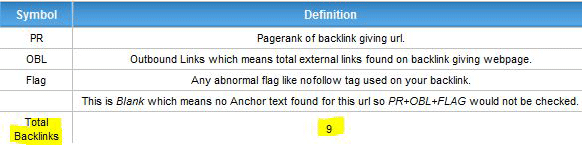
Now it might take a few seconds, but on the left side of the screen you will see a box up the left. This holds the important information you are looking for which is the total backlinks. As you can see with this site there are only a total of 9.

Now with knowing that the owner is not focused on the On-Site SEO and the Off-Site SEO, but is still ranked first for the keyword in question you know this keyword will be fairly easy to target. Now just repeat these steps with each keyword you would like to target and you will be gaining lots of high quality tech related traffic to your site in no time.
Here are some keyword combinations that will work quite often in major cities.
"[city] computer repair"
"[city] computer services"
"[city] virus removals"
"[city] data recovery"

© Technibble – A Resource for Computer Technicians to start or improve their computer business
To get started with your own computer business, check out our Computer Business Kit. Finding The Right Keywords For Your Computer Businesses Website

image

Read more:

Brands You Love Hate

Authors: Bryce Whitty

Computer Technicians tend have a special insight into the reliability of computer hardware. Big brands can spend millions boosting their brand but in the end it comes down to the Computer Technicians who really see what hardware lasts and what doesn’t.

In this article I would like to ask you, the reader, what brands of hardware do you love and what brands of hardware you hate and why you feel that way towards them. This can include peripherals like Printers, Keyboards and Mice.

I would love to see what the community has to say and we may even find brands that are highly popular or unpopular with Computer Technicians. Please leave us a comment below, as usual you do not need to sign up in order to leave a comment and you can even post anonymously.

© Technibble – A Resource for Computer Technicians to start or improve their computer business
To get started with your own computer business, check out our Computer Business Kit. Brands You Love & Hate

image

Read more:

How Much Is Your Time Worth?

Authors: admin

A few days ago a hard drive in one of my clients servers showed up as failing. Typically, all the server management is done remotely by another company and I manage the workstations locally. However, since the hard drive was failing mechanically I was asked to do the physical task of removing it and replacing it with a new one. Luckily, the server was in a RAID 1 setup so there was no downtime while removing the failing hard drive.

This server was only a few months old so the hard drive is well within its warranty. On the clients behalf, I found out where the server came from (it was a custom build) and the store owner agreed to swap the failed hard drive.

In order to get the replacement hard drive, they said all I had to do was goto the supplier which was about 15 minutes from my clients location, return the dead hard drive and get it swapped with the new one. I agreed to this because I wanted to get the hard drive replaced quickly.
I went ahead and physically removed the hard drive, destroyed the data using Dariks Boot & Nuke and while I was doing this the store owner called again and told me that the supplier now says that it must be her that does the swap with them and it cannot be me. So, we both agree on a time to meet down at the suppliers.

So, I go down to the suppliers to meet her there and quickly pick up the hard drive but she says that its going to take 4 hours for them to process the return. This was pretty annoying but I did have work to do in the area that should fill 4 hours or so.
Four hours later I return to the suppliers and the hard drive is still not ready but they said it wont be much longer. I start talking to the store owner to kill some time and help keep my finger on the pulse of the computer repair world and found out that she came from a town outside of my city that is a 3 hour drive from here. I asked whether she had any other work down this way today and she said no, she was there only for the hard drive.

The supplier was still taking longer than expected and she complained that she had to pass on some client work in order to be here.
I didnt entirely believe this, why would you drive a 6 hour round trip, pass on client work for a 500gb SATA hard drive?

After a while she goes inside the suppliers building to see what is happening so I talk to her husband who is part of their computer business. He also mentions that it was a 6 hour round trip, they had to pass up client work to be here and they are only in town to return the hard drive.

I was amazed. A 500GB Seagate SATA hard drive could be worth no more than $60 USD. They would have spent $30-40 in petrol for the round trip and could have earned hundreds of dollars by supporting their clients that day. Once we did finally get the hard drive they hopped in their car and left. So they didnt even pick up additional stock to make it worth their while.

I was trying to figure out why they would have done this but the only thing I could think of is they must have believed that they were saving some money because the supplier will swap it for free. Maybe they did it to get it swapped quickly, but there are faster methods.

This is a bad use of time and resources and you cant do this when you own a business. Your time is so much more valuable now and you always need to look at the bigger picture. The opportunity cost in this case was very high, the loss of hundreds of dollars.

If I were in their place, I would have either posted a hard drive with same day delivery from either their town or directly from the supplier to the client and be out of pocket for a little while until I got the replacement on the failing hard drive.
If I had known about the delays I wouldn’t have even bothered getting it swapped for free, I would have just purchased a new one. There is no point my client paying for 2-3 hours of my time to swap a hard drive for free when I could have just billed for 1 hour plus the cost of the hard drive.

So how much was their time worth? Obviously not much.

© Technibble – A Resource for Computer Technicians to start or improve their computer business
To get started with your own computer business, check out our Computer Business Kit. How Much Is Your Time Worth?

image

Read more:

Customer Not Happy With Your Work? Here Is How To Deal With It.

Authors: Bryce Whitty

In this article, I would like to show you how to deal with customers that are not happy with your work. I would like to start by saying that I am not a lawyer and the contents of this article is not legal advice. There is no substitute for the knowledge of a local lawyer specialized in this area of law. Now we have that out of the way, lets get into dealing with these customers.

If you have been in this business for a while, you have most likely encountered a client that is not happy about your work because they believe you didn’t fix the problem properly. It might be that their computer still locks up or perhaps the virus you were supposed to have removed came back. They are fairly common complaints in this industry and here are some ways to deal with them.

Hear Them Out
Whether they are right or wrong, you need to hear them out and let them say what they need to say. The fact that someone is listening to them usually calms them down.
However, if they are being abusive (as in, more than just an angry customer) you can say something like “I hear you and would love help you out by taking a look at the system, but I cannot work with you until you settle down. Please give me call back when you have settled down”. If they settle down after you say that then let them continue, otherwise hang up the phone.

For all of the non abusive customers, always emphasize with their problem by saying something like “Ahh, thats no good. Bring it into the workshop and we’ll take a look at it”. Once the computer is on your workbench you can then determine what the problem and whether it was your fault.

Determine The Problem and Whether You Are At Fault
Its quite possible that you simply didn’t remove the virus completely or you didn’t diagnose the problem correctly. If that is the case you simply need to man up and fix it, then apologize to the customer for the inconvenience. Maybe even offer them 10% off their next repair or some other olive branch to keep the peace.

It is possible that you are completely in the right but you didnt manage your clients expectations correctly. For example, while you were working on the computer originally, you said to your client that “you will install an antivirus product so they dont get any viruses” as a passing comment.
You and I both know that an antivirus product wont completely protect a computer and that it only helps prevent infections rather than completely prevents them. However, when you said that you “will install an antivirus product so they dont get any viruses”, the client heard something totally different. The client heard “once I pay for this, I will never get a virus again”.

This is an example of not managing their expectations correctly and there isn’t a whole lot you can do to fix it after you have done it other than correcting them and remembering not to do it next time.

Did They Do It To Themselves?
A common issue in the Computer Repair business is when a technician removes a virus correctly but the client managed to reinfect themselves a short time after. This comes down to user education and you will need to tell them about the dangers of opening email attachments, clicking on questionable links etc..
You can also make use of applications like IEHistoryView and MozillaHistoryView to prove they were going to potentially dangerous websites. In most cases, once a client realizes that “they have been bad” they usually understand that the reinfection was their own fault and they will need to treat it as a separate incident.

Is It A Scam?
There is a scam out there similar to this that some Computer Technicians have been stung by. The scam is when the scammer drops off a computer to a technician and makes a point of saying that the computer has certain specifications when it really doesn’t. For example, they might say something like “I had the RAM upgraded to 4GB last month” as a passing comment. However, it was delivered with only 1GB of RAM installed. When the scammer returns to pick up the computer, they accuse you of stealing the 3GB of “missing” RAM and make threats of suing you or ruining your reputation.
In many cases, the Computer business will just give them the 3GB of RAM to make them go away.

Make Them Go Away
Having just said that, sometimes it is worth doing something to make the client go away. I have never had this scam attempted against me but there comes a time when you have the choice of being right and potentially getting sued (even though they will lose) and ruining your reputation, or just giving them their money back and telling them not to return. This doesn’t mean that you should let people walk all over you, you should still stand up for yourself but you need to keep in mind that sometimes fighting it is just not worth it.
Why get pulled into small claims court for a day over a $50-100 argument when you could use that day to fix 10 other happy customers computers and earn $1000? Sometimes it is worth just chalking it up to experience and moving on.

Get Paperwork Signed
Having signed paperwork in place is invaluable in these sort of situations and this is the whole point of work orders. When you complete a job, get the client to sign the work order which says they are happy with the work that has been done and they understand your terms and conditions. In one of the Work Orders in the Computer Business Kit, there are some terms and conditions that says that your business only warrants the service that was performed for a period of one month and that does not include any software issues created by the end user such as virus/spyware infections, tampering with the settings etc..

If It Has The Potential To Get Ugly, Talk To A Lawyer
If an issue has the potential to get ugly, talk to a lawyer. Yes, they are expensive but you are not only paying for legal advice, you are also buying peace of mind. You can stress about an issue for days fearing the possibility of getting sued, or you can spend $200 for an hour of a Lawyers time who will tell you that they dont have a leg to stand on and you can sleep well at night.

© Technibble – A Resource for Computer Technicians to start or improve their computer business
To get started with your own computer business, check out our Computer Business Kit. Customer Not Happy With Your Work? Here Is How To Deal With It.

image

Read more:

Questions and Answers #3

Authors: Bryce Whitty

If you have been subscribed to the Technibble mailing list for a month or so, you might have noticed that we have a survey for our members. In this survey we leave an area for you to ask a question about the computer business. In this article, I will be answering some of those questions.

“What is the best approach is when a clients computer is too old to repair or upgrade?”
There does come a time when a clients computer is either not economical to repair or upgrade and sometimes it is not even possible. I find the best way to tell the client about this is to tell them in a way that most people care about – value for money. When I say this with my own clients, I would say something like:
“I have diagnosed the issue with your computer and it appears that the issue is with the computers motherboard which is one of the main parts of the computer. I can replace this old part for $XXX but for a little bit more, I can provide you with a new, much faster and much more reliable computer.
It is just not economical to repair this older one when you can have a new one for the same money”
.
Its upfront, gets the point across and your clients will appreciate you looking out for them.

“How should I deal with clients that are not very aware of new technologies?”
I have found that my clients attitude towards computers are similar to most people with cars, they get in, turn the key and off they go. The car is just a utility to get from point A to point B and they don’t understand or care about how it works. Computers are the same to most of them. They dont care about the latest news in the computer world and the only time they do care is when their stops working (just like cars). I dont think having to “deal with clients” not knowing about new technologies is a negative thing. It is an excellent opportunity to recommend technologies that they may not be aware about.
For example, I might have noticed that my client had an external backup drive sitting on top of their computer so I ask them whether they take it them at night. If they dont I would ask them what they would do if the place caught fire or was broken into and the backup drive was destroyed or stolen (a little bit of fear based marketing). I would then use this as an opportunity tell them about offsite cloud based backup which has only gone mainstream in recent years with brands like Carbonite and Mozy.
I think the trick is to keep it relevant to their needs and interests. I wouldn’t just start yapping about how fantastic the newest CPU/Video cards are. Most people just dont care because the computer is just a utility like their car.

“How to maximize my limited marketing/advertising budget?”
The best ways to maximize a limited marketing budget is to start with either the cheap or free options available to you. If you have a website, the best thing you can do is to read up on some SEO articles/websites and make changes to your site to improve your search engine rankings. Natural search is always the cheapest way to advertise online.
I have heard from other Computer Technicians that Craigslist can bring in some phone calls and Google Adwords can be good since it is mostly pay-per-click.
Social Networking is also option and I am not just talking about sites like Facebook, Twitter or Linked In. I am talking about real life social networking such as joining clubs, making sure everyone you know knows that you do computer repair and handing out business cards.
Also, after you have done work for a client, hand them 3 or so cards and say “Here is my card in case you need me again or if you know anyone else that could use my services”. By saying “if you know anyone else” it actually makes them think about whether they do know anyone else that can use your services. If you do great work it is assumed by default that they will tell their friends about you but it is not always the case. You need to make them actively think about which friends could use your services and this helps push that along.

“How should I deal with “friends” who use you for diagnoses or second opinions, which are always right on, but ultimately go to someone with more experience to do the same work?”
You would need to find out why they go with someone else with more experience to do the work. Are they just not confident with your skills? are they going with someone cheaper to do the actual work? Are they even fixing it themselves once you have accurately diagnosed the issue?

I would also limit the amount of free work you do for friends. I am sure you have a small handful of people that you would do anything for (immediate family for example) but for anyone else, you need to let them know that you are not an unlimited source of free tech knowledge. The key to doing computer repair work for non-immediate family and friends is to always charge something. It doesnt even have to be money, it could be a beer at the local pub or a meal somewhere. When friends ask you to fix their computer, say something like “Sure, no problems, just buy me a beer next time we are at the pub and we’ll call it even”.
Even though the beer is incredibly cheap compared to the value of the computer work that you are doing, it establishes in their mind that you are not an unlimited source of free tech knowledge and that if they want something fixed, it better be worth at least a beer at the pub. This also helps prevent the “quick computer question” that they ask you all the time. Again, that quick computer question better be important enough because they know that they will owe toy a beer.
You do not want to stop being the second opinion though; being the second opinion can bring a lot of work to you.

What are some good ways to get clients off the phone in the store?
Every now and then you will get the client who just cant take a hint. The best thing you can do with these types of people is to take control of the conversation. Don’t let them rant. Ask questions and as soon as they give you your answer, ask your next one so you are the one in control of the conversation. Once you have all the information you need, wrap it up by saying something like “Alright, great. I will see you at 123 Station St on Monday the 11th. See you then.”.
If you haven’t been able to booked in work and you just cannot get them off the phone, you could just say that someone just walked into the shop and you need to go. If you work from a home office, say that you have another call coming through or something to that effect.

How should I document and prove that the repair has actually been done correctly in order to avoid “comebacks” where the customer argues it should be fixed for free, yet the problem (although it looks like the original problem to a non-technical user) is a different problem?
I think this comes down to user education. If you were called to fix an error message when a client did a certain task on the computer, repeat that task in front of the client to show them that it has been fixed. You also need to manage your clients expectations with jobs such as virus removal. Once you remove the original virus they were infected with, you seen to say something like:
“I have installed an antivirus product to help protect you from future viruses. They arent 100% and you need to be careful about what you download and the sites you visit. For example, a trusted friend can send you an infected email attachment because they themselves are infected. You also need to avoid questionable sites, clicking on questionable banner ads etc..”
This puts the responsibility to keep the computer clean back in the client’s hands. When you educate your clients about the ways to get infected, know will when they have been bad and are unlikely to put the blame on you.
I also emphasize the word “help” because we dont want them to think that installing an antivirus product makes them completely immune to viruses.

How do you deal with clients that want to watch everything you do?
This is a tough one and everyone has different strategies. Personally, it doesn’t bother me that they are watching my every move, although I dont want them to learn what I am actually doing. I am fairly quick on the computer and use a lot of shortcut keys so I am usually moving too fast for them to figure out what I am doing.

Some technicians will stop working altogether and talk to the client hoping that they will get the idea that their presence distracts them and prevents them from working which in turn increases the overall bill .
Other technicians will flat out tell the client to go away in the nicest sense. You need to work out what you are most comfortable with.

How can I make money given that super markets and other multinationals are destroying hardware margin?
It is not as easy it once was to sell new computers now that the big box stores sell computers at such low prices. However, there is still plenty of money to be earned in that area.
I personally wont compete against the big box stores in price. In fact, there is a large retail store near my place which is available to any member of the public that is cheaper than my proper “business only” computer parts supplier. The way I make money with hardware is either by installing parts onsite, selling a superior machine or make money with the setup costs.

When I sell a computer part onsite such as a stick of RAM, I could easily have a 50-100% markup on it and the clients are happy to pay it because of the convenience. I am here, I have the stick of RAM with me and I can install it right now. In my 9 or so years of being a Computer Technician I have rarely had a client say no to an onsite hardware recommendation like that.

In some cases, the client will ask me whether a machine at a big box store is good quality or whether it is a good deal. I will ask what type of work they expect to do on the computer and tell them the truth. If it is bad hardware with a bad price then I tell them that I could build something better. If it is a good hardware at a great price then I tell them to go ahead and tell them to buy the big box computer. I dont make any money by recommending the big box machine but I do make them aware that they might need to their emails/files/settings transferred to the new computer and I offer my services. In most cases they take me up on it.

There is still money in computer hardware now that the big boxes are in the game, its just in a slightly different form.

How can I snatch clients from the big companies?
You wont need to. If the big box stores do good work and look after their client, good for them. If they do poor work and their clients get burned, then those clients will come to you.

© Technibble – A Resource for Computer Technicians to start or improve their computer business
To get started with your own computer business, check out our Computer Business Kit. Questions and Answers #3

image

Read more: