Authors: Mitalis
2011 Veterans On Wall Street Conference
Thursday June 23, 2011 at the Intrepid Sea, Air and Space Museum in New York City
The one-day conference will be held Thursday June 23, 2011 on the Intrepid Sea, Air and Space Museum in

Authors: Mitalis
Thursday June 23, 2011 at the Intrepid Sea, Air and Space Museum in New York City
The one-day conference will be held Thursday June 23, 2011 on the Intrepid Sea, Air and Space Museum in
Authors: Bryce Whitty
One of the most powerful mindsets to have as your own boss is to always blame yourself for anything that goes wrong. That’s right, anything. Everything is your fault.
Why on earth would you want to blame yourself for everything? Because it allows you to build up an incredibly rugged business. It allows you to change how external problems affect you.

Ill jump right into an example of what I am talking about. Let’s say you have spent hours on a single clients computer. You do the work, invoice the client, a few weeks pass and you give them a call. They tell you that they are not going to pay you. Not because they have a complaint or that you have done anything wrong, they are just not going to pay you.
I am sure you will be thinking all sorts of expletives towards your customer and how this external source hurt your business. However, at the end of the day you let this happen.
You probably should have had a system in place to prevent this happening, but hindsight is always 20/20.
You need to take it on board and put a new system in place. Take a deposit up front, do a credit check before you take on big projects, get a contract signed, create payment milestones, whatever you need to do.
Suddenly, you’ve taken control of the situation to prevent or at least minimize the chances of it happening again. It was your fault that you didn’t have a system in place to begin with, you took it on board and now you do. Your business just got stronger.
Another example is a common scam that is attempted against business. In fact, one of my business clients fell for this one. It is a scam where scammers "invoice" businesses for something very general. The secretary or whoever is in charge of paying the bills often doesn’t know what is happening out in the field and therefore doesn’t know what their co-workers purchased. This is especially true in larger business. It’s the secretary’s job to pay the bills and so they do what they are hired to do.
This scam works very well on businesses that don’t have a defense against it. Now, as I mentioned before, one of my business clients got stung by this one so they set up a system where the boss (who has a better idea of the businesses purchases), gives all the invoices a quick "once over" to make sure that they did actually purchase what they are being invoiced for. Again, the scammer was an external source but they took it on and controlled it.
You might have lost one of your clients details in the craziness of your day to day work. Don’t let that happen again by setting up a CRM like CommitCRM, mHelpdesk or ShopManager.
Forgot to invoice? Make your onsite Computer Technicians invoice from their Smartphone as soon as they return to their car. Tech CRMs like CommitCRM, mHelpdesk and Shopmanager can all be made web accessible so onsite Technicians can do this.
Not Blaming Yourself
I knew someone who has been blaming others for his problems for his entire life, no matter what it was.
This person eventually purchased a business with a shop front.
The business is failing? "The person who I bought it off cooked the books".
"My customers take advantage of the business, they are all bastards".
All of these issues remained something that he couldn’t control because he never took ownership of them. Eventually, the business went bust. He still maintains that it wasn’t his fault.
By always taking the blame on board, you are being pro-active at preventing it from happening again, making your business incredibly robust.
So next time something happens, think "I shouldn’t have let that happen, and I am not going to let it happen again".
© Technibble – A Resource for Computer Technicians to start or improve their Computer Business
To get started with your own computer business, check out our Computer Business Kit. Blame Yourself
Authors: Marie Johns

All of us at SBA know that America’s future prosperity depends on the next generation of entrepreneurs. That’s why I’m committed to making sure our young people
Authors: Mitalis
By Allison Bruce
Posted April 18, 2011
What: Power Your Business diversity conference<br
Authors: Karen Mills

We’re constantly working to ensure that small businesses with big potential have the support they need to scale up and create hundreds – or thousands – of jobs.
Authors: Bryce Whitty

In my last post I asked the question “What do you think of Registry Cleaners?” and the community spoke. At the time of writing this there were 164 responses and after taking out the discussion comments (where they didnt say one way or the other), here are the results:
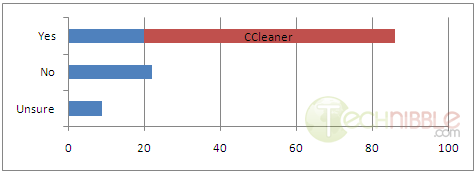
There were 86 Yes’s with 66 of those recommending CCleaner. 22 No’s and 9 Unsure’s.
The majority of the people who answered Yes said that they make use of a registry cleaner in most system cleanup jobs and they mostly use CCleaner. Glary Utilities also got a few mentions.
Those who said No consider registry cleaners as modern day snake oil or find its just better to work on the specific issue rather than a scattergun approach.
Those who were unsure typically hasn’t really been proven either way or they are unsure of any speed improvements after using one.
Lets look a little deeper into each answer:
Yes, I use registry cleaners
The registry is a large and complex database of information and there is no doubt that after a while there will be many entries left behind by applications that have since been removed. Less entries means a smaller registry and therefor makes it load faster right?
I spent some time looking for a study from a reliable source on the performance improvements of registry cleaners, but I couldnt find any. I could definitely find many sites talking about the benefits of a registry cleaner, but those sites are either directly selling a registry cleaning product or its a third party site that is making a commission for every registry cleaner product they sell.
One of the few trusted sources I could find was from Mark Russinovich’s blog. Mark is a widely recognized expert in the Windows operating system internals as well as operating system architecture and design. You might have heard Mark Russinovich before as he is the creator of Process Explorer and Autoruns.
On Marks blog, he said:
A few hundred kilobytes of unused keys and values causes no noticeable performance impact on system operation, but I figured it was natural for a Registry cleaner to be an essential part of running a tight ship for the anal retentive systems administrator.
So reducing the size of the registry by removing unneeded entries probably wont speed up the system, as Mark said, removing these entries would only reduce the size of the registry by a few hundred kilobytes.
But what about the contents of the registry keys? not so much the amount of space they take but the fact they are referencing a missing file? I expect there would be some speed improvements there, but I really couldn’t find any data from reliable sources proving this.
Wikipedia had something to say about it. While you cannot ever fully trust Wikipedia due to the fact that it is volunteer based, it is usually pretty good.
From Wikipedia:
Metrics of performance benefit
On Windows 9x computers, it was possible that a very large registry could slow down the computer’s startup time. However this is far less of an issue with NT-based operating systems (including Windows XP and Vista) due to a different on-disk structure of the registry, improved memory management and indexing. Slowdown due to registry bloat is thus far less of an issue in modern versions of Windows. Defragmenting the registry files (e.g. using a Microsoft-supported tool such as PageDefrag), has likewise been de-emphasized due to this increased efficiency, and is largely an automated process under Vista.
Are Computer Technicians following old information? Are we doing something we have always done but never actually tested it on a modern system? The comments left in the previous article were overwhelmingly in favor of registry cleaners, so there is definitely something there.
No, I dont use registry cleaners
Much of the hate towards registry cleaners seems to have been caused by the many questionable products out there with advertisements saying that “You have 1000 critical errors with your registry. Press OK to fix it now”.
This is known as “Scareware” and even if you believe in good products like CCleaner, you can understand why people believe that registry scanners are modern day snake oil with this kind of advertising going on.
Some of the nay sayers also mentioned that most technicians dont fully understand the Windows registry and unless you know what you are doing, you cannot trust an automated program to do it for you. This is good advice. If you use a registry cleaner such as CCleaner or Glary Utilities, take a look through the list of what it is going to do and untick things you arent sure about. Dont use it indiscriminately and before you do any work with the registry, always back it up beforehand with something like ERUNT.
I am not sure
Some of the “I am not sure” responses said they do use registry cleaners but cannot see any obvious speed improvements, but it doesn’t hurt to do it anyway.
Other “I am not sure” responses said they weren’t sure because there aren’t any studies to back it up so they cannot make an informed decision.
In conclusion, the majority of the commenter’s do use them and when they do its usually CCleaner. I am personally in the “Not sure” camp since I haven’t seen any research to prove it one way or the other. The only time I dive into the registry to do something specific like a registry tweak or removing remnants of Malware, but thats about it. Anyway, a big thank you to all who commented!
© Technibble – A Resource for Computer Technicians to start or improve their computer business
To get started with your own computer business, check out our Computer Business Kit. RESULTS: What Do You Think Of Registry Cleaners?
Authors: Mitalis
Save the date!
May 9, 2011
Location:
EPCC Admin Services Center
9050 Viscount Blvd., Bldg. A
El Paso, TX 79925
Attention: ALL INTERESTED SMALL BUSINESS CONTRACTORS
Authors: Bryce Whitty
If you have listened to some of the podcasts I have been featured in, you might have heard that I love travelling.
It is because of this I am taking my business in a slightly different direction. For now, I am turning my business into a remote support business.
Over the last few years there has been a handful of clients who make up the majority of my income (80\20 rule). Fortunately, just about all the work I do for them can be done via remote support and if any physical work needs to be done, I have arranged another Technician to do the onsite work. I have mentioned moving to remote support and these clients have no problems with it. In fact, in many cases my turn around time will be even quicker.
After looking at my records and viewing the income that these few businesses generate, I can live comfortably just supporting these few. Obviously, there will be a reduction in my income but I gain something else – freedom. Freedom to work just about anywhere in the world.
I have taken advantage of this and have moved to London in the UK where I am allowed to stay for up to two years. Ive always wanted to work in another country but didn’t really care where, while my fiancée has always wanted to work in the UK. She came to me one day about 4 or 5 months ago and said she wanted to move to the UK. I thought about how this would affect my business. I thought about the work I do for my main client and wondered whether most of it could be done remotely, it could. I thought what would happen if I need to go onsite? I can get a trusted person to go onsite and do the work for a percentage.
What about all my other clients? Especially my residential mom-and-pop clients whom I probably wont be able to support remotely?
I have passed them onto a Technibble forum member who has the same service area as me for a percentage. They are an excellent group of clients because I have already filtered out all the crap so I am very sure the other business will be very happy with them.
Learning Remote Support
Before jumping into remote support only, Ive had to spend some time learning the ins-and-outs so its less of a jump into the deep-end and more of a slow slide into the shallow end. Remote support comes with the benefit of freedom of location, but it also comes with a different set of problems.
What do you do when the computer needs to be restarted in Safe Mode? How do you get clients to pay you? Etc..
Luckily, I have had a pre-release of Lisa’s new ebook called “CallThatGirls Guide To Remote Support” for a few weeks now. For those of you who don’t know, Lisa is a well known member on the Technibble forums who is the owner of a successful computer repair business called “Call That Girl”. She specializes in remote support but also has some physical stores.
Lisa has written down what she has learned after years of supporting clients remotely and here are some of the topics that she covers in the guide.

The guide has 34 pages, but it gets straight to the point. Have you ever read a long book only to come away with a few gold nuggets of information? This guide cuts out the fluff.
It sells for $100 USD which is not cheap for an ebook, but super cheap for an operations manual. When someone spends tens of thousands of dollars on a franchise, one of the most important things that they are buying (other than the brand name) is the businesses operations manual. Its well worth it if you are looking to get into remote support and while I could have learned many of these lessons the hard way, it has been a massive shortcut for me.
Click Here for more information about Call That Girls Guide To Remote Support
© Technibble – A Resource for Computer Technicians to start or improve their Computer Business
To get started with your own computer business, check out our Computer Business Kit. My Move To Remote Support
Authors: Bryce Whitty
If you have listened to some of the podcasts I have been featured in, you might have heard that I love travelling.
It is because of this I am taking my business in a slightly different direction. For now, I am turning my business into a remote support business.
Over the last few years there has been a handful of clients who make up the majority of my income (80\20 rule). Fortunately, just about all the work I do for them can be done via remote support and if any physical work needs to be done, I have arranged another Technician to do the onsite work. I have mentioned moving to remote support and these clients have no problems with it. In fact, in many cases my turn around time will be even quicker.
After looking at my records and viewing the income that these few businesses generate, I can live comfortably just supporting these few. Obviously, there will be a reduction in my income but I gain something else – freedom. Freedom to work just about anywhere in the world.
I have taken advantage of this and have moved to London in the UK where I am allowed to stay for up to two years. Ive always wanted to work in another country but didn’t really care where, while my fiancée has always wanted to work in the UK. She came to me one day about 4 or 5 months ago and said she wanted to move to the UK. I thought about how this would affect my business. I thought about the work I do for my main client and wondered whether most of it could be done remotely, it could. I thought what would happen if I need to go onsite? I can get a trusted person to go onsite and do the work for a percentage.
What about all my other clients? Especially my residential mom-and-pop clients whom I probably wont be able to support remotely?
I have passed them onto a Technibble forum member who has the same service area as me for a percentage. They are an excellent group of clients because I have already filtered out all the crap so I am very sure the other business will be very happy with them.
Learning Remote Support
Before jumping into remote support only, Ive had to spend some time learning the ins-and-outs so its less of a jump into the deep-end and more of a slow slide into the shallow end. Remote support comes with the benefit of freedom of location, but it also comes with a different set of problems.
What do you do when the computer needs to be restarted in Safe Mode? How do you get clients to pay you? Etc..
Luckily, I have had a pre-release of Lisa’s new ebook called “CallThatGirls Guide To Remote Support” for a few weeks now. For those of you who don’t know, Lisa is a well known member on the Technibble forums who is the owner of a successful computer repair business called “Call That Girl”. She specializes in remote support but also has some physical stores.
Lisa has written down what she has learned after years of supporting clients remotely and here are some of the topics that she covers in the guide.

The guide has 34 pages, but it gets straight to the point. Have you ever read a long book only to come away with a few gold nuggets of information? This guide cuts out the fluff.
It sells for $100 USD which is not cheap for an ebook, but super cheap for an operations manual. When someone spends tens of thousands of dollars on a franchise, one of the most important things that they are buying (other than the brand name) is the businesses operations manual. Its well worth it if you are looking to get into remote support and while I could have learned many of these lessons the hard way, it has been a massive shortcut for me.
Click Here for more information about Call That Girls Guide To Remote Support
© Technibble – A Resource for Computer Technicians to start or improve their computer business
To get started with your own computer business, check out our Computer Business Kit. My Move To Remote Support
Authors: Bryce Whitty

Guest Post by Bryan Vest: Bryan Vest is a web developer/SEO specialist who enjoys writing articles to help make techs websites succeed.
As you all know sometimes finding the right keywords to target can be one of the hardest parts of SEO. With proper keyword research you can find keywords with low competition to bring you high quality local traffic. In this article, I would like to show you some methods to properly research keywords to target for your SEO campaign. This is by no chance the only ways, but these are very easy and great methods to look for keywords to target.
Now we all would like to jump right out there and target the short tail keywords like "Computer Repair"(673,000 unique searches) and "Virus Removal" (550,000 unique searches), but the competition on those keywords are very high and let’s face it without a very high SEO budget a small town Computer Repair shop doesn’t stand a chance. Another thing you have to think about is how much of this traffic is areas you actually can support. So the perfect keywords to target would be something that is low competition and focused on your supported area.
Now that we have the basics covered let’s begin with the process itself.I will be using local major cities in my area for the example. We will start with the just about universal tool for researching keywords, Google Adwords Keyword Tool. What would be better to use in getting to know the exact amount of hits your computer repair site can receive than a tool made by Google itself? Now follow the link https://adwords.google.com/select/KeywordToolExternal. This form should be very simple and easy to follow for just about everyone. You type the keywords you want to research in the "Word or phrase" box one line at a time. You may put your website in the website box, but for the sake of research you won’t want to since this will just pull keywords from your site. A good way to start your research is by typing in local cities you support followed by computer repair. In my case those major cities would be Temecula and Murrieta. Now just fill out the captcha and press search.
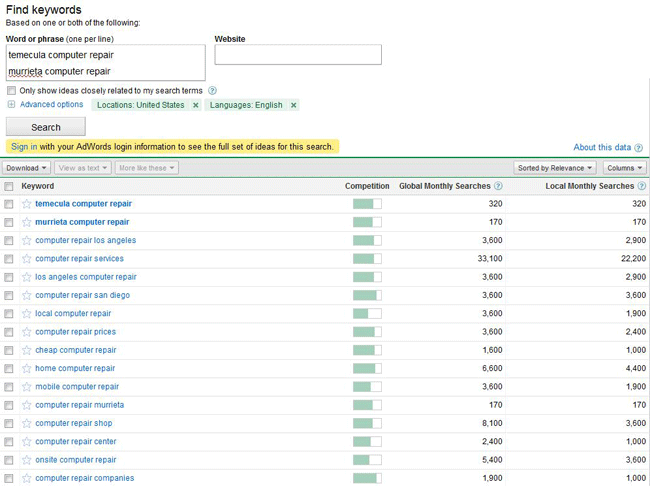
You will immediately see a list of keywords populate the bottom of the screen as seen above. As you can see in my case the searches "Temecula computer repair" brings in about 320 searches a month while “Murrieta computer repair” brings in about 170 unique searches. These would be good keywords to target since just imagine the work you could get if you had the combined 490 clicks to your site a month.

Now you have found 2 keywords you would like to target your next step is to find the competitiveness of the keywords. You may notice the competition bar as shown above.Just completely ignore this! You will find very noncompetitive keywords showing competition of way above 75% while highly competitive keywords ranking in the 30%. Now what we are going to do to find the competitiveness of the keyword is actually look at the competition! Click on the keywords to bring up the searches in a new tab.
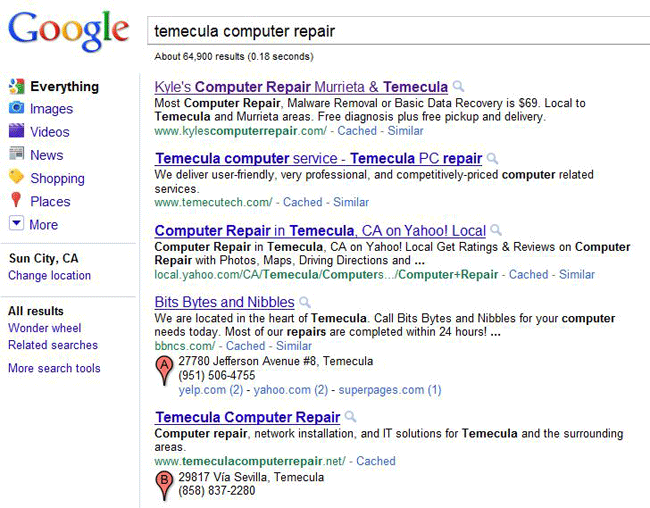
Here you can see who is ranking for the keyword in question. Right off the bat you can tell this keyword is not very competitive as the Yahoo Local page is ranking 3rd! To properly assess the competition I always look at where I want to be. You always want to be number 1 so we will look at "Kyle’s Computer Repair". I will not be posting a picture of the design since this is a live site and it’s really has nothing to do with keyword research. Moving on, right click anywhere on the background of a page and select "view source". This will bring up his source coding of the website. Now if you don’t understand HTML don’t worry we will include some basics.

The first thing we will look at is the title tag. This is the main writing that appears when you search on Google. Now unless you are an industry leader the best thing you can do is put the keyword right in the beginning of the title tag. Is his case he put his company name first. Though this doesn’t hurt him it will not carry the same weight as say "Keyword – Business Name". In his case though the way he went the right way as his name includes computer repair.

The next thing you will want to look for is IMG tags. This is the biggest giveaway of them all since most designers forget about them and it is a clear sign if he is focusing on SEO. As you can say in this sites case the ALT attribute is left blank. This is major since Google’s spiders can’t read images as humans do, but can read the ALT attribute. Looking just at these 2 things you can determine that he is not really focused on SEO as much as he should be.
Now everyone knows the biggest part of SEO is backlinks! Backlinks are essentially other sites telling Google "Hey! This site is important!" We are now going to check the competitions backlinks to how hard this keyword will really be. Now there are many tools out there to check the backlinks of a site, but the simplest one for the sake of this guide will be http://www.backlinkwatch.com. Now once you open this site you just type the URL of the site you want to research in the box and click "Check Backlinks".
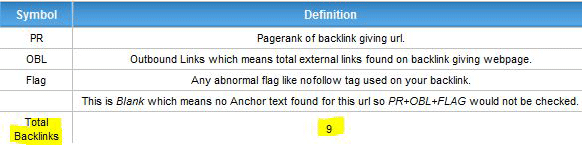
Now it might take a few seconds, but on the left side of the screen you will see a box up the left. This holds the important information you are looking for which is the total backlinks. As you can see with this site there are only a total of 9.
Now with knowing that the owner is not focused on the On-Site SEO and the Off-Site SEO, but is still ranked first for the keyword in question you know this keyword will be fairly easy to target. Now just repeat these steps with each keyword you would like to target and you will be gaining lots of high quality tech related traffic to your site in no time.
Here are some keyword combinations that will work quite often in major cities.
"[city] computer repair"
"[city] computer services"
"[city] virus removals"
"[city] data recovery"
© Technibble – A Resource for Computer Technicians to start or improve their computer business
To get started with your own computer business, check out our Computer Business Kit. Finding The Right Keywords For Your Computer Businesses Website