Looking For Technical Writers, Computer Business Writers and People Looking To Get Their Work Out There

Authors: Bryce Whitty

Do you know your stuff when it comes to computers? Do you write about computers and are computers your passion? If you are looking for an opportunity to get some solid experience or possibly join Technibble for the long haul, you might be in luck. I am currently looking for writers to write technician how-to guides on advanced computer topics. For example, I wouldn’t be looking for end-user level articles such as how to install and run an antivirus program. Rather, I would be looking for an article on how to image a hard drive, how to move a MBR virus and other Technician level articles.

We also have a position open for a Business writer. I am seeking people who know the Computer Repair business and have their own tips to share. It can be telling what kind of advertising worked for you, your successes, your failures, lessons learned the hard way and the way to dealt with a certain problem.
Technibble is a growing site and as I said, if you want exposure, Technibble has hundreds of thousands of people reading the site every month.
If this is something that interests you, contact Bryce at: hiring1 [at] technibble.com

When you contact us, please let us know any experience you may have, what your expectations are (if any), and what topics you wish to cover. It would be helpful if you could let us know how much/often you are able to contribute and if you have any writing samples.
All enquiries will at least get a response and be considered, but not all will be accepted to join us.
I look forward to hearing from you!

© Technibble – A Resource for Computer Technicians to start or improve their Computer Business
To get started with your own computer business, check out our Computer Business Kit. Looking For Technical Writers, Computer Business Writers and People Looking To Get Their Work Out There

image

Read more:

How To Get More Calls From Your Computer Businesses Website

Authors: Bryce Whitty

In this day and age just about every Computer Business should have a website. Of course, most Computer Technicians already know this and set out to make their own website. Some of you may make use of a free website builder, some might start with a template and some of you may know how to make them from scratch. While many Computer Technicians have the technical skills to create their own website, most Computer Technicians don’t have the internet marketing skills to maximize turning website visitors into paying customers.

As we all know, getting traffic to your site is important and topics like SEO or choosing the right keywords deserve an entire article on their own. You might even be paying for Google Adwords or have an ad in a business directory to get traffic to your website but it is all wasted if you cannot convert the website viewers into paying customers.
When a visitor arrives on your website, a handful of events occur:

Is this what I want?
Once you have driven someone to your website, you need to make it obvious what you are about very quickly. What do you do? Where you are located? In the internet marketing world, they say that you only have 7 seconds to grab someone’s attention before they leave the site.
The solution to this is to have a headline saying what your business is about and/or a very short paragraph right up the top of the page. The headline can be as simple as saying "Los Angeles Computer Repair" since this answers the question of what you do and where you do it, which are the first two questions for any client searching for a Computer Technician will want to know. Now that you have their attention they will read the rest of the copy on the website.
The small paragraph can say something like "We are a Professional, Certified and Insured Computer Repair company operating in the Los Angeles area. We serve small and medium sized businesses as well as home offices". Again, this answers as many questions as quickly as possible to maintain their attention.

Now we have their attention..
We need to convey more information to let them know that we are what they are looking for, all while still maintaining their attention. We need to remember that at this point, most people that are searching for something wont read website copy, they will scan it.
In order to do this, we need to avoid big blocks of text and use bullet points instead. The best way to take advantage of the bullet points is to list your services in them. For example:

  • Laptop Repair
  • Virus and Spyware Removal
  • Desktop Repair
  • Data Recovery and Backup etc.

The client usually knows what they want. If they believe that they have a virus then they are going to be scanning for the page for the words "virus removal".
Once you tick that box in their mind, they are much more likely to continue reading your website.

Continue Answering Questions
So we have answered what we are, where we are and that we can remove their virus, the next questions they are probably going to ask is how much it costs. There is a lot of discussion on the Technibble forums on whether you should post your prices on your website or not but if you are targeting the home or small business market, I suggest you do.

Close The Deal
Now that we have answered their questions, lets close the deal by establishing some credibility. You can mention some certifications using their full names (Microsoft Certified Professional rather than MCP) and maybe some unobtrusive logos on the side of the page or some testimonials.

Call To Action
The client is now sold on us and we need to make the conversion. We need to ask for the sale. If we want the client to call us, we can write "Call 555-555-5555". If we want them to fill out a form stating their problem we would write "Tell us about your problem" or something similar. This needs to be obvious as the next step. We do not want to sidetrack them once we get to this point.
This is actually why I have always recommended Podnutz’s Tech Site Builder, it does all of this right of the box.

Where you can lose your visitor

  • Having too manage pages – Unless you have your visitors undivided attention (which we cannot assume), they are not very likely to go through all your pages. It is not uncommon to see Computer Technician website with Services on one page, Prices on a second page and Contact Information on a third.
    You might have seen a really long sales page on the internet at some point; this is because internet marketers know that visitors won’t go through your pages.
  • Distracting them from your main goal – Don’t distract your visitor from the main goal which is your phone number or your email form. We need to keep them on our page until they reach our contact details.
    I have seen Computer Technicians place Google Adsense ads on their site to generate money from their website. This is one of the worst things you can do because when a client comes to your site through your expensive advertising, they see your competitor’s ad on your Google Adsense block, clicks it and you make 30c for the click while your competitor gets the $100 repair job. Try not to have any links on your sales page that takes the visitor away from your site such as linking to the home page of your certification. If you must, open the link in a new window by adding target="blank" to the link.

Analyze how visitors use your site and make changes
You can also use a service like Clicktale which allows you to analyze your visitors in great detail including which links they clicked, how long they spent reading a certain area and even watching their mouse movements on your page. You may find that they become confused by your page, click on something that isn’t clickable, get stuck somewhere and leave. Once you know where any problems lie, you can fix them and may find that one technical issue was preventing you from getting many calls per day.
Clicktale has a free option that records 400 page views a month and then stops recording if you go over.

Conclusion
So, to rehash, a good landing page does the following really quickly:

  • What we are about
  • Where we are located
  • How much we cost
  • Establish some credibility (testimonials, certifications etc.)
  • How to get in contact with us.

© Technibble – A Resource for Computer Technicians to start or improve their Computer Business
To get started with your own computer business, check out our Computer Business Kit. How To Get More Calls From Your Computer Businesses Website


image

Read more:

How To Get More Calls From Your Computer Businesses Website

Authors: Bryce Whitty

In this day and age just about every Computer Business should have a website. Of course, most Computer Technicians already know this and set out to make their own website. Some of you may make use of a free website builder, some might start with a template and some of you may know how to make them from scratch. While many Computer Technicians have the technical skills to create their own website, most Computer Technicians don’t have the internet marketing skills to maximize turning website visitors into paying customers.

As we all know, getting traffic to your site is important and topics like SEO or choosing the right keywords deserve an entire article on their own. You might even be paying for Google Adwords or have an ad in a business directory to get traffic to your website but it is all wasted if you cannot convert the website viewers into paying customers.
When a visitor arrives on your website, a handful of events occur:

Is this what I want?
Once you have driven someone to your website, you need to make it obvious what you are about very quickly. What do you do? Where you are located? In the internet marketing world, they say that you only have 7 seconds to grab someone’s attention before they leave the site.
The solution to this is to have a headline saying what your business is about and/or a very short paragraph right up the top of the page. The headline can be as simple as saying "Los Angeles Computer Repair" since this answers the question of what you do and where you do it, which are the first two questions for any client searching for a Computer Technician will want to know. Now that you have their attention they will read the rest of the copy on the website.
The small paragraph can say something like "We are a Professional, Certified and Insured Computer Repair company operating in the Los Angeles area. We serve small and medium sized businesses as well as home offices". Again, this answers as many questions as quickly as possible to maintain their attention.

Now we have their attention..
We need to convey more information to let them know that we are what they are looking for, all while still maintaining their attention. We need to remember that at this point, most people that are searching for something wont read website copy, they will scan it.
In order to do this, we need to avoid big blocks of text and use bullet points instead. The best way to take advantage of the bullet points is to list your services in them. For example:

  • Laptop Repair
  • Virus and Spyware Removal
  • Desktop Repair
  • Data Recovery and Backup etc.

The client usually knows what they want. If they believe that they have a virus then they are going to be scanning for the page for the words "virus removal".
Once you tick that box in their mind, they are much more likely to continue reading your website.

Continue Answering Questions
So we have answered what we are, where we are and that we can remove their virus, the next questions they are probably going to ask is how much it costs. There is a lot of discussion on the Technibble forums on whether you should post your prices on your website or not but if you are targeting the home or small business market, I suggest you do.

Close The Deal
Now that we have answered their questions, lets close the deal by establishing some credibility. You can mention some certifications using their full names (Microsoft Certified Professional rather than MCP) and maybe some unobtrusive logos on the side of the page or some testimonials.

Call To Action
The client is now sold on us and we need to make the conversion. We need to ask for the sale. If we want the client to call us, we can write "Call 555-555-5555". If we want them to fill out a form stating their problem we would write "Tell us about your problem" or something similar. This needs to be obvious as the next step. We do not want to sidetrack them once we get to this point.
This is actually why I have always recommended Podnutz’s Tech Site Builder, it does all of this right of the box.

Where you can lose your visitor

  • Having too manage pages – Unless you have your visitors undivided attention (which we cannot assume), they are not very likely to go through all your pages. It is not uncommon to see Computer Technician website with Services on one page, Prices on a second page and Contact Information on a third.
    You might have seen a really long sales page on the internet at some point; this is because internet marketers know that visitors won’t go through your pages.
  • Distracting them from your main goal – Don’t distract your visitor from the main goal which is your phone number or your email form. We need to keep them on our page until they reach our contact details.
    I have seen Computer Technicians place Google Adsense ads on their site to generate money from their website. This is one of the worst things you can do because when a client comes to your site through your expensive advertising, they see your competitor’s ad on your Google Adsense block, clicks it and you make 30c for the click while your competitor gets the $100 repair job. Try not to have any links on your sales page that takes the visitor away from your site such as linking to the home page of your certification. If you must, open the link in a new window by adding target="blank" to the link.

Analyze how visitors use your site and make changes
You can also use a service like Clicktale which allows you to analyze your visitors in great detail including which links they clicked, how long they spent reading a certain area and even watching their mouse movements on your page. You may find that they become confused by your page, click on something that isn’t clickable, get stuck somewhere and leave. Once you know where any problems lie, you can fix them and may find that one technical issue was preventing you from getting many calls per day.
Clicktale has a free option that records 400 page views a month and then stops recording if you go over.

Conclusion
So, to rehash, a good landing page does the following really quickly:

  • What we are about
  • Where we are located
  • How much we cost
  • Establish some credibility (testimonials, certifications etc.)
  • How to get in contact with us.

© Technibble – A Resource for Computer Technicians to start or improve their Computer Business
To get started with your own computer business, check out our Computer Business Kit. How To Get More Calls From Your Computer Businesses Website

image

Read more:

WebBrowserPassView – Recover Passwords from Web Browsers

Authors: Bryce Whitty

WebBrowserPassView is a small, portable and freeware utility designed to recover passwords from:

  • Internet Explorer (Version 4.0 – 9.0)
  • Mozilla Firefox (All Versions)
  • Google Chrome
  • Opera

Once WebBrowserPassView has gathered all the passwords from the various browsers, it displays them in a single table with the URL the password was saved for, what browser it was saved in and of course the username and password.

From there, you can save it as a TXT file, export the table as HTML and more. This product was created by Nirsoft and in true Nirsoft fashion, the application is very easy to incorporate into scripts due to its excellent command line support.

This utility works on any version of Windows, starting from Windows 2000, and up to Windows 7, including 64-bit systems.

Note: Due to the hacking/password revealing nature of this application. Some antivirus products will detect it as malware or a hacking tool. You can view the VirusTotal.com report here.

Screenshots:

Downloads:
Download from Official Site – 204kb

More Information

© Technibble – A Resource for Computer Technicians to start or improve their Computer Business
To get started with your own computer business, check out our Computer Business Kit. WebBrowserPassView – Recover Passwords from Web Browsers

image

Read more:

National IT Warranty Companies – The Good and the Bad

Authors: Bryce Whitty

National IT & Warranty companies allow businesses access to a huge range of IT Professionals from all over the country. This means more work for us Computer Technicians, but some National IT & Warranty companies also have a dark side. In this article I would like to talk about dealing with "Nationals" and what to watch out for.

There are generally two types of Nationals. National IT Services allow businesses such as your own to hire Computer Technicians in other states, expanding their reach. The other type are National Warranty providers where a company can send you out to fulfill their warranty obligations. A typical client of a National Warranty provider would be a very large business that has warranty obligations to fulfill such as Staples. Staples primary focuses on office supplies but they also sell computers and peripherals. They don’t want to maintain a network of their own technicians across the country so they outsource this work to a National.
Nationals acting as the middle men will then refer work to a technician who is geographically close to the location of the work and take a cut of the profit.
The obvious benefit of this to Computer Technicians is that we have work sent our way. It really sounds like it is win-win for all parties and I know some technicians who have had success with them. However, it doesn’t always work out that way. The good ones are good and the bad ones can be really bad. Here are some of the reasons that make the bad ones bad:

Lowballin’
A large problem with the National companies is that many of them allow the client to set the rate of the work that needs to be done. The rate is often so low than no legitimate Computer Business would waste their time accepting it. You would believe that the market would sort itself out when no one accepts the lowball jobs and forces the client to pay a higher price. However, this is often not the case as inexperienced and possibly unqualified technicians accept the work.
The client gets work done cheaply and continues to post lowball jobs driving technicians with real overheads out of the Nationals marketplace.

My Monitor Has A Virus
When a client needs some work done, the job gets put the onto the Nationals marketplace for techs to snap up or the National might even directly call a technician who is in the area. The client wants the work done at a price they specify and its up to the technician to either accept or reject the work.
The real danger here is the diagnosis of the initial problem. Have you ever had a client say that their computer has a virus only for you to go onsite and find out that it was a blown power supply? In most cases, the client’s initial diagnosis was wrong.
When you are working for yourself and are being paid on an hourly basis, this is not a problem. You simply tell the client that the problem seems to be X and is not a virus. You let them know the costs of fixing X, get the go-ahead and fix the problem.
When you work for a National you have agreed to do a certain job at a certain rate, even though that is obviously not the issue. In some cases you can get approval to fix whatever needs to be done, but with some Nationals you are just the grunt who needs to do what they say.
In some cases, the person with the failing hardware had to call a support line who diagnosed the issue over the phone and then sent you out with the appropriate parts. The diagnosis might be a little more accurate but it is still possible that they are wrong. The whole back and forth, getting approval and getting parts can get ugly.

Getting Paid
I have heard horror stories where technicians have gone onsite to do a very specific task with parts in hand, find out that the diagnosis was incorrect and are unable to fix the problem. Since the problem wasn’t fixed, the client isn’t going to pay the National and in turn the National isn’t going to pay you, even though you did exactly as they asked.
I have also heard of other payment horror stories where they take months to pay you and make you jump through all sorts of hoops. This is possibly a cash flow issue on their end.

So Should I Avoid National Service Providers?
I don’t believe you should avoid National Service Providers entirely. I know of many technicians who have used them to fill slow times in the day. Apparently, If you have a very specific qualification you might be able to avoid the majority of the issues I have pointed out in this article. If you are the only person in a certain area that is qualified to do a certain job, then you can call the shots and set the price you want.
The trick with working for Nationals is to build your business with your own clients and use the Nationals during slower times. If you don’t rely on them, you have the power to say “Pay my rate and I am happy to do the work. If not, see ya later”.

If you are doing some work with them for the first time, do not accept a large job to begin with and do not accept any more work until they have paid you for your first callout. Many technicians have had problems getting paid by certain Nationals.

If you need some work and want to do a job for a National, always research them first by searching for terms such as:
[name] scam
[name] complaints

Also search for the name of the National (or even just the word “nationals” using the search box in the top right corner of the Technibble site.

I would have listed the names of some of the better known Nationals here in this article but some of the mainstream ones have so many complaints against them that I wouldn’t dare mention them. So, I am going to send this question out to the Technibble community.

Which National’s have you worked for? Which ones were the best and which ones were the worst? Please leave us a comment in the form below.

As always, you do not need to sign up to leave a comment and you can even do so anonymously. Email/RSS readers will need to visit the site in order to leave comment.

© Technibble – A Resource for Computer Technicians to start or improve their Computer Business
To get started with your own computer business, check out our Computer Business Kit. National IT & Warranty Companies – The Good and the Bad

image

Read more:

National IT Warranty Companies – The Good and the Bad

Authors: Bryce Whitty

National IT & Warranty companies allow businesses access to a huge range of IT Professionals from all over the country. This means more work for us Computer Technicians, but some National IT & Warranty companies also have a dark side. In this article I would like to talk about dealing with "Nationals" and what to watch out for.

There are generally two types of Nationals. National IT Services allow businesses such as your own to hire Computer Technicians in other states, expanding their reach. The other type are National Warranty providers where a company can send you out to fulfill their warranty obligations. A typical client of a National Warranty provider would be a very large business that has warranty obligations to fulfill such as Staples. Staples primary focuses on office supplies but they also sell computers and peripherals. They don’t want to maintain a network of their own technicians across the country so they outsource this work to a National.
Nationals acting as the middle men will then refer work to a technician who is geographically close to the location of the work and take a cut of the profit.
The obvious benefit of this to Computer Technicians is that we have work sent our way. It really sounds like it is win-win for all parties and I know some technicians who have had success with them. However, it doesn’t always work out that way. The good ones are good and the bad ones can be really bad. Here are some of the reasons that make the bad ones bad:

Lowballin’
A large problem with the National companies is that many of them allow the client to set the rate of the work that needs to be done. The rate is often so low than no legitimate Computer Business would waste their time accepting it. You would believe that the market would sort itself out when no one accepts the lowball jobs and forces the client to pay a higher price. However, this is often not the case as inexperienced and possibly unqualified technicians accept the work.
The client gets work done cheaply and continues to post lowball jobs driving technicians with real overheads out of the Nationals marketplace.

My Monitor Has A Virus
When a client needs some work done, the job gets put the onto the Nationals marketplace for techs to snap up or the National might even directly call a technician who is in the area. The client wants the work done at a price they specify and its up to the technician to either accept or reject the work.
The real danger here is the diagnosis of the initial problem. Have you ever had a client say that their computer has a virus only for you to go onsite and find out that it was a blown power supply? In most cases, the client’s initial diagnosis was wrong.
When you are working for yourself and are being paid on an hourly basis, this is not a problem. You simply tell the client that the problem seems to be X and is not a virus. You let them know the costs of fixing X, get the go-ahead and fix the problem.
When you work for a National you have agreed to do a certain job at a certain rate, even though that is obviously not the issue. In some cases you can get approval to fix whatever needs to be done, but with some Nationals you are just the grunt who needs to do what they say.
In some cases, the person with the failing hardware had to call a support line who diagnosed the issue over the phone and then sent you out with the appropriate parts. The diagnosis might be a little more accurate but it is still possible that they are wrong. The whole back and forth, getting approval and getting parts can get ugly.

Getting Paid
I have heard horror stories where technicians have gone onsite to do a very specific task with parts in hand, find out that the diagnosis was incorrect and are unable to fix the problem. Since the problem wasn’t fixed, the client isn’t going to pay the National and in turn the National isn’t going to pay you, even though you did exactly as they asked.
I have also heard of other payment horror stories where they take months to pay you and make you jump through all sorts of hoops. This is possibly a cash flow issue on their end.

So Should I Avoid National Service Providers?
I don’t believe you should avoid National Service Providers entirely. I know of many technicians who have used them to fill slow times in the day. Apparently, If you have a very specific qualification you might be able to avoid the majority of the issues I have pointed out in this article. If you are the only person in a certain area that is qualified to do a certain job, then you can call the shots and set the price you want.
The trick with working for Nationals is to build your business with your own clients and use the Nationals during slower times. If you don’t rely on them, you have the power to say “Pay my rate and I am happy to do the work. If not, see ya later”.

If you are doing some work with them for the first time, do not accept a large job to begin with and do not accept any more work until they have paid you for your first callout. Many technicians have had problems getting paid by certain Nationals.

If you need some work and want to do a job for a National, always research them first by searching for terms such as:
[name] scam
[name] complaints

Also search for the name of the National (or even just the word “nationals” using the search box in the top right corner of the Technibble site.

I would have listed the names of some of the better known Nationals here in this article but some of the mainstream ones have so many complaints against them that I wouldn’t dare mention them. So, I am going to send this question out to the Technibble community.

Which National’s have you worked for? Which ones were the best and which ones were the worst? Please leave us a comment in the form below.

As always, you do not need to sign up to leave a comment and you can even do so anonymously. Email/RSS readers will need to visit the site in order to leave comment.

© Technibble – A Resource for Computer Technicians to start or improve their computer business
To get started with your own computer business, check out our Computer Business Kit. National IT & Warranty Companies – The Good and the Bad

image

Read more:

RESULTS: What Do You Think Of Registry Cleaners?

Authors: Bryce Whitty

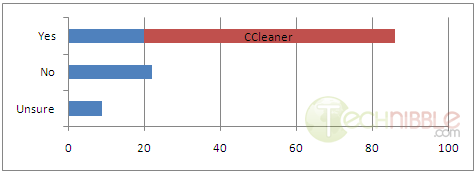
In my last post I asked the question “What do you think of Registry Cleaners?” and the community spoke. At the time of writing this there were 164 responses and after taking out the discussion comments (where they didnt say one way or the other), here are the results:

There were 86 Yes’s with 66 of those recommending CCleaner. 22 No’s and 9 Unsure’s.

The majority of the people who answered Yes said that they make use of a registry cleaner in most system cleanup jobs and they mostly use CCleaner. Glary Utilities also got a few mentions.

Those who said No consider registry cleaners as modern day snake oil or find its just better to work on the specific issue rather than a scattergun approach.
Those who were unsure typically hasn’t really been proven either way or they are unsure of any speed improvements after using one.

Lets look a little deeper into each answer:

Yes, I use registry cleaners
The registry is a large and complex database of information and there is no doubt that after a while there will be many entries left behind by applications that have since been removed. Less entries means a smaller registry and therefor makes it load faster right?

I spent some time looking for a study from a reliable source on the performance improvements of registry cleaners, but I couldnt find any. I could definitely find many sites talking about the benefits of a registry cleaner, but those sites are either directly selling a registry cleaning product or its a third party site that is making a commission for every registry cleaner product they sell.

One of the few trusted sources I could find was from Mark Russinovich’s blog. Mark is a widely recognized expert in the Windows operating system internals as well as operating system architecture and design. You might have heard Mark Russinovich before as he is the creator of Process Explorer and Autoruns.

On Marks blog, he said:

A few hundred kilobytes of unused keys and values causes no noticeable performance impact on system operation, but I figured it was natural for a Registry cleaner to be an essential part of running a tight ship for the anal retentive systems administrator.

So reducing the size of the registry by removing unneeded entries probably wont speed up the system, as Mark said, removing these entries would only reduce the size of the registry by a few hundred kilobytes.
But what about the contents of the registry keys? not so much the amount of space they take but the fact they are referencing a missing file? I expect there would be some speed improvements there, but I really couldn’t find any data from reliable sources proving this.

Wikipedia had something to say about it. While you cannot ever fully trust Wikipedia due to the fact that it is volunteer based, it is usually pretty good.

From Wikipedia:
Metrics of performance benefit
On Windows 9x computers, it was possible that a very large registry could slow down the computer’s startup time. However this is far less of an issue with NT-based operating systems (including Windows XP and Vista) due to a different on-disk structure of the registry, improved memory management and indexing. Slowdown due to registry bloat is thus far less of an issue in modern versions of Windows. Defragmenting the registry files (e.g. using a Microsoft-supported tool such as PageDefrag), has likewise been de-emphasized due to this increased efficiency, and is largely an automated process under Vista.

Are Computer Technicians following old information? Are we doing something we have always done but never actually tested it on a modern system? The comments left in the previous article were overwhelmingly in favor of registry cleaners, so there is definitely something there.

No, I dont use registry cleaners
Much of the hate towards registry cleaners seems to have been caused by the many questionable products out there with advertisements saying that “You have 1000 critical errors with your registry. Press OK to fix it now”.
This is known as “Scareware” and even if you believe in good products like CCleaner, you can understand why people believe that registry scanners are modern day snake oil with this kind of advertising going on.

Some of the nay sayers also mentioned that most technicians dont fully understand the Windows registry and unless you know what you are doing, you cannot trust an automated program to do it for you. This is good advice. If you use a registry cleaner such as CCleaner or Glary Utilities, take a look through the list of what it is going to do and untick things you arent sure about. Dont use it indiscriminately and before you do any work with the registry, always back it up beforehand with something like ERUNT.

I am not sure
Some of the “I am not sure” responses said they do use registry cleaners but cannot see any obvious speed improvements, but it doesn’t hurt to do it anyway.
Other “I am not sure” responses said they weren’t sure because there aren’t any studies to back it up so they cannot make an informed decision.

In conclusion, the majority of the commenter’s do use them and when they do its usually CCleaner. I am personally in the “Not sure” camp since I haven’t seen any research to prove it one way or the other. The only time I dive into the registry to do something specific like a registry tweak or removing remnants of Malware, but thats about it. Anyway, a big thank you to all who commented!

© Technibble – A Resource for Computer Technicians to start or improve their computer business
To get started with your own computer business, check out our Computer Business Kit. RESULTS: What Do You Think Of Registry Cleaners?

image

Read more:

Ask The Community: What Do You Think Of Registry Cleaners?

Authors: Bryce Whitty

If you read any tech blogs, chances are you have seen an ad for a Registry Cleaner at some point.
Registry Cleaners are an interesting issue because some Computer Technicians do a ‘registry clean’ as part of every system cleanup they do while others avoid them like the plague.

What do you think of registry cleaners?
Do you make use of one? If you do, which one? Do you see any noticeable improvements?
Do you believe the Windows registry never needs a ‘cleanup’ and you are more likely cause more problems than you will fix?

Tell us your opinion in the comment box below. If you are reading this via the newsletter, hit the Comments link to visit the site. You do not need to signup for anything to leave a comment and you can even comment anonymously.

Be sure to check back in a few days when I post the results.

© Technibble – A Resource for Computer Technicians to start or improve their computer business
To get started with your own computer business, check out our Computer Business Kit. Ask The Community: What Do You Think Of Registry Cleaners?

image

Read more: