Work Market expands into Canada, rolls out new platform features

(TheForceField.Net) September 9, 2012 — Work Market, the world’s first Labor Resource Platform™ or LRP, is expanding its operation into Canada beginning today. In a telephone conversation with The Force Field last week, Work Market Vice President of Client Services Eric Castro confided the company is now actively recruiting technicians in Canada and will officially enter the market today.

Entering the Canadian market is a milestone Work Marketfor the company and one that places Work Market in an interesting position as a primary competitor against OnForce, the largest and most well known of the IT service platforms. OnForce, which introduced its services to Canada in 2006, has since been operating there with limited competition. The entry of Work Market into the Canadian market could potentially change that as Work Market recruits both clients and resources to work their LRP, including those who may currently use OnForce exclusively. This is of particular significance to both platforms, as Work Market CEO Jeff Leventhal, who founded the company in 2010, also founded OnForce.

According to Jeff Leventhal, Work Market is a welcoming opportunity to expand and compete beyond the US market. “Opening up to Canada is huge for us”, Leventhal said. “It is the first big step on our global mission to bring Work Market everywhere.”

In addition to the Canada expansion, Work Market is rolling out new features significant to the platform itself.

The company now provides techs (or “resources”, as Work Market calls them) with the ability to block companies from sending inappropriate or undesirable work, a practice referred to in The Force Field Forums as “spamming”. Resources will now be able to block any company they do not want to do business with and focus only on the work they want to receive.

The lack of ability to block undesirable clients has long been a point of concern and frustration among resources on the platform. Some complained they were recruited without solicitation by companies that they did not want to work for and bombarded with requests to perform work at extremely low rates or outside their area of expertise, with no option to opt out of such networks. Work Market aims to change that by empowering resources to block clients from which they do not want to receive work.

Resource MetricsAnother new feature is the recently released Resource Metrics, a tool for clients to rate the efficiency and reliability of the resources. Resource Metrics measures the number of assignments performed, punctuality, assignment cancellations and abandonment rates, level of activity and overall performance of each resource during thirty and ninety day periods. This tool helps clients better select resources for their groups and assignments, thus rewarding the most reliable resources with the best ratings.

Conversely, the client rating system was improved as well. Resources now rate clients after the assignment is completed and they have received payment for services rendered. According to Work Market, This improvement was made to encompass the entire work relationship.

While adding these new features, Work Market removed an existing one to improve the overall platform experience. The social and networking groups were phased out by Work Market due to under utilization by legitimate clients and complaints from resources alleging abuse of the groups by spammers. The company pared down the groups to a single category consisting exclusively of groups that send assignments.

In addition to the other features recently introduced on the platform, perhaps the most interesting is a new payment option. Work Market now offers PayPal as an alternate way to receive earnings. The new payment option was fully operational as of Friday, September 9. Resources who prefer PayPal to conduct monetary transactions can simply log into their Work Market account, go to Manage Accounts, click on Add Financial Account and choose PayPal from the Method drop-down box to receive payments from Work Market clients through the popular online payment system.

About Work Market

Work Market is the world’s first modular, web-based Labor Resource Platform™ designed to enable any business to efficiently deliver and manage employee, consultant and contract labor and services. Businesses post assignments and can invite professionals with specific qualifications or post the assignment to the entire Work Market network.  Professionals can post their profiles, join groups, take tests and background screenings to align themselves for assignments that match their skill sets.

Work Market was founded by Jeffrey Leventhal, (who also founded the on-site services marketplace OnForce.com) and Jeffrey Wald. The company is backed by Spark Capital and Union Square Ventures.

Five Steps to Keeping Existing Clients in the Tech Industry

Authors: Micah Lahren

We’ve all lost clients from time to time, some of them very valuable. While it may not have been something we did, or something we didn’t do, it’s just one of those things that hurts business, and something we should keep to a minimum if at all possible. Clients switch from service to service sometimes because they hear of a discount, and often they find that service not up to par with the service you provide, and they call you back and resume business with you. Sometimes they never call back, and that’s where you can take the initiative. But the burning issue of the hour is: How can you make sure you are keeping existing clients, and not losing them due to some lack of effort on your part?

Be Willing and Attentive

Clients are often impressed by a willing attitude. If you sound like you’re not looking forward to working with them, the feeling may be mutual. If you show a willing attitude in your voice and countenance, they’ll be much more likely to look forward to doing business with you again, and might even refer you to their associates and friends. Be attentive to their descriptions of the issues they’re describing, and help them out when they find difficulty explaining exactly what is wrong. Often, people pretend they’re listening when they’re not, and falling into that trend isn’t a good practice. Basically, make the client feel they are important to you and your business, that they are your ‘number one’ client, and they’ll be much more likely to call you back for repeat work.

Be Punctual

If you say you’ll be there by 3:30, be there by 3:30. If you’re running late due to an absolutely unforseen emergency, notify them as soon as you can, so they can adjust their schedule accordingly. Punctuality is one of those pet peeves for many people, and causes them no end of frustration. Repeatedly being late for appointments is enough for some clients to pull the plug on your relationship. It’s just another way of showing respect to the client as well. You’ve got things to do, and so do they, and they don’t want to have to wait around while you get there. Punctual workers often get repeat work because they’re dependable, and that’s very important in the business sector. Keeping your appointments is a good step toward keeping existing clients satisfied with your service.

Be Honest

This pretty much goes without saying. This is probably one of the most important things in your relationship with your clients. Honesty is one of the most valuable assets in the workforce, and when it’s missing, the work will disappear as well. This applies to charges on invoices, clear descriptions of work performed, billed hours, honesty regarding parts purchased, replaced, and repaired. If they find something has been less than truthful between you and them, don’t expect them to call you again. On the other hand, if you’re consistently honest in your business dealings, you’ll be much more likely to get repeat work and referrals. I can’t emphasize this enough. Honesty is very important!

Be Respectful and Courteous

This is also a very important aspect of the client relationship. Don’t badmouth clients to other clients, word can get around quickly, and you’ll find yourself at odds with other clients. Then those clients will start to wonder what you’ve said about them to other clients, and before you know it, you’ve lost the respect and trust of a whole chain of referred clients. If you’re interested in keeping existing clients happy with you and your service, show them the same respect you would expect from them, and you can’t go wrong.

Also, some clients aren’t as tech savvy as many technicians, and they may not know all the terms we use to describe parts and computer issues, and that’s not their fault. Everybody has their area of expertise, and while a mechanic can’t tell you what’s wrong with his computer, he can tell you what’s wrong with your car and fix nearly any problem it could have. So be respectful and courteous, and don’t belittle a client or speak with a condescending attitude. It’s easy to pick up, and it’s not likely they’ll call you back unless they are absolutely desperate. If you show them decent respect, they’ll be very likely to refer you to others and call you back for more work.

Give Bonuses

This is more or less optional, but it’s a good idea. If you’ve kept track of how long clients have been with you, or how many calls you’ve made on them, implement a bonus based on how many calls or how many years they’ve been a client. Perhaps you could offer a free light computer clean-up, or optimization. You could also offer some sort of discount on their invoice. This is also the type of bonus that is likely to get passed around by word of mouth. If they find out you give discounts based on how long clients have been with you, and good discounts at that, they’ll tell all their friends and associates so they can get good deals too. This can result in a lot of extra referrals. I know in one situation we were nearly overrun by all the clients who took advantage of this bonus idea, so it’s good to use it in moderation.

In conclusion, it’s mostly just the basics of any relationship, but often these basics are forgotten in business relationships. You’ve heard the phrase ‘it’s not personal, it’s business’. Perhaps that personal touch in business has been neglected, and that’s what’s missing from a lot of business relationships. It’s important to be professional, but don’t lose that personal touch that makes the client feel important. Just remember the fundamental basics, and you’ll be much more likely to keep all your existing clients, and gain referrals at a steady rate.

© Technibble – A Resource for Computer Technicians to start or improve their Computer Business
To get started with your own computer business, check out our Computer Business Kit.

image

Read more:

Time Warner outage defines exemplary customer service and support

Last night, Time Warner once again demonstrated their genius tech support and classy, top-of-the-industry customer service in a dazzling display of quick response time, troubleshooting, resolution and professionalism.

Our Time Warner Business Class Internet connection went down.

My wife and I rely on a constant, stable connection to the cloud. She works online from our home full-time and I remote into the office at my day job and manage The Force Field at night. We rely on 99.999% uptime from Time Warner. This service is crucial to our livelihood. So when we lose the service, it is a potential disaster and a matter of urgency to have it restored as quickly as possible.

I immediately called Time Warner Cable.

The first time I dialed their primary number, there was no response. I mean, there was literally no response from the phone. The number did not even dial out, much less ring. Strange, I thought. I was on my Droid and it had full bars. Perhaps it was the phone itself. I dialed my son’s phone to check. Sure enough, the call went through. It was not the phone. So I tried the Time Warner number again. The number was dead. I dialed the main customer service line. This one rang, but after a brief announcement from the IVR to “stay on the line” for connection to customer service, the call dropped. I dialed the number again. Same result. Then I called a third number for Time Warner. That one was dead too.

Now I was getting worried. Did the entire company suddenly go dark? What was going on at Time Warner?

I had one other source to check: the Time Warner web site. I pulled the browser up on my Droid and connected through Verizon’s 3G network. Yep, the site was still there. I checked for notices of an outage. There were none. This was no surprise, since Time Warner generally didn’t proactively announce outages on their web site. I clicked on Tech Support, which consisted of Frequently Asked Questions (and rather mundane ones at that), which was no help at all. There was only one other option: Live Chat.

Yes, I entered the world of Time Warner Live Chat. This was always a fruitful, entertaining experience, chatting with the knowledgeable, friendly professionals at Time Warner who were always quick to resolve an issue and never patronized their customers. I had a very strong feeling that this chat session would meet or exceed my expectations as usual; right on par with all of my previous experiences with the universally praised and highly regarded Time Warner Customer Service and Tech Support teams, whose various departments communicated with one another in harmony and with one ultimate goal: to provide best in class service to all of Time Warner’s valued customers.

I was not disappointed.

After years of troubleshooting technical issues and a “gut instinct” for deduction, I quickly put two and two together and realized this wasn’t an isolated incident, but a general outage. Based on my ability to access their phone system, or the lack thereof, I deduced that the suspected outage was probably fairly widespread. This outage was more than just disruptive, it was essentially a broken lifeline. I needed answers and, as a paying customer, I needed to be in the loop. So, on Sep 1, 2012 at 10:23 PM Eastern Daylight Time, I entered a live internet chat with a representative from Time Warner Cable.

Sep 1, 2012 10:23 PM:
Jasper: Thank you for contacting Time Warner Cable. At the end of our chat you will be given the option of taking a brief survey. My name is Jasper. Please give me a moment while I access your account.

I provided my account information and a description of the issue when I entered the chat, including the fact that their phone lines were down. This is important to keep in mind as you read the chat log.

Sep 1, 2012 10:24 PM:
Me: Hello
Jasper: Hello!!
Jasper: Thank you for waiting.
Jasper: Since when you are experiencing this issue?
Me: Within the last half hour.
Jasper: Okay.

Jasper: To resolve this issue, I will refreshed the Signals from my end your cable box will reboot.

I knew he was going to try this first, because it follows their standard flowchart. Since I suspected a system outage, I didn’t think this was going to work, and I lamented the fact that Time Warner’s troubleshooting flowchart was flawed, because technically he should have checked for a possible outage first to avoid taking customers through tech support hell, but I wasn’t in the mood to argue, so I let him do his thing. To move things along, I gently offered a clue, just in case he happened to have any real troubleshooting skills and could think outside the box.

Me: Your tw phone numbers are not working so i am contacting you through my cell phone. (He didn’t get it and completely ignored this fact. That was disappointing, but no surprise.)

Jasper: I have refreshed the signals from my end this should resolve your issue. (It didn’t).
Jasper: Okay. (Okay, what? I could tell from my end he couldn’t even ping it, much less send a signal to reboot it).
Jasper: no problem. (At this point I realized he had no idea what was or wasn’t happening with the modem).
Me: So far no go.
Jasper: Okay.

Now, I’ve dealt with Time Warner customer service and tech support (if you can call it that) for a number of years, and I have lot of stories to tell, some of them absurd. But I didn’t quite expect what happened next.

Jasper: In this case, I will place a request for a service call. A technician will visit your house and will fix the issue.

Was he serious? One failed reboot and we get a truck roll? He didn’t check anything else and he didn’t even try? This was absurd even for Time Warner.

Me: When
Jasper:  Let me check the earliest available slot for you. (I knew exactly what he was going to say next).
Jasper: Selected TimeSlot : 11-1PM on Tuesday September 04 2012

And he did. I knew he would say that for two reasons. One, it is Labor Day weekend, and Monday is a holiday. Two, For residential class service, it’s always on Tuesday. Yes, they will always schedule a truck roll out to me on Tuesday, no matter what day of the week I call. There was just one little difference, one that he should have been aware of since he already took a moment at the start of the chat to “access my account”.

Me: This is tw business class. Full uptime is needed for my job.
Me: That is not acceptable.
Jasper: Alright.

Oh, no, he won’t get rid of me that easily. He still didn’t get the situation and it was obvious he wasn’t interested in doing much more than whatever he could to close the chat, so I decided it was time for me to do his job for him and tell him exactly what he needed to do next.

Me: Is there an outage in my area?
Jasper: Let me check this for you.

A minute or two later:

Jasper: Thank you for waiting.
Jasper: There is an outage in your area.
Jasper: Our technician are working on it.
Jasper: It will be resolved within couple of hours.

That’s it? No further explanation? Not even the old “we apologize for the inconvenience”? At least give me that.

Me: What is the issue and is there an eta for uptime?
Jasper: Well, honestly I do not have detail information about it.

Sadly, I knew he was honest about this. It is a known fact, and one that I’ve corroborated by talking to many of their alumni over the years, that the different departments at Time Warner generally aren’t very good at inter-departmental communications, especially at times like these, much to the chagrin of their “valued” customers. However, Jasper could have figured the problem out on his own, had he been trained properly to “listen” to the customer and simply paid attention to the clues.

Me: Okay. Why are the tw numbers dropping when I call?

Me: is your cs call center down too?
Jasper: That is because of large calls volume.
Jasper: Yes, it is down too.

Now, it isn’t at all uncommon for customer service and support agents to make stuff up on the fly when they don’t really know the answer, just to tell you what they think you want to hear and to keep up the appearance that they do. Time Warner is no exception; they have falsified the facts to me on more than one occasion. This is also when I fully realized from the poor grammer that I probably wasn’t chatting with someone in my own country, so it was more than likely he had absolutely no idea what was going on at Time Warner Cable in North Carolina. So I pressed him.

Me: Do you know this for a fact or are you just saying that?
Jasper: I got an update about this.
Jasper: Then I am giving you correct information.
Jasper: I want to get this done for you.

Yeah.. riiiigght. Up to that point he really hadn’t done anything.

Me: Okay. Fair enough. Forgive my skepticism but I used to work in a cs center like tw and I know how it works inside. (In other words, okay, okay, but don’t patronize me. I can read between the lines. Don’t overdo it).

Jasper: Thank you for your cooperation.
Jasper: In this matter.
Jasper: You are so nice and patience. (He did it anyway, and he did overdo it).
Jasper: Don’t worry, I will try my best to resolve your issue. (How? What is he going to do?)
Jasper: I have made a note on your account about this. (Oh, well, that will help a lot. Hey, I may not have Internet, but at least we have notes about it. Woo-hoo! I feel better already).
Me: I will wait a couple of hours. Thanks. (Thanks for wasting my time. Just get me out of this chat).
Jasper: Your issue will be getting resolved within 2-3 hours.
Jasper: You are welcome.

Sep 1, 2012 10:46 PM:
Jasper: Is there anything else I may assist you with today? (I think you’ve already done enough, which was basically nothing).
The chat session has been closed.

This chat session would have lasted all of two minutes had Time Warner practiced better communications between departments and trained their agents to do one thing first after account verification before doing anything else: assure their own systems were in good order. One of the problems with this company is that they don’t take outages seriously enough to instantly notify all of their teams when an outage does occur and provide as much pertinent information as possible to keep the customer happy. Nothing complicates down time more than unhappy customers and nothing makes customers more irate (besides loss of service) than being kept in the dark and out of the loop as to why.

Unfortunately, Time Warner (and many, many other companies as well) don’t really understand their customers and what really makes them happy. Oh, they think they do, and their philosophies for happy customers are drummed into the heads of every customer service and technical support agent in call centers throughout the company. Take ownership of the calls, they say. Sympathize with the customer, they say. Tell them you “understand their frustration”. Connect with the customer. Tell them you will do whatever you can to solve whatever issues they have, even though in many cases you can’t. Repeat the issue back to the customer to assure him or her that you are actually listening to them. Before the close of the call, always ask them if there is anything else you can do for them today. Because when you close that call, you want that customer to feel good about talking to you, you want them to feel good about the company and you want them to feel good about themselves, even if you haven’t actually solved or even addressed the issue. Because that isn’t important. The most important thing is for the customer to feel good about the company and make the company look good to the customer, whether the customer gets what they paid for or not.

There’s just one problem. It’s all crap.

This charade of “customer service” is somewhat rooted in the ideology that people are idiots and can be easily satiated, at least momentarily, with the perceived notion that the company is personally interested in the problems of each individual customer, when in fact customer service is just another annoyingly necessary Cost of Business and a huge one that many businesses prefer to rid themselves of, if at all possible. Yes, there are idiots out there to be sure, but most people aren’t stupid and do not like to be patronized as if they are. They didn’t call the company for a warm and fuzzy feeling. They called the company to solve a problem.

Then there is the IVR. Ah, yes, the Interactive Voice Response, the virtual voice of big business that speaks to the customer with the warmth of a HAL 9000 computer and the personality of a vending machine. Some customers tolerate it, others loathe it, but few of them can escape it when it picks up the call.

The IVR was supposedly created to increase efficiency, decrease agent call times and generally save money on the staffing of real living, breathing people who could actually talk to customers somewhat intelligently and think for themselves. In reality, all it does is cause confusion, increase frustration and generally alienate callers. But that doesn’t stop companies from using it, including Time Warner Cable.

Among its other virtues, one of the greatest benefits of the Time Warner IVR is its natural ability to create an even thicker layer of protection from the customer and detach the company even further from the image of a brand perceived as consumer friendly and personal. Indeed, their phone system is long winded, counter-intuitive and seems designed to do whatever it can to prevent you from talking to a real person. It is difficult to describe in one paragraph. You have to experience it. To put it simply, Time Warner has an IVR from hell.

Companies complain about the Cost of Business when it comes to customer service and after sales support and do whatever they can to keep costs as low as possible. What many of them don’t realize or refuse to acknowledge is that when it comes to these costs, the company is usually its own worst enemy. Time Warner’s own corporate infrastructure, environment and management actually costs them more to deliver good customer service than it should.

Take the chat above for example, or any typical support call. Had I not told Jasper (probably not his real name) what he should have checked in the first place, the conversation could have taken one of two pointless directions. Either he would have authorized a truck roll (which he did anyway, more on that in a moment), which is expensive for the company, especially if its subbed out to tiers of contractors, or he would have taken me on a time consuming and expensive ride into tech support land, where we would be swapping cables, disconnecting devices and rebooting routers for eons until he either ordered a replacement modem or finally figured out the problem could be on their end, in which case he would have rolled a truck anyway, wasting not only more money, but everyone’s time.

Imagine if the company had a local or widespread outage. If they had a plan for broadcasting the news of such an outage to relevant departments quickly, to all customer service reps, to all support reps, with as much information as possible, and periodic updates on the status of the outage as well as an estimated time for repairs, and if such information were treated as if it were an urgent matter, an alert, if you will, posted on a relevant page on their web site, as if it were a weather alert, and if this plan were followed as a matter of corporate policy and adherence, they may find the load on both customer service and various levels of support to be quickly handled and greatly diminished, saving time, energy, and money. Since most customers who call during an outage want to either report the outage or want know what happened and when it will be fixed, these customers would get exactly what they wanted, improving confidence in the company and increasing customer satisfaction.

In other words, the customers would be a lot happier if, instead being patronized as idiots, the company just gave them what they asked for in the first place.

Unfortunately, this is not likely to happen anytime soon, if ever. After all, Time Warner has a reputation to uphold, and what a reputation it has! According to Customer Service Scoreboard, Time Warner Cable Customer Service has a terrible one, with a score of 33.62 out of a possible 200. Yes, I said two hundred. Over 92% of customers surveyed on the site are not happy with customer service at Time Warner.

Ratings on a scale of 1 to 10 in specific categories include: 2.7 for reachability (their IVR is extremely annoying, generally unhelpful and almost as long-winded as my posts), 3.8 for Friendliness, (one rep on another support call was rude and practically accused me of lying about the issue, but that is another story for another time), 2.8 for Product Knowledge (reference the chat log above) and only a 1.8 for issue resolution (I can certainly understand that one).

Now, if you are still reading at this point, you are probably asking yourself this question: if Time Warner is so bad, why are you still with them? The answer is simple. I need the bandwidth. I need the speed, and Time Warner has it (when it works). For high speed cable internet, they are the only game in town.

Oh, I want leave them, and if I could, I would. Thanks in large part to lobbyists, local governments and the FCC, my choices are limited to either one cable monopoly in this area or unacceptably slower speeds for what we need on DSL or wireless. Yes, there is AT&T, and they have Uverse, but their data speeds aren’t even close to what I can get from Time Warner. Ditto on the wireless option, and it may not work well where I want it. In addition, as bad as Time Warner is for customer service, AT&T is even worse. In fact, in December 2011 AT&T was rated by Consumer Reports as the worst carrier for the past two years, and according to complaints on the Internet, they may win that rating again for a third. At least Time Warner pretends they care about their customers. AT&T simply doesn’t. I used to be an AT&T customer, and I don’t plan to go back. I am basically stuck with Time Warner, unless or until another carrier with better bandwidth and a better reputation comes along.

So did Time Warner fix the outage? Yes, eventually they did. I woke up this morning relieved to find our household and our home offices back online. Unfortunately for Time Warner, I am now using their cable connection to write about my experience with their amazing customer service in the cloud.

And, yes, Jasper (or whatever his real name is) did schedule a phone survey as he promised at the beginning of our chat. We received it this morning. It was an automated survey doled out by a wonderfully humanless IVR, requesting a follow up on our internet chat the night before.

But it wasn’t really a survey at all. It didn’t ask for my sentiment on the customer service I received, or my satisfaction with their support or an opinion of their operation. It simply wanted to know if the service was now back up and if I still needed a truck roll.

As I was about to press a number on the keypad to confirm restoration of my Internet connection and cancel the onsite visit, the virtual voice suddenly, and without warning, said thank you, goodbye and hung up.

The truck rolls on Tuesday.

Wi-Fi Testing and Mapping Apps for Techs

Authors: Micah Lahren

As PC repair techs, we’re often called upon to troubleshoot issues such as Wi-Fi network issues, such as low signal, no connectivity, and so on. There are many many apps related to network testing, exploration, security analysis, and basic troubleshooting. Many of these are included in the Linux distro BackTrack, a favorite among those who work in penetration testing and network security infrastructure. However, in this article, I’d like to highlight two Wi-Fi testing and mapping apps for techs, both of which are freeware. They are invaluable for wireless network mapping, and should be included in every tech’s toolkit. Depending on what you use in the field, laptop, netbook, tablet, or smart phone, and depending on the area you’re analyzing, one or the other might be more useful. Both support 802.11a/b/g/n, as well.

Ekahau’s HeatMapper

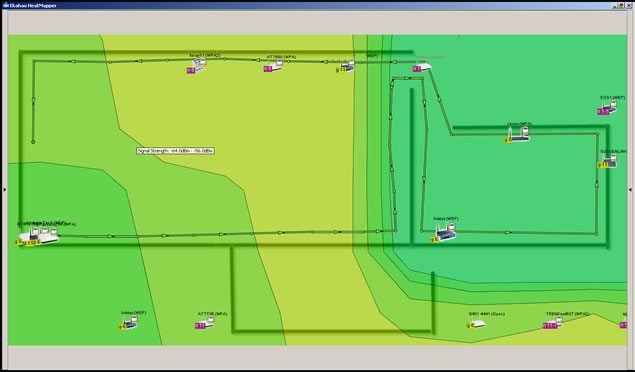
HeatMapper requires a device running Windows, and only takes a minute to install. There are two mapping options. You can upload a floor plan image, a screen-shot of a geographical map of the area you’re testing, or any other diagram that could be used as a floor plan. Alternatively, you can use the ‘grid’ option, which is basically a basic grid that you use to map your own ‘floor plan’ for network mapping. After you choose your option, you’re shown all available networks, and you can click on the area, and start walking. As you continue walking around the area you’re mapping, continue clicking at intervals to provide location coordinates to assist in accurate mapping.

Wi-Fi Testing and Mapping Apps

HeatMapper will show the Wi-Fi coverage, including all access points, their security settings, their channel, speed, and more. It should work with any built in network adapter, as well as external wireless adapters. I’ve found the speed with which it maps target areas to be exceedingly fast, compared with some other testing apps I’ve tried. It’s very accurate at locating network access points, based only on signal strength and the coordinates you provide by clicking on the map or grid as you walk.

Wi-Fi Testing and Mapping Apps

I should mention that this app limits your continuous site survey to 15 minutes, but it will probably be a rare occasion that you’ll need to spend more than 15 minutes walking through your testing area. If you have more than one floor, you’ll probably need to have a floor plan image for each floor. If you try to put all floors on one floor plan image, it’s not likely to come out very well. Instead, the signal strength lines will probably end up skewed and out of alignment. At the end of each survey, you can take a screen-shot, and keep the image for reference in your results.

Meraki’s WiFi Mapper

I found Meraki’s WiFi Mapper very useful as well. It’s a browser app, but it can also be used even when you’re not connected to the internet. As a browser app, it will function on most tablets and some smart phones as well, and this is where it really shines. Google Map integration is included, which means you can pull up your location on a Google Map, and simply start clicking as you walk around, pausing as it tests.

Wi-Fi Testing and Mapping Apps


You’ll notice it’s not quite as speedy as HeatMapper, but what it lacks in speed is made up in other features. After signing up for an account, you can upload floor plans and use them as maps. Unlike HeatMapper, here you can upload a floor plan image with several floors on the same map, and use the same map during the whole survey. The interface is very easy to use, and I found the color coding feature has a very professional look to it, and it’s easy to locate spots with very low signal.

Wi-Fi Testing and Mapping Apps


WiFi Mapper is only in the beta phase, which is very promising, considering what it currently offers. There doesn’t seem to be any time limitation on the site survey, which also favors those who need a multi-story site survey. However, I do recommend that while you’re walking around and clicking to provide coordinates, stop walking while it runs the test for the coordinates you just provided, to provide better accuracy. I’d recommend going to Meraki’s site for WiFi Mapper, and over here for HeatMapper, just to check them out. Meanwhile, talk a walk around your office or business, and test your network coverage with whatever mobile browsing device you have handy.

Do you have a favorite Wi-Fi testing app you frequently use in your work? Leave a comment!

© Technibble – A Resource for Computer Technicians to start or improve their Computer Business
To get started with your own computer business, check out our Computer Business Kit.

image

Read more:

In memory of Renee Wright, aka Genoagirl

Renee Wright
This past weekend, The Force Field lost an Admin and a friend. Renee Wright passed away.

Renee, who was known on our site and forums as Genoagirl, died August 18 after a long battle with cancer. She was 48.

I knew she was dealing with a health issue but I wasn’t sure about the specifics. I had not spoken to her in awhile, so her passing came as a bit of a shock.

I first met Renee in the OnForce Forums sometime between 2005 and 2006. As a female in a male dominated platform, she held her own and quickly gained the respect of her male counterparts as a capable IT professional. She became an OnForce forum moderator and her dedication and common sense approach impressed me so that when I founded The Force Field portal, I made it a point to ask her to become an Admin. It turned out to be a good call, because her presence and influence became a great asset to The Force Field community, especially in its early days.

Although I never had the pleasure of meeting her in person, I did get to know Renee online and considered her a friend. As one of her fellow Admins, Todd Hughes said, “Renee (G-girl) was instrumental in making this forum what it is today. She spent many long hours organizing, adding content, etc. Although she was conspicuously absent from here the past year or so she will be missed by those of us that were here from the beginning and understand all she did for the FF forums.”

Renee was indeed instrumental in getting these forums up and organized, and she kept them in order, especially in the early days. She wasn’t always out front in the forums, but she was there, working quietly behind the scenes, and whenever there was a call to action she was usually the first to respond and do whatever was necessary to make things happen.

Renee had a lot of friends here. She was well liked and well respected by her peers. Forum communities tend to become highly charged and even volatile at times, and personalities tend to get in each other’s way. Renee tended to avoid getting caught up in such conflicts and always kept it professional. She moderated with a firm even-handedness and was quick to help calm a tense discussion. Folks liked her quiet, professional approach and engagement in discussions. She helped keep the peace in the community.

She was never hesitant to contribute when the need arose and she often did so proactively. She monitored the web site and forums closely, sometimes more so than I did. It was not unusual for me to log in late at night or early in the morning and find her online, checking up on the site or performing some task.

There is something else that most members are not aware of. Renee put a lot of work into the back end of the portal on the administration side that probably no one else knows about and likely no one will ever see. She also contributed to the ill-fated wiki and was one of the few to actually take an active interest in it. There was no doubt that she took her Admin position seriously and with dedication. I will always admire her for that.

I also interviewed Renee for The Force Field podcast. If you would like to hear her contributions to the show, you can listen to her in episodes 7 and 10.

I do have one major regret. Renee had been absent from the forums for the last year or so and other than the occasional post on Facebook I had not heard from her. I had not checked in on her for quite awhile and intended to e-mail her at some point but kept procrastinating because with everything else going on with the site, it just didn’t seem to take priority. This was a painful lesson for me about putting things off until tomorrow, because as the saying goes, tomorrow never comes.

It is rare that I find it difficult to express thoughts and opinions in writing and I am seldom at a loss for words. Today, however, is different, and the right words are not easy to find. I wish I could say it directly to her, but it is too late for that. I will post it here in her memory and honor.

Renee, thank you for your hard work, loyalty and selfless dedication to The Force Field. Your contributions meant more than you ever knew and I appreciate everything you did for us and our online community.

Thank you for your service as an Admin and thank you for your friendship. May God be with you and your family.

Rick Savoia


Update: I was informed by her sister that the funeral will be held Wednesday, August 22, 2012 at 11 AM at the Robinson-Walker Funeral Home, 501 West St., Genoa, OH 43430. Interment will be at Clay Township Cemetary and a wake at Rayz Cafe in Genoa will follow.

We respectfully ask members and friends of The Force Field Community who would like to honor the memory of Renee Wright (Genoagirl) to participate with a donation to The National Breast Cancer Foundation.

Cobian Backup

Cobian Backup is a program that allows you to schedule and bacup fils and directories to other directories or locations in the same computer or another machine on a network. The program is multi-threaded, works in both download and upload using few resources. It comes in application or service versions.

Cobian Backup is a FREE download.


Website: Cobiansoft

ScreenConnect

ScreenConnect is a self-hosted remote support solution developed by Elsinore Technologies that not only helps you service your customers, it can also be customized to promote your brand. FREE 30 Day Trial.


Contact:

Elsinore Technologies
4700 Six Forks Road Suite 320
Raleigh, North Carolina 27609


Sales: (919) 925-0650 Option 1
Support: (919) 925-0650 Option 2
General: (919) 925-0650
Fax: (919) 532-0023

D7 – The Ultimate Technician Tool Every Tech Should Have!

Authors: Micah Lahren

We all have our little USB toolkits, our ‘ultimate’ CD’s, our repair disks and other related repair tools. Most of us like to have a comprehensive list, a solution for every possible problem we could encounter in the field, to the extent of carrying around drivers for common hardware in the rare case there is no reliable internet connection near the client. The issue with having a comprehensive set of tools often means you have to search through your tools for the one you need, and once you’ve located it, run it, and then search for the tool you need to use next.

You may have a routine you would like to automate, but instead you sit there at the computer and babysit the mouse, clicking once every 5 to 15 minutes to close something, affirm something, or perform some other menial task. While automation is a partial solution, there is a much better solution that has been available for about a year in the tech sector, about which there have been some recent improved developments. It’s been mentioned on Technibble and Podnutz before, but it deserves full coverage.

Enter D7, the ultimate technician tool, from Foolish IT, LLC. What is D7, and what does it do? Perhaps a better question would be: What doesn’t it do? It has everything from ‘one-click’ malware removal automation, Windows repair and maintenance, backup, restoration, and migration of data, as well as a slew of system tools, shortcuts to commonly used tweaks and configurations in Windows, and much more! It can keep your tools updated, yet is fully portable. Yes, you can put it on your UBCD4WIN drive and run it from there.

A note of caution is in order, however. This is not a tool designed for consumer use. This is strictly for Tech use. The rest of the tools in your kit might be hacksaws, maybe even circular saws. D7 is the V8 chainsaw of the Tech world. It can do a lot of damage if you don’t know what you’re doing with it, and that is why you can password protect it when you leave the client’s computer, so that they don’t inadvertently find it and toy around with it when you leave, requiring you to return and repair the havoc they might have caused.

Seriously, though, what does it do? The official web site (www.foolishit.com) has some good info on how to use it and configure it if you’re new to the tool, but for starters, it offers offline and live malware removal assistance through internal tools as well as third party tools you can customize yourself. It will automatically download and extract those tools when they are missing, and you can configure it to update your tools with the use of Ketarin. It’s a registry editor with a mass search and delete feature.

It’s a data migration tool, with backup and restore features as well. It’s a networking swiss knife tool, with handy shortcuts to commonly used components in Windows that we use often, but tire of locating the long way through the Windows OS. Command line tools are condensed into ‘one-click’ executions, so you can forget needing to remember all those executable names and extensions. It also includes password removal features, and is more or less the equivalent of a virtual locksmith.

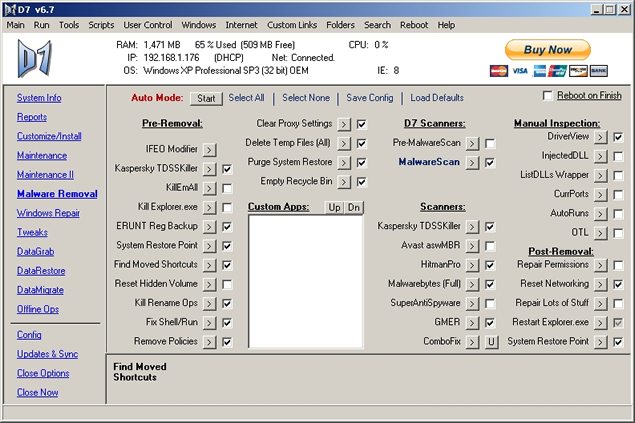
Let’s take a look at version 6.7, the last ‘free’ D7 version. (I’ll discuss more about this later, this has to do with the recent developments regarding D7.) On the left side, you’ll see the tabs you can click on, such as Reports, where you’ll find info reports, malware logs, and can perform screen captures and access them. On the Customize/Install tab, you can change host files, update third party apps, and work with dSupport. The Maintenance tab covers everything from Time Zone checks to system cleaning tools such as deletion of temp files, internet files, cookies, history, toolbars, BHO’s, and registry cleaning tools. The Maintenance II tab has many more utilities you can use to test and stress test hardware, check performance, and repair other items such as the Windows Updates feature.


The Malware Removal tab covers malware removal assistance, and provides easy ways to recover shortcuts and hidden files after the infection. It includes scanners and methods of fighting malware as well, which you most likely wouldn’t find all in one place like this anywhere else. The Windows Repair tab has a plethora of repair tools for nearly everything you could want, from repairing the firewall, checking system files, using MS FixIt, clearing print spoolers, and much more. The tweaks tab is handy for tweaking features within Windows. Datagrab is your backup tab, and it has some extremely useful features as well. DataRestore is where you work on the restoration of data, and is fairly self-explanatory. DataMigrate is again, self-explanatory, and allows you to migrate user settings, mail settings, and search for specific files with specific extensions, in case they are hidden on the drive.


Offline Ops can find keys, restore settings after malware removal, and perform other tasks as well. The Config tab sets up the customized options, Updates and Sync updates your third party tools, and syncs your D7 configuration to a centralized location, and keeps all your D7 drives in sync. All in all, a major comprehensive computer repair utility, and best of all, it’s completely free! If you’ve never used it before, go check it out. Once you’ve downloaded it, simply mouse around inside the GUI, nearly everything has a tooltip that shows up in the bottom of the GUI that describes what it does. The best part of it all is that you can automate nearly every routine of tasks you want to perform!

Regarding the recent developments, as of July 30th, 2012, Foolish IT, LLC is partnering with RepairTech, Inc, to create a new revolutionary tech product, combining TechUSB with D7 to create TechUSB Pro. For those serious about computer tech and the repair business, this is a tool you need in your toolkit. It will be a premium product, brandable with your own company name and logo, and include premium features such as uploading D7 logs to your TechUSB Portal online. D7 6.7 is still free to use, although it has some ‘nag screens’ when you try to perform certain tasks. As far as I know, previous versions (with less features) don’t include those nag screens, but if you see this tool being useful in your company, you won’t regret the small price for the usage of the premium version. The company branding feature is sure to impress your clients as well.

In summary, D7 is one of those tools you just shouldn’t be without. Remember to protect the client from locating it and toying with it on their own, and you shouldn’t have any problems. Use it wisely, and you will probably wonder how you ever got along without it!

© Technibble – A Resource for Computer Technicians to start or improve their Computer Business
To get started with your own computer business, check out our Computer Business Kit.

image

Read more:

Why You Need to Patch More Than Just the Operating System

Authors: Guest Writer

Guest Post by Ronn Hanley:
Applying security patches to the Operating System of your computer can save you a ton of trouble when fighting viruses and malware. The problem is, as technicians we don’t always go far enough when it comes to patching software and hardware. It’s important to realize that you and your clients are vulnerable from other directions as well.

Just OS?

Most clients understand their systems have vulnerabilities, but they’ve been conditioned by one marketing campaign after another that once the operating system is patched they’ll be protected.

It’s a given that patches come out for everything from MS Windows to every version of Linux. The problem is, in the rush to protect the ‘main’ system, it’s possible to forget that support software has the same or even worse vulnerabilities. This includes office suites, productivity software, online games, web browsers, document viewer or rendering software, plug-ins, and system firmware – free, shareware or commercial – the bad guys don’t care.

It may seem like a no brainer that simply patching the operating system isn’t enough, but how obvious is it really? I’ve been doing this for a long time and I only became aware of how serious the ‘third party problem’ is within the last 3 or 4 years.

Clients want the fastest answer to their problems. Most know that if they are using a Windows system there will be patch releases that they have to deal with and that’s as far as it goes for them. They neither know, no care that there may be other issues to deal with. This is one of those things that must be built into your Service Level Agreements’s (SLA) not only to cover you, but to make sure that the client isn’t left hanging.

Research is key

Malware writers are on a constant hunt to find weaknesses in all software and every time a security patch comes out they are immediately find ways to circumvent it.

If you’ve worked with your clients for any length of time you have an idea of what’s on their systems. If part of your SLA is doing updates to software or firmware it’s always a good idea to keep a log of what software they have installed, when the last update was done and whether or not any new vulnerabilities have cropped up since your last visit. This is why documentation is so incredibly important.

I keep a running log of my client systems that’s only a page long. It has a list of the major and support software that they use on a daily basis. This process can be time consuming to start, but once the basic list is done, it’s easy to update or remove entries. The way I look at it, if this is the first time I’ve sat at a computer I automatically assume that NOTHING has been updated, this keeps me from missing things.
Belonging to sites like Technibble or Techrepublic (well, back in the day…) can pay off. Reading articles or being involved in forums can give you a heads up about which software is the current favorite of malware attacks. There’s no way you can know it all, or even keep up with every little change.

That’s where a helping hand can be a great thing.

Software that can help

I’ve found Secunia PSI to be an invaluable tool for Windows based systems. The software can either be used as a downloaded app which will scan the entire PC on demand looking for software that needs to be updated and then pointing you to the manufacturer for download or purchase. It can also be set to routinely scan the system and give you updates when something has become outdated, but I don’t recommend this setting in a business environment since its likely to slow the PC down. The software can also be run as a web based app, but it will only do a surface scan and can miss programs.

Secunia PSI is designed for home PC’s but they do have a version for Enterprise level systems called Corporate Software Inspector (CSI) which is designed to act as a vulnerability scanner with a patch management system running on the back end.

The programs work well on Windows based PC’s and the company claims they work well on Apple, but I haven’t been able to test that yet.

About the only complaint I have with the software is that it can take some time (5 to 10 minutes) to scan a full HD and report its findings. And then for some third party software you have to visit the company website to get the update or patch. PSI will automatically update most software, but not all.

Ultimately you protect your clients

The larger software companies have teams of people looking at their software, finding holes and then patching them. The smaller developers don’t have that kind of manpower or capital, so it’s no surprise that a third party application is going to be more vulnerable. That doesn’t mean that it has to be a crap shoot every time you sit down to take care of a system.

It may take some time to develop a solid plan to keep your clients patched and protected, but that time is an investment in your business and the health of your clients systems.

Guest Post by Ronn Hanley: Ronn is a technology enthusiast from way back, during the dark ages of the Arpanet and the Purple monochrome monitor screens. His first computer was a Commodore PET and his first laptop was the size of a suitcase. Despite that, he loves computers and technology to distraction and has been working in the tech world for almost 10 years full time, currently as the owner of a Desktop and Network support company in Atlanta, Georgia.

© Technibble – A Resource for Computer Technicians to start or improve their Computer Business
To get started with your own computer business, check out our Computer Business Kit.

image

Read more: