Skip to content

The Force Field Podcast
  • Home
  • News
    • Blogs
    • Rick Rant
  • Podcast
  • Forums
  • About Us
    • FAQs
    • Advertise With Us!
    • Contact Us
    • Press Room
  • Resources
    • Free Publications
    • Media Center
  • Home
  • News
    • Blogs
    • Rick Rant
  • Podcast
  • Forums
  • About Us
    • FAQs
    • Advertise With Us!
    • Contact Us
    • Press Room
  • Resources
    • Free Publications
    • Media Center

Rick

6 Reasons Why You Should Consider Remote Support

November 23, 2011 by Rick

Authors: Bryce Whitty

Have you ever considered expanding your computer repair business by doing remote support? While it is unlikely to replace your physical computer repair work, it does allow you to save time with your current work and expand your service area. Here are some of the benefits of remote support that are worth considering.

6 Reasons Why You Should Consider Remote Support

Billable Hours

Many people scoff at the fact that a Computer Technician will charge in the range of $100 hour. Especially when a 9 to 5 office job will only earn in the range of $20-40 per hour. What these people dont understand is as business owners, we have to these charge prices because there is a large amount of unbillable hours where we still have to work, but cannot directly charge for. One of the biggest contributors to unbillable time is driving time (I know some techs DO charge for driving time/distance though).
With remote support, you can often cut out the driving time. In fact, you can pretty much start the moment you get the call.
If you are an onsite computer technician, think about how much time you spend driving around on a typical day. In my business, it was easily 3-5 hours depending on how many jobs I had lined up in the day.

Profit

On the topic of driving time, while you are running around town all day you are consuming fuel and slowly devaluing your vehicle as you rack up the miles/kilometers on the odometer. Of course, these are normal business expenses that you factor in but with remote support you can reduce these. Resulting in more overall profit.

Efficiency

Remote Support also allows you to work more efficiently. We all know about “loading bar time” where we cant do much more other than but sit there and watch the loading/installing bar slowly reach 100%. If you were working on a machine where you had to wait like this via remote support, you could use that time to work on another persons computer or do an in-office task – making better use of your time.

Access To Resources

We computer technicians cannot know what every single error message means and how to fix it, so we occasionally need to turn to the almighty Google. There is no shame in referring to Google but it doesnt always look good doing so in front of customers. With remote support, you have access to one of your own machines where you can research the clients problems and have access to a range of applications.

Geographic Location

This is an obvious benefit. Most onsite technicians have a “service area” where they limit the maximum distance they are willing to drive. With remote support, the geographics dont really matter anymore as long as the client has a good enough internet connection. Even with my own business, I look after my clients in my home city of Melbourne Australia even though I am currently living in London UK. Even though my clients are half a world away, the speeds are actually pretty good.

Proactive System Maintenance

If you are a computer technician who has maintenance contracts with their clients, keeping an eye on your clients systems is made much easier and more effective with remote support. For example, you can log into their systems and check the usual Windows/Antivirus updates and hardware statuses once every 2 weeks, and visit the clients physical location quarterly to check the physical state of the computer. Again, this saves you time driving around all the time to support your maintenance contracts.

Getting Started

If you are interested getting into remote support, I recommend you check out Lisa Hendricksons guide “Call That Girls Guide To Remote Support” which is now in its second edition.
Lisas book is not a technicial manual on how to do remote support but rather a remote support business operations manual. It includes setting your remote support rates, getting a ticketing system setup, marketing your remote support services, accepting payments remotely and up-selling.
It also talks about what to do if the clients internet doesnt work, dealing with issues you cannot fix remotely and how to deal with issues that make working remotely difficult.

Lisa’s guide is currently selling for $79 until December 24th, comes with a free copy of her “Computer Business Manual of Operations” and comes with a full refund policy if you find its not for you, so its completely risk free. You can check out the guide and what is in it by CLICKING HERE.

If you are looking for remote support software, ScreenConnect is picking up a lot of popularity on the Technibble forums. Their concurrent licenses start at $275 and once you purchase it you can use it forever. The software is self hosted giving you a bit more control over your product.
It comes with all the features you would expect from a good remote support package such as being crossplatform, has a Android/iOS app and is brandable. You can check out ScreenConnect HERE.

© Technibble – A Resource for Computer Technicians to start or improve their Computer Business
To get started with your own computer business, check out our Computer Business Kit. 6 Reasons Why You Should Consider Remote Support

image image

image

Read more:

Categories News Feeds Tags a, support, the, to, you 1 Comment

Plus One Solutions

November 21, 2011 by Rick

Plus One Solutions provides service fulfillment solutions and services to IT service organizations, such as Consumer Electronics, Appliance Manufacturers, Retailers, Home Improvement, Home Based Services, Cable and Telecommunications and Third Party Warranty Administrators (TPAs). The company claims to have over 45,000 service providers. Plus One Solutions also provides online training solutions, recruiting and dispatch management services as well as background, certification and drug screening.


Contact:

PlusOne Solutions, Inc.
11301 Corporate Blvd,
Suite 215
Orlando, FL 32817-8354

Phone: 407-359-5929
Toll Free: 877-943-0100
Fax: 407-359-6929

407-249-3011
877-943-0800 Toll Free


Web site: http://www.plusonesolutions.net

Technician Sign Up: http://www.plusonesolutions.net/our_network

Technician Log In: http://my.plus1solutions.net

Categories Directory of National Contractors Leave a comment

Exel-i Inc.

November 21, 2011 by Rick

Exceli-i procures and resells new, refurbished, and excess computers and computer peripherals. The company specializes in provisioning spare parts and claims to offer hard-to-find computer parts at competitive prices.


Contact:

John T Wieber
Exel-i Inc.
john@exel-i.com
http://www.exel-i.com

7913A Cessna Ave
Gaithersburg, MD 20879
240-632-2100 x222
240-632-0231 fax

Categories Suppliers Leave a comment

System Restore Explorer – View, Delete and Browse Inside System Restore Points

November 18, 2011 by Rick

Authors: Bryce Whitty

System Restore Explorer is small, freeware tool that allows you to view and delete specific Windows system restore points. This is a handy way to clear up some disk space without wiping out all of the restore points since previously the only built in option we had was either all or none.

However, the best feature is that it allows browse and copy individual files inside the system restore points, without performing a full system restore.

CommitCRM


When you install System Restore Explorer, you see a list of all the available system restore points including the time and date of when they were taken. You can right click on any of these and you
have the option to Mount, Unmount or Delete that specific restore point. If you Mount that restore point, it will show you the files inside that restore point in your standard Windows Explorer interface allowing you to manage the files inside it like you would any other file on your system.

This application only works in Windows Vista and Windows 7.

Screenshots

Viewing the list of available restore points to Mount or Delete.


Browsing inside a mounted restore point.


Download

Download from Official Site (search for “download it here”) – 840kb

Special thanks to the forum member Galdorf for recommending this one.

© Technibble – A Resource for Computer Technicians to start or improve their Computer Business
To get started with your own computer business, check out our Computer Business Kit. System Restore Explorer – View, Delete and Browse Inside System Restore Points

image image

image

Read more:

Categories News Feeds Tags and, restore, the, to, you Leave a comment

Seeking Computer Technicians To Interview

November 15, 2011 by Rick

Authors: Bryce Whitty

I am going to be interviewing fellow computer technicians via email so people can hear their stories, be inspired by them and learn something new.

What questions would you like me to ask them beyond the typical “Who you are and how did you start”? You can leave a comment below. (Or hit reply if you are reading this via Email)

If you consider yourself successful, whether a single guy in his bedroom always keeping busy, or someone with a shop and multiple employees, I would love to interview you via email. Shoot an email to tips@technibble.com, tell me a little bit about yourself, what about yourself you believe would be interesting to your fellow techies and I’ll get in touch with you.

Last but not least, if you know someone you would really love to have interviewed, send me their details to tips@technibble.com and I’ll do what I can.


© Technibble – A Resource for Computer Technicians to start or improve their Computer Business
To get started with your own computer business, check out our Computer Business Kit. Seeking Computer Technicians To Interview

image image

image

Read more:

Categories News Feeds Tags a, and, computer, to, you Leave a comment

Chief Counsel Praises the Repeal of Three Percent Withholding Requirement on Contractors

November 15, 2011 by Rick

Authors: Mitalis

Read more

Categories News Feeds Tags and, of, small, the, to Leave a comment

Canon Resellers

November 15, 2011 by Rick

Canon Resellers have access to rebates, newsletter, banners, customized marketing programs, support, product images, presentations, videos, product documentation, product training and white papers.


Join online:


http://www.canonresellers.com

Categories Partner Programs Leave a comment

How To Perform a Perfect BackUp Reinstall with Apple Time Machine

November 14, 2011 by Rick

Authors: Bryce Whitty

Guest Post by Marco Rodi: Marco Rodi owns an IT Engineering university degree. He has his own computer repair business (OrdiRodi) that mainly does Apple Support.

So you receive a call from a client saying “My hard drive just crashed!!” or “I just bought a new Mac and I need to transfer all my information” or even “I want to clear my hard drive and do a clean installation”.

As a professional, you need to know exactly what to do to perform a perfect backup and reinstall. You don’t want to lose a client’s files or preferences. The client wants to have the exact same thing as before: their beautiful Mac, up and running again. They do not want to call you back and say: “Hey! I don’t have my music in my iTunes anymore!”, “Where are my bookmarks?” or “How come my icons are smaller?”.

Here are the steps to perform a perfect backup and reinstall on OSX using Time Machine.

CommitCRM


First of all, you need to backup everything. With Apple it’s easy.
There is a built in application called Time Machine and you simply need to plug an empty external drive into the computer (Yes, it must be empty because it will wipe everything on it), and activate Time Machine.

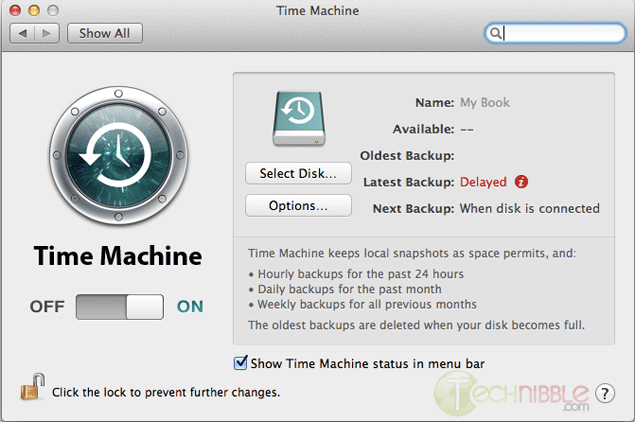
To activate Time Machine, simply open your System Preferences. And click on the Time Machine icon.

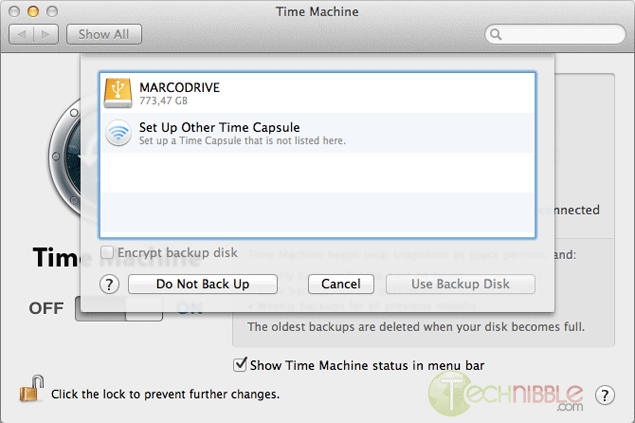
Click on “Select Disk”.

Choose your external drive and click on “Use Backup Disk”.

Time Machine will copy everything (OS, Software, Files, and Preferences) to the external hard drive. So when you will reinstall the OS, you can restore everything from that backup.

Once everything is backed up, we need to clear and format the new hard drive. To do so, you need to have a copy of the OS that you need to install (Snow Leopard or Lion). It can be on either CD or USB, it does not matter.

Shutdown the computer and insert your bootable device into the client’s Mac.

Boot the Mac while holding the “Option” key (ALT key if you are using a non-Apple keyboard). You will arrive on a window where you can choose a bootable device. Please choose your OS Installation (Either CD or USB).

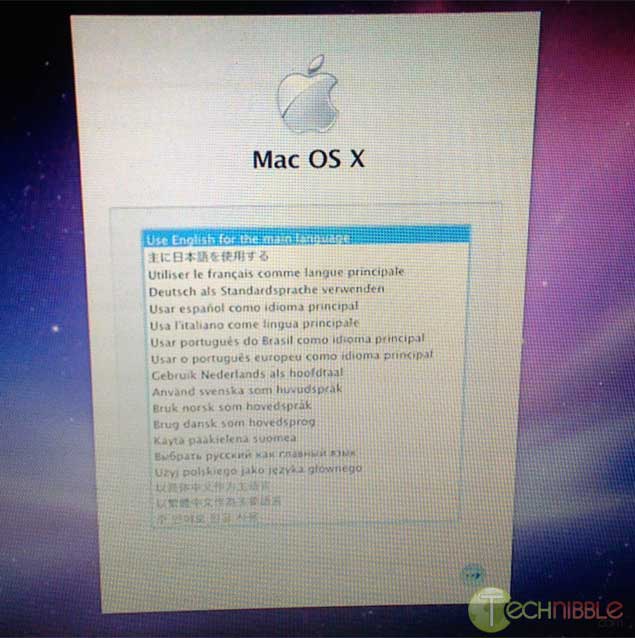
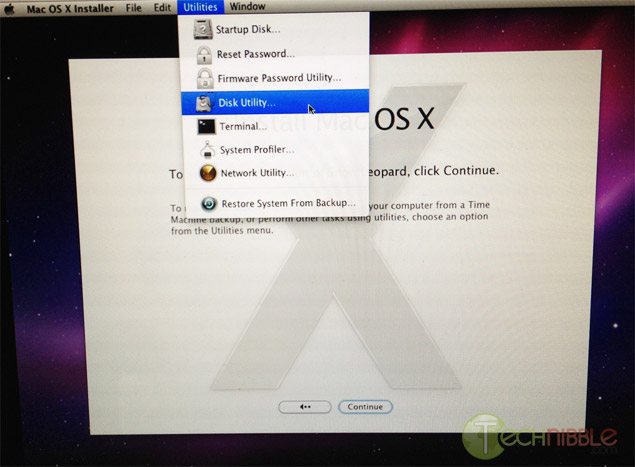
You will then arrive at this window. Choose the language you want and press enter.

Click on Utilities and choose Disk Utility.

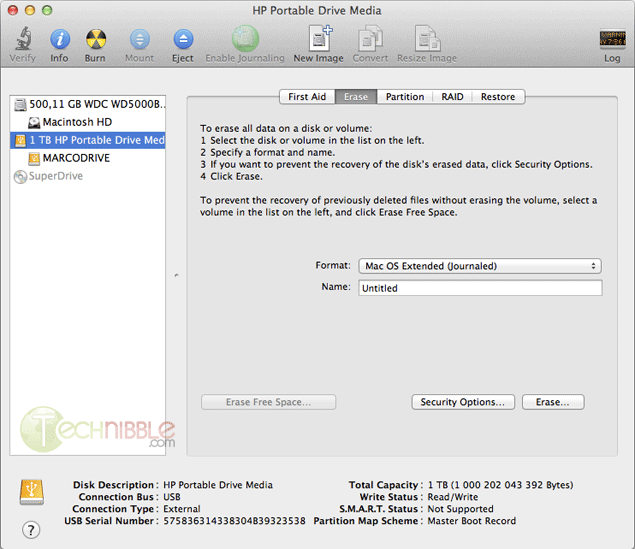
Select the drive you want to format to the left.

On the Erase Tab, use the “Format” Dropdown and choose “Mac OS Extended (Journaled)”.

Name your Hard Drive

Click the Erase Button.

It will then take some time to format the hard drive.

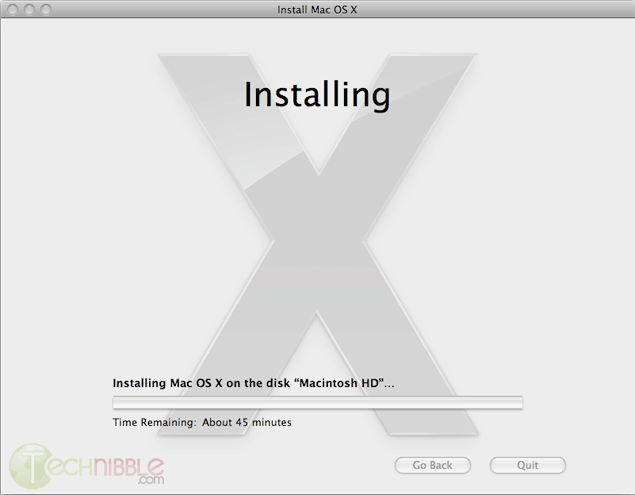
Once this is completed, you can close the Disk Utility window and start the installation. It will install the OS on your new hard drive.

Once the installation is complete, it will reboot and it will start from your newly installed OS.

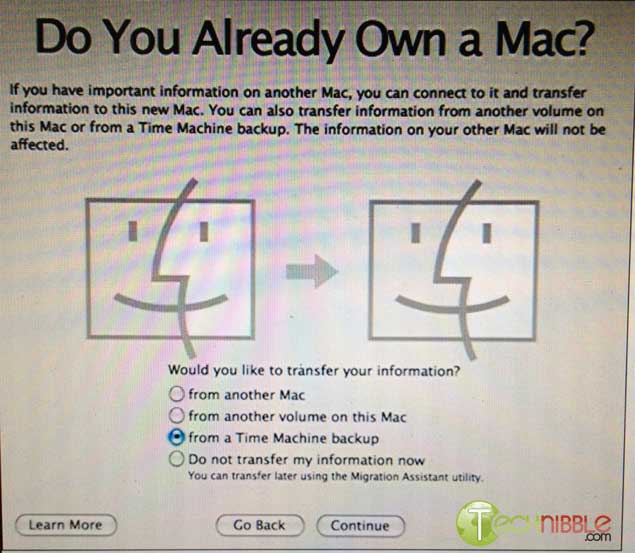
At the beginning, it will ask you if you want to transfer your information.

Plug your external device with the Time Machine backup and select “from a Time Machine backup” at the “Do You Already Own a Mac?” stage.

It will transfer all the files and settings that Time Machine made a backup of back onto the Mac.

So that is it. You can let your client test the computer and confirm that everything is back to normal.

© Technibble – A Resource for Computer Technicians to start or improve their Computer Business
To get started with your own computer business, check out our Computer Business Kit. How To Perform a Perfect BackUp & Reinstall with Apple Time Machine

image image

0 0

Read more:

Categories News Feeds Tags a, and, the, to, you Leave a comment

Labtech Software

November 11, 2011 by Rick

Labtech Software offers a remote monitoring and management (RMM) solution to IT service providers for their clients. According to the company, Labtech was designed by working IT service professionals with actual experience in the industry. Labtech offers a fully functional FREE trial download .


Contact:


LabTech Software
2805 W. Busch Blvd.
Suite 102
Tampa, FL 33618
United States

1-877-522-8323
1-813-397-4600

e-mail: sales@labtechsoftware.com

http://www.labtechsoftware.com/


Categories Managed Services Leave a comment

Eaton PowerAdvantage® Partner Program

November 11, 2011 by Rick

Eaton provides power quality and backup power management solutions. According to Eaton, their partner program was designed VAR community. It includes two tiers – Authorized and Certified.


Benefits of the partner program include:

  • Instant Rebates Up to 9%
    Dedicated Pre and Post sales support
    Deal Registration
    Marketing Development Funds
    Training and Certifications
    Lead Generation
    Sales & marketing tools and collateral
    Special deal pricing program
    Demo Unit Program


Contact:


http://www.poweradvantage.eaton.com/

Categories Partner Programs Leave a comment
Older posts
Newer posts
← Previous Page1 … Page11 Page12 Page13 … Page103 Next →

Pages

  • About The Force Field
  • Advertise with us!
  • Contact Us
  • Posting Rules
  • Privacy Policy
  • Subscribe!
  • Terms of Use
  • Welcome
    • News Feeds

Subscribe to Podcast

Apple PodcastsAndroidby EmailRSSMore Subscribe Options

Archives

  • February 2015
  • January 2015
  • June 2014
  • May 2014
  • March 2014
  • February 2014
  • January 2014
  • November 2013
  • September 2013
  • June 2013
  • April 2013
  • March 2013
  • January 2013
  • November 2012
  • October 2012
  • September 2012
  • August 2012
  • July 2012
  • June 2012
  • May 2012
  • April 2012
  • March 2012
  • February 2012
  • January 2012
  • December 2011
  • November 2011
  • October 2011
  • September 2011
  • August 2011
  • July 2011
  • June 2011
  • May 2011
  • April 2011
  • March 2011
  • February 2011
  • January 2011
  • December 2010
  • November 2010
  • October 2010
  • September 2010
  • August 2010
  • July 2010
  • June 2010
  • May 2010
  • April 2010
  • March 2010
  • February 2010
  • January 2010
  • December 2009
  • November 2009
  • October 2009
  • September 2009
  • August 2009
  • July 2009
  • June 2009
  • May 2009
  • April 2009
  • March 2009
  • February 2009
  • January 2009
  • December 2008
  • November 2008
  • October 2008
  • September 2008
  • August 2008
  • July 2008
  • June 2008
  • May 2008
  • April 2008
  • March 2008
  • February 2008
  • January 2008
  • December 2007
  • November 2007
  • October 2007
  • September 2007
  • August 2007
  • May 2007
  • April 2007
  • January 2007
  • December 2006
  • November 2006
  • October 2006

Show Call-In Line

Skype Me™!

or call 407-278-5698 from any landline phone!

Get it On Your Phone!

Listen to Stitcher

Recent Posts

  • TFF-71 – How To Limit Liability In Your IT Business
  • TFF-70 – Customers Who Scam
  • The Force Field to carry LIVE coverage of CES 2015
  • Add Your Company!
  • TFF Episode 69 concludes interview with Computer Business book author

Recognition

Member Tech Podcast Network

[Valid RSS]

2013 Top 100 Podcast Badges

podcast 100

podcast 100

podcast 100

podcast 100

© 2026 theforcefield.net. All Rights Reserved. theforcefield.net™, The Force Field dot Net™ and The Force Field with Rick Savoia™ are trademarks of Savoia Media.