Disk2VHD – Turn Physical Disks into Virtual Machines

Authors: Bryce Whitty

Disk2VHD is a free application that will make a copy of a hard disk from within the OS using Windows’ Volume Snapshot capability. This copy can then be mounted in Windows as a ‘disk’ or run as a Virtual Machine.

Some of the reasons why you would want to do this is to make a backup of the OS, test a repair in the virtual machine copy before you do so in the live environment or move an existing OS installation into a new or different one. For example, backing up a clients install of Windows Vista, doing a clean install of Windows 7 and then allow the client to run their old Windows Vista install in a Virtual Machine.

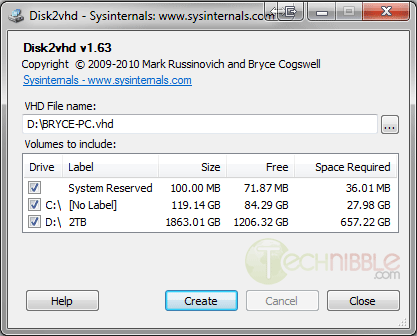
The application is small, fast, portable and very easy to use. Simply run the executable, choose the location where you want to backup the Virtual Machine image to, tick the drives you want to make an image of, and press “Create”.

As the name suggests, the image gets turned into a .VHD file which is native to MS Virtual PC. One downside of MS Virtual PC is that it only supports a maximum virtual disk size of 127GB. However, other software such as VirtualBox can also open .VHD files and support much larger image sizes.

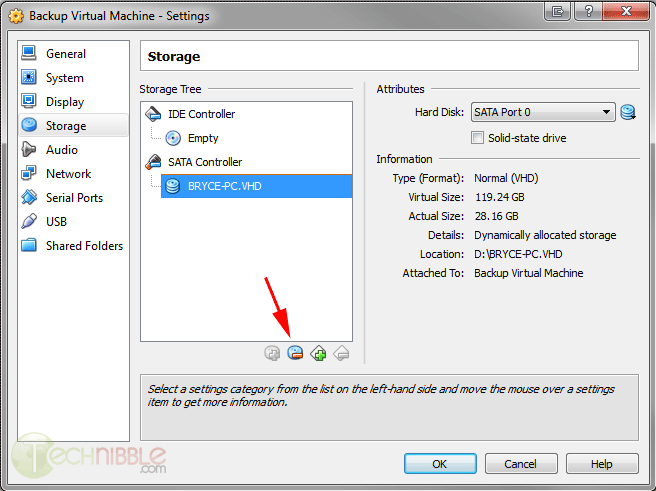
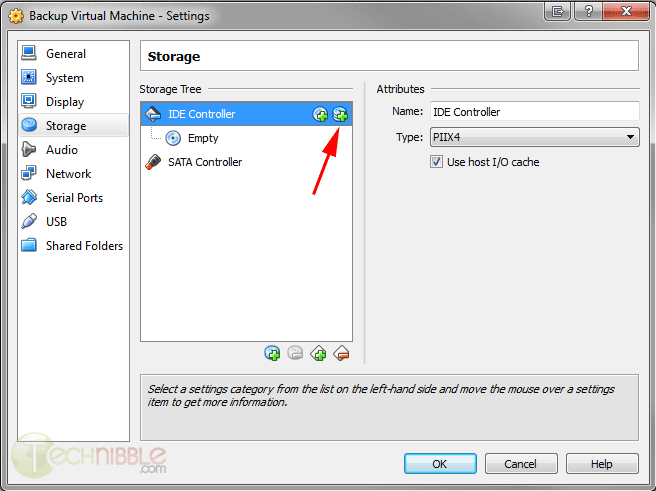
In my own tests, I made an image of my C: drive which took around 5 minutes. I opened up Virtualbox, pressed “New” and went through the Create Virtual Machine wizard. When the Hard Drive stage came I chose to “Use an existing virtual hard drive” and chose the .VHD file that Disk2VHD created for me. I got a Blue Screen of Death when I first tried to boot the VM but the solution to this was to go into the virtual machines settings, goto Storage, remove the .VHD file as a SATA controller and add it back in as an IDE controller. After I made that change and booted the Virtual Machine everything worked fine.

Screenshots


Downloads

Download from Official Site – 812kb

Special thanks to 16k_zx81 on our forums for recommending this one.

© Technibble – A Resource for Computer Technicians to start or improve their Computer Business
To get started with your own computer business, check out our Computer Business Kit.


image

Read more:

How To Shop on Behalf of Clients as a Computer Technician

Authors: Bryce Whitty

If a large part of your client base is residential then you may have been asked “shop around” on a clients behalf. The client knows they need to purchase something but want to do it alone because they want to make sure they dont purchase the wrong one or get ripped off. This usually occurs in two ways:

  • 1. The client tells you what they want, you look around for an item that does what they need and gives them the best bang for their buck, then they purchase it through you.
  • 2. The client already had a store in mind to purchase the product from (usually a Bigbox store) and wants you to help them choose the right one.

While this sounds like an easy way to make money, how do you charge? Do you charge for your time or do you place a markup on the product?
Well, there is a right way and a wrong way to go about this and if you get it wrong, you can end up wasting a lot of time or upsetting your customer.

The client will generally let you know whether they want to purchase through you or purchase from another business but you may have to ask. Here is what to do in each situation:

The Client Wants To Purchase From You

If the client wants to purchase the product through you, then you simply to treat this like you would with any other stock you carry, where the markup makes it worth your time. You do the research for your client, you buy the product through your business and place your markup on it that is appropriate for the amount of time you spent, and the client never knows who your suppler was.

The Client Wants To Purchase From Another Business

If the client has another business in mind like BestBuy or Newegg, you need to charge based on your time rather than have a markup. Marking up a product is difficult to do in this situation without looking like like you picked a price out of thin air.

For example, which way sounds sounds more legitimate?

  • “Here is the screen from BestBuy which cost $150. That’ll be $200 please”
  • “Here is the screen from BestBuy which cost $150. It has been an hour at fifty dollars an hour, so that’ll be $200 please”

The first looks like you plucked a price out of thin air, the second sounds fair enough.
The best way to go about this is to shop with them either physically or using remote support software to shop with them online. This way they know they are taking up your time and that you need to charge for it.

Otherwise, if you tell them what to purchase after you put in the time researching for them, it is possible that they will just go buy it from a Big Box store and circumvent you entirely. There was a topic similar to this in the Technibble forums recently where Lisa from Call That Girl said: “We tell the clients to pay us for our shopping time. Remote time with me is our normal rates, $59-$79 to shop online together, or they can take my lead tech to Microcenter and he’s $125 an hour. We save people money by shopping with them.”

Following the simple guideline above, this should help prevent you from getting stung when shopping on behalf of your clients.

© Technibble – A Resource for Computer Technicians to start or improve their Computer Business
To get started with your own computer business, check out our Computer Business Kit.
image

Read more:

A Short FAQ on IPv6 For Computer Repair Technicians

Authors: Derrick Wlodarz

Few technological shifts in our tumultuous industry have moved as slowly and methodically as the long-proposed shift to IPv6. The confusion surrounding this radical new approach to the way we view networking is still quite high, especially among computer technicians I speak to.

I’ve heard them refer to IPv6 as “the new internet” or “version 6 of the web.” Clearly there is an informational disconnect between those on the front lines working with these technologies and the major players pushing this change in the networking realm. If technicians are to be prepared to answer questions that customers will be asking as this revolution heats up, they need to have a base understanding of what IPv6 not only is, but what it aims to accomplish.

I want to address some of the most common concerns and questions about this shift, what it means for technicians, and most of all, what it means in real terms for the customers you support. For all intents and purposes, IPv6 is already a real technology that is steadily being implemented across the web – starting with the innermost core hardware that runs the modern internet and moving outward towards the hardware/software at the end-user level.

Here are some of the most important things you should know about this increasingly important standard.

What exactly is IPv6?

IPv6 is just short for Internet Protocol Version 6. When most technicians think about networking, they probably encounter network addresses at customer locations that look like 192.168.1.120, 10.1.1.150, or similar. These are all considered IPv4 (Internet Protocol Version 4) addresses which are the most prevalent and represent what a majority of equipment and software developed up until about 2007 solely utilized. The new standard doesn’t represent any new version of the internet as a whole; it merely updates the way in which devices and software inter-operate with one another.

What was wrong with IPv4 that it had to be updated?

One of the biggest reasons for the push to IPv6 is the real fact that we are slowly running out of IPv4 public addresses. Simply put, IPv4 is a 32-bit addressing scheme which translates into an available pool of only 4,294,967,296 addresses. That may seem like a lot of addresses, but we are very near the exhaustion point for much of what is publicly available. The use of NAT has pushed off the inevitable, but it’s more of a bona-fide bandage then an alternative to switching to IPv6. As they say, you can only slice a pie so many ways – eventually, there’s none left to go around.

The way that these public IP addresses get handed out globally is ultimately led by an authority known as IANA (Internet Assigned Numbers Authority.) This body hands address “pools” out to various RIRs (Regional Internet Registries) across the world, which in turn trickle down addresses to ISPs (for customer internet access, like what you are using to read this website now) and other parties that request them.

IPv6 redefines the addressing scheme for networking devices and software to a 128-bit structure. This allows for a near limitless number of addresses, or 2128 to be numerically exact. Technical experts proclaim they never expect there to be another address shortage due to IPv6. If that holds true obviously remains to be seen.

You can view a neat countdown ticker of how many IPv4 addresses are left in global registries provided by INTEC, Inc.

How quickly do I have to upgrade my customers’ infrastructure?

This is quite a tough question to answer with 100% certainty as most experts in the networking fields still don’t have a uniform voice to lead the way. Some claim that there is no pending crisis due to the depletion of IPv4; others are clamoring for a brisk and swift change to IPv6. I’m not in the camp that is calling this a global crisis yet, but I do believe that the reasonably mindful thing to do is to ensure that all new network gear you are purchasing for customers is IPv6 compliant.

Thankfully, this task is not as difficult as some may think. Most new networking hardware that has been in production since about 2010 (with a fair number of devices pre-2010 as well) natively support the IPv6 standard out of the box. This means that, in general, you don’t have to “hunt” for gear that supports IPv6. It’s still a good idea to check the equipment you are looking to purchase because some legacy gear on the market still doesn’t have dual compatibility. Spec sheets are always publicly available for most equipment sold and you can easily keyword scan them for IPv6 references.

In terms of “when” your customers should be IPv6 ready, this is also a catch 22 dilemma. Most networking realists are taking the cost-effective approach that all new gear going into place should have full IPv6 compatibility, and the hope is that slowly all equipment will be replaced by the time IPv4 is phased out. This is because coexistence plans are already in place for using IPv4 side-by-side with the new IPv6. Schemes such as dual IP stacks and IPv6-over-IPv4 tunneling are some of the methods that we will live in a cooperative networking world for the near term.

In plain terms: just ensure you are purchasing IPv6 capable equipment when the need arises; ensure that all new equipment has IPv6 turned on by default; and don’t turn IPv6 capability off within Windows for customers.

Do Windows and MAC OS X handle IPv6 already?

This is a common concern among technicians I speak to, and it happens to be the area that is already in place for IPv6. Microsoft included full out-of-the-box support for IPv6 in Windows Vista, 7, and 8 (a full compatibility chart has been posted for Microsoft products.) Windows XP has support too, but it has to be installed manually per these instructions.

Apple has our backs on IPv6 too, and has included full support for the new protocol since OS X 10.1 (it has only been turned on by default since 10.3, however.) In basic terms, technicians don’t have to do much for customers running Vista or above, and likewise, OS X 10.3 or above. All they need to worry about at this point is to ensure all network hardware is compatible (which is unfortunately much tougher and expensive to get into place.)

How can I test my customers’ IPv6 readiness?

The easiest form of test you can run is a public-facing readiness test from one of the many sources that offer them. A good one that I like to use with customers is aptly named Test-IPv6.com and provides a visual result page with overview on your IPv6 public address, your DNS’ IPv6 compatiblity, as well as simple scores that show how “ready” you or a customer are for IPv6. Take the results with a grain of salt; even though I personally get a 0/10 for IPv6 readiness on this site, there is no immediate crisis since a majority of the world is still working hard to get all the proper switches flipped.

Within Windows, you can check your Network Connection status details for every flavor of Windows since XP to see what your current IPv6 address is; MAC’s control panel area for networking shows similar information for the wired/wireless adapters. To most people this information is not necessary yet… but remember, one day, IPv6 will become as prevalent, or replace, IPv4 that we are so fond of today.

When will IPv6 become necessary for my customers?

If I knew the answer to this, I’d probably be some exec at a large and famous networking company. While IPv6 has been pushing its way into eventual relevance (and necessity, many say) with events like World IPv6 Launch Day, this change is so radical and far reaching that it likely has at least 4-6 years before it becomes a major force in the way we think about networking.

As I said earlier, however, as long as you are playing your part in preparing customers for the eventual switchover (whenever it happens, as gradual as it may be) then you are doing your part in this technical evolution. I’m not scaring customers of my company FireLogic with IPv6 readiness, but am being mindful to always look for IPv6 gear when new hardware goes into place.

More importantly, I haven’t willingly recommended any Windows XP-based workstations to clients in over a year now; Windows 7 is my base OS of choice thus far, with Windows 8 likely to be the eventual standard once it hits in October.

IPv6 is coming, but IPv4 is here to stay – for now

While the best thing technicians can do now is ensure their customers are being softened into an IPv6-ready ecosystem, rest assured that IPv4 won’t be dying in the flick of a finger. As mentioned above, dual-stacking schemes will likely be the compatibility path for some years down the road until a full steamrolling of the networking landscape happens globally. It’s a lofty prospect to see such a radical change happening in even 5 to 10 years, and I’d presume that it may take closer to 15 or more years before we even begin to see the dimming of IPv4 as a whole.

The likely scenario is that websites will slowly start forcing the IPv6 revolution from top-down, and we will see a slow squeeze to catch up by all of the network equipment vendors and software providers alike.

Following the simple guidelines I laid out above, you can help make this transition as painless for your customers as possible. While IPv6 may seem like mere hoopla for the time being, it will soon become a growing reality for the wired world.

© Technibble – A Resource for Computer Technicians to start or improve their Computer Business
To get started with your own computer business, check out our Computer Business Kit.
image

Read more:

Protecting Your Clients from Device Theft

Authors: Micah Lahren

Most businesses that work with sensitive data and have multiple workstations or servers also make use of alarm systems and theft protection services in case of attempted theft. However, many businesses are growing exponentially and constantly send out traveling representatives to do demonstrations or make business contacts. Others are of a mobile nature and require constant travel, often with devices containing the materials for the demonstrations or other sensitive data such as trade secrets or promotional information. As users of mobile devices increase, and dependence on them increases, the loss or theft of such devices are becoming increasingly common, not to mention costly. In some cases, the actual value of the device stolen may be chump change compared with the value of the information on the device and the disruption to business operations. How can you protect your tech clients from device theft, information theft from their device, and potentially assist in recovery of their device?

There have been several anti-theft solutions floating around for some years, some of them paid services, others completely free but offering limited features, while some only offer a 30 day trial period. One service that stands head and shoulders above the rest while maintaining free and open source status is known as Prey. While offering a free service, they offer ‘Pro’ services for an exceptionally reasonable cost, which include more features as well as a higher degree of service. All ‘Pro’ plans contain the same extra features, but are based on how many computers your client wants to track with that one account.

Protecting Your Clients from Device Theft

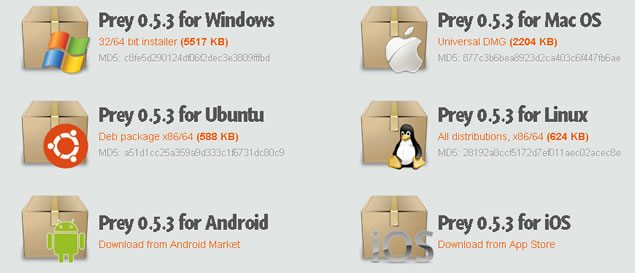
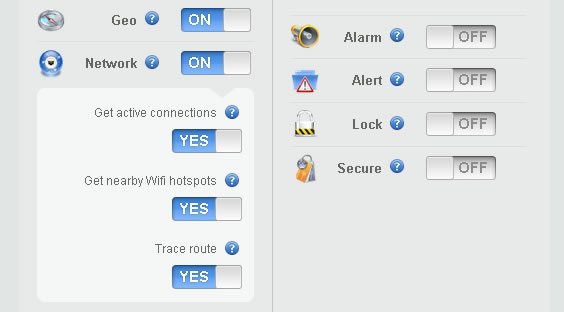
If you are worried that Prey won’t work on your client’s device, have no fear. Prey can be installed on Windows, Mac, Linux, Android, iOS, and even has a specialized version for Ubuntu. While there are other free solutions for Android and iOS, which I’ll refer to later, it can’t hurt to have more than one in case one of the theft protection solutions is detected by the thief, and disabled. With multi-platform support like this, your client can track a laptop, smartphone, and tablet, all from one account. The free version offers 10 reports per device, WiFi and GPS geolocation services, and offers data protection features such as onscreen remote alerts, lockdown, alarm triggers, and will wipe sensitive data from the device if your client chooses that feature.

The ‘Pro’ versions include 100 reports per device, on-demand activation, report frequency at a rate of up to one report every 2 minutes, and keeps a record of your client’s device checking in periodically. It scans your client’s device hardware for changes, and automatically updates by remote. Included in the many features mentioned is access to automated installers which make installing on multiple devices much easier, bypassing the need to manually set them all up one by one.

Protecting Your Clients from Device Theft

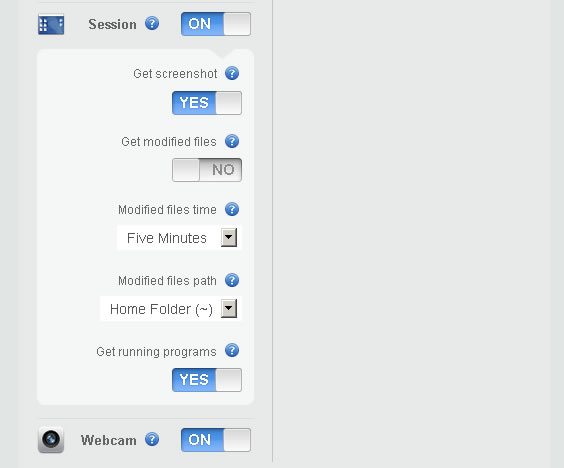
What do the reports include? The Geolocation feature will show your client where on the map their device is, down to the exact coordinates on a Google Map capture. The Network feature will detect nearby networks and detect location based on nearby networks, hotspots, active connections, and a trace route. The Session feature gets a screenshot of what the thief is doing on the device, notifies you of modified files, and running programs. Last in the free service list of features is the Webcam option, which takes stealthy pictures of the thief at the stolen device.

Protecting Your Clients from Device Theft

One warning about the webcam feature on devices with little lights that turn on when the webcam starts up: this may notify the thief that the device is taking pictures, and it may alert them to the fact they are being tracked. On the other hand, the short time the light actually turns on is not very noticeable, unless you’re actually looking for it and know what’s taking place. The average thief will probably not notice or may not realize what the light signifies, allowing your client to track their ‘prey’ unnoticed.

Unfortunately, there seems to be a slight problem with Ubuntu 12.04 taking screenshots of what’s going on, on the screen, when the device is reported missing. I’m sure this will be patched up soon, and while that feature seems to be an issue at the moment, the rest of the report is more than sufficient to track the stolen device down. The screenshot feature may be useful in case the thief tries to log into a social network that displays their name or other personally identifiable information, but may not always be useful in recovery. All in all, for a free service with all those great features, I heartily recommend it to you for protecting your clients from device theft.

There are other solutions for specific platforms, but they are limited in functionality. For example, ‘Find My iPhone’ enables you to find your missing iPhone, iPad, iPod touch, or Mac, display a message, play a sound, remotely lock it, or erase data on it, but only if you access the app from another iOS device. If your client loses their iPhone and doesn’t have another iOS device, hopefully they can find a friend that does, or they might have a problem.

Another handy app for Android devices is called Android Lost. It can read the latest SMS messages from the device and send them to an email address, activate a remote control alarm, view the device location on a map, lock it, and even send SMS messages from a PC to the device. Remote messages can be sent to the device in case some friendly soul has located the device and wishes to return it. On the other hand, the device may contain sensitive data, and the device can be wiped of all SMS data, contacts, and Google setup configurations. Calls can be forwarded, the SD card can be erased, notifications of SIM card changes will be sent via email, and a list of all incoming and outgoing calls will be sent to the owner of the device as well. The camera can also be utilized for taking pictures of the thief, and the phone can still be accessed and data retrieved via the internet. Multiple phones can be used on the same account, and from all the features, you can see why this app is very useful for protecting your clients from device theft.

Some of us have never had our devices stolen, and we’ve never given it a second thought, until a fellow Tech or workmate has lost their device or had it stolen, or a client comes in to get a new device because their device has been lost or stolen. It’s imperative to take preventive measures before the chance becomes reality, and protecting your clients from device theft is an important measure of security in the Tech sector that shouldn’t be neglected.

© Technibble – A Resource for Computer Technicians to start or improve their Computer Business
To get started with your own computer business, check out our Computer Business Kit.
image

Read more:

Why Technology Alone Doesn’t Sell Itself

Authors: Derrick Wlodarz

If you build it, he will come. Or so goes the famous quote. I see this phrase as a metaphor guiding the recommendations of some solely profit-driven technicians in the computer repair and tech industry at large. Technology before purpose; technology above emotion; and the misnomer that technology sells itself.

These are all misguided principles in a digital age that is only becoming more entrenched both in work and personal aspects of life. While some companies, like Apple, can get away with creating blind demand for product, computer repair technicians need to follow more logical approaches to consulting their customers to avoid becoming seen as mere salesman at a big box retailer, itching for every dollar of margin they can drive.

Let’s face it. Budgets aren’t limitless. People’s emotions play a big part into how they purchase technology. And this is the heart of the reason why some customers will agree to pay for certain services over others. No matter how logical or clear something may seem to a technician, unless a certain need is filled by a piece of technology, its value is non-existent to a potential customer.

Time and time again, my company FireLogic is called in to clean up situations where technology was blindly installed to fill unwanted needs or to disproportionately replace other technology before it. This approach is very close to that of what smooth talking car salesman are good at doing. Up-selling vehicles with features people don’t need, or inflating the perceived needs gap so that people fall victim into purchasing more car than they originally intended. Computer repair technicians are in the business of not just pushing product – they are called on to provide unbiased, experienced judgement for the computing needs of individuals and businesses.

Don’t overlook customer emotions

I learned this fact the hard way after a proposed customer project fell flat before takeoff. We properly made the business, technical, and financial case for why a critical piece of software would be better suited being moved and upgraded to a different industry-standard platform. In the end, it doesn’t matter what system they were coming from or supposed to move to because ultimately the project sputtered before any proposal was approved.

What we clearly misjudged was the emotion that went into the product that the customer was using. The piece of software happened to be implemented and supported by a good friend of the customer, and even though our solution was cheaper, faster, and future-proofed, it didn’t matter in the end. The customer had an emotional tie to the platform which extended beyond the technical specs and bottom line surrounding the project. We could have pushed our case (and won) with almost any other business owner. But there was baggage that had to be realized here, and as a result, we backed away and considered it a dead end.

Don’t be afraid to concede defeat to a customer’s emotion. It’s a battle that, no matter how great new tech can be, will never win the hearts and minds of every customer you serve.

Perceived benefit doesn’t always match realized benefit

Hybrid cars are great money savers on gas – until you realize that you won’t actually recoup the initial investment until years after usage. On-premise servers don’t require a subscription like cloud services require – but their licensing and maintenance costs can easily change a business owner’s mind. The problem with technicians that trumpet technology specs above all else is that don’t have a macro view of the customer’s perspective.

I personally love technology and enjoy getting wrangled into discussions about why one concept is better than another. But when it comes to consulting customers, there is no such thing as an “obvious” answer. When coming up with proposals to meet customer needs, I put myself in their shoes to see what their perspective is on a given need. What do they want to spend? What will suit them best for the long term? What’s more than just cool – but actually gets the job done in the given budget and is proven to work as advertised? If you’re merely out supporting one brand’s products because you happen to be receiving commission on sales, then you’re going to lose the trust of your customers sooner or later.

A well-informed technician is able to wade through the distortion field that exists in many aspects of our industry and filter out the knowledge that a customer needs to make an informed decision. The closer you can match realized and perceived benefits, the better your repeat business and referrals will end up being. It’s a proven recipe that works.

Even great technology can still suck

Google Wave was a technology full of promise. It mended the gap between email and other forms of IM, and looked to create a landscape of messaging that was truly email on steroids. It died before it ever went primetime. The same fate fell on the Palm Foleo. If we want to be technically accurate, it was the first true Netbook before Asus’ EEE became a household name.

What do all of these infamous technologies have in common? They met needs which no customers needed filled at the time. To the same extent, they represented a perception gap with their intended audience. Reality just didn’t match up with what the developers expected customers to believe. As technicians, we need to be mindful that just because some technology is great, that doesn’t mean it sells itself. That is, good tech requires purpose and proven need in order to fully satisfy a customer’s desires. Too many times when I see overbearing technology pushed on customers by former IT support companies, it makes me wonder where the technicians’ real allegiance sat: with that of the customer or that of their vendor.

Some of the points I touched on this article were directly pulled from my formal writeup on how to manage customer hardware and software lifecycles which is a great read as well. The biggest thing to remember here is that we need to keep our audience (aka clients) in mind before recommending technology. Even the greatest technologies out on the market can be useless to someone who has no emotional desire for it, or that doesn’t provide the ROI they were looking for.

Either way, as technicians, we are considered the first line of defense when it comes to recommendations and implementation of good solutions. If we break that trust with our customers, our consulting roles will merely be reduced to that of a disposable commodity – up for bid to the lowest priced technician. Technology isn’t always the solution; sometimes it becomes the hindrance for progress.

© Technibble – A Resource for Computer Technicians to start or improve their Computer Business
To get started with your own computer business, check out our Computer Business Kit.
image

Read more:

Knowing When to Let Go of Bad Computer Repair Customers

Authors: Derrick Wlodarz

Building an expanding customer base is one of the utmost concerns for any growing or budding computer repair business. My Technibble articles consistently focus on the various ways to harness new business and keep it for the long term. But an unwieldy topic that comes up in every businesses’ lifespan is the quandary of not only knowing how to let go of a bad customer, but just as importantly deciding when exactly is the right time to come to such a conclusion.

Consider this an unofficial extension to the discussion I started in my previous article that targeted the how-to of firing bad customers. This topic is very fresh on my mind because my company FireLogic recently ran across a situation that required me to make the tough decision to cut ties with what was originally an exciting new customer. While I won’t get into specifics, the reasons to drop this relatively new client were getting more and more evident with each day that passed.

From a lack of client-technician trust, to unwarranted and baseless finger pointing, and temper issues that would make Donald Trump look like a saint, I had to put my foot down and call it quits. It’s very hard to say no to potential business with a straight face, but knowing when the time is right to hasten such a decision will save you a lot of aggravation and time on a growing dead-end relationship.

Going off my own experiences with the above, and similar sub-par customers, here are my top pieces of advice when it comes to dropping bad business before it bites your company’s bottom line.

A client’s trust in your services is as important as their ability to pay

If you’re building a business along the lines that you’ll take on ANY customer as long as they can pay, you’re truly setting yourself up for major bumps in the long term. In the example I used above, one of the biggest reasons I cut ties with this unnamed customer is because of the degrading lack of trust that existed on their behalf. Let me clarify – there was almost no trust in my company from the day we stepped in for the first consultation. This customer cited issues with past technicians as the basis for their lack of trust, but I truly think it was the other way around: no techs could service this customer because they were unmanageable in every regard. This should have been my first clear sign of trouble.

Back to the point, however, is that you should approach each new customer with an eye to see how it is that they view your company as soon as you walk through the door. What kind of language is the customer using in discussions about what they are looking for, and what they expect of your company? Is your expertise and professionalism being questioned right out of the gate? Is the customer acting as the true expert, merely utilizing your services for the sake of manpower rather than professional insight? These are all warning signs to a relationship that could end up in disaster, as I very well experienced just a short time ago. A good rapport going two ways is essential to a solid long term relationship between your computer repair business and your customers.

Don’t get caught in an endless blame game, because you can’t win

Another reason why I decided to cut ties with the aforementioned troublesome customer is because my company was being blamed for numerous IT-related issues that we had no hand in. Our services were called in to help resolve a bevy of problems that were festering until our arrival. Even after our best efforts, we still had the lower hand in a vicious blame game that was being led on by an unnamed third party provider which had a longer business relationship with the client than we ever could have had. I rightfully defended my company’s stance on the issues and our decisions on how to resolve them, but a lack of trust further tarnished our ability to stand on a professional footing through this nightmare.

This rule goes pretty simply: if you’re stuck in a blame game war, either you vs customer or in a multi-party scenario, consider it your beacon that an exit path is needed soon. The customer always considers themselves right and will continue to view you in a poor light no matter what truths you may bestow your stance in. It’s a perpetual game of Pin the Tail on the Donkey, and you guessed it – your company is the eternal donkey here.

Profits shouldn’t blind your decisions on who to work with

Just a few weeks back I argued why trimming services that don’t make money is a good idea. One of my main points in the article was that you shouldn’t let short term profits get in the way of good decision making. There definitely is such a thing as great short term money making that leads to horrible long term repeat business. This same model stands true for customers that should ultimately be dropped for a combination of reasons – some of which may look like what I described above.

I sadly looked past my gut feeling in dealing with the above customer because of the short-sighted promise of multiple near term projects and ultimately a fervent promise of long term business. That should have been one of my first clues to trouble ahead: when a customer uses the basis of their potential future usage of your services as to why discounts and/or promised service should be given in the shorter term. These should red flags for any serious discussion with a new customer, especially business clients that are looking to bring your company in for outsourced IT support needs. Getting entrenched too far with such customers places your company in a bad position and makes it ever-so-harder to cut ties down the road.

Just as much as a customer has the right to choose your company over another, you can freely decide on who YOU want to work for too. Don’t be afraid to practice this two-way right.

Hoping that “next visit” will be better is wishful thinking

I was under the misguided impression that once “all this” blew over with the aforementioned customer, we could get off to a better footing and move forward. Time and time again, I was wrong, and felt the relationship spiraling downward on each subsequent visit. In fact, I dreaded waking up on the days that we were scheduled to be onsite at this client’s location – it literally brought out the worst emotion inside. Even our best efforts couldn’t clear the veil of doubt cast upon my company, and my wishing that the situation would improve didn’t end up happening. Instead, we blew through countless hours of free support that couldn’t be billed out and we had no clear path for moving forward positively on discussed projects.

Your gut feeling shouldn’t be dismissed as mere emotion. If you feel like a relationship is endlessly heading south, it’s probably gone too far already and you’re just catching on. Count your losses, close off efforts to patch the relationship, and follow my advice on how to cleanly cut ties and go your own separate ways.

Computer repair is a service that requires an imprecise mixture of trust, communication, and responsibility which are critical pillars to solid long term relationships. When any one of the above factors fall out of tune, it’s a downhill spiral that only grows out of control, eventually leaving casualties on both sides of the field. Use best judgement when consulting with prospective new customers to save yourself the frustration and stress that comes with defusing irreparable relationships. Just because someone calls for service, this doesn’t mean you are obligated to oblige blindly. An ounce of prevention will go a long way.

What kind of experiences do you have with customers that led you to re-think a relationship? When did you know that it was time to “cut the noose” with a customer? Do you have tips for dealing with out of control situations? Share them with us in the comments section – we’d love to hear about it!

© Technibble – A Resource for Computer Technicians to start or improve their Computer Business
To get started with your own computer business, check out our Computer Business Kit.
image

Read more:

How to Keep “Geek Speak” Out of Client Conversations

Authors: Derrick Wlodarz

As a fellow technician, I know how difficult it can be to have a simplified discussion with customers about highly technical matters. What is bandwidth? Why do I need an x64 processor instead of an x86? How does more RAM actually make a computer faster? These are just a sample of the questions that get tossed my way every week. While I know very well how to tell another technician about these items, bringing the discussion down to the level of the average Joe is another matter.

People skills are tough to teach and that’s a known fact. Many computer repair business owners that I’ve spoken to have outright admitted that they will gladly hire a great people-person that has limited technical skills over an individual with a skillset that is flipped the other way around. My previous years in working IT support for a public high school has taught me that tech people (in general – I’m not saying all) have a hard time in remembering their audience in the line of support they are providing. This, in turn, creates an unwarranted bias against those providing tech support and what they represent.

While not every technical topic can be easily translated into “normal person speak,” a technician needs to make this a top priority in dealing with customers. While some customers will gladly stop you and ask for clarification, many people will merely nod their heads and give you blind agreement over the material being discussed. This not only does a disservice to the person receiving support, but is more often than not seen as condescending to the customer. Saturday Night Live had some excellent skits back in the day called “Nick Burns – Your Company’s Computer Guy” that played off this very facet (in a humorous way, I might add – check one video out for yourself.)

One of the reasons my company FireLogic receives so much praise is because of the people-first approach we take to providing service. I’m not going to lie and say that I’m perfect in this regard myself, but I do make every effort possible to watch over my lingo when consulting customers. It’s easy to get lost in technical acronyms and related geek speak when you are knowledgeable about the realm of computer repair, but remember that your customers are counting on YOU to act as curator and translator of their technical problems. They hire you as an expert in your field and expect to be treated as equals and not as subjects in a college classroom.

Here are the key things to keep in mind when having technical discussions with your own customers.

Use simple comparisons for easy context in technical explanations

This has to be my top tip for dealing with sticky scenarios that involve highly technical concepts that your customer just won’t otherwise comprehend. It merely involves using the simple and known to explain the unknown to customers in a logical manner. I’ve got plenty of examples in my bag of tricks, but here are some common comparisons I make to otherwise difficult technology questions and terms:

Question: Why is more RAM better for my PC?
Answer: Think of RAM as the number of hands your computer has. The more hands it has available, the more work it can get done at once, which translates simply into better real-life performance for your everyday tasks.

Question: Why should I use OpenDNS instead of the DNS my ISP offers?
Answer: DNS is like the yellow pages that your computer refers to anytime you want to visit a website. There are many flavors of yellow pages out there, but OpenDNS is safer because it’s like getting a phone directory that is already cleaned up to remove many of the bad and fake entries that otherwise exist. The cleaner your phone directory is, the safer your online experience will be.

Good car mechanics are skilled at the very same types of translations for their customers. And it wouldn’t be a misguided guess to believe that those mechanics which can relate tough topics to their customers with ease are the ones which will likely see repeat business and foster better (and more) referrals.  I’ve been practicing these kinds of discussions with my customers for years and can usually even come up with comparisons out of thin air. For some techs, this will take a lot of practice, but it will come easier as time goes on. I’m consistently praised for my ability to level with customers in light of previous technicians that simply talked down to them.

Skip the acronyms – unless a customer already knows them

Some of my customers already have knowledge of what DNS, RAM, and CPU stand for. However, unless I know for a fact that someone has already made it known to me that they are aware of an acronym, I won’t bring it up in discussion. Avoid it like the plague. A CPU can just as easily be called a processor; RAM can be equated just fine as memory; and a PSU will always be a simple power supply in the end.

You don’t have to prove to yourself that you have the knowledge of various acronyms, or worse yet, believe that you should be showing off to customers by whipping out acronyms. You may think that you are coming off as experienced and knowledgeable, but you’re going to build a trust gap with your customers more often than not.

One of my colleagues at FireLogic is the funny butt end of an ongoing inside joke due to his past usage of the acronym “API” with a crowd of bewildered entry level computer users at a volunteer training event we held. While it’s a funny rub for us as techs, it’s a prime example that geek speak has its place. And that place is a technician’s lunch break, away from customers.

Use the “lowest common denominator” skill of technical conversation

This piece of advice should be the easiest way to keep geek speak to a minimum. If you’re prone to bringing out the Einstein when you talk to customers, perhaps it’s best to merely assume by default that each customer is unbeknownst to a technical topic unless you either have previous experience with them or they blatantly prove otherwise during discussion. There’s no way to otherwise go astray in your conversation if you treat each customer as a “newbie” and steer clear of the acronyms techs love to throw around.

This is personally how I keep myself in check. I put on the mental brakes that allow me to think twice before conversing about a particular topic that may be above their heads. It’s too easy to otherwise ramble on and get exposed to the inevitable “mental slip” that occurs when we get too technical and don’t even realize it. If you treat each customer under the assumption that they need an explanation, you can catch yourself before the geek speak hits. The worst that can happen is someone will merely cue you in as to their comfort level with the topic at hand, and you can then let your guard down.

Written communication is not exempt

It pains me when technicians that otherwise have excellent verbal communication skills with customers let themselves blabber in tech speak in their invoicing or emails. Your written word is in some cases more critical than the spoken tongue because first and foremost, you generally can’t take back documented record! Whether it be a mailed invoice or a sent email, the “undo” button generally doesn’t exist.

It’s easy to let tech speak fill an email without thinking twice because many people naturally don’t keep mental check of what they write. It’s almost an innate blindness towards realizing what was said as a sentence rolls onward. I get caught in this conundrum many times over when I write articles, and hence why I always proofread my writing for clarity before they get posted. The same guidance should apply to all written communication you have with a customer. Keep it concise; keep out the acronyms; and don’t think that just because you write it they will read it. Customers can have selective reading and exercise that skill quite well.

Poor customer communication can have as much damage on your growing business as inadequate technical work. It breeds mistrust and it tends to foster a growing perception gap between a client and a technician. Using the above guidelines that I practice and enforce at my company FireLogic can be good ways to improve the approach you take with your own customers. You don’t need to be an English major to follow some simple techniques that can ultimately make a great technician an even better communicator.

How do you approach working with customers when it comes to technical lingo? What has worked for you, and what hasn’t? Let us know in the comments section below!

© Technibble – A Resource for Computer Technicians to start or improve their Computer Business
To get started with your own computer business, check out our Computer Business Kit.

image

Read more:

Wi-Fi Testing and Mapping Apps for Techs

Authors: Micah Lahren

As PC repair techs, we’re often called upon to troubleshoot issues such as Wi-Fi network issues, such as low signal, no connectivity, and so on. There are many many apps related to network testing, exploration, security analysis, and basic troubleshooting. Many of these are included in the Linux distro BackTrack, a favorite among those who work in penetration testing and network security infrastructure. However, in this article, I’d like to highlight two Wi-Fi testing and mapping apps for techs, both of which are freeware. They are invaluable for wireless network mapping, and should be included in every tech’s toolkit. Depending on what you use in the field, laptop, netbook, tablet, or smart phone, and depending on the area you’re analyzing, one or the other might be more useful. Both support 802.11a/b/g/n, as well.

Ekahau’s HeatMapper

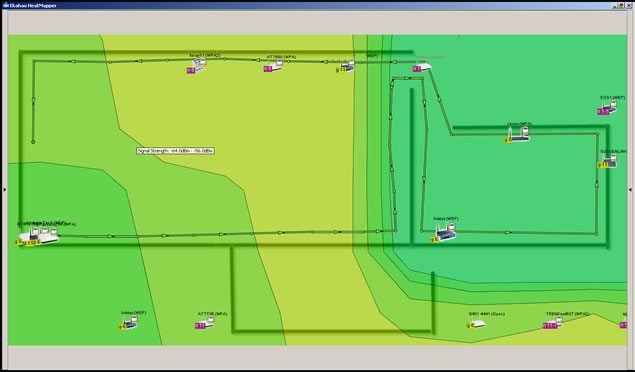
HeatMapper requires a device running Windows, and only takes a minute to install. There are two mapping options. You can upload a floor plan image, a screen-shot of a geographical map of the area you’re testing, or any other diagram that could be used as a floor plan. Alternatively, you can use the ‘grid’ option, which is basically a basic grid that you use to map your own ‘floor plan’ for network mapping. After you choose your option, you’re shown all available networks, and you can click on the area, and start walking. As you continue walking around the area you’re mapping, continue clicking at intervals to provide location coordinates to assist in accurate mapping.

Wi-Fi Testing and Mapping Apps

HeatMapper will show the Wi-Fi coverage, including all access points, their security settings, their channel, speed, and more. It should work with any built in network adapter, as well as external wireless adapters. I’ve found the speed with which it maps target areas to be exceedingly fast, compared with some other testing apps I’ve tried. It’s very accurate at locating network access points, based only on signal strength and the coordinates you provide by clicking on the map or grid as you walk.

Wi-Fi Testing and Mapping Apps

I should mention that this app limits your continuous site survey to 15 minutes, but it will probably be a rare occasion that you’ll need to spend more than 15 minutes walking through your testing area. If you have more than one floor, you’ll probably need to have a floor plan image for each floor. If you try to put all floors on one floor plan image, it’s not likely to come out very well. Instead, the signal strength lines will probably end up skewed and out of alignment. At the end of each survey, you can take a screen-shot, and keep the image for reference in your results.

Meraki’s WiFi Mapper

I found Meraki’s WiFi Mapper very useful as well. It’s a browser app, but it can also be used even when you’re not connected to the internet. As a browser app, it will function on most tablets and some smart phones as well, and this is where it really shines. Google Map integration is included, which means you can pull up your location on a Google Map, and simply start clicking as you walk around, pausing as it tests.

Wi-Fi Testing and Mapping Apps


You’ll notice it’s not quite as speedy as HeatMapper, but what it lacks in speed is made up in other features. After signing up for an account, you can upload floor plans and use them as maps. Unlike HeatMapper, here you can upload a floor plan image with several floors on the same map, and use the same map during the whole survey. The interface is very easy to use, and I found the color coding feature has a very professional look to it, and it’s easy to locate spots with very low signal.

Wi-Fi Testing and Mapping Apps


WiFi Mapper is only in the beta phase, which is very promising, considering what it currently offers. There doesn’t seem to be any time limitation on the site survey, which also favors those who need a multi-story site survey. However, I do recommend that while you’re walking around and clicking to provide coordinates, stop walking while it runs the test for the coordinates you just provided, to provide better accuracy. I’d recommend going to Meraki’s site for WiFi Mapper, and over here for HeatMapper, just to check them out. Meanwhile, talk a walk around your office or business, and test your network coverage with whatever mobile browsing device you have handy.

Do you have a favorite Wi-Fi testing app you frequently use in your work? Leave a comment!

© Technibble – A Resource for Computer Technicians to start or improve their Computer Business
To get started with your own computer business, check out our Computer Business Kit.

image

Read more:

Why You Need to Patch More Than Just the Operating System

Authors: Guest Writer

Guest Post by Ronn Hanley:
Applying security patches to the Operating System of your computer can save you a ton of trouble when fighting viruses and malware. The problem is, as technicians we don’t always go far enough when it comes to patching software and hardware. It’s important to realize that you and your clients are vulnerable from other directions as well.

Just OS?

Most clients understand their systems have vulnerabilities, but they’ve been conditioned by one marketing campaign after another that once the operating system is patched they’ll be protected.

It’s a given that patches come out for everything from MS Windows to every version of Linux. The problem is, in the rush to protect the ‘main’ system, it’s possible to forget that support software has the same or even worse vulnerabilities. This includes office suites, productivity software, online games, web browsers, document viewer or rendering software, plug-ins, and system firmware – free, shareware or commercial – the bad guys don’t care.

It may seem like a no brainer that simply patching the operating system isn’t enough, but how obvious is it really? I’ve been doing this for a long time and I only became aware of how serious the ‘third party problem’ is within the last 3 or 4 years.

Clients want the fastest answer to their problems. Most know that if they are using a Windows system there will be patch releases that they have to deal with and that’s as far as it goes for them. They neither know, no care that there may be other issues to deal with. This is one of those things that must be built into your Service Level Agreements’s (SLA) not only to cover you, but to make sure that the client isn’t left hanging.

Research is key

Malware writers are on a constant hunt to find weaknesses in all software and every time a security patch comes out they are immediately find ways to circumvent it.

If you’ve worked with your clients for any length of time you have an idea of what’s on their systems. If part of your SLA is doing updates to software or firmware it’s always a good idea to keep a log of what software they have installed, when the last update was done and whether or not any new vulnerabilities have cropped up since your last visit. This is why documentation is so incredibly important.

I keep a running log of my client systems that’s only a page long. It has a list of the major and support software that they use on a daily basis. This process can be time consuming to start, but once the basic list is done, it’s easy to update or remove entries. The way I look at it, if this is the first time I’ve sat at a computer I automatically assume that NOTHING has been updated, this keeps me from missing things.
Belonging to sites like Technibble or Techrepublic (well, back in the day…) can pay off. Reading articles or being involved in forums can give you a heads up about which software is the current favorite of malware attacks. There’s no way you can know it all, or even keep up with every little change.

That’s where a helping hand can be a great thing.

Software that can help

I’ve found Secunia PSI to be an invaluable tool for Windows based systems. The software can either be used as a downloaded app which will scan the entire PC on demand looking for software that needs to be updated and then pointing you to the manufacturer for download or purchase. It can also be set to routinely scan the system and give you updates when something has become outdated, but I don’t recommend this setting in a business environment since its likely to slow the PC down. The software can also be run as a web based app, but it will only do a surface scan and can miss programs.

Secunia PSI is designed for home PC’s but they do have a version for Enterprise level systems called Corporate Software Inspector (CSI) which is designed to act as a vulnerability scanner with a patch management system running on the back end.

The programs work well on Windows based PC’s and the company claims they work well on Apple, but I haven’t been able to test that yet.

About the only complaint I have with the software is that it can take some time (5 to 10 minutes) to scan a full HD and report its findings. And then for some third party software you have to visit the company website to get the update or patch. PSI will automatically update most software, but not all.

Ultimately you protect your clients

The larger software companies have teams of people looking at their software, finding holes and then patching them. The smaller developers don’t have that kind of manpower or capital, so it’s no surprise that a third party application is going to be more vulnerable. That doesn’t mean that it has to be a crap shoot every time you sit down to take care of a system.

It may take some time to develop a solid plan to keep your clients patched and protected, but that time is an investment in your business and the health of your clients systems.

Guest Post by Ronn Hanley: Ronn is a technology enthusiast from way back, during the dark ages of the Arpanet and the Purple monochrome monitor screens. His first computer was a Commodore PET and his first laptop was the size of a suitcase. Despite that, he loves computers and technology to distraction and has been working in the tech world for almost 10 years full time, currently as the owner of a Desktop and Network support company in Atlanta, Georgia.

© Technibble – A Resource for Computer Technicians to start or improve their Computer Business
To get started with your own computer business, check out our Computer Business Kit.

image

Read more: