Kill the Employee Mindset or your Business is Doomed

Authors: Guest Writer

Guest Post by Ronn Hanley:
On paper my business is three years old.

In reality, it began more than 30 years ago.

The desire to own my own business isn’t new. I’ve always known that I have less control of destiny if I work for someone else. The problem is, early education, a large portion of average home life and life’s general experience doesn’t prepare you for being your own boss.

When I started my company, I did everything wrong. I gave away time and service for free. I sometimes forgot previous scheduling and had to backpedal after realizing that being in two places at the same time really is impossible. I obsessed over having to tell clients no. Despite all of this, I managed to survive by realizing that beginners have a lot to learn and trying to give myself a break.

Despite all of my ‘growth pains’ one constant thought has run through the whole process of getting to where I am now. I’ve made it a goal to be mindful that I’m doing something outside of my ‘training’.

Early life and school seem to be designed to turn us into good little automatons. We’re told to get good grades, do the right (safe) thing, graduate and then join the workforce. We’re taught to do our best for the group. Individuality is frowned upon in most instances. I’m not saying its like this for everyone, but for the great majority of us, it is.

When you start a business, no matter what kind it is, it’s very possible you are attempting to break out of 15 to 20 years of indoctrination. If you spend time in the workforce before starting the business, the problem is even worse.

When I started my company, I had been an ‘employee’ for 30 years. All I knew was how to ‘wait’ for work to be brought to me. Like most employees, I was somewhat proactive, but I never really went out of my way to do things. This was the result of being burned for trying to think outside the box in corporate settings.

My biggest issue to overcome – and if its your’s as well, you’ll understand – is putting the employee mindset in its proper place.

I’ve consistently caught myself saying WE towards my clients, as if I were something more than a vendor. It’s hard wired into me to make myself part of the ‘group’.

On the face of it, the mindset isn’t a bad thing. I’m able to quickly acclimate myself to whatever setting I find myself in. It allows me to connect to my client and get the job done faster with less awkwardness.

The problem is, once its time to sever that cord and move on to the next job or client, I sometimes run into an emotion wall. This issue tends to show up with my long term clients or for those that I have intense daily interactions. I tend to blur the lines of what a client should be. I look at the client more like a co-worker than what they truly are – a client that’s paying me for a project or my services. I’ve never noticed this issue with clients I don’t have daily interaction.

My largest client is also my oldest. In a lot of ways they are more like a job than a client. I know their goals, strengths and weaknesses. And I honestly wonder if I should know what I know about this client. If I’m just supposed to be a vendor, shouldn’t I keep it in the realm of – do a job, invoice them and keep it moving?

But that’s not what happens. I find myself emotionally entangled with their company goals and problems. During meetings or jobs I find myself saying WE a lot.

And this was my original point. The WE comes from my training to be a good team player. 30 years in corporate and private America has left its mark on me. Chances are you have a similar story.
If you’re wired this way you have to be actively aware every day that a certain distance is necessary – this means home user clients as well as businesses.

It doesn’t mean you have to be some kind of emotionless machine. Your clients are people who need to see the confidence and humanity you bring to the table as a problem solver. BUT the minute you violate that boundary you set yourself up for all kinds of problems. Their issues aren’t your issues (to the extent that their issues don’t interfere with your ability to do what they contracted you for).

I remember a conversation I had with the very first IT contractor I ever met. I was working for a heating and cooling company in Portland, Oregon and he had come by to fix some computers. During a break, I found myself talking to him and I mentioned a problem that we were having in the office. He stopped me before I really got going and said – “Please don’t tell me about the problems here, I don’t involve myself with my clients internal issues. I don’t have the time or energy for it.”

At the time I thought he was being an arrogant jerk, but now, all of these years later, owning my own business, I get it.

Your business lives or dies based on the way you conduct yourself around clients. I don’t mean just acting like a professional, I mean actively keeping yourself from getting drawn in and sidetracked by clients internal issues. I can’t imagine a faster way to reach burnout than ignore the trained in employee mindset while you’re trying to build a business.

A few things I do to help me ‘keep it real’ include:

  • Plan for my business to solve problems for more than one client. If I wanted to help only one entity I’d get a job.
  • Realize that my clients have issues have NOTHING to do with the growth and continued operation of my company. (I know this sounds like Duh, but its harder than it looks when you truly care.)
  • Realize that my clients can only see within their own little world. As a business owner I have to see in different spectrum’s.
  • Stay mindful that my employee mindset is a trained response and its stronger than it seems
  • Remind myself (sometimes daily) that one client won’t pay the bills or allow for me to grow this business to what it could be, no matter how nice they are or how much they seem to need me.

Good luck.

Guest Post by Ronn Hanley: Ronn is a technology enthusiast from way back, during the dark ages of the Arpanet and the Purple monochrome monitor screens. His first computer was a Commodore PET and his first laptop was the size of a suitcase. Despite that, he loves computers and technology to distraction and has been working in the tech world for almost 10 years full time, currently as the owner of a Desktop and Network support company in Atlanta, Georgia.

© Technibble – A Resource for Computer Technicians to start or improve their Computer Business
To get started with your own computer business, check out our Computer Business Kit.
image

Read more:

Randy The Tech Professor

Hello everyone,

I started a computer repair/tech blog about three years ago. I was experiencing so many different repair scenarios on a daily basis that I wanted to write about them.

I have always liked to write and teach as well as share any knowledge with others. If you would like to check out the blog you can do so here: http://randythetechprofessor.com

Any comments, suggestions, additional tips, etc. are very welcomed and appreciated.

Best wishes,

Randy Read More…

Read more:

Disk2VHD – Turn Physical Disks into Virtual Machines

Authors: Bryce Whitty

Disk2VHD is a free application that will make a copy of a hard disk from within the OS using Windows’ Volume Snapshot capability. This copy can then be mounted in Windows as a ‘disk’ or run as a Virtual Machine.

Some of the reasons why you would want to do this is to make a backup of the OS, test a repair in the virtual machine copy before you do so in the live environment or move an existing OS installation into a new or different one. For example, backing up a clients install of Windows Vista, doing a clean install of Windows 7 and then allow the client to run their old Windows Vista install in a Virtual Machine.

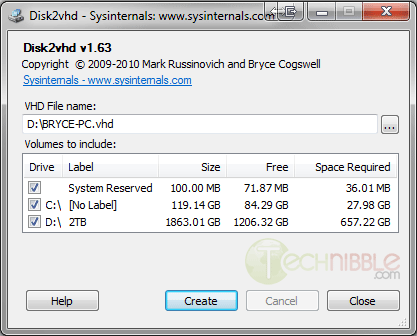
The application is small, fast, portable and very easy to use. Simply run the executable, choose the location where you want to backup the Virtual Machine image to, tick the drives you want to make an image of, and press “Create”.

As the name suggests, the image gets turned into a .VHD file which is native to MS Virtual PC. One downside of MS Virtual PC is that it only supports a maximum virtual disk size of 127GB. However, other software such as VirtualBox can also open .VHD files and support much larger image sizes.

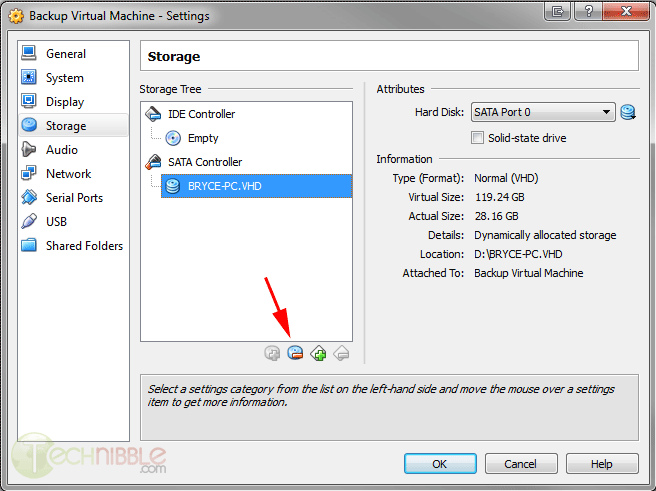
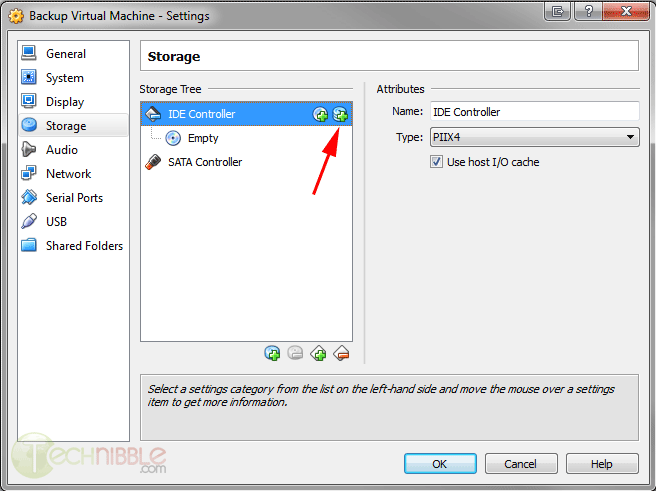
In my own tests, I made an image of my C: drive which took around 5 minutes. I opened up Virtualbox, pressed “New” and went through the Create Virtual Machine wizard. When the Hard Drive stage came I chose to “Use an existing virtual hard drive” and chose the .VHD file that Disk2VHD created for me. I got a Blue Screen of Death when I first tried to boot the VM but the solution to this was to go into the virtual machines settings, goto Storage, remove the .VHD file as a SATA controller and add it back in as an IDE controller. After I made that change and booted the Virtual Machine everything worked fine.

Screenshots


Downloads

Download from Official Site – 812kb

Special thanks to 16k_zx81 on our forums for recommending this one.

© Technibble – A Resource for Computer Technicians to start or improve their Computer Business
To get started with your own computer business, check out our Computer Business Kit.
image

Read more:

How To Shop on Behalf of Clients as a Computer Technician

Authors: Bryce Whitty

If a large part of your client base is residential then you may have been asked “shop around” on a clients behalf. The client knows they need to purchase something but want to do it alone because they want to make sure they dont purchase the wrong one or get ripped off. This usually occurs in two ways:

  • 1. The client tells you what they want, you look around for an item that does what they need and gives them the best bang for their buck, then they purchase it through you.
  • 2. The client already had a store in mind to purchase the product from (usually a Bigbox store) and wants you to help them choose the right one.

While this sounds like an easy way to make money, how do you charge? Do you charge for your time or do you place a markup on the product?
Well, there is a right way and a wrong way to go about this and if you get it wrong, you can end up wasting a lot of time or upsetting your customer.

The client will generally let you know whether they want to purchase through you or purchase from another business but you may have to ask. Here is what to do in each situation:

The Client Wants To Purchase From You

If the client wants to purchase the product through you, then you simply to treat this like you would with any other stock you carry, where the markup makes it worth your time. You do the research for your client, you buy the product through your business and place your markup on it that is appropriate for the amount of time you spent, and the client never knows who your suppler was.

The Client Wants To Purchase From Another Business

If the client has another business in mind like BestBuy or Newegg, you need to charge based on your time rather than have a markup. Marking up a product is difficult to do in this situation without looking like like you picked a price out of thin air.

For example, which way sounds sounds more legitimate?

  • “Here is the screen from BestBuy which cost $150. That’ll be $200 please”
  • “Here is the screen from BestBuy which cost $150. It has been an hour at fifty dollars an hour, so that’ll be $200 please”

The first looks like you plucked a price out of thin air, the second sounds fair enough.
The best way to go about this is to shop with them either physically or using remote support software to shop with them online. This way they know they are taking up your time and that you need to charge for it.

Otherwise, if you tell them what to purchase after you put in the time researching for them, it is possible that they will just go buy it from a Big Box store and circumvent you entirely. There was a topic similar to this in the Technibble forums recently where Lisa from Call That Girl said: “We tell the clients to pay us for our shopping time. Remote time with me is our normal rates, $59-$79 to shop online together, or they can take my lead tech to Microcenter and he’s $125 an hour. We save people money by shopping with them.”

Following the simple guideline above, this should help prevent you from getting stung when shopping on behalf of your clients.

© Technibble – A Resource for Computer Technicians to start or improve their Computer Business
To get started with your own computer business, check out our Computer Business Kit.
image

Read more:

Dropbox Portable – Run Dropbox form a USB Drive

Authors: Bryce Whitty

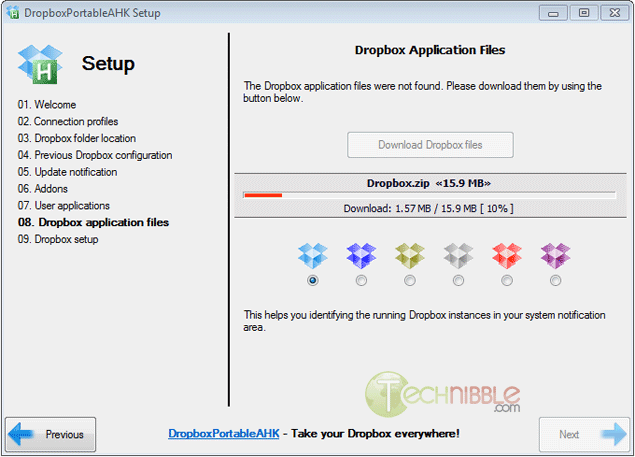
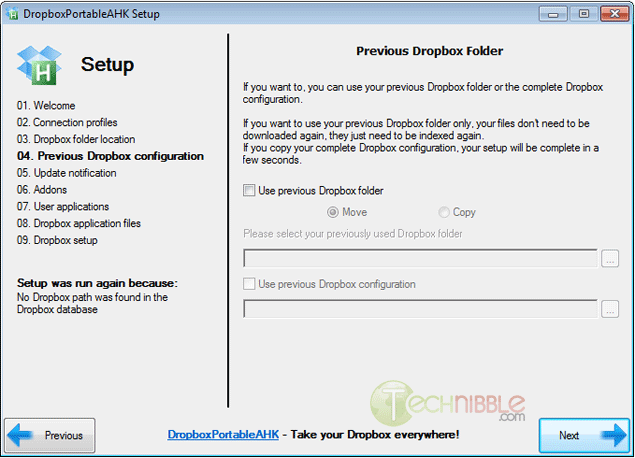
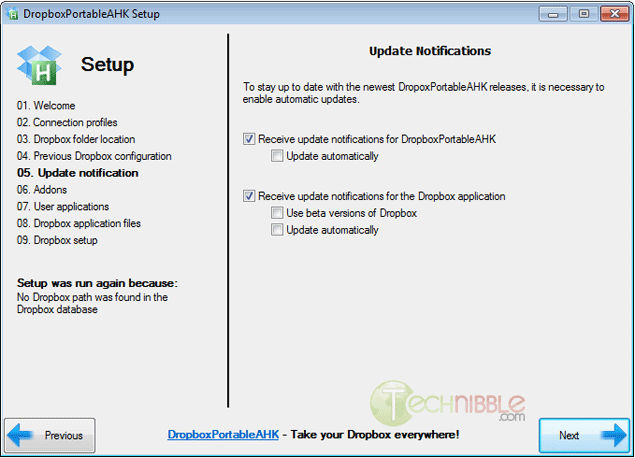
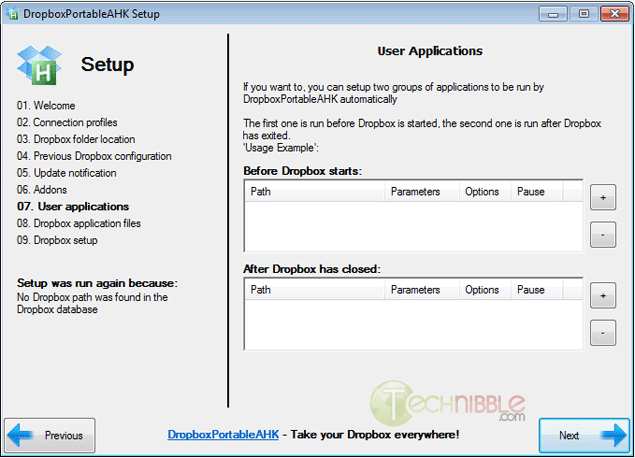
DropboxPortableAHK is a portable version of Dropbox made possible with a small application written in the scripting language AutoHotKey. While this is not a repair tool, there are a huge amount of technicians who make use of Dropbox to access files while onsite. This application allows you to run Dropbox from a USB drive and sync files that are contained on your Dropbox account. Other than the obvious benefit of being able to access your Dropbox files on your USB key, it doesn’t leave any files on your clients computers and can be run when you don’t have administrator permissions.

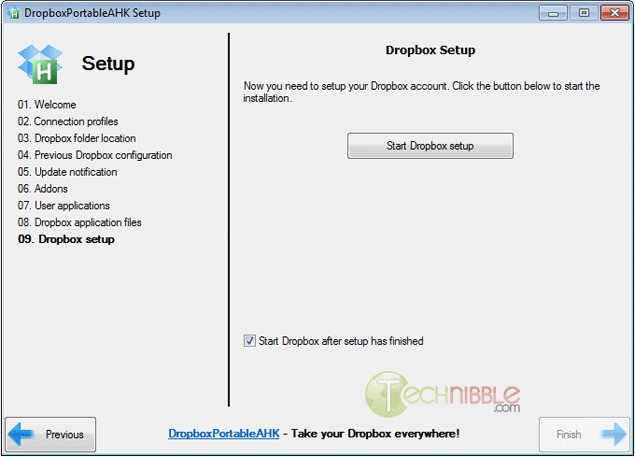
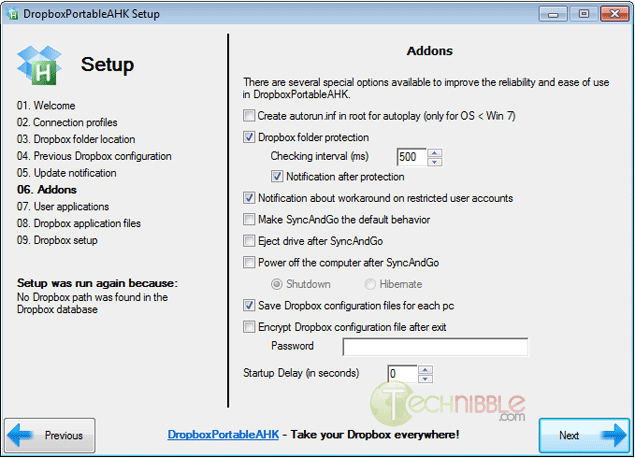
The setup application itself has some nice features such as allowing you to create an autorun.inf file to automatically start software on your USB drive, import the Dropbox folder and optionally make it so the application syncs all files before you exit Dropbox.

One caveat is that this software uses Dropbox version 1.1.45 which is an older version. The reason why they use an older version is because newer versions encrypt their configuration files which prevents this application from changing the Dropbox path to your USB drive.

To install DropboxPortableAHK, download and extract the zip file to your USB key, run the DropboxPortableAHK.exe file and follow the prompts.

Screenshots

DropBox Portable
DropBox Portable
DropBox Portable
DropBox Portable
DropBox Portable
DropBox Portable
DropBox Portable
DropBox Portable
DropBox Portable


Download

Download from Official Site – 1.4mb

More Information

© Technibble – A Resource for Computer Technicians to start or improve their Computer Business
To get started with your own computer business, check out our Computer Business Kit.
DropBox Portable 1 1

Read more:

A Short FAQ on IPv6 For Computer Repair Technicians

Authors: Derrick Wlodarz

Few technological shifts in our tumultuous industry have moved as slowly and methodically as the long-proposed shift to IPv6. The confusion surrounding this radical new approach to the way we view networking is still quite high, especially among computer technicians I speak to.

I’ve heard them refer to IPv6 as “the new internet” or “version 6 of the web.” Clearly there is an informational disconnect between those on the front lines working with these technologies and the major players pushing this change in the networking realm. If technicians are to be prepared to answer questions that customers will be asking as this revolution heats up, they need to have a base understanding of what IPv6 not only is, but what it aims to accomplish.

I want to address some of the most common concerns and questions about this shift, what it means for technicians, and most of all, what it means in real terms for the customers you support. For all intents and purposes, IPv6 is already a real technology that is steadily being implemented across the web – starting with the innermost core hardware that runs the modern internet and moving outward towards the hardware/software at the end-user level.

Here are some of the most important things you should know about this increasingly important standard.

What exactly is IPv6?

IPv6 is just short for Internet Protocol Version 6. When most technicians think about networking, they probably encounter network addresses at customer locations that look like 192.168.1.120, 10.1.1.150, or similar. These are all considered IPv4 (Internet Protocol Version 4) addresses which are the most prevalent and represent what a majority of equipment and software developed up until about 2007 solely utilized. The new standard doesn’t represent any new version of the internet as a whole; it merely updates the way in which devices and software inter-operate with one another.

What was wrong with IPv4 that it had to be updated?

One of the biggest reasons for the push to IPv6 is the real fact that we are slowly running out of IPv4 public addresses. Simply put, IPv4 is a 32-bit addressing scheme which translates into an available pool of only 4,294,967,296 addresses. That may seem like a lot of addresses, but we are very near the exhaustion point for much of what is publicly available. The use of NAT has pushed off the inevitable, but it’s more of a bona-fide bandage then an alternative to switching to IPv6. As they say, you can only slice a pie so many ways – eventually, there’s none left to go around.

The way that these public IP addresses get handed out globally is ultimately led by an authority known as IANA (Internet Assigned Numbers Authority.) This body hands address “pools” out to various RIRs (Regional Internet Registries) across the world, which in turn trickle down addresses to ISPs (for customer internet access, like what you are using to read this website now) and other parties that request them.

IPv6 redefines the addressing scheme for networking devices and software to a 128-bit structure. This allows for a near limitless number of addresses, or 2128 to be numerically exact. Technical experts proclaim they never expect there to be another address shortage due to IPv6. If that holds true obviously remains to be seen.

You can view a neat countdown ticker of how many IPv4 addresses are left in global registries provided by INTEC, Inc.

How quickly do I have to upgrade my customers’ infrastructure?

This is quite a tough question to answer with 100% certainty as most experts in the networking fields still don’t have a uniform voice to lead the way. Some claim that there is no pending crisis due to the depletion of IPv4; others are clamoring for a brisk and swift change to IPv6. I’m not in the camp that is calling this a global crisis yet, but I do believe that the reasonably mindful thing to do is to ensure that all new network gear you are purchasing for customers is IPv6 compliant.

Thankfully, this task is not as difficult as some may think. Most new networking hardware that has been in production since about 2010 (with a fair number of devices pre-2010 as well) natively support the IPv6 standard out of the box. This means that, in general, you don’t have to “hunt” for gear that supports IPv6. It’s still a good idea to check the equipment you are looking to purchase because some legacy gear on the market still doesn’t have dual compatibility. Spec sheets are always publicly available for most equipment sold and you can easily keyword scan them for IPv6 references.

In terms of “when” your customers should be IPv6 ready, this is also a catch 22 dilemma. Most networking realists are taking the cost-effective approach that all new gear going into place should have full IPv6 compatibility, and the hope is that slowly all equipment will be replaced by the time IPv4 is phased out. This is because coexistence plans are already in place for using IPv4 side-by-side with the new IPv6. Schemes such as dual IP stacks and IPv6-over-IPv4 tunneling are some of the methods that we will live in a cooperative networking world for the near term.

In plain terms: just ensure you are purchasing IPv6 capable equipment when the need arises; ensure that all new equipment has IPv6 turned on by default; and don’t turn IPv6 capability off within Windows for customers.

Do Windows and MAC OS X handle IPv6 already?

This is a common concern among technicians I speak to, and it happens to be the area that is already in place for IPv6. Microsoft included full out-of-the-box support for IPv6 in Windows Vista, 7, and 8 (a full compatibility chart has been posted for Microsoft products.) Windows XP has support too, but it has to be installed manually per these instructions.

Apple has our backs on IPv6 too, and has included full support for the new protocol since OS X 10.1 (it has only been turned on by default since 10.3, however.) In basic terms, technicians don’t have to do much for customers running Vista or above, and likewise, OS X 10.3 or above. All they need to worry about at this point is to ensure all network hardware is compatible (which is unfortunately much tougher and expensive to get into place.)

How can I test my customers’ IPv6 readiness?

The easiest form of test you can run is a public-facing readiness test from one of the many sources that offer them. A good one that I like to use with customers is aptly named Test-IPv6.com and provides a visual result page with overview on your IPv6 public address, your DNS’ IPv6 compatiblity, as well as simple scores that show how “ready” you or a customer are for IPv6. Take the results with a grain of salt; even though I personally get a 0/10 for IPv6 readiness on this site, there is no immediate crisis since a majority of the world is still working hard to get all the proper switches flipped.

Within Windows, you can check your Network Connection status details for every flavor of Windows since XP to see what your current IPv6 address is; MAC’s control panel area for networking shows similar information for the wired/wireless adapters. To most people this information is not necessary yet… but remember, one day, IPv6 will become as prevalent, or replace, IPv4 that we are so fond of today.

When will IPv6 become necessary for my customers?

If I knew the answer to this, I’d probably be some exec at a large and famous networking company. While IPv6 has been pushing its way into eventual relevance (and necessity, many say) with events like World IPv6 Launch Day, this change is so radical and far reaching that it likely has at least 4-6 years before it becomes a major force in the way we think about networking.

As I said earlier, however, as long as you are playing your part in preparing customers for the eventual switchover (whenever it happens, as gradual as it may be) then you are doing your part in this technical evolution. I’m not scaring customers of my company FireLogic with IPv6 readiness, but am being mindful to always look for IPv6 gear when new hardware goes into place.

More importantly, I haven’t willingly recommended any Windows XP-based workstations to clients in over a year now; Windows 7 is my base OS of choice thus far, with Windows 8 likely to be the eventual standard once it hits in October.

IPv6 is coming, but IPv4 is here to stay – for now

While the best thing technicians can do now is ensure their customers are being softened into an IPv6-ready ecosystem, rest assured that IPv4 won’t be dying in the flick of a finger. As mentioned above, dual-stacking schemes will likely be the compatibility path for some years down the road until a full steamrolling of the networking landscape happens globally. It’s a lofty prospect to see such a radical change happening in even 5 to 10 years, and I’d presume that it may take closer to 15 or more years before we even begin to see the dimming of IPv4 as a whole.

The likely scenario is that websites will slowly start forcing the IPv6 revolution from top-down, and we will see a slow squeeze to catch up by all of the network equipment vendors and software providers alike.

Following the simple guidelines I laid out above, you can help make this transition as painless for your customers as possible. While IPv6 may seem like mere hoopla for the time being, it will soon become a growing reality for the wired world.

© Technibble – A Resource for Computer Technicians to start or improve their Computer Business
To get started with your own computer business, check out our Computer Business Kit.
image

Read more:

Protecting Your Clients from Device Theft

Authors: Micah Lahren

Most businesses that work with sensitive data and have multiple workstations or servers also make use of alarm systems and theft protection services in case of attempted theft. However, many businesses are growing exponentially and constantly send out traveling representatives to do demonstrations or make business contacts. Others are of a mobile nature and require constant travel, often with devices containing the materials for the demonstrations or other sensitive data such as trade secrets or promotional information. As users of mobile devices increase, and dependence on them increases, the loss or theft of such devices are becoming increasingly common, not to mention costly. In some cases, the actual value of the device stolen may be chump change compared with the value of the information on the device and the disruption to business operations. How can you protect your tech clients from device theft, information theft from their device, and potentially assist in recovery of their device?

There have been several anti-theft solutions floating around for some years, some of them paid services, others completely free but offering limited features, while some only offer a 30 day trial period. One service that stands head and shoulders above the rest while maintaining free and open source status is known as Prey. While offering a free service, they offer ‘Pro’ services for an exceptionally reasonable cost, which include more features as well as a higher degree of service. All ‘Pro’ plans contain the same extra features, but are based on how many computers your client wants to track with that one account.

Protecting Your Clients from Device Theft

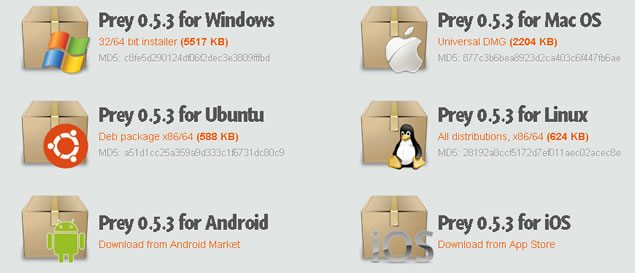
If you are worried that Prey won’t work on your client’s device, have no fear. Prey can be installed on Windows, Mac, Linux, Android, iOS, and even has a specialized version for Ubuntu. While there are other free solutions for Android and iOS, which I’ll refer to later, it can’t hurt to have more than one in case one of the theft protection solutions is detected by the thief, and disabled. With multi-platform support like this, your client can track a laptop, smartphone, and tablet, all from one account. The free version offers 10 reports per device, WiFi and GPS geolocation services, and offers data protection features such as onscreen remote alerts, lockdown, alarm triggers, and will wipe sensitive data from the device if your client chooses that feature.

The ‘Pro’ versions include 100 reports per device, on-demand activation, report frequency at a rate of up to one report every 2 minutes, and keeps a record of your client’s device checking in periodically. It scans your client’s device hardware for changes, and automatically updates by remote. Included in the many features mentioned is access to automated installers which make installing on multiple devices much easier, bypassing the need to manually set them all up one by one.

Protecting Your Clients from Device Theft

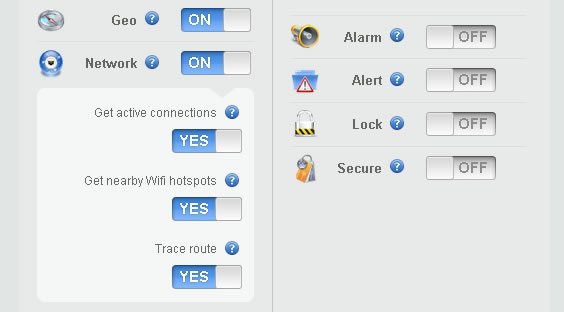
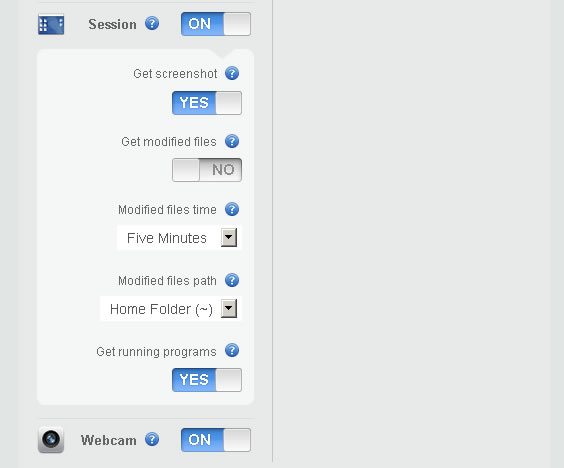
What do the reports include? The Geolocation feature will show your client where on the map their device is, down to the exact coordinates on a Google Map capture. The Network feature will detect nearby networks and detect location based on nearby networks, hotspots, active connections, and a trace route. The Session feature gets a screenshot of what the thief is doing on the device, notifies you of modified files, and running programs. Last in the free service list of features is the Webcam option, which takes stealthy pictures of the thief at the stolen device.

Protecting Your Clients from Device Theft

One warning about the webcam feature on devices with little lights that turn on when the webcam starts up: this may notify the thief that the device is taking pictures, and it may alert them to the fact they are being tracked. On the other hand, the short time the light actually turns on is not very noticeable, unless you’re actually looking for it and know what’s taking place. The average thief will probably not notice or may not realize what the light signifies, allowing your client to track their ‘prey’ unnoticed.

Unfortunately, there seems to be a slight problem with Ubuntu 12.04 taking screenshots of what’s going on, on the screen, when the device is reported missing. I’m sure this will be patched up soon, and while that feature seems to be an issue at the moment, the rest of the report is more than sufficient to track the stolen device down. The screenshot feature may be useful in case the thief tries to log into a social network that displays their name or other personally identifiable information, but may not always be useful in recovery. All in all, for a free service with all those great features, I heartily recommend it to you for protecting your clients from device theft.

There are other solutions for specific platforms, but they are limited in functionality. For example, ‘Find My iPhone’ enables you to find your missing iPhone, iPad, iPod touch, or Mac, display a message, play a sound, remotely lock it, or erase data on it, but only if you access the app from another iOS device. If your client loses their iPhone and doesn’t have another iOS device, hopefully they can find a friend that does, or they might have a problem.

Another handy app for Android devices is called Android Lost. It can read the latest SMS messages from the device and send them to an email address, activate a remote control alarm, view the device location on a map, lock it, and even send SMS messages from a PC to the device. Remote messages can be sent to the device in case some friendly soul has located the device and wishes to return it. On the other hand, the device may contain sensitive data, and the device can be wiped of all SMS data, contacts, and Google setup configurations. Calls can be forwarded, the SD card can be erased, notifications of SIM card changes will be sent via email, and a list of all incoming and outgoing calls will be sent to the owner of the device as well. The camera can also be utilized for taking pictures of the thief, and the phone can still be accessed and data retrieved via the internet. Multiple phones can be used on the same account, and from all the features, you can see why this app is very useful for protecting your clients from device theft.

Some of us have never had our devices stolen, and we’ve never given it a second thought, until a fellow Tech or workmate has lost their device or had it stolen, or a client comes in to get a new device because their device has been lost or stolen. It’s imperative to take preventive measures before the chance becomes reality, and protecting your clients from device theft is an important measure of security in the Tech sector that shouldn’t be neglected.

© Technibble – A Resource for Computer Technicians to start or improve their Computer Business
To get started with your own computer business, check out our Computer Business Kit.
image

Read more:

Why Technology Alone Doesn’t Sell Itself

Authors: Derrick Wlodarz

If you build it, he will come. Or so goes the famous quote. I see this phrase as a metaphor guiding the recommendations of some solely profit-driven technicians in the computer repair and tech industry at large. Technology before purpose; technology above emotion; and the misnomer that technology sells itself.

These are all misguided principles in a digital age that is only becoming more entrenched both in work and personal aspects of life. While some companies, like Apple, can get away with creating blind demand for product, computer repair technicians need to follow more logical approaches to consulting their customers to avoid becoming seen as mere salesman at a big box retailer, itching for every dollar of margin they can drive.

Let’s face it. Budgets aren’t limitless. People’s emotions play a big part into how they purchase technology. And this is the heart of the reason why some customers will agree to pay for certain services over others. No matter how logical or clear something may seem to a technician, unless a certain need is filled by a piece of technology, its value is non-existent to a potential customer.

Time and time again, my company FireLogic is called in to clean up situations where technology was blindly installed to fill unwanted needs or to disproportionately replace other technology before it. This approach is very close to that of what smooth talking car salesman are good at doing. Up-selling vehicles with features people don’t need, or inflating the perceived needs gap so that people fall victim into purchasing more car than they originally intended. Computer repair technicians are in the business of not just pushing product – they are called on to provide unbiased, experienced judgement for the computing needs of individuals and businesses.

Don’t overlook customer emotions

I learned this fact the hard way after a proposed customer project fell flat before takeoff. We properly made the business, technical, and financial case for why a critical piece of software would be better suited being moved and upgraded to a different industry-standard platform. In the end, it doesn’t matter what system they were coming from or supposed to move to because ultimately the project sputtered before any proposal was approved.

What we clearly misjudged was the emotion that went into the product that the customer was using. The piece of software happened to be implemented and supported by a good friend of the customer, and even though our solution was cheaper, faster, and future-proofed, it didn’t matter in the end. The customer had an emotional tie to the platform which extended beyond the technical specs and bottom line surrounding the project. We could have pushed our case (and won) with almost any other business owner. But there was baggage that had to be realized here, and as a result, we backed away and considered it a dead end.

Don’t be afraid to concede defeat to a customer’s emotion. It’s a battle that, no matter how great new tech can be, will never win the hearts and minds of every customer you serve.

Perceived benefit doesn’t always match realized benefit

Hybrid cars are great money savers on gas – until you realize that you won’t actually recoup the initial investment until years after usage. On-premise servers don’t require a subscription like cloud services require – but their licensing and maintenance costs can easily change a business owner’s mind. The problem with technicians that trumpet technology specs above all else is that don’t have a macro view of the customer’s perspective.

I personally love technology and enjoy getting wrangled into discussions about why one concept is better than another. But when it comes to consulting customers, there is no such thing as an “obvious” answer. When coming up with proposals to meet customer needs, I put myself in their shoes to see what their perspective is on a given need. What do they want to spend? What will suit them best for the long term? What’s more than just cool – but actually gets the job done in the given budget and is proven to work as advertised? If you’re merely out supporting one brand’s products because you happen to be receiving commission on sales, then you’re going to lose the trust of your customers sooner or later.

A well-informed technician is able to wade through the distortion field that exists in many aspects of our industry and filter out the knowledge that a customer needs to make an informed decision. The closer you can match realized and perceived benefits, the better your repeat business and referrals will end up being. It’s a proven recipe that works.

Even great technology can still suck

Google Wave was a technology full of promise. It mended the gap between email and other forms of IM, and looked to create a landscape of messaging that was truly email on steroids. It died before it ever went primetime. The same fate fell on the Palm Foleo. If we want to be technically accurate, it was the first true Netbook before Asus’ EEE became a household name.

What do all of these infamous technologies have in common? They met needs which no customers needed filled at the time. To the same extent, they represented a perception gap with their intended audience. Reality just didn’t match up with what the developers expected customers to believe. As technicians, we need to be mindful that just because some technology is great, that doesn’t mean it sells itself. That is, good tech requires purpose and proven need in order to fully satisfy a customer’s desires. Too many times when I see overbearing technology pushed on customers by former IT support companies, it makes me wonder where the technicians’ real allegiance sat: with that of the customer or that of their vendor.

Some of the points I touched on this article were directly pulled from my formal writeup on how to manage customer hardware and software lifecycles which is a great read as well. The biggest thing to remember here is that we need to keep our audience (aka clients) in mind before recommending technology. Even the greatest technologies out on the market can be useless to someone who has no emotional desire for it, or that doesn’t provide the ROI they were looking for.

Either way, as technicians, we are considered the first line of defense when it comes to recommendations and implementation of good solutions. If we break that trust with our customers, our consulting roles will merely be reduced to that of a disposable commodity – up for bid to the lowest priced technician. Technology isn’t always the solution; sometimes it becomes the hindrance for progress.

© Technibble – A Resource for Computer Technicians to start or improve their Computer Business
To get started with your own computer business, check out our Computer Business Kit.
image

Read more: