Brands You Love Hate

Authors: Bryce Whitty

Computer Technicians tend have a special insight into the reliability of computer hardware. Big brands can spend millions boosting their brand but in the end it comes down to the Computer Technicians who really see what hardware lasts and what doesn’t.

In this article I would like to ask you, the reader, what brands of hardware do you love and what brands of hardware you hate and why you feel that way towards them. This can include peripherals like Printers, Keyboards and Mice.

I would love to see what the community has to say and we may even find brands that are highly popular or unpopular with Computer Technicians. Please leave us a comment below, as usual you do not need to sign up in order to leave a comment and you can even post anonymously.

© Technibble – A Resource for Computer Technicians to start or improve their computer business
To get started with your own computer business, check out our Computer Business Kit. Brands You Love & Hate

image

Read more:

How Much Is Your Time Worth?

Authors: admin

A few days ago a hard drive in one of my clients servers showed up as failing. Typically, all the server management is done remotely by another company and I manage the workstations locally. However, since the hard drive was failing mechanically I was asked to do the physical task of removing it and replacing it with a new one. Luckily, the server was in a RAID 1 setup so there was no downtime while removing the failing hard drive.

This server was only a few months old so the hard drive is well within its warranty. On the clients behalf, I found out where the server came from (it was a custom build) and the store owner agreed to swap the failed hard drive.

In order to get the replacement hard drive, they said all I had to do was goto the supplier which was about 15 minutes from my clients location, return the dead hard drive and get it swapped with the new one. I agreed to this because I wanted to get the hard drive replaced quickly.
I went ahead and physically removed the hard drive, destroyed the data using Dariks Boot & Nuke and while I was doing this the store owner called again and told me that the supplier now says that it must be her that does the swap with them and it cannot be me. So, we both agree on a time to meet down at the suppliers.

So, I go down to the suppliers to meet her there and quickly pick up the hard drive but she says that its going to take 4 hours for them to process the return. This was pretty annoying but I did have work to do in the area that should fill 4 hours or so.
Four hours later I return to the suppliers and the hard drive is still not ready but they said it wont be much longer. I start talking to the store owner to kill some time and help keep my finger on the pulse of the computer repair world and found out that she came from a town outside of my city that is a 3 hour drive from here. I asked whether she had any other work down this way today and she said no, she was there only for the hard drive.

The supplier was still taking longer than expected and she complained that she had to pass on some client work in order to be here.
I didnt entirely believe this, why would you drive a 6 hour round trip, pass on client work for a 500gb SATA hard drive?

After a while she goes inside the suppliers building to see what is happening so I talk to her husband who is part of their computer business. He also mentions that it was a 6 hour round trip, they had to pass up client work to be here and they are only in town to return the hard drive.

I was amazed. A 500GB Seagate SATA hard drive could be worth no more than $60 USD. They would have spent $30-40 in petrol for the round trip and could have earned hundreds of dollars by supporting their clients that day. Once we did finally get the hard drive they hopped in their car and left. So they didnt even pick up additional stock to make it worth their while.

I was trying to figure out why they would have done this but the only thing I could think of is they must have believed that they were saving some money because the supplier will swap it for free. Maybe they did it to get it swapped quickly, but there are faster methods.

This is a bad use of time and resources and you cant do this when you own a business. Your time is so much more valuable now and you always need to look at the bigger picture. The opportunity cost in this case was very high, the loss of hundreds of dollars.

If I were in their place, I would have either posted a hard drive with same day delivery from either their town or directly from the supplier to the client and be out of pocket for a little while until I got the replacement on the failing hard drive.
If I had known about the delays I wouldn’t have even bothered getting it swapped for free, I would have just purchased a new one. There is no point my client paying for 2-3 hours of my time to swap a hard drive for free when I could have just billed for 1 hour plus the cost of the hard drive.

So how much was their time worth? Obviously not much.

© Technibble – A Resource for Computer Technicians to start or improve their computer business
To get started with your own computer business, check out our Computer Business Kit. How Much Is Your Time Worth?

image

Read more:

Customer Not Happy With Your Work? Here Is How To Deal With It.

Authors: Bryce Whitty

In this article, I would like to show you how to deal with customers that are not happy with your work. I would like to start by saying that I am not a lawyer and the contents of this article is not legal advice. There is no substitute for the knowledge of a local lawyer specialized in this area of law. Now we have that out of the way, lets get into dealing with these customers.

If you have been in this business for a while, you have most likely encountered a client that is not happy about your work because they believe you didn’t fix the problem properly. It might be that their computer still locks up or perhaps the virus you were supposed to have removed came back. They are fairly common complaints in this industry and here are some ways to deal with them.

Hear Them Out
Whether they are right or wrong, you need to hear them out and let them say what they need to say. The fact that someone is listening to them usually calms them down.
However, if they are being abusive (as in, more than just an angry customer) you can say something like “I hear you and would love help you out by taking a look at the system, but I cannot work with you until you settle down. Please give me call back when you have settled down”. If they settle down after you say that then let them continue, otherwise hang up the phone.

For all of the non abusive customers, always emphasize with their problem by saying something like “Ahh, thats no good. Bring it into the workshop and we’ll take a look at it”. Once the computer is on your workbench you can then determine what the problem and whether it was your fault.

Determine The Problem and Whether You Are At Fault
Its quite possible that you simply didn’t remove the virus completely or you didn’t diagnose the problem correctly. If that is the case you simply need to man up and fix it, then apologize to the customer for the inconvenience. Maybe even offer them 10% off their next repair or some other olive branch to keep the peace.

It is possible that you are completely in the right but you didnt manage your clients expectations correctly. For example, while you were working on the computer originally, you said to your client that “you will install an antivirus product so they dont get any viruses” as a passing comment.
You and I both know that an antivirus product wont completely protect a computer and that it only helps prevent infections rather than completely prevents them. However, when you said that you “will install an antivirus product so they dont get any viruses”, the client heard something totally different. The client heard “once I pay for this, I will never get a virus again”.

This is an example of not managing their expectations correctly and there isn’t a whole lot you can do to fix it after you have done it other than correcting them and remembering not to do it next time.

Did They Do It To Themselves?
A common issue in the Computer Repair business is when a technician removes a virus correctly but the client managed to reinfect themselves a short time after. This comes down to user education and you will need to tell them about the dangers of opening email attachments, clicking on questionable links etc..
You can also make use of applications like IEHistoryView and MozillaHistoryView to prove they were going to potentially dangerous websites. In most cases, once a client realizes that “they have been bad” they usually understand that the reinfection was their own fault and they will need to treat it as a separate incident.

Is It A Scam?
There is a scam out there similar to this that some Computer Technicians have been stung by. The scam is when the scammer drops off a computer to a technician and makes a point of saying that the computer has certain specifications when it really doesn’t. For example, they might say something like “I had the RAM upgraded to 4GB last month” as a passing comment. However, it was delivered with only 1GB of RAM installed. When the scammer returns to pick up the computer, they accuse you of stealing the 3GB of “missing” RAM and make threats of suing you or ruining your reputation.
In many cases, the Computer business will just give them the 3GB of RAM to make them go away.

Make Them Go Away
Having just said that, sometimes it is worth doing something to make the client go away. I have never had this scam attempted against me but there comes a time when you have the choice of being right and potentially getting sued (even though they will lose) and ruining your reputation, or just giving them their money back and telling them not to return. This doesn’t mean that you should let people walk all over you, you should still stand up for yourself but you need to keep in mind that sometimes fighting it is just not worth it.
Why get pulled into small claims court for a day over a $50-100 argument when you could use that day to fix 10 other happy customers computers and earn $1000? Sometimes it is worth just chalking it up to experience and moving on.

Get Paperwork Signed
Having signed paperwork in place is invaluable in these sort of situations and this is the whole point of work orders. When you complete a job, get the client to sign the work order which says they are happy with the work that has been done and they understand your terms and conditions. In one of the Work Orders in the Computer Business Kit, there are some terms and conditions that says that your business only warrants the service that was performed for a period of one month and that does not include any software issues created by the end user such as virus/spyware infections, tampering with the settings etc..

If It Has The Potential To Get Ugly, Talk To A Lawyer
If an issue has the potential to get ugly, talk to a lawyer. Yes, they are expensive but you are not only paying for legal advice, you are also buying peace of mind. You can stress about an issue for days fearing the possibility of getting sued, or you can spend $200 for an hour of a Lawyers time who will tell you that they dont have a leg to stand on and you can sleep well at night.

© Technibble – A Resource for Computer Technicians to start or improve their computer business
To get started with your own computer business, check out our Computer Business Kit. Customer Not Happy With Your Work? Here Is How To Deal With It.

image

Read more:

Questions and Answers #3

Authors: Bryce Whitty

If you have been subscribed to the Technibble mailing list for a month or so, you might have noticed that we have a survey for our members. In this survey we leave an area for you to ask a question about the computer business. In this article, I will be answering some of those questions.

“What is the best approach is when a clients computer is too old to repair or upgrade?”
There does come a time when a clients computer is either not economical to repair or upgrade and sometimes it is not even possible. I find the best way to tell the client about this is to tell them in a way that most people care about – value for money. When I say this with my own clients, I would say something like:
“I have diagnosed the issue with your computer and it appears that the issue is with the computers motherboard which is one of the main parts of the computer. I can replace this old part for $XXX but for a little bit more, I can provide you with a new, much faster and much more reliable computer.
It is just not economical to repair this older one when you can have a new one for the same money”
.
Its upfront, gets the point across and your clients will appreciate you looking out for them.

“How should I deal with clients that are not very aware of new technologies?”
I have found that my clients attitude towards computers are similar to most people with cars, they get in, turn the key and off they go. The car is just a utility to get from point A to point B and they don’t understand or care about how it works. Computers are the same to most of them. They dont care about the latest news in the computer world and the only time they do care is when their stops working (just like cars). I dont think having to “deal with clients” not knowing about new technologies is a negative thing. It is an excellent opportunity to recommend technologies that they may not be aware about.
For example, I might have noticed that my client had an external backup drive sitting on top of their computer so I ask them whether they take it them at night. If they dont I would ask them what they would do if the place caught fire or was broken into and the backup drive was destroyed or stolen (a little bit of fear based marketing). I would then use this as an opportunity tell them about offsite cloud based backup which has only gone mainstream in recent years with brands like Carbonite and Mozy.
I think the trick is to keep it relevant to their needs and interests. I wouldn’t just start yapping about how fantastic the newest CPU/Video cards are. Most people just dont care because the computer is just a utility like their car.

“How to maximize my limited marketing/advertising budget?”
The best ways to maximize a limited marketing budget is to start with either the cheap or free options available to you. If you have a website, the best thing you can do is to read up on some SEO articles/websites and make changes to your site to improve your search engine rankings. Natural search is always the cheapest way to advertise online.
I have heard from other Computer Technicians that Craigslist can bring in some phone calls and Google Adwords can be good since it is mostly pay-per-click.
Social Networking is also option and I am not just talking about sites like Facebook, Twitter or Linked In. I am talking about real life social networking such as joining clubs, making sure everyone you know knows that you do computer repair and handing out business cards.
Also, after you have done work for a client, hand them 3 or so cards and say “Here is my card in case you need me again or if you know anyone else that could use my services”. By saying “if you know anyone else” it actually makes them think about whether they do know anyone else that can use your services. If you do great work it is assumed by default that they will tell their friends about you but it is not always the case. You need to make them actively think about which friends could use your services and this helps push that along.

“How should I deal with “friends” who use you for diagnoses or second opinions, which are always right on, but ultimately go to someone with more experience to do the same work?”
You would need to find out why they go with someone else with more experience to do the work. Are they just not confident with your skills? are they going with someone cheaper to do the actual work? Are they even fixing it themselves once you have accurately diagnosed the issue?

I would also limit the amount of free work you do for friends. I am sure you have a small handful of people that you would do anything for (immediate family for example) but for anyone else, you need to let them know that you are not an unlimited source of free tech knowledge. The key to doing computer repair work for non-immediate family and friends is to always charge something. It doesnt even have to be money, it could be a beer at the local pub or a meal somewhere. When friends ask you to fix their computer, say something like “Sure, no problems, just buy me a beer next time we are at the pub and we’ll call it even”.
Even though the beer is incredibly cheap compared to the value of the computer work that you are doing, it establishes in their mind that you are not an unlimited source of free tech knowledge and that if they want something fixed, it better be worth at least a beer at the pub. This also helps prevent the “quick computer question” that they ask you all the time. Again, that quick computer question better be important enough because they know that they will owe toy a beer.
You do not want to stop being the second opinion though; being the second opinion can bring a lot of work to you.

What are some good ways to get clients off the phone in the store?
Every now and then you will get the client who just cant take a hint. The best thing you can do with these types of people is to take control of the conversation. Don’t let them rant. Ask questions and as soon as they give you your answer, ask your next one so you are the one in control of the conversation. Once you have all the information you need, wrap it up by saying something like “Alright, great. I will see you at 123 Station St on Monday the 11th. See you then.”.
If you haven’t been able to booked in work and you just cannot get them off the phone, you could just say that someone just walked into the shop and you need to go. If you work from a home office, say that you have another call coming through or something to that effect.

How should I document and prove that the repair has actually been done correctly in order to avoid “comebacks” where the customer argues it should be fixed for free, yet the problem (although it looks like the original problem to a non-technical user) is a different problem?
I think this comes down to user education. If you were called to fix an error message when a client did a certain task on the computer, repeat that task in front of the client to show them that it has been fixed. You also need to manage your clients expectations with jobs such as virus removal. Once you remove the original virus they were infected with, you seen to say something like:
“I have installed an antivirus product to help protect you from future viruses. They arent 100% and you need to be careful about what you download and the sites you visit. For example, a trusted friend can send you an infected email attachment because they themselves are infected. You also need to avoid questionable sites, clicking on questionable banner ads etc..”
This puts the responsibility to keep the computer clean back in the client’s hands. When you educate your clients about the ways to get infected, know will when they have been bad and are unlikely to put the blame on you.
I also emphasize the word “help” because we dont want them to think that installing an antivirus product makes them completely immune to viruses.

How do you deal with clients that want to watch everything you do?
This is a tough one and everyone has different strategies. Personally, it doesn’t bother me that they are watching my every move, although I dont want them to learn what I am actually doing. I am fairly quick on the computer and use a lot of shortcut keys so I am usually moving too fast for them to figure out what I am doing.

Some technicians will stop working altogether and talk to the client hoping that they will get the idea that their presence distracts them and prevents them from working which in turn increases the overall bill .
Other technicians will flat out tell the client to go away in the nicest sense. You need to work out what you are most comfortable with.

How can I make money given that super markets and other multinationals are destroying hardware margin?
It is not as easy it once was to sell new computers now that the big box stores sell computers at such low prices. However, there is still plenty of money to be earned in that area.
I personally wont compete against the big box stores in price. In fact, there is a large retail store near my place which is available to any member of the public that is cheaper than my proper “business only” computer parts supplier. The way I make money with hardware is either by installing parts onsite, selling a superior machine or make money with the setup costs.

When I sell a computer part onsite such as a stick of RAM, I could easily have a 50-100% markup on it and the clients are happy to pay it because of the convenience. I am here, I have the stick of RAM with me and I can install it right now. In my 9 or so years of being a Computer Technician I have rarely had a client say no to an onsite hardware recommendation like that.

In some cases, the client will ask me whether a machine at a big box store is good quality or whether it is a good deal. I will ask what type of work they expect to do on the computer and tell them the truth. If it is bad hardware with a bad price then I tell them that I could build something better. If it is a good hardware at a great price then I tell them to go ahead and tell them to buy the big box computer. I dont make any money by recommending the big box machine but I do make them aware that they might need to their emails/files/settings transferred to the new computer and I offer my services. In most cases they take me up on it.

There is still money in computer hardware now that the big boxes are in the game, its just in a slightly different form.

How can I snatch clients from the big companies?
You wont need to. If the big box stores do good work and look after their client, good for them. If they do poor work and their clients get burned, then those clients will come to you.

© Technibble – A Resource for Computer Technicians to start or improve their computer business
To get started with your own computer business, check out our Computer Business Kit. Questions and Answers #3

image

Read more:

Smartphone Applications For Computer Technicians Pt2 – Android

Authors: Bryce Whitty

Last week we listed some iPhone applications that are useful to Computer Technicans, this week we are listing some Techie applications for Android based smartphones.

OnTheJob Management
OnTheJob Management is a tool to help you organise your data by Job. When you view a job it will show you who you are supposed to visit, to fix what, where, when and allows you to enter some notes. OnTheJob Management seamlessly intergrates with your contacts, calendar events and SMS messages. However, it does not have any finances/invoices etc..
OnTheJob Management – Free


WiFi Analyzer
WiFi Analyzer is a wireless network scanning tool that works by listing the wireless access points in range and provides a graphical representation of which wireless channel each of them operates. With this knowledge, you can set your wireless channel to the one with the least interference.
Wifi Analyzer – Free


Teamviewer
Teamviewer is a remote support program that allows you to control computers remotely.
Teamviewer – Free for non-commercial use


LogMeIn Ignition
Teamviewer is a remote support program that allows you to control computers remotely.
LogMeIn Ignition – $29.99


AndroidVNC
AndroidVNC is an open source remote desktop problem. It can connect to most VNC servers including TightVNC, RealVNC on Windows and Linux as well as Apple Remote Desktop on OSX.
AndroidVNC – Free


ConnectBot
ConnectBot is a powerful open-source secure shell (SSH) client. It can manage simultaneous SSH sessions, create secure tunnels, and copy/paste between other applications.
ConnectBot – Free


ES File Explorer
ES File Explorer is a free file manager, app manager and task killer that has the ability to explore both the phone and a PC shares on the network.
ES File Explorer – Free


Dell Service Tag Scanner
If you are working with Dells a lot this is a great tool. This application allows you to scan or enter a service tag to fetch the warranty information for a Dell service.
Dell Service Tag Scanner – Free


PDANet
PDANet allows you to use your Android phone like a 3G modem. It does not require a tether phone plan and you can connect it to your computer via USB or Bluetooth
PDANet – Free limits secure sites. Paid is $15.95


1 VPN
0 01 VPN allows you to connect to VPNs in 1 click by saving VPN usernames and passwords. You can also use its Tasker/Local Plugin feature to connect to VPNs automatically. The application supports PPTP, L2TP, L2TP/IPSec CRT.
1 VPN – $3.61


Dropbox
1 1Sync your files between your computer and mobile device and open them using your favorite Android applications.
Dropbox – Free


Square
2 2Square allows you to Accept credit cards on your Android device with no contract, monthly fees, or merchant account required. Every user receives a free Square credit card reader in the mail.
Square – Free


Newegg Mobile
3 3The Newegg Mobile application allows Android users to search, shop, read reviews and make purchases on Newegg.com. Excellent for those onsite price checks.
Newegg Mobile – Free


Tapatalk
4 4Tapatalk is an application that allows you to read certain forums as a native application. Its faster and more phone friendly that the full sized pages of forums or even some mobile versions. The Technibble forums supports Tapatalk (see pictures here) and it is well worth the money.
Tapatalk – $2.96

A big thank you to the Technibble forum members who suggested these Android applications. If you know of other great applications for the Android that you think should be here, drop us a comment.

© Technibble – A Resource for Computer Technicians to start or improve their computer business
To get started with your own computer business, check out our Computer Business Kit. Smartphone Applications For Computer Technicians Pt2 – Android

7 7

Read more:

Smartphone Applications For Computer Technicians Pt1 – iPhone/iPad

Authors: Bryce Whitty

Smartphones are very quickly becoming an important business tool and they are absolutely ideal for the onsite Computer Technician. In this article, I would like to share with you some iPhone applications that Computer Technicians use in their businesses.

If you have a Blackberry, Android or Windows 7 based smartphone, please list the applications that you make heavy use of (and the device you are using) in the comments below and I will include them in the next Smartphone app article.

Teamviewer
I always had wondered how good a remote desktop application could be on an iPhone with its small screen. I tried out the free version for use on my own machines and found the speed to be very impressive. I was testing it on an iPhone 3G which is one of the older iPhones over the 3G network which can also be slow. I was really impressed with how well it ran. It is free for personal use but you need to pay for the Pro version if you are using it to support any clients.

TeamViewer – Free Version (personal use only)
TeamViewer Pro – $99.99

iPad Versions:
TeamViewer HD – Free Version (personal use only)
TeamViewer Pro HD – $139.99

LogMeIn Ignition
LogMeIn Ignition allows you to directly control one or more of your computers anywhere. It has a different interface to Teamviewer but they both work great on an old iPhone 3G over the 3G network.
LogMeIn Ignition – $29.99

iSSH
iSSH is effectively several clients in one, containing functionality for ssh/telnet/raw connections, an X11 server and VNC tunneling. iSSH supports multiple, simultaneous connections with more complete terminal compatibility, more configurable macro and key options and an intuitive UI.
iSSH – $9.99


TripCubby
Computer Technicians do a large amount of driving going onsite and use up a lot of petrol. Luckily, the petrol that you use to get to your clients house would be considered a business expense so you can you can get a tax deduction or reimbursement. Trip Cubby is an application designed for anyone who needs to track mileage for tax reasons. It was designed with IRS compliance in mind and allows you to export the information as a CSV file via email.
Trip Cubby – $4.99


Squareup
I mentioned Squareup on Technibble a while ago when I wrote about accepting credit cards. Squareup is a service that allows you to accept credit card payments onsite by turning your iPhone/iPad into a credit card reader thanks to a small attachment.
Square – Free (for the application, not to signup)

Scany
Scany is a powerful multifunctional networking instrument for finding connected devices, looking up detailed device information, network troubleshooting, scanning ports, testing network security and firewalls.
Scany offers lots of useful tools in addition to its primary feature of scanning your Wi-Fi, LAN or any other network and providing detailed information about any device connected to it, its domain and network names, addresses and vendor. Scany also includes a whole set of networking utilities such as ping, traceroute, remote wake (WOL), Whois, Geo IP and shows information about active network connections along with the external IP address of your router.
Scany – $0.99


BSOD: Stop Codes
BSOD: Stop Codes is an application that provides indexed information on Microsoft Windows (blue screen) stop codes. This application allows you to lookup common stop codes that can be found on the MSDN web site provided by Microsoft without the need for an active cellular data or wifi network.
BSOD: Stop Codes – Free


Dropbox
Dropbox is an incredibly useful and powerful service that allows you to sync files between computers and devices. Dropbox is so well known that many other applications also allow you to syncronize the data made in that application with your Dropbox account.
You can create a free Dropbox account here.
Dropbox – Free


Aplayer
Aplayer is an application designed to allow the user to view their IP based security cameras from their iPhone. I have heard of some Computer Technicians using it to keep an eye on their technicians in the shop while they are onsite.
Aplayer – Free


Newegg
0 0The application Newegg is exactly what you expect it would be, Newegg for the iPhone.
The application provides you with an iPhone optimized layout of the website which is great for onsite price checks.
Newegg – Free


Amazon
1 1Just like the Newegg application, its Amazon for the iPhone. Again, great for quick onsite price checks.
Amazon – Free


Run Your Client Management Software
Dont forget, many Client Management solutions also have web option which allows you to access it on a mobile device. CommitCRM is a desktop application but also runs a web server allowing you to access it via the internet. mHelpDesk has a native iPhone application and ShopManager is a web based application so you can also access that via you mobile browser. You can also make a shortcut link to your CRM appear on the main page of the iPhone.

If you believe I missed any great iPhone applications for Technicians that are worth a mention, please leave us a comment. If you have a Blackberry, Android or Windows 7 based smartphone, please list the applications that you make heavy use of (and the device you are using) in the comments below and I will include them in the next Smartphone app article.

© Technibble – A Resource for Computer Technicians to start or improve their computer business
To get started with your own computer business, check out our Computer Business Kit. Smartphone Applications For Computer Technicians Pt1 – iPhone/iPad

4 4

Read more:

The Cheapest Laptop Screw Management System – That Works Great!

Authors: Bryce Whitty

One of our Technibble forum members shared with us a fantastic way to organize screws when disassembling a laptop. The need to organize laptop screws comes from the fact that there are many screws with many different sizes and lengths depending on which part it came from. Getting the laptop apart isnt the problem, but knowing which type of screw went where when putting it back together is. Its incredibly frustrating to have left over screws when you put the laptop back together again and then trying to figure out where it came from.
This is one Technibble members solution to the problem.

Aaron from Aarons PC Support said:
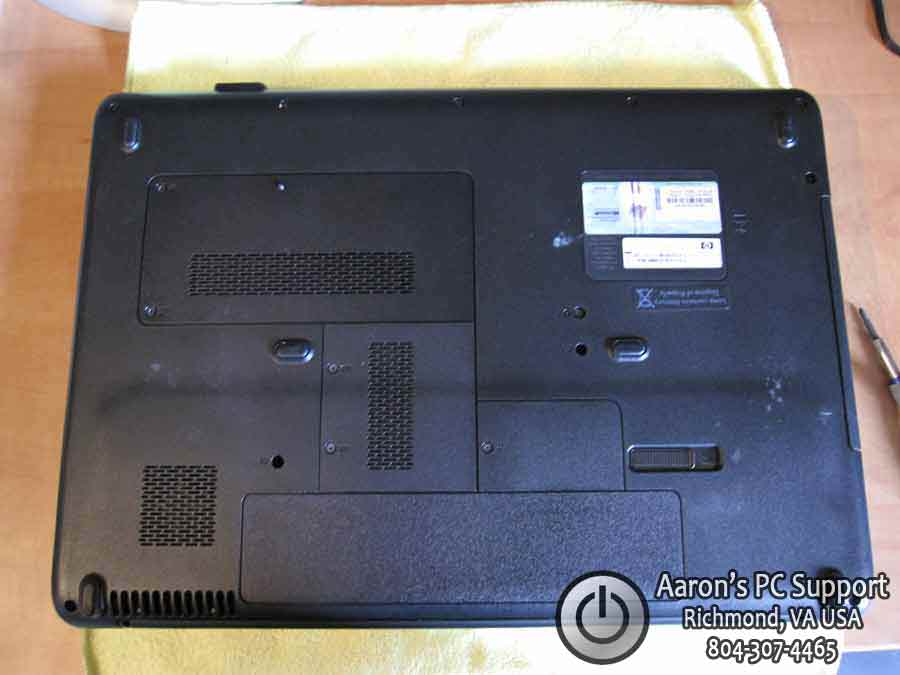
I have tried different screw management techniques and nothing has been as cheap, fast, and perfect as this. I have never had extra screws or mix-ups during re-assembly. In this example this HP laptop has a broken DC power jack which will require the laptop to be taken apart completely.

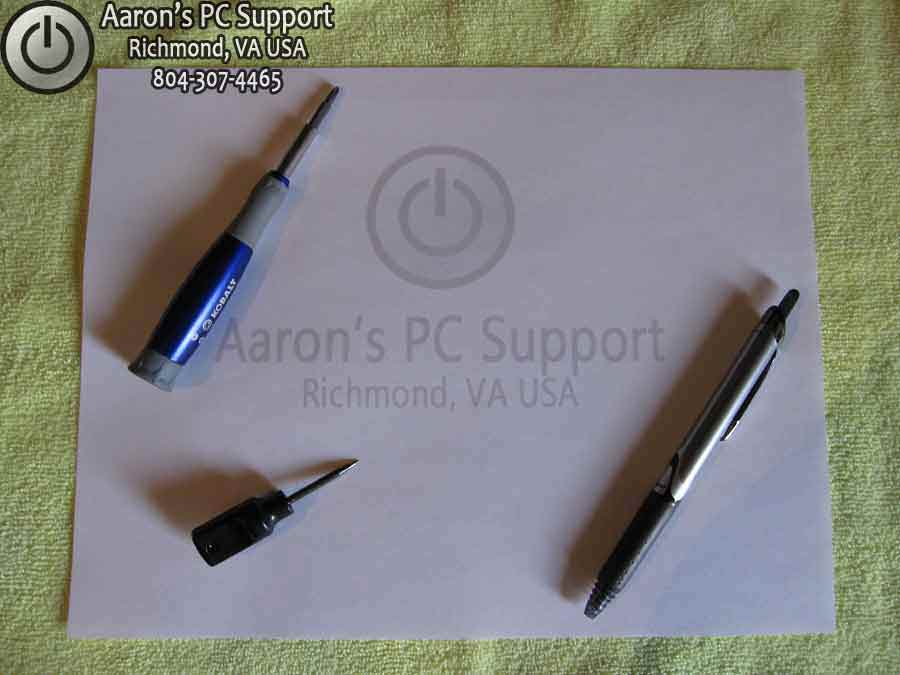
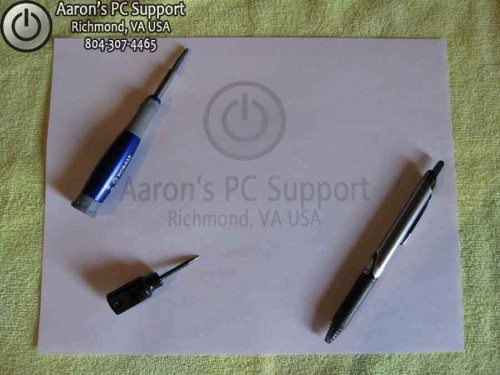
First, you will need a plain sheet of 8.5 x 11 paper, a towel (microfiber prefered, or other soft top as not to scratch laptop lid), a pen, screwdriver, and a small Awe.


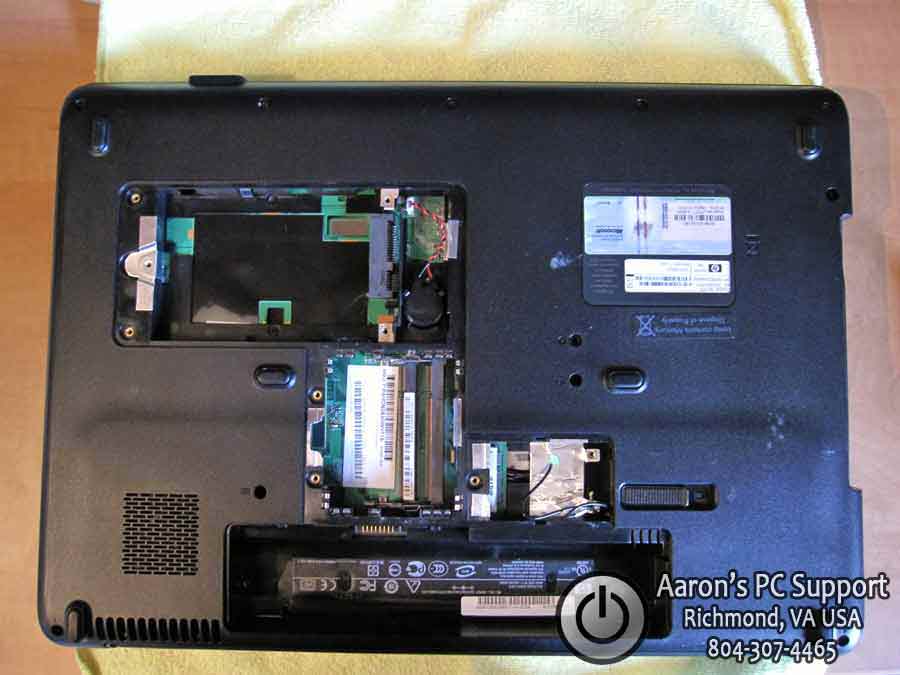
Next, we need to remove all of the covers and hardware from the bottom of the laptop. This will expose all screws that may be hidden. Be sure to place all of your parts into or on an anti-static bag of some sort.


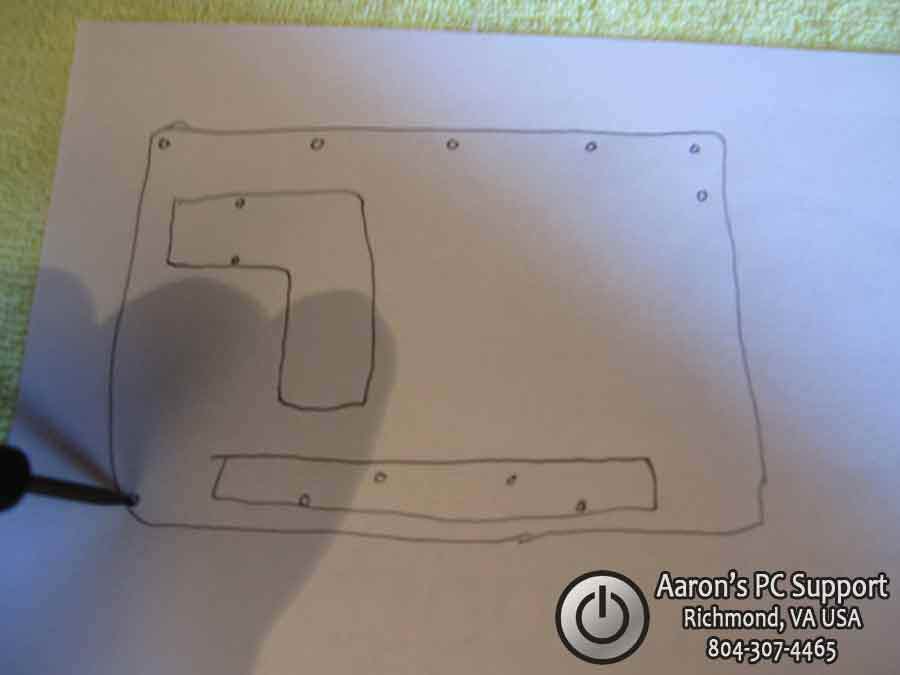
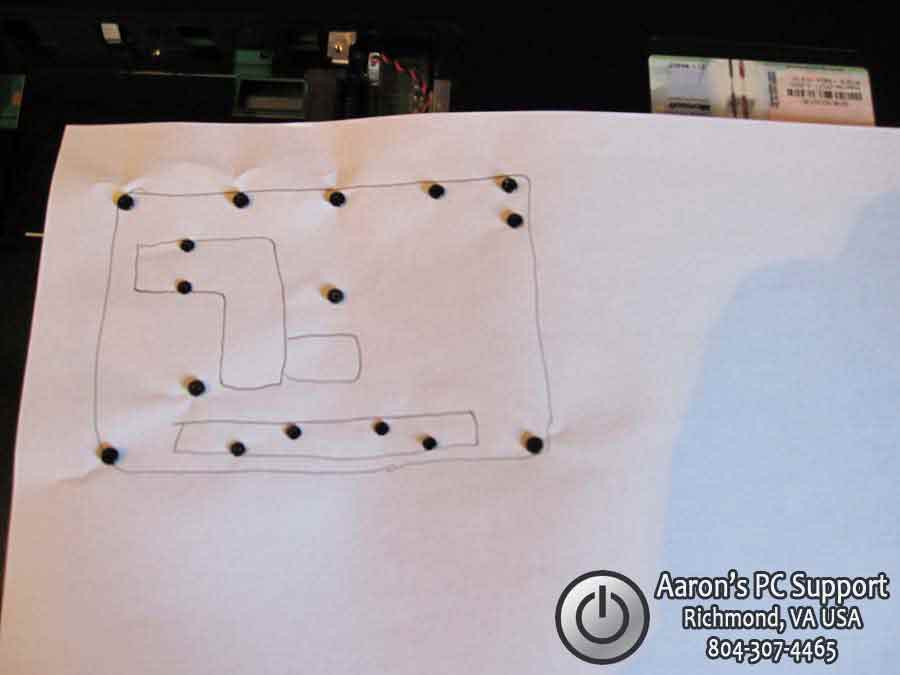
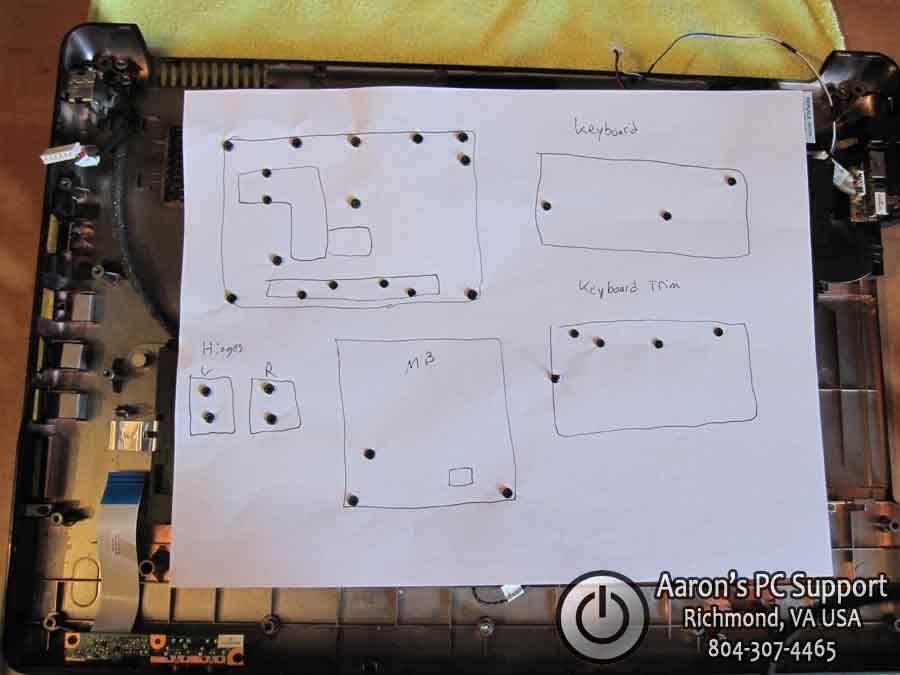
Now we can see all of the screws that need to be removed. Start by taking your blank piece of paper and drawing a rough outline of the bottom of the laptop. I like to draw basic features such as the battery bay, cover locations, as to give a orientation reference as we move along.


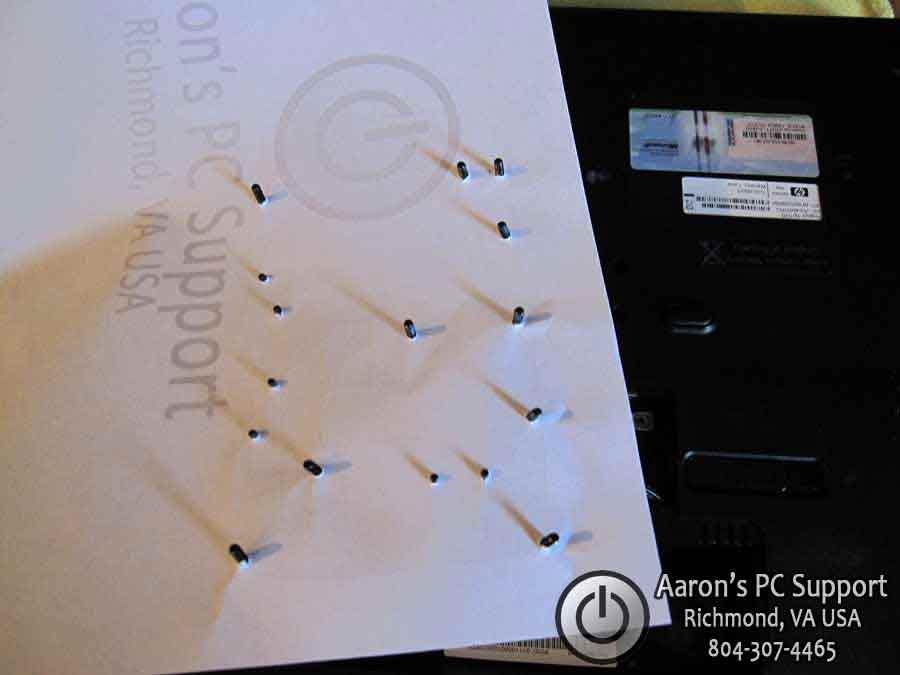
Now punch holes into the paper where you have screws drawn. It is important to punch the holes with an Awe or something similar. Not punching a small hole, and then inserting the screw will rip the paper, and the paper will not hold the screws tightly.. which means you will probably lose one. To make punching real easy: place the rough outline paper on a towel, then punch. We don’t need any bloody fingers.


Next, remove all of the screws and punch them into the oppropriate spots on the paper.


Here, you can see the paper is upside down, and all of the screws are held securely in place.


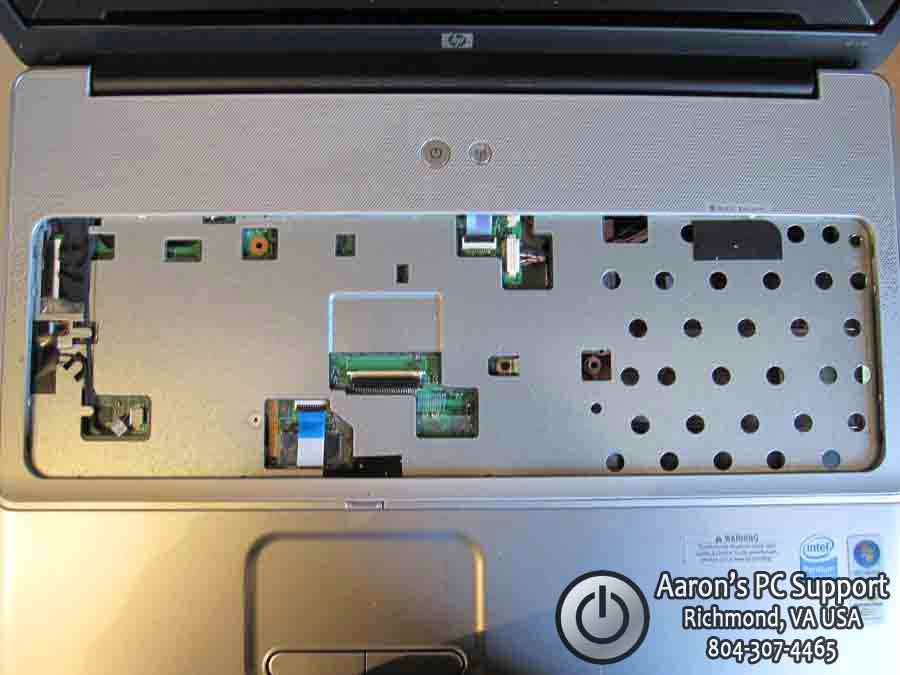
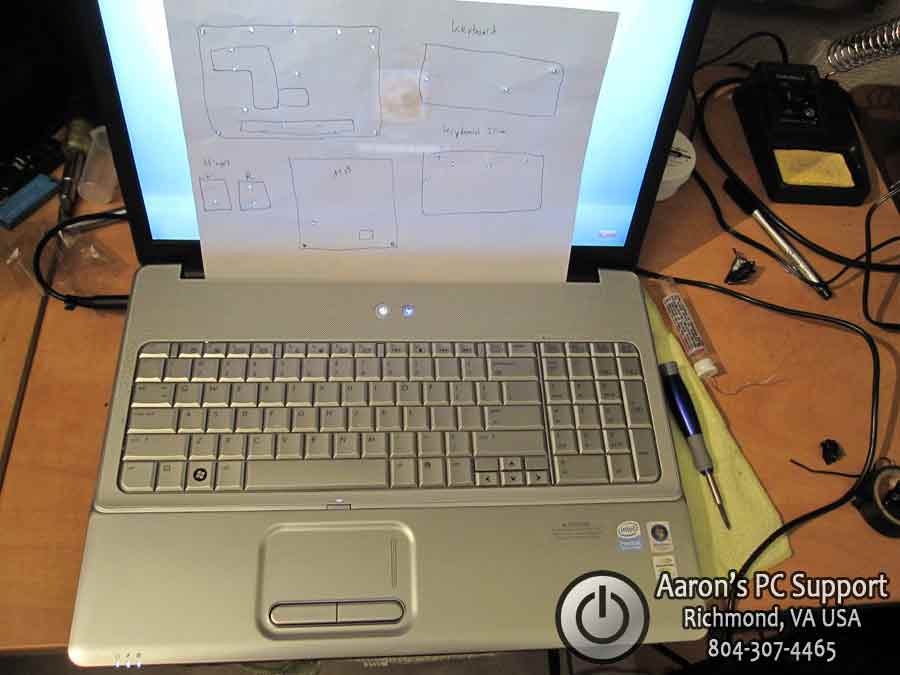
Now we flip the laptop over, right-side-up, and remove the keyboard and keyboard trim ring to reveal some more screws. So I draw another simple sketch and punch some more holes. I also punch holes for the LCD hinge screws as well.


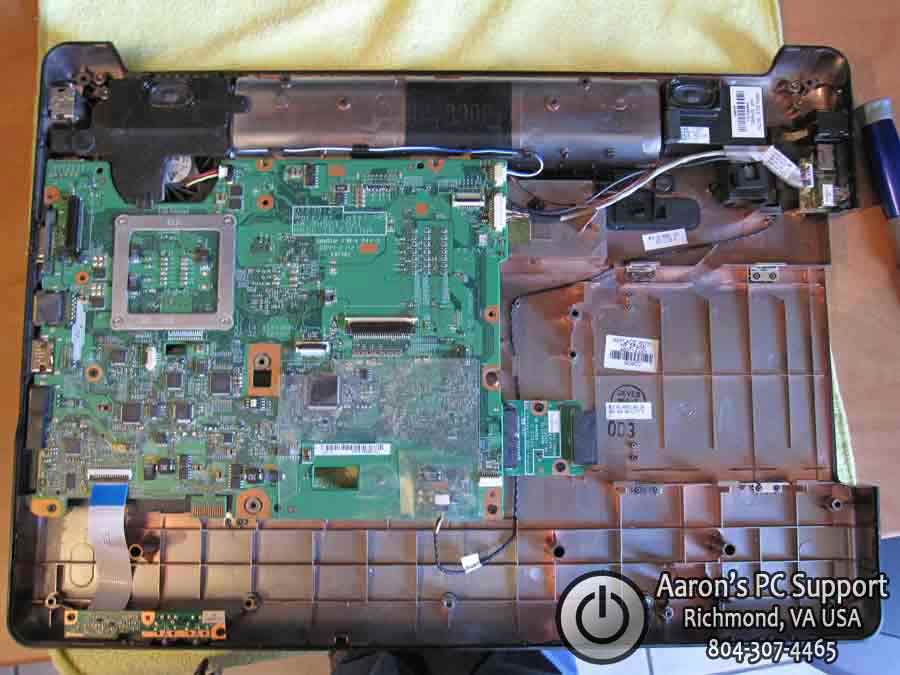
Now we can remove the top cover of the laptop to reveal the motherboard and some more cabling. Now is a good time to draw a diagram of the motherboard, punch, and remove and place the screws in the paper.


Now it is easy to reassemble the laptop and place the screws into the correct positions… another job well done!

0 0


I hope this helps some of you out there using pill bottles and other methods that “lump” together a bunch of screws that may be slightly longer/shorter or fat/skinny. If your repairs didn’t go as planned, you still have your paper so you can disassemble the laptop again if needed.

Special thanks to Aaron of Aaron’s PC Support for sending this in. Aaron’s PC Support is an affordable computer repair shop with over 20 years of experience. Aaron’s PC Support provides alternative low-cost computer repair services for Central Virginia; Richmond VA, Chesterfield VA, Midlothian VA, Chester VA, and Henrico VA.

If you want to learn how to repair laptops including how to disassemble them, check out Podnutz’s Laptop Repair Videos.

© Technibble – A Resource for Computer Technicians to start or improve their computer business
To get started with your own computer business, check out our Computer Business Kit. The Cheapest Laptop Screw Management System – That Works Great!

3 3

Read more:

10 Simple Steps to Get Started With Social Media

Authors: Bryce Whitty

Guest Post by Lisa Hendrickson, Owner of Call That Girl. Lisa has published her proven social media strategies in her latest eBook, "Call That Girl’s Guide to Social Media". Lisa has been a featured writer for Technibble in 2010 and is a contributor in the Business and Marketing forums.

Everyone is talking about social media lately and the craze doesn’t seem to be going away. If you’re not utilizing it in your business marketing plan, you might feel like you’re behind the times. Many people who are not using it, don’t know how to even get started. As it is one of the top marketing strategies I use for my business, I found it to be easy to learn, affordable and not something I needed to outsource. You can do it yourself and start seeing results in one day by following these 5 starter steps and these 5 action steps.

1.) Collect your contacts emails. Go through all of your emails, client databases, email accounts and create a generic list. An excel spreadsheet will work fine or use notepad.

2.) Create a LinkedIn profile (http://www.linkedin.com). It’s recommended you use your real name for your profile, not your business name. Fill your profile with your credentials and as much information as you are comfortable sharing. Most people on LinkedIn share most of their career highlights, past positions and skill sets. Of course there is more to using LinkedIn than just creating a profile, but this is a good start.

3.) If you have a website, add a blog page or sign up for a free blog like http://www.blogger.com.

4.) Start an email marketing program. Many popular email marketing companies have free 30 or 60 day trials. For 2011, I am using Constant Contact.

5.) Upload the emails you just collected to your email marketing program and LinkedIn profile. You will need a few contacts to build your network and to have people to send your email newsletter to.

Those are the 5 easy steps to get going, here is your action list.

1.) Write a blog about a simple value-add tip you know of about your industry that others would enjoy learning about. (Example: Tips for buying a new computer).

2.) Create a newsletter with a welcome message, a blog tip (the one you just blogged about) and offer a coupon or discount for services. Be sure to write a short paragraph about the blog and then in the newsletter, put in a hyperlink to the blog to encourage folks to go to your website or blog to finish reading the story. Remember to track the analytics of the newsletter.

3.) Join your local city and state groups on Linkedin. After you join these groups, be sure to introduce yourself to the group. After you have done that, post your blog link “Tips on buying a new computer” in a new discussion. A tip for being effective on LinkedIn is to make sure that your discussion is not pushy or gives the appearance of spamming the group. Try to peak the interest of the members with hopes they read it and remember your discussion later for if they need your services. It’s a good idea to use your professional signature with all discussion postings.
4.) Invite members of those discussion groups to your LinkedIn network. (These are all potential new clients as everyone on LinkedIn has a computer available to them). Many of the people in these groups have the potential to be commercial clients and of course, they are all residential clients.

5.) Attend local face to face networking events. Many of your LinkedIn groups will have free or low cost events. Be sure to watch for those and attend. Meet as many people as you can and when you get home, invite them to your LinkedIn network and add to your email marketing. Meeting new people in person is a very important factor to winning big with social media.

I hope these 10 steps will help you get started with social media. If you would like to learn more, my latest eBook will help you with step by step instructions.

Good luck!
– Lisa

© Technibble – A Resource for Computer Technicians to start or improve their computer business
To get started with your own computer business, check out our Computer Business Kit. 10 Simple Steps to Get Started With Social Media

image

Read more:

Rizone Complete Internet Repair – Repair Common Internet Connection Issues

Authors: Bryce Whitty

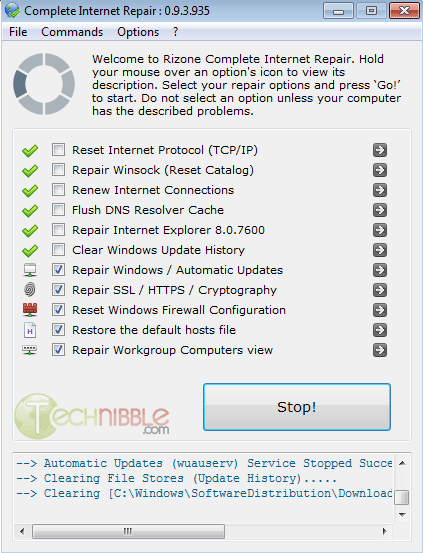
Rizone Complete Internet Repair is a small, freeware and portable application designed to repair common internet connection issues. A multitude of problems can prevent a computer from accessing the internet such as a virus/adware attack, an incorrect firewall rule or even a legitimate antivirus product that didn’t install or uninstall correctly. Rizone complete Internet Repair attempts to repair everything internet related on a Windows system and will do the following tasks:

  • Reset Internet Protocall (TCP/IP)
  • Repair Winsock (Reset Catalog)
  • Renew Internet Connections
  • Flush DNS Resolver Cache
  • Repair Internet Explorer 8.0.7600
  • Clear Windows Update History
  • Repair Windows / Automatic Updates
  • Repair SSL / HTTPS / Cryptography
  • Reset Windows Firewall Configuration
  • Restore the default hosts file
  • Repair Workgroup Computers view

Works on Windows XP, Windows 2003, Windows Vista, Windows 2008 and Windows 7.

Note: Due to the nature of this application (editing internet settings and such), a very small amount of antivirus products detect this application as malicious. This is a false positive. [VirusTotal.com Results]

Screenshots:

Downloads:
Download from Official Site – 441 KB

© Technibble – A Resource for Computer Technicians to start or improve their computer business
To get started with your own computer business, check out our Computer Business Kit. Rizone Complete Internet Repair – Repair Common Internet Connection Issues

image

Read more: