
6 Reasons Why I Hesitate to Make Recommendations to Clients

Authors: Guest Writer

Guest Post by Ronn Hanley:
I have never refused to answer a direct question from a client, but I have been known to cringe a bit when I’m asked for recommendations about specific computer equipment, software or technology purchases.

It’s a lesson that I’ve learned the hard way through trial and error (mostly error…). If you’re in the process of starting any kind of technology based business or even just helping out a friend, it’s important to realize that choices you make for yourself won’t always match your client’s needs.

Here are my six top reasons to always think twice when offering advice or answers to clients about technology choices.

1. Recommendations can blow up in your face

Your clients need computers or other technology devices to do specific tasks for them. Trouble is, they may only have a vague idea of what they want to do based on some Microsoft commercial that talks about how amazing the ‘cloud’ is. Once they ask you, the problem becomes yours to solve.

If you’re at all conscientious, you’ll approach the question from the standpoint of reliability, functionality, and ease of use. The biggest thing you want to do is be honest about the technology since you know that it has its upsides and downsides. As a matter of fact, a lot of what you might say to them is based on your own biases, there isn’t much you can do about that, if you been working in the field for any length of time you will have developed specific likes and dislikes.

Here’s where it gets difficult, your clients needs and your dislikes or likes aren’t going to agree. You’ve developed your skills along a specific path, usually due to trial and error. When they ask about a specific computer brand, that’s where the inclination to steer them away or towards a brand comes from.

It’s very possible, even with the knowledge you possess, the product you ‘recommend’ might not suit their needs. There are many reasons for this, but ultimately if things don’t work out, it becomes your problem for recommending the product in the first place. I’m not saying this happens every time, but its well within human nature to blame the person who made the recommendation.

2. There might be too hard or too long of a learning curve

Your clients are busy people. They have a business to run and they don’t intend to spend a lot of time learning new software or hardware. Businesses are all about making money. They aren’t making money if their staff are taking time learning the newest app or hardware gadget.

I’ll be totally honest, they don’t really care about new whiz-bang stuff like that. They want it to work right out of the box. They don’t want long winded explanations and they certainly don’t want a lot of techno babble doublespeak.

I realize this sounds harsh, but remember, you didn’t get into this business to be coddled.

3. The client will have to change too much to make the software/hardware work

Sounds trite, but clients are people and people generally avoid changing how they do things. It doesn’t matter that you ‘know’ what you are proposing will work better, that’s never the point. You must to be prepared to handle this mindset. Don’t believe me? Ask an older tech, I bet they’ll tell you the same thing. Business owners are slow to change from what has worked for them in the past.

It’s not a bad thing, it’s just something you have to factor in when making recommendations and one reason that I will make sure I ask a billion questions of my client before they ever get even a small recommendation from me. I’ve run into clients who are upset that what I offer actually works better than their current pet machine or product. You are messing with people’s ideas and emotions when you make a recommendation, be prepared for that.

4. The software/hardware solution may not work for them depending on how they try to use it

Every office runs different. If you want to see push-back, try introducing Open Office in a Windows or Microsoft Office environment. It doesn’t matter that OO if free and pretty much works the same. Your clients are only worried that their documents are readable by the receiving end. And there is that pesky learning curve to consider. It’s very possible that the recommendation you offer, be it hardware or software will simply not work based on how the client does business.

Internet Explorer has been the standard browser for more than 20 years. MANY Citrix, Electronic Discovery or SharePoint applications simply will not work in Firefox, Opera or even Chrome (To be perfectly honest, a lot of them won’t work in IE9…). It’s not your fault, it’s the way the system works, so you have to be careful about any recommendations you make in this regard. And you also need to be prepared to make corrections on the fly when something doesn’t work properly.

Yes, it’s true that many companies are changing their back office systems, but Windows is the largest out there and that’s not going to change any time soon.

5. All recommendations are subjective

Just because you had a good experience with a certain hardware or software solution doesn’t mean that your clients will. It’s no different than movies or food, your tastes aren’t always going to be in alignment with your clients. I’ve had friend who swore by a certain cable company, and I’ve also had friend who wants to find medieval ways to destroy the same cable company.

Any recommendation you make is completely subjective, which sucks since you are just trying to do your best for your client. Be aware that your job is to think things through after asking questions. Get to know your client well before you offer anything. It’s a policy I’ve learned the hard way and I won’t change it no matter how ‘simple’ it might make me seem to a new client.

Trust and believe that when you get to know your clients and how they do business, you become a valued member of the team, not just some guy or girl who fixes stuff when it breaks (this is both good and bad, but I’ll save that for another article). Your recommendations will still be subjective, but at least they will be flavored with solid knowledge about what works for particular clients.

6. You very seriously run the risk of losing customers

Losing customers is never a joke. It’s hard on you, it’s hard on them, and its hard on your bottom line.

The problem is, you can never please everyone. Think about it this way, even the worst client contact usually is nothing personal. You are a vendor, they are a client and they need you to do a job. Your recommendations need to follow the same concept. You aren’t helping a friend (even if it is a friend), you’re helping a client solve a problem. Treat them all as serious – I’ll bet you dollars to donuts that your clients are.

Ultimately you have to determine the risks

In the end it’s up to you whether or not you want to offer advice or recommendations. You know your clients and you know their way of thinking. The best advice I can offer is to be honest in your appraisals of their questions. If you don’t know about something, SAY SO. A good client doesn’t expect you to know everything, and if someone does, then that’s not a person you need to be working for anyway.

Guest Post by Ronn Hanley: Ronn is a technology enthusiast from way back, during the dark ages of the Arpanet and the Purple monochrome monitor screens. His first computer was a Commodore PET and his first laptop was the size of a suitcase. Despite that, he loves computers and technology to distraction and has been working in the tech world for almost 10 years full time, currently as the owner of a Desktop and Network support company in Atlanta, Georgia.

© Technibble – A Resource for Computer Technicians to start or improve their Computer Business
To get started with your own computer business, check out our Computer Business Kit.
image

Read more:

Are We Completely Wiping That Hard Disk?

Authors: Guest Writer

Guest Post by Micah Lahren:
"I’ll just run DBAN on it and that will be good enough."
Is that really good enough? What if the individual or business in question is required by law to complete an erasure protocol up to a certain level of security? In some countries, including the United States, laws requiring secure erasure of data are also accompanied with a punishment if the protocol is not followed, such as fines of $250,000 and 10 years imprisonment.

Is your client’s company disposing of old hardware, or do you have a client with sensitive data who desires complete and total erasure of data? Jackhammers, wrenches, and explosives may be more enjoyable methods of destruction, but what if the user would like to use the old hardware for non-sensitive data in another way, such as an external hard drive for storing personal data of a non-sensitive nature? DBAN it, right?

Why DBAN Isn’t Enough

On the official dban.org website, DBAN is heralded as a “self-contained boot disk designed for consumer use”. The key word in that statement is ‘consumer’. DBAN and similar software intended for wiping hard disks are known as software based overwrites, or ‘clear level processes’, and are vulnerable to recovery without requiring laboratory methods. For instance, if you know what the HPA is (Host Protected Area), you’ll know DBAN doesn’t wipe it. Why should we worry about the HPA?

The HPA can be used by rootkits to hide from Anti-Virus software, manifesting again upon a reinstall of an operating system. The HPA is also used by some vendors to store data relative to the installations of software. One security firm is known to use the HPA to load software that reports back to their servers when the machine is connected to the internet. An employee could use the HPA to store data which would be hidden from many wiping tools, and recover that data later after the drive had been supposedly ‘wiped’ of all data and considered free to use in other applications.

In view of the above currently known uses, including the looming recent threat of cyberwarfare, this alone could present a high security risk for many companies and government entities. Many erasure tools do not touch the HPA or other hidden areas of the drive, which are inaccessible to many wiping tools. How can we effectively eliminate all data on the hard disk without physically destroying it?

Secure Erase

Secure Erase (SE) is a feature built into all ATA drives with 15 GB or greater capacity manufactured after 2001. There is also a Secure Erase command for SCSI drives as well, but you may not find it on all drives, as it is an optional feature. Basically, executing a SE command will virtually shred all electronic data on the hard disk in question. It will completely wipe the HPA and other hidden partitions on disk drives, which means any area of the drive which is available for hiding data will be completely wiped, beyond known forensic recovery.

SE will also wipe sectors that are unused by the drive due to errors. It performs a single pass, and that one single pass is more than enough, as technical testing confirmed that multiple passes were unneeded as far as additional erasing was concerned. This single pass meets U.S. Requirements for secure erasure of data for the regulations concerned, with the exception of highly sensitive data which requires complete physical destruction of the disks. Unless you’ve got top secret government files on your hard disk, SE should fit the bill for most clients.

A Freeware Tool That Implements Secure Erase?

That’s right, it’s completely free. And while the NSA has unfortunately dropped support of this great tool, it’s still available. It also utilizes something called Enhanced Secure Erase technology, which the FAQ for this utility details: Enhanced secure erase writes predetermined data patterns (set by the manufacturer) to all user data areas, including sectors that are no longer in use due to reallocation. It’s called HDDerase, and can be found here: http://cmrr.ucsd.edu/people/Hughes/SecureErase.shtml

Due credit goes to G. Hughes of UCSD CMRR for this utility. I won’t go into the details of all the technical aspects of the utility, but there’s a data sheet referenced on the web site you can read that goes into deep detail on the methods used.

Basically, HDDerase is a DOS-based utility for ATA hard disks. You can boot it with an antique 3.5 disk, or boot it from a CD. The last time I checked, HDDerase is also available on the Ultimate Boot CD, and is probably on a few other less known boot cd’s along with other tools useful to techs. It can also be booted from a USB flash drive as well. This utility can also bypass the ‘security freeze lock’ which the BIOS sometimes executes when it detects the drive.

Make sure you use version 3.1 or later, as these versions allow you to remove the HPA as well as the DCO on the disk. While this tool cannot be guaranteed to work on absolutely every hard disk in the field, it has worked on every hard disk I’ve had thrown at me for erasure. Scan the readme file provided on the official site before running the utility, just to be sure you cover all your bases. Simply boot it up, follow the prompts, and you’ll have a forensically clean hard disk that is beyond recovery as far as data is concerned, and still have a usuable disk for other applications.

Guest Post by Micah Lahren – Micah covers a wide spectrum of the tech industry, including PC repair, front-end development, WIMAX networking and installation, and more. He currently works with an ISP in Texas that also provides web hosting/design and computer repair, although he’s been tinkering with computers since he was 6 and eventually turned it into a career. He also enjoys traveling and doing volunteer missions in other countries.

© Technibble – A Resource for Computer Technicians to start or improve their Computer Business
To get started with your own computer business, check out our Computer Business Kit.
image

Read more:

WiseTechnician Review

Authors: Bryce Whitty

Does up-selling to your clients make you feel like a used car salesman? Most Computer Technicians come from a technical background so sales and marketing does not come naturally. Now that you are in business, sales is really something that you cannot avoid if you want to make money. I had heard about these WiseTechnician videos mentioned a few times in my Computer Technician circles that focused on the sales side of the Computer Repair business, and I wanted to check it out not only for myself, but for all of Technibbles readers to see if they are worth purchasing. This is my WiseTechnician review.

So What Is it?

The WiseTechnician videos are a collection of videos about the business and marketing side of the computer repair business. The package includes 26 High Quality 480p videos resulting in 3.5 hours of content. There are also audio-only versions of each of the videos so you can listen to them on the go.

The package includes videos on a variety of topics such as what to ask the customer, stocking inventory and selling it, finding a wholesaler, parts and pricing, billing and accounting, working in small/depressed areas, managed services, getting business customers and more.

Under The Hood

The videos are done in an interview style over Skype with Steve Cherubino from Podnutz as the host. The videos are broken up into 26 different topics and each video ranges from 5 to 10 minutes in length making them 3.5 hours in total.

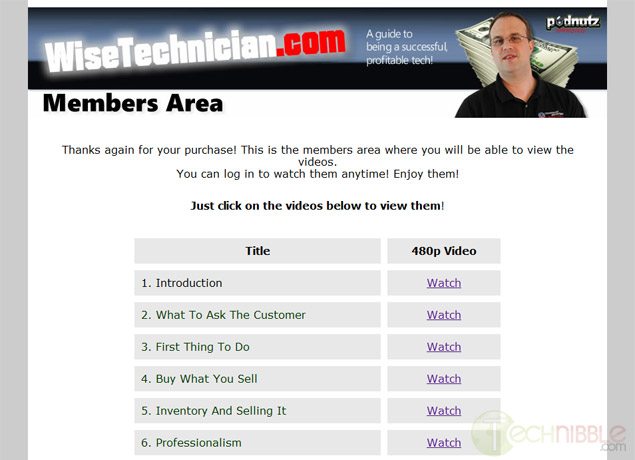
Once you pay for the product via Paypal, you will be sent an email with login details to access the members only area on the WiseTechnician website which allows you to access the videos from any computer and mobile device capable of playing .mp4 files. Having the product stored like this is handy if you lose the videos because you can just login and download them again.


So What Are The Videos Like?

The videos are high quality Skype video calls and both Steve Cherubino and Chris Barre having good microphones and webcams. While the total length of the videos is only 3.5 hours long, there is little fluff in these videos and they are full of “gold nuggets” of information. In fact, while I was watching these videos there were many times where I thought “That tip alone is worth the cost of these videos”.
The videos are like watching one giant Podnutz interview and Chris can quite animated. He really is a no nonsense kind of guy.


A lot of technicians talk about ideas that they are going to try which may or may not work. I found the videos useful because they say “Do this, it works. Here is how to say it”.

I have only two gripes with this product. First, there are a couple of points audio drops out, but only for a split second. I guess thats is the the nature of Skype.
Second, I am not a fan of the site design as it looks too infomercial-like. However, the product itself is no-fuss, solid content.

So Who is Chris Barre?

Chris (the “Wise Technician”) has been doing computer repair for the last 7 years and has been sales for 14 years in both retail and business to business.
He used to own an an applicance repair company which had a store front and as well as doing onsite applicance repair. That business is still going strong and had 5 employees when he sold it.
Chris wanted to make a product that helped Computer Technicians make some serious money and get over the “computer guy shyness”. He has been talking to Computer Technicians for the past 3 years on the Podnutz network and their issues always came down to them not charging enough, feeling bad for making “too much” profit on a product, and not being able to sell new services and products to their existing customers.

Who Is This Product Not For?

If you have been running your business for many many years (Say, 5 years plus) then you are going to get less out of it. That is not to say you wont get anything out of it as the videos are a combination of startup tips and sales tips. I myself have been in business for about 10 years and I still got sales tips out of it that would make it worth the cost. If you still dont feel comfortable with sales then you will find the product useful.

The videos are not for you if you dont plan to invest the time to actually watch/listen to the videos and impliment the tips. This is not a get-rich-quick plan.

Who Is This Product For?

If you are within the first few years of your business, you will get a lot of great tips from these videos. As mentioned above it covers both startup tips (such as how to find a supplier) as well as sales tips. I know most new computer business owners dont feel comfortable about sales since they came from a more technical background. They often feel like a sleezy car salesman when trying to sell. Chris gives you some really elegant ways to sell to your clients without feeling like a scumbag.

The product retails for $79.95 and comes with a 60 day money back guarantee. There is really is no reason not to give them a try as it is risk free.

Check out the WiseTechnician Videos Here


© Technibble – A Resource for Computer Technicians to start or improve their Computer Business
To get started with your own computer business, check out our Computer Business Kit.
image

Read more:

Ottawa Computer Services

Ottawa Computer Services. Taleam Systems offers desktop and laptop repair in Ottawa, Ontario at affordable rate only $30 per hour.

We can fix your computer if you are having Windows problems, Virus issues, hardware problems, network issues or printer problems.

Taleam Systems offers support for Acer, Dell, HP, IBM, Lenovo, Sony and Read More…

Read more:

Ottawa Computer Services

Ottawa Computer Services. Taleam Systems offers desktop and laptop repair in Ottawa, Ontario at affordable rate only $30 per hour.

We can fix your computer if you are having Windows problems, Virus issues, hardware problems, network issues or printer problems.

Taleam Systems offers support for Acer, Dell, HP, IBM, Lenovo, Sony and Read More…

Read more:

Instant Virus Removal Support From FixSmith !!!


The possible reasons for PC problems are multiple. Viruses Infections, malware or spyware are typical problems that are experienced with computers. These infections are seen as a a lack of files unexpectedly, programs which are acting randomly, and also the computer responding slowly to commands. If Skilled technicians have found a few of the symptoms  on your PC, then repair really should not difficult. It does not take too much time.

<p class=”MsoNorRead More…

Read more:

Instant Virus Removal Support From FixSmith !!!


The possible reasons for PC problems are multiple. Viruses Infections, malware or spyware are typical problems that are experienced with computers. These infections are seen as a a lack of files unexpectedly, programs which are acting randomly, and also the computer responding slowly to commands. If Skilled technicians have found a few of the symptoms  on your PC, then repair really should not difficult. It does not take too much time.

<p class=”MsoNorRead More…

Read more:

YUMI – Install Multiple Operating Systems to a Single Bootable USB Drive

Authors: Bryce Whitty

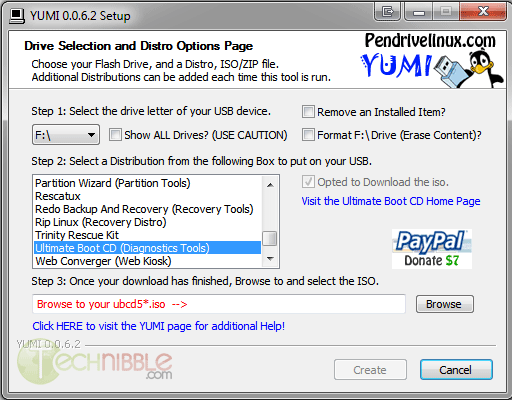
YUMI (which stands for Your Universal Multiboot Installer) is a tool that allows you to install multiple operating systems to a single bootable flash drive. YUMI will automatically create a menu allowing you to choose which operating system you wish to boot into as the system starts. We have featured mutliboot creators in the past but I really like YUMI because it is just so easy to use.

To use YUMI, you simply choose the drive letter of the thumb drive you wish to use, select a distribution you wish to install from the list, tick the “Download the ISO” if you havent done so already, wait for the ISO to download, navigate to the download location of the ISO on your hard drive and press Create. Thats it. To add an additional ISO to the USB drive, just do the steps above again.

Even though the boot menu and the ISOs installed on the USB drive are Linux based, you can still use the same drive to carry your Windows based repair tools since it formats the thumb drive to FAT32 – which is readable by Windows. However, I suggest you don’t move any of the files YUMI placed since it may upset the software installed on it.

Another reason I like this software, especially for us Computer Technicians is the selection of ISOs you can install on it. As you would expect, the usual suspects like Linux Ubuntu, Mint and Puppy are included. However, YUMI features a lot of distributions specifically intended for computer repair such as:

  • Acronis Antimalware CD
  • AVG Rescue CD
  • AVIRA AntiVir Rescue CD
  • BitDefender Rescue Disk
  • Dr. Web Live CD
  • F-secure Rescue CD
  • Kaspersky Rescue Disk
  • Panda SafeCD
  • Blackbox (penetration testing)
  • BackTrack5 Blackbox (penetration testing)
  • Clonezilla (Backup + Clone Tool)
  • DBAN (Hard Drive Nuker)
  • Deft 7 (Forensics)
  • DRBL (Diskless Remote Boot in Linux)
  • EASEUS Disk Copy (Disk Cloning Tool)
  • GParted (Partition Tool)
  • HDT (Hardware Detection Tool)
  • Matriux (penetration testing)
  • Offline NT Password & Registry Editor
  • Ophcrack XP (Password Finder)
  • Ophcrack Vista/7 (Password Finder)
  • Parted Magic (Partition Tool)
  • PING (Partimg Is Not Ghost)
  • Partition Wizard (Partition Tool)
  • Redo Backup and Recover (Recovery Tool)
  • RIP Linux (Recovery Distro)
  • Trinity Rescue Kit
  • Hirens Boot CD
  • Kon-Boot Floppy Image
  • Windows Vista/7/8 Installer

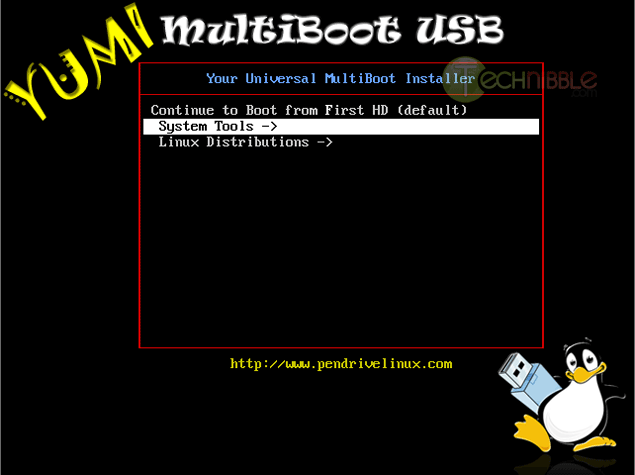
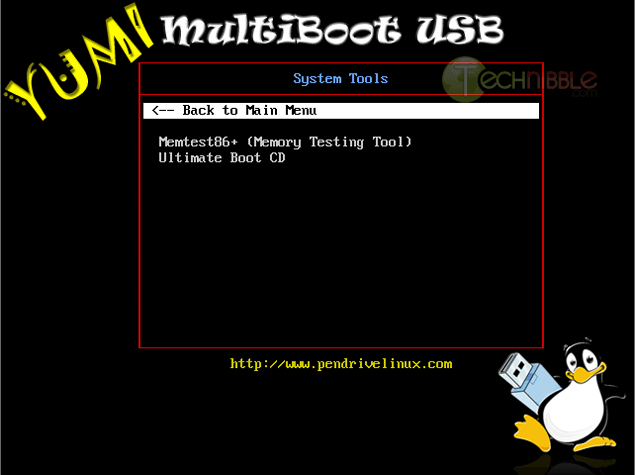
If you happen to install multiple operating systems to your USB key, YUMI will categorize them as you can see in the screenshots.

Screenshots

YUMI - Multiboot USB Interface

YUMI - Multiboot USB Bootloader

YUMI - Multiboot USB Bootloader


Downloads:

Download from Official Site – 948kb

More Information

© Technibble – A Resource for Computer Technicians to start or improve their Computer Business
To get started with your own computer business, check out our Computer Business Kit.
image

Read more:

How to Increase Your Business Clients to Improve Your Profit Margins

Authors: Guest Writer

Guest Post by Richard Muscat Azzopardi
Taking the step from being a computer technician fixing home PCs to someone running a business which thrives off planning, building, maintaining and repairing other businesses’ IT solutions is one which might seem daunting to some. However by doing so you can increase profit margins considerably and probably reduce your general stress levels in the process too.

Before you ponder on changing your business model, however I would advise taking a long hard look at the business you’re running at the moment. Have you ever thought of whether it is really profitable? If you were paying yourself (and your better half, who’s probably putting in quite a bit of hours with you) an honest wage would you still be running a profitable business? When was the last time you ran this exercise?

As part of this check I would also recommend analyzing the different jobs you’re doing. Which of them are profitable and which of them are you doing as a “service” to your clients? For example some home clients expect you to do the installation work for free when you sell them hardware. Even if you are charging them, there is a limit to what you can charge unless you want them to run to the Internet to look for advice and try it out themselves.

Business customers are very different. First of all they see IT as an essential tool. There might have been a time when a farmer would try and fix his own truck, but nowadays they all take them to mechanics. The same goes for computers – businesses see them as something they can’t live without (because they really can’t!) and therefore tend to do whatever is needed to keep their systems running smoothly. A home computer not working for a day means you can’t check Facebook for 24 hours. A business computer not working for a day implies loss of productivity and therefore precious income.

Because IT is so important to businesses, they tend to generate a significant amount of work. A successful business must take its maintenance seriously, its upgrades with enough foresight and its backups with the precision of a Swiss watch! In addition to generating more work per computer, when you’re hooked up with a business client, you usually have more PCs to work on too. If you take a look at the turnover generated by a single (small) business client over the course of a year you can probably equate it to four to five families’ worth of work.

It is not all fun and games, because expectations on your level of commitment increase too, but this is mainly the reason you can charge higher rates. It is also harder to win the client over because there is more competition and a higher chance that they are already in some form of a relationship with another supplier/technician.

If you have decided that it is worth exploring as an idea, you now need to find ways to get the word out there and start attracting business clients. I have a few suggestions that you might want to try out.

1) Tap your existing client base

Your existing clients are probably an ideal first step in trying to get new business. Statistically, most of them work at a small business, so if you approached them there is a good chance of them either being the decision maker at office or at least knowing who is. Don’t push yourself too hard with people who are generating your bread and butter income though, because you don’t want to scare them off from giving you their custom. You can either drop a hint when you’re at their place or else insert a new email signature which says you service businesses too. It might also be worth your while to offer a small bounty to friends and long-term clients who can introduce you to a new business client.

2) Approach the local business community

Targeting local businesses with direct mail, the local yellow pages or advertising in a local paper would be a great method to start offering services. Your major investment here could be your time. Offer a free audit of their systems – that way you can give them something of value. If you do your job well enough at this stage, you’re the one they’re going to want to implement the recommendations to fix the issues that arise.

3) Mixing at business events

Scour the papers and online notice boards for business breakfasts or any other business meetings organised in your community. These are a great source of new contacts and people are expecting you to discuss business opportunities. If there are talks, then try and get a speaking gig – even if you offer your time for free. Use this time to outline the importance of having a solid IT infrastructure. Businesses love having a thought leader consulting them – it inflates their ego.

4) Buy a set of golf clubs

Or join the local chapter of the Rotary Club. Every community has its own version of a place for businessmen to hang out informally. Whereas these might seem to be a place to relax, a lot of business wheeling and dealing goes on in between holes on the local golf course. You will have to take it more easily here. People are officially there to enjoy themselves and relax so you have to observe others and respect the etiquette in place.

5) Online

Building a good presence online is a crucial part of achieving your goal. I have left it to last for one simple reason – no matter which of the methods above you decide to go with, this should have to happen in tandem. Create a personal LinkedIn profile and build it up as much as possible. Get recommendations from former colleagues and current clients and keep the account active on a daily basis. Create Google+ and Facebook pages as a local business and post items to them regularly. Ideally you shouldn’t broadcast, but also interact with people who’ve liked your pages. Offer free advice online to business customers – and make these posts public so you can show your expertise.

Whichever of these tickles your fancy, I would suggest not trying out more than one or two of them to start off. Ease yourself into the market and there is far less chance of being overwhelmed. Slow and steady wins the race.

This is a guest post written by Richard Muscat Azzopardi on behalf of IT Channel Insight, a site related to managed IT services. Richard draws on his experience from over 12 years in the publishing industry to bring you top quality content that works. He now writes blog posts, white papers and e-books for the IT industry with the same passion that drove him to create his country’s most popular publication.

© Technibble – A Resource for Computer Technicians to start or improve their Computer Business
To get started with your own computer business, check out our Computer Business Kit.

image

Read more: