Episode 60 – 20 Tips To Improve Your Computer Business Part 1

We talk with a computer consultant who wrote an e-book with helpful tips for other computer business owners and is giving it to them FREE.

TechPodcasts Promo Tag :10
Intro 1:18
Billboard 1:34

News and Comment segment 2:53
AMD was awarded $12.6 million from the U.S. Department of Energy for two research projects.

MakeUseOf is offering a free e-book called Your Guide to Solid State Drives.

Over 400,000 Yahoo passwords were stolen July 11.

Betaworks reports that it has acquired Digg.

Commercial Break 2:00
The Computer Business Kit

Intro to Topic 2:11
Today we’re going to talk with Matthew Rodela an IT consultant, owner of Your Friendly Neighborhood Computer Guy and author of a free e-book called 20 Things You Can Do Right Now To Improve Your Computer Business. We’ll learn what inspired him to write it, find out what makes it different from other publications of its kind, and discuss how you can incorporate the first ten tips listed in his e-book into your own business. Par1 1 of a two part series.

Interview with Matthew Rodela 21:59

Episode 61 Teaser :33

Wrap up and Close :46

Comments, questions or suggestions? Send them in to comments@theforcefield.net or post them in The Force Field Forums. Feedback on this topic will be read by the host and included in future episodes of the show. Visit us at http://www.theforcefield.net!

©2012 Savoia Computer. All rights reserved.

Marketing a Computer Business In A Small Town

Authors: Guest Writer

Guest Post by Adam Sewell:
Let me introduce myself. My name is Adam Sewell, and I run a technology services business in a small town of 20,000. MyGeek Computer Services has been around for a little over two years now, and I’ve had a hard time making my business known in the community, even though I grew up here. I found that marketing my business using conventional advertising methods was ineffective. Yellow Pages, Google Ads, Facebook ads, and other advertisements just didn’t produce the results that I expected. After about a year of failed marketing attempts, I realized something important. My small town reacts differently to marketing compared to a large city. In this article, I will detail what I did, how I did it, and what proved successful.

As I mentioned, my small town has about 20,000 residents. The population is composed of ex-textile workers, small business owners, and a good selection of affluent individuals. Our town is best known for its pork barbeque, and a nearby lake is popular for recreational activities. We are nestled in the middle of a triangle of three of the largest cities in the state, all within an hours drive. Like many other small southern cities, there is a very strong network of ‘good ol’ boys’. There are several other computer repair shops in the area – some mobile, some with physical shops, and some working out of their homes. Most of these do no advertising at all.

In today’s digital world, you might expect most people to search the internet for new businesses, or to read reviews of existing businesses, especially when it comes to computer services. That may be true in your city, but in mine, it’s a different matter. I will concede that those in the 18-30 age bracket utilise the Internet to locate possible service providers more than the previous generation, but still not as much as you might expect.

A few times over the past two years I’ve run Internet marketing campaigns, including Google Ads and Facebook Ads. With Google I averaged about 1 or 2 clicks per week – yes, per week. I’m not claiming to be an expert with Google Ads, but I did spend a considerable amount of time reading up on the subject.
With Facebook Ads I had more success. I averaged about 1 or 2 ‘likes’ per day. But the interesting thing was that they were all from out of town! I set the radius to target my county, which bled over into a larger city to the north. Nearly all my new ‘likes’ were from this larger city. But even with that limited activity, I received no phone calls from the Facebook traffic. So I’ve eliminated those methods from my marketing plan for now.

I next looked into Yellow Book. Yellow Book has a reputation for being on the expensive side, but it’s almost a necessity, especially if you are targeting residential clients. I sat down with the representative from the company, and he proceeded to give me a demographic summary. Most of what he said wasn’t new to me, as I had done my own research. However, he confirmed my suspicion that the residents of my county respond poorly to internet marketing compared to residents of other counties.

Newspaper advertising is another traditional way to get your business name out in a small town, but from my experience, it was expensive and seemed ineffective as well. I ran several ads in the local newspaper and received no calls from them. However, I was able to get a decent response from a couple of articles they ran about my business. One of the articles was a grand opening article that I personally wrote, which they edited before publishing. I also wrote a few articles for the newspaper detailing some tech help items. While the expensive advertising yielded nothing, the articles were actually worthwhile.

Internet marketing was ineffective, Yellow Book was expensive and didn’t have the focus towards business that I needed, and newspaper ads were expensive and produced very little response. What’s next? What about ‘word of mouth’?
I have actually received most of my business from referrals and hitting the pavement. It all started with my CPA. I worked out a deal with the CPA to maintain their network. He felt I did such a good job that he referred me to some of his clients, who then referred me to other businesses they had relationships with. I also joined a networking group that meets weekly, Business Networking International, which has been great for my business.

By getting into this closed network of ‘good ol’ boys’, striking deals, and getting referrals, I was able to kickstart my business. Word of mouth is the most important form of advertising, and by using a network like BNI you are able to extend your salesforce out into the community through people the community already trusts. People trust their friends and family before they would trust an advertisement in the newspaper or on the radio.
In the end, you just need to get your business in the public eye, whether that means going door to door introducing yourself or joining a networking group. Regardless, it may take some trial and error to find out what works for your business in your community. Most importantly, ask your friends or family members where they go to find services they need, such as a plumber or electrician. Wherever they are looking, that’s where you need to be seen.

Guest Post by Adam Sewell: Adam is a technology professional with over 10 years of experience. Classically trained in Information Technology but passionate about open source software such as WordPress and Linux. Other interest include politics, religion, and anything else you’re not suppose to talk about in polite company.

© Technibble – A Resource for Computer Technicians to start or improve their Computer Business
To get started with your own computer business, check out our Computer Business Kit.

image

Read more:

Massive Discounts For Computer Technician Software – Get Them While You Can

Authors: Bryce Whitty

I have noticed that 4 fantastic Computer Technician products have recently gone on sale that are well worth getting. In fact, are the deepest discounts I have ever seen these products. Up to 50% OFF!
All four of these products should be no stranger to the Technibble readers as I have talked about them a few times before and they are often mentioned on the Technibble forums.

The products that have recently gone on sale are:


I dont know how long these are going to remain on sale so get them while you can. I have written about each of these here on Technibble in the past, a few of them being product reviews. Read on for a little bit more information about these products and the links to my past writeups & reviews about these products. Be sure to use the links above as the links in the writeups and reviews are not the discounted ones.

Fabs Autobackup 4 Tech

Fabs Autobackup is a small, portable application that makes backing up and restoring your clients data incredibly easy.
It will backup pretty much anything your client would want backed up such as their My Documents folder, browser favorites, emails, address books and more to a location of your choice. I personally use it to back up my clients data to a USB hard drive, plug it into the new machine, hit restore and all the data and settings are back where they should be without all the manual work. It works on Windows XP, Windows Vista and Windows 7.
[Technibble Writeup]

Laptop Repair Videos

Laptop repair can be tricky. There are hidden screws all over the place, a certain order you have to pull it apart and sometimes the spare parts are hard to find. Laptops are also prone to damage that a desktop wouldnt normally have such as being dropped or having a damaged DC jack.
Steve Cherubino, who was computer technician until he went full time podcasting has worked on thousands of laptop computers in his shop and would now like to share his laptop repair knowledge with you in the form of high definition, narrated, downloadable videos.

Podnutz Tech Site Builder

The package contains 20 high resolution videos show you how to customize, get a professional looking website online within a couple of hours and includes all of the files and software you need in order to do it. Check out the Technibble Review of Tech Site Builder.

Linux For The Rest Of Us

Linux is something that isn’t going away any time soon. Servers use it, Smart Phones use it and even devices like TiVo use it. In fact, we should be seeing much more of it in the future as Linux acceptance increases. In the computer repair world, Computer Technicians are using Linux builds to remove viruses, resize partitions and recover data. Many computer technicians are also installing lightweight Linux builds to give old computers a new lease on life. It pays to know at least a little bit of Linux in the computer repair world.
Steve Mclaughlin (aka DoorToDoor Geek), a regular on the Podnutz show has created a series of Linux training videos videos called “Linux For The Rest Of Us” to help people learn the basics of the Linux flavor “Ubuntu”. Check out the Technibble review of Linux For The Rest Of Us.

As always, all 4 have a refund policy to get your money back if you find the product is not for you. So it really is risk free.

© Technibble – A Resource for Computer Technicians to start or improve their Computer Business
To get started with your own computer business, check out our Computer Business Kit.

image

Read more:

5 Great Ways to Re-Purpose Old PCs for Customers

Authors: Derrick Wlodarz

Any computer repair technician should be able to properly recycle an old customer PC after wiping it effectively. But this shouldn’t be the only course of action to recommend to customers. Perhaps a client is looking to make use of a still-capable system in some other manner. Having a few tricks up your sleeve never hurts, which is why I wanted to show some of the ways which my company FireLogic has internally “recycled” older PCs to fit niche functions for customers. All of the options described below entail free or open-source software, and usually require no further upgrades of the hardware inside of the machine in question. If a hardware upgrade is recommended, I make note of it for you.

Before I go over these 5 neat feats of PC re-purposing, I’d like to tackle how these mini projects serve both the customer and your own business in a positive manner. First off, the customer will fully appreciate that you aren’t pushing new hardware on them to fit newfound needs. Saving customers money is what we need to be mindful of whenever we are consulting on projects. Likewise, this will also help us keep hardware out of the recycling centers and put it to good use.

I’m not going to say than an old PC is ALWAYS the best fit for any of the projects described below, so use good judgement. Trying to re-purpose a Windows 2000 system to run as a file server? Probably best to invest in a NAS-box for the customer instead of sipping hundreds of watts of energy to power a dinosaur of a system. But most of all, these are all great ways to provide some extra income from systems that would otherwise be saying hello to the recycling bin.

Without any hesitation, here are my top 5 ways to re-purpose old PCs for your customers:

5) Setup a Free Open Source PBX Phone System on Asterisk

This particular scenario involves a little more Linux than some may be comfortable with, but luckily there are already pre-built distributions available that do most of the legwork for you. My personal favorite happens to be AsteriskNOW which includes the open source Asterisk PBX software configured on top of a ready to go Linux installation. But there are a few other choices out there – and if you are Linux-proficient, you can even install Asterisk on the distro of your choice.

What can you do with Asterisk? I won’t go over all of the many uses, but to sum it up, it’s pretty much an all-out PBX phone system for your home or office (for free). There are no catches to it. As long as you can follow a simple guide, like this one put together by the folks at Maximum PC, then you can provide your customers with a completely free phone system like the big boys use.

The above guide goes into tying Google Voice to your Asterisk system for a truly 100% free in/out calling setup, but this may be a bit of a stretch for some businesses. I suggest you play with such a setup first before recommending and installing this for customers. The Asterisk website has a full archive of excellent help videos for first time users in getting setup, configuring IP phones, and much more.

4) Configure an Open Source FOG-based Cloning Server

If you thought Symantec Ghost or Microsoft System Center were the only players in the IT management market, think again. A wonderful free and open source alternative is available now by the name of FOG. The name is short for Free Open Source Ghost which is a full blown PC management server utility that replicates much of the functionality of a suite like Symantec’s Ghost platform. Any old PC a customer may have can be turned into a Linux box and have FOG installed on top of it, in essence becoming a central management point for all of the systems in a company’s network.

Keep in mind that the follow through on getting this setup properly is what counts, and an effective rollout of a FOG-based managed network takes time. One of the caveats in order to utilize FOG fully is that your client PCs all have to support PXE boot and you need to be able to place PXE into the first spot of the boot order. Many OEM systems do not offer this capability yet, but it is definitely growing. However, if a prospective customer does meet these requirements, then you can deploy a FOG server and offer things like centralized system imaging, virus scanning, disk wiping, and even patch management. The best part about FOG? It requires no client software to be installed. How about that!

You can download the latest version of FOG anytime.

3) Turn an Old PC Into a High End Open Source Firewall with IPCop

Nothing beats a standalone quality hardware firewall, except for one that happens to be open source and replicates most of what the big players do for the price of free. If one of your customers is looking to filter out traffic or particular websites, look no further than IPCop. This all-in-one Linux distro with powerful firewall functionality can be easily deployed onto an aging system that can likewise be turned into the primary firewall of a small business (or mid-size business, if you so wish.)

While this nifty system is quite powerful, it does require some re-architecture of a company’s network, so you will need to plan your downtime and installation path appropriately. A great overview of the layout of an IPCop protected network can be found on their installation guide. One of the other requirements you will need to be mindful of is that each “logical network” you want to configure within IPCop will require an additional network card with patch cord tying back into the physical infrastructure. This may be a challenge for PCs that may have only 1-2 PCI slots that are full. A system best suited for running IPCop will likely be a mid-tower to full-tower ATX system due to the hardware requirements.

Feel free to download the IPCop Linux distro for evaluation and see if it will work for your customers.

2) Ditch the Old Fax Machine and Setup a Windows-based Fax Server

I hate the word “fax” just as much as the next tech. In the year 2012, email should have taken over faxing of all forms by now. Unfortunately, many businesses (and home offices) still rely on faxing for one reason or another. Instead of trying to coerce customers to ditch the technology altogether, offer them a cost-saving solution: turn an old Windows PC into a fax server. They can easily add up all of the electricity, toner, paper, and upkeep costs that are going into the old 14.4 fax machine year after year.

Many techs may not know it, but Microsoft has been supporting native faxing in Windows since before Windows 2000. For the sake of brevity, I’m going to only touch on this native capability of all the recent common Microsoft operating systems including Windows XP, Windows Vista, and Windows 7. The steps to get faxing setup and working differ slightly in each version, but the notion is the same. Windows can easily take any run of the mill fax modem card and turn it into a full blown fax server for any phone line. Windows will then take incoming faxes and save them into a centralized fax console. Users with access to the system can then take the faxes and export them or print them. I’ve setup numerous businesses with this free functionality and they have been running marvelously ever since. Look – no more fax toner needed!

1) Convert an Old PC Into an Open Source Storage Server with FreeNAS

I’ve long been a proponent of cutting down on overspending in small business IT, namely in the form of full-blown Windows servers (my company decommissions old and overkill servers on a monthly basis.) Most small businesses don’t need them, and are paying dearly for keeping all aspects of such a server running including licensing, electricity, upkeep, AV protection, and so on. I’ve previously penned about my love of QNAP NAS (Network Attached Storage) boxes for SOHO and small businesses, but if your customers are on the budget-conscious side, they may prefer the “re-use” route instead.

A great piece of free software is thankfully available in the form of FreeNAS. Like some of the other solutions I mentioned earlier, this open-source Linux distribution is geared towards users who are newer to Linux and may need some hand-holding in the process of getting a box configured. FreeNAS is very powerful in that it supports all of the advanced technologies that the expensive NAS appliances do like ZFS support, spanning volumes, RAID 0, RAID 1, RAID 3, and full sharing support for Apple Microsoft and Linux machines, just to name a few features.

The system requirements on FreeNAS are a tad higher than some of the other uses I mentioned, but trust me, you will be pleased to see what this system can provide. For the cost of a used PC, an extra stick of RAM, and a few hard disks, you can put together the equivalent of a $2000 Windows Server box for a few bucks. And the best part is that the entire box can be managed remotely over a web interface, meaning you don’t have to wade through dialog boxes like in a traditional server environment. It’s worth a shot.

You can download FreeNAS in x86 or x64 flavors right off their home page, and learn more about the product off their excellent installation guide WIKI page.

Have other great uses for retired PCs that are otherwise hitting the recycling bin? Post them in the comments section below!

© Technibble – A Resource for Computer Technicians to start or improve their Computer Business
To get started with your own computer business, check out our Computer Business Kit.

image

Read more:

6 Reasons Why I Hesitate to Make Recommendations to Clients

Authors: Guest Writer

Guest Post by Ronn Hanley:
I have never refused to answer a direct question from a client, but I have been known to cringe a bit when I’m asked for recommendations about specific computer equipment, software or technology purchases.

It’s a lesson that I’ve learned the hard way through trial and error (mostly error…). If you’re in the process of starting any kind of technology based business or even just helping out a friend, it’s important to realize that choices you make for yourself won’t always match your client’s needs.

Here are my six top reasons to always think twice when offering advice or answers to clients about technology choices.

1. Recommendations can blow up in your face

Your clients need computers or other technology devices to do specific tasks for them. Trouble is, they may only have a vague idea of what they want to do based on some Microsoft commercial that talks about how amazing the ‘cloud’ is. Once they ask you, the problem becomes yours to solve.

If you’re at all conscientious, you’ll approach the question from the standpoint of reliability, functionality, and ease of use. The biggest thing you want to do is be honest about the technology since you know that it has its upsides and downsides. As a matter of fact, a lot of what you might say to them is based on your own biases, there isn’t much you can do about that, if you been working in the field for any length of time you will have developed specific likes and dislikes.

Here’s where it gets difficult, your clients needs and your dislikes or likes aren’t going to agree. You’ve developed your skills along a specific path, usually due to trial and error. When they ask about a specific computer brand, that’s where the inclination to steer them away or towards a brand comes from.

It’s very possible, even with the knowledge you possess, the product you ‘recommend’ might not suit their needs. There are many reasons for this, but ultimately if things don’t work out, it becomes your problem for recommending the product in the first place. I’m not saying this happens every time, but its well within human nature to blame the person who made the recommendation.

2. There might be too hard or too long of a learning curve

Your clients are busy people. They have a business to run and they don’t intend to spend a lot of time learning new software or hardware. Businesses are all about making money. They aren’t making money if their staff are taking time learning the newest app or hardware gadget.

I’ll be totally honest, they don’t really care about new whiz-bang stuff like that. They want it to work right out of the box. They don’t want long winded explanations and they certainly don’t want a lot of techno babble doublespeak.

I realize this sounds harsh, but remember, you didn’t get into this business to be coddled.

3. The client will have to change too much to make the software/hardware work

Sounds trite, but clients are people and people generally avoid changing how they do things. It doesn’t matter that you ‘know’ what you are proposing will work better, that’s never the point. You must to be prepared to handle this mindset. Don’t believe me? Ask an older tech, I bet they’ll tell you the same thing. Business owners are slow to change from what has worked for them in the past.

It’s not a bad thing, it’s just something you have to factor in when making recommendations and one reason that I will make sure I ask a billion questions of my client before they ever get even a small recommendation from me. I’ve run into clients who are upset that what I offer actually works better than their current pet machine or product. You are messing with people’s ideas and emotions when you make a recommendation, be prepared for that.

4. The software/hardware solution may not work for them depending on how they try to use it

Every office runs different. If you want to see push-back, try introducing Open Office in a Windows or Microsoft Office environment. It doesn’t matter that OO if free and pretty much works the same. Your clients are only worried that their documents are readable by the receiving end. And there is that pesky learning curve to consider. It’s very possible that the recommendation you offer, be it hardware or software will simply not work based on how the client does business.

Internet Explorer has been the standard browser for more than 20 years. MANY Citrix, Electronic Discovery or SharePoint applications simply will not work in Firefox, Opera or even Chrome (To be perfectly honest, a lot of them won’t work in IE9…). It’s not your fault, it’s the way the system works, so you have to be careful about any recommendations you make in this regard. And you also need to be prepared to make corrections on the fly when something doesn’t work properly.

Yes, it’s true that many companies are changing their back office systems, but Windows is the largest out there and that’s not going to change any time soon.

5. All recommendations are subjective

Just because you had a good experience with a certain hardware or software solution doesn’t mean that your clients will. It’s no different than movies or food, your tastes aren’t always going to be in alignment with your clients. I’ve had friend who swore by a certain cable company, and I’ve also had friend who wants to find medieval ways to destroy the same cable company.

Any recommendation you make is completely subjective, which sucks since you are just trying to do your best for your client. Be aware that your job is to think things through after asking questions. Get to know your client well before you offer anything. It’s a policy I’ve learned the hard way and I won’t change it no matter how ‘simple’ it might make me seem to a new client.

Trust and believe that when you get to know your clients and how they do business, you become a valued member of the team, not just some guy or girl who fixes stuff when it breaks (this is both good and bad, but I’ll save that for another article). Your recommendations will still be subjective, but at least they will be flavored with solid knowledge about what works for particular clients.

6. You very seriously run the risk of losing customers

Losing customers is never a joke. It’s hard on you, it’s hard on them, and its hard on your bottom line.

The problem is, you can never please everyone. Think about it this way, even the worst client contact usually is nothing personal. You are a vendor, they are a client and they need you to do a job. Your recommendations need to follow the same concept. You aren’t helping a friend (even if it is a friend), you’re helping a client solve a problem. Treat them all as serious – I’ll bet you dollars to donuts that your clients are.

Ultimately you have to determine the risks

In the end it’s up to you whether or not you want to offer advice or recommendations. You know your clients and you know their way of thinking. The best advice I can offer is to be honest in your appraisals of their questions. If you don’t know about something, SAY SO. A good client doesn’t expect you to know everything, and if someone does, then that’s not a person you need to be working for anyway.

Guest Post by Ronn Hanley: Ronn is a technology enthusiast from way back, during the dark ages of the Arpanet and the Purple monochrome monitor screens. His first computer was a Commodore PET and his first laptop was the size of a suitcase. Despite that, he loves computers and technology to distraction and has been working in the tech world for almost 10 years full time, currently as the owner of a Desktop and Network support company in Atlanta, Georgia.

© Technibble – A Resource for Computer Technicians to start or improve their Computer Business
To get started with your own computer business, check out our Computer Business Kit.

image

Read more:

Marketing your business in The Force Field Part 2: Sevacall responds

Last week I blogged about a recent incident in which The Force Field Forums were spammed by representative from a new web-based “lead generation” platform called Sevacall. I wrote about it for two reasons – as an effort to fight back against forum spamming, and to use this as an opportunity to explain the basics of social media marketing on the web with a real world example of its potential return on the branding of your business.

The post was titled My new approach to fighting spammers – or how to market your business in The Force Field. As part of this exercise, I publicly released an e-mail response I sent to the member from Sevacall whose one and only post in the forums started it all. There were no real expections that my post would actually enlighten the average forum spammer and curb such an annoying and unethical practice. In fact, a lot of forum spammers are really just spambots, and those who are human aren’t promoting reputable brands anyway, so chances are they don’t care what anyone thinks of them or not. They just want to leave links that will get them higher rankings in the search engines. Normally, the links are the key component in the spam post. To these spammers, it’s all about posting links to boost Google page rank on their sites. That’s all the forums are to them.

However, while this spammer did attempt to mislead the members by posting a phony “testimonial” of sorts as a satisfied customer instead of as direct representative of the company (which is who this individual really was), this individual forgot the one key thing most forum spammers are there to do – embed the forum with all the spammy links. This is what prompted me to check them out. What I found was a bona fide startup that was trying to market itself elsewhere as legit.

How could a company like this make such a huge marketing blunder? Were they really out to sabotage their reputation and destroy their brand as they built it? Or did they really not understand how to market their business to forum communities? This is why I wrote the article. It wasn’t for the spambots and the sleazy spammers marketing phony meds, pirated software and porn. It was for those companies who are legit and are trying to do it right, but don’t understand how to market to communities on the web. It is also a primer for professionals like us who want to learn how to market their IT businesses and build their brands properly.

Okay, there are other companies out there, some of them quite well established, that have made one, several or all these mistakes. Some of them never learn from them, either, as they continue to make them, despite the negative feedback from their customers. I’ve written about some of them before as prime examples of how not to market your business. Barrister Global Services, Endeavor and Geeks Mobile USA are three that immediately come to mind. Given those examples, I wasn’t really sure if I would receive a response to my e-mail message or not.

But I did.

A couple of days after I sent the e-mail, Sevacall responded. Since I posted my e-mail to them publicly, I want to be completely fair and post their response publicly as well.


Rick,

We are sorry to hear that your forums are getting spammed so much.  Some of our team members at Seva Call have had the pleasure of moderating an active blog/forum in the past and have also dealt with tens of thousands of spam messages.  We know it can be frustrating and from that perspective we are happy to see your blog post.

We also appreciate the level of research you conducted on our behalf before writing the blog and e-mail.  You are correct in saying that we have recently launched and also brought on 17 summer interns, most of whom have not even been here a month yet.  The post you marked as spam was, in fact, written by one of our interns, and we do apologize for that.  We should have given that particular intern more direction on how best to use forums as a marketing tool.

Although there are several lead-generation platforms in existence, we have designed Seva Call to enable real-time conversations between consumers and professionals that best match the specific request.  We allow professionals to prescreen service requests before they choose to accept or reject them.The prescreening process provides professionals with the consumer’s availability, location, and the details of the request, allowing them to make an informed decision about the quality of the lead before they spend any money.

Along with that, Seva Call’s Pay Per Conversation model makes Seva Call more cost effective than other lead-generating platforms because professionals are only charged if they have a conversation with a potential consumer about their service, as opposed to buying contact information and having to track down the consumer only to find out that they no longer need help or it isn’t really a good match.  We scratch the consumer’s itch when it happens and get a high quality professional on the phone immediately.   

As a side note, we also offer service pros a Free for Life account which allows them to get conversations at no cost.  Professionals using the Free for Life status are prioritized lower in the matching process, but there is no cost at all.

The good news about your post is that this gives us an opportunity to have a team meeting and re-visit our ethical policies and our forum marketing strategies.  We will be taking some action internally to improve our marketing processes and review intern work before it goes live.  We appreciate the opportunity to do this early in our launch cycle so that as we grow into a larger company we will have the proper processes in place.  We went from a 4-5 person team to a team of over 30 in a few short weeks.

The bad news is that most other spammers aren’t budding young start-ups that care for their reputation and will modify their internal processes and go out of their way to make sure they do things the right way.  Therefore, it is doubtful that the blog you wrote will really be an effective deterrent for future spam, but I do understand your sentiment.

Best of luck to http://www.theforcefield.net and all your members.

Thanks,
Seva Call Team
http://www.sevacall.com


There is a right way and a wrong way to market your business. If or when a mistake is made that could threaten your reputation and your brand, there is a right way and a wrong way to handle it. No matter what one thinks these days of web-based service platforms in general or the “lead generation” model in particular, Sevacall may earn some respect based on their response alone. I think their response deserves promotion as an excellent example of how to properly handle negative press and avoid a potential blemish on your reputation and brand.

Whether Sevacall helps or hurts the industry with their lead generation service, only time will tell. They do have one thing in their favor. They got this one right.

Are We Completely Wiping That Hard Disk?

Authors: Guest Writer

Guest Post by Micah Lahren:
"I’ll just run DBAN on it and that will be good enough."
Is that really good enough? What if the individual or business in question is required by law to complete an erasure protocol up to a certain level of security? In some countries, including the United States, laws requiring secure erasure of data are also accompanied with a punishment if the protocol is not followed, such as fines of $250,000 and 10 years imprisonment.

Is your client’s company disposing of old hardware, or do you have a client with sensitive data who desires complete and total erasure of data? Jackhammers, wrenches, and explosives may be more enjoyable methods of destruction, but what if the user would like to use the old hardware for non-sensitive data in another way, such as an external hard drive for storing personal data of a non-sensitive nature? DBAN it, right?

Why DBAN Isn’t Enough

On the official dban.org website, DBAN is heralded as a “self-contained boot disk designed for consumer use”. The key word in that statement is ‘consumer’. DBAN and similar software intended for wiping hard disks are known as software based overwrites, or ‘clear level processes’, and are vulnerable to recovery without requiring laboratory methods. For instance, if you know what the HPA is (Host Protected Area), you’ll know DBAN doesn’t wipe it. Why should we worry about the HPA?

The HPA can be used by rootkits to hide from Anti-Virus software, manifesting again upon a reinstall of an operating system. The HPA is also used by some vendors to store data relative to the installations of software. One security firm is known to use the HPA to load software that reports back to their servers when the machine is connected to the internet. An employee could use the HPA to store data which would be hidden from many wiping tools, and recover that data later after the drive had been supposedly ‘wiped’ of all data and considered free to use in other applications.

In view of the above currently known uses, including the looming recent threat of cyberwarfare, this alone could present a high security risk for many companies and government entities. Many erasure tools do not touch the HPA or other hidden areas of the drive, which are inaccessible to many wiping tools. How can we effectively eliminate all data on the hard disk without physically destroying it?

Secure Erase

Secure Erase (SE) is a feature built into all ATA drives with 15 GB or greater capacity manufactured after 2001. There is also a Secure Erase command for SCSI drives as well, but you may not find it on all drives, as it is an optional feature. Basically, executing a SE command will virtually shred all electronic data on the hard disk in question. It will completely wipe the HPA and other hidden partitions on disk drives, which means any area of the drive which is available for hiding data will be completely wiped, beyond known forensic recovery.

SE will also wipe sectors that are unused by the drive due to errors. It performs a single pass, and that one single pass is more than enough, as technical testing confirmed that multiple passes were unneeded as far as additional erasing was concerned. This single pass meets U.S. Requirements for secure erasure of data for the regulations concerned, with the exception of highly sensitive data which requires complete physical destruction of the disks. Unless you’ve got top secret government files on your hard disk, SE should fit the bill for most clients.

A Freeware Tool That Implements Secure Erase?

That’s right, it’s completely free. And while the NSA has unfortunately dropped support of this great tool, it’s still available. It also utilizes something called Enhanced Secure Erase technology, which the FAQ for this utility details: Enhanced secure erase writes predetermined data patterns (set by the manufacturer) to all user data areas, including sectors that are no longer in use due to reallocation. It’s called HDDerase, and can be found here: http://cmrr.ucsd.edu/people/Hughes/SecureErase.shtml

Due credit goes to G. Hughes of UCSD CMRR for this utility. I won’t go into the details of all the technical aspects of the utility, but there’s a data sheet referenced on the web site you can read that goes into deep detail on the methods used.

Basically, HDDerase is a DOS-based utility for ATA hard disks. You can boot it with an antique 3.5 disk, or boot it from a CD. The last time I checked, HDDerase is also available on the Ultimate Boot CD, and is probably on a few other less known boot cd’s along with other tools useful to techs. It can also be booted from a USB flash drive as well. This utility can also bypass the ‘security freeze lock’ which the BIOS sometimes executes when it detects the drive.

Make sure you use version 3.1 or later, as these versions allow you to remove the HPA as well as the DCO on the disk. While this tool cannot be guaranteed to work on absolutely every hard disk in the field, it has worked on every hard disk I’ve had thrown at me for erasure. Scan the readme file provided on the official site before running the utility, just to be sure you cover all your bases. Simply boot it up, follow the prompts, and you’ll have a forensically clean hard disk that is beyond recovery as far as data is concerned, and still have a usuable disk for other applications.

Guest Post by Micah Lahren – Micah covers a wide spectrum of the tech industry, including PC repair, front-end development, WIMAX networking and installation, and more. He currently works with an ISP in Texas that also provides web hosting/design and computer repair, although he’s been tinkering with computers since he was 6 and eventually turned it into a career. He also enjoys traveling and doing volunteer missions in other countries.

© Technibble – A Resource for Computer Technicians to start or improve their Computer Business
To get started with your own computer business, check out our Computer Business Kit.

image

Read more:

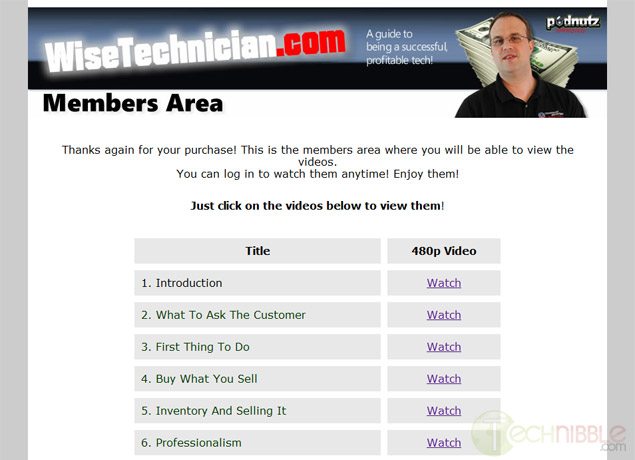
WiseTechnician Review

Authors: Bryce Whitty

Does up-selling to your clients make you feel like a used car salesman? Most Computer Technicians come from a technical background so sales and marketing does not come naturally. Now that you are in business, sales is really something that you cannot avoid if you want to make money. I had heard about these WiseTechnician videos mentioned a few times in my Computer Technician circles that focused on the sales side of the Computer Repair business, and I wanted to check it out not only for myself, but for all of Technibbles readers to see if they are worth purchasing. This is my WiseTechnician review.

So What Is it?

The WiseTechnician videos are a collection of videos about the business and marketing side of the computer repair business. The package includes 26 High Quality 480p videos resulting in 3.5 hours of content. There are also audio-only versions of each of the videos so you can listen to them on the go.

The package includes videos on a variety of topics such as what to ask the customer, stocking inventory and selling it, finding a wholesaler, parts and pricing, billing and accounting, working in small/depressed areas, managed services, getting business customers and more.

Under The Hood

The videos are done in an interview style over Skype with Steve Cherubino from Podnutz as the host. The videos are broken up into 26 different topics and each video ranges from 5 to 10 minutes in length making them 3.5 hours in total.

Once you pay for the product via Paypal, you will be sent an email with login details to access the members only area on the WiseTechnician website which allows you to access the videos from any computer and mobile device capable of playing .mp4 files. Having the product stored like this is handy if you lose the videos because you can just login and download them again.


So What Are The Videos Like?

The videos are high quality Skype video calls and both Steve Cherubino and Chris Barre having good microphones and webcams. While the total length of the videos is only 3.5 hours long, there is little fluff in these videos and they are full of “gold nuggets” of information. In fact, while I was watching these videos there were many times where I thought “That tip alone is worth the cost of these videos”.
The videos are like watching one giant Podnutz interview and Chris can quite animated. He really is a no nonsense kind of guy.


A lot of technicians talk about ideas that they are going to try which may or may not work. I found the videos useful because they say “Do this, it works. Here is how to say it”.

I have only two gripes with this product. First, there are a couple of points audio drops out, but only for a split second. I guess thats is the the nature of Skype.
Second, I am not a fan of the site design as it looks too infomercial-like. However, the product itself is no-fuss, solid content.

So Who is Chris Barre?

Chris (the “Wise Technician”) has been doing computer repair for the last 7 years and has been sales for 14 years in both retail and business to business.
He used to own an an applicance repair company which had a store front and as well as doing onsite applicance repair. That business is still going strong and had 5 employees when he sold it.
Chris wanted to make a product that helped Computer Technicians make some serious money and get over the “computer guy shyness”. He has been talking to Computer Technicians for the past 3 years on the Podnutz network and their issues always came down to them not charging enough, feeling bad for making “too much” profit on a product, and not being able to sell new services and products to their existing customers.

Who Is This Product Not For?

If you have been running your business for many many years (Say, 5 years plus) then you are going to get less out of it. That is not to say you wont get anything out of it as the videos are a combination of startup tips and sales tips. I myself have been in business for about 10 years and I still got sales tips out of it that would make it worth the cost. If you still dont feel comfortable with sales then you will find the product useful.

The videos are not for you if you dont plan to invest the time to actually watch/listen to the videos and impliment the tips. This is not a get-rich-quick plan.

Who Is This Product For?

If you are within the first few years of your business, you will get a lot of great tips from these videos. As mentioned above it covers both startup tips (such as how to find a supplier) as well as sales tips. I know most new computer business owners dont feel comfortable about sales since they came from a more technical background. They often feel like a sleezy car salesman when trying to sell. Chris gives you some really elegant ways to sell to your clients without feeling like a scumbag.

The product retails for $79.95 and comes with a 60 day money back guarantee. There is really is no reason not to give them a try as it is risk free.

Check out the WiseTechnician Videos Here


© Technibble – A Resource for Computer Technicians to start or improve their Computer Business
To get started with your own computer business, check out our Computer Business Kit.

image

Read more:

My new approach to fighting spammers – or how to market your business in The Force Field

Last week in The Force Field Forums, we got spammed.

We get a lot of forum spammers every day. 24 hours a day, seven days a week. A lot of them are spambots, a few of them are real humans, but nearly all of them we catch before they even get approved for membership in the forums and all of them are immediately banned. Okay, that’s not news. Hardly enough to write about in a blog, right?

Except for this spammer. This one was different. This one got through. And this one was representing a new, legitimate business. So the Admins trashed the post. But we didn’t ban this spammer. Nope. We’ve banned over 125,000 known forum spammers and its time to set one straight. So we’re going to give this spammer an education. But it’s more than that. It’s a learning experience for all of us trying to make it in a Web based world of business, particularly in IT. It’s a lesson in how to market our businesses to others and build a good, solid business reputation and reputable brand with etiquette, ethics and finesse.

The individual who spammed The Force Field Forums was a representative from Sevacall, a new startup that has been in beta mode for awhile and just officially opened its virtual doors June 13, 2012. Sevacall is a “lead generation” type service platform that connects clients with service providers over the telephone. Just when you thought you were done with services like Geekatoo (Geekatoo? Really? Sheesh!), along comes Sevacall. Yes, I know it’s quite innovative and all to be another lead generation platform on the web with the same old “connect Buyers and Providers for the lowest price” line, but what makes it really unique? Spamming forums to recruit service technicians? Trying to alienate their provider base right out of the gate? Well, so far they’re off to a great start.

To be fair, they have 17 interns on staff, so it is possible the culprit was some college kid who didn’t know network marketing from his rear end and not the CEO himself. So I decided to “reach out” as they say in the corporate world and give Sevacall a chance to redeem themselves. I sent an e-mail response to the spammer. The e-mail is below:


HeretoHelp,

I noticed you signed up for our forums recently and was approved for membership. Unfortunately your first post was flagged by a member as spam and subsequently moved to the trash folder by our Admins. The forums are a place to network with other members and self-promotion is encouraged within reason. While we do encourage our members to promote themselves and their businesses, there is a certain standard protocol for this. To avoid confusion or misunderstanding, we do request that all new members read the forum rules before they post for the first time. You can read the forum rules at http://www.theforcefield.net/forums/index.php?topic=5292.0.

You may be surprised to learn that spamming the forums certainly did not win you any friends in there. This is unfortunate, since Sevacall is a potential resource for techs in The Force Field and, had you done this properly, you could have actually won some of them over to your service. It’s all in the approach.

You likely found The Force Field Forums by Googling for sites with keywords related to Thumbtack and Geekatoo, which you may consider as your primary competitors when recruiting techs. While that may a logical procedure for recruitment, it isn’t the only one, and as you have probably discovered by now, spamming the sites that appeared in the search results is hardly effective and can actually make more enemies than friends, ultimately hurting Sevacall’s reputation.

There are other less intrusive and more effective ways to accomplish your goal. One tried and true method is by (gasp!) advertising in the right venues to your direct audience. Yes, it costs money, but if you’re going to invest in the other aspects of a legitimate business, marketing your business is very important, so you can’t skimp on that if you want to do it right.

There are also FREE ways to market your domain that are ethical and highly effective. (spamming the domains of others is NOT ethical and can actually be self-destructive). One powerful, yet cost effective way is through product or service endorsements on blogs and social media networks. Yes, it takes more effort on your part, but it can be well worth it in the long run. It can even boost your reputation in a positive way, if you do it right.

A third way is the one you encountered June 18, 2012 at 2:29:48 PM – the exact day and time you registered for The Force Field Forums. Had you bothered to explore the entire site before you made your first post, you would have discovered great potential for promoting Sevacall – most of it absolutely FREE!!

Since you probably didn’t do this (or you wouldn’t have spammed the forums) you probably don’t know who I am and you probably don’t know what The Force Field is, thus you probably have no idea what I am talking about. So I will explain it to you.

The site you stumbled upon is a business portal of news and resources for IT service providers – the very “service pros” you are trying to recruit for Sevacall. The Force Field offers a Business Resources Directory, news, reviews of products, services and companies, blogs, and, of course, The Force Field Forums. The Business Resource Directory offers FREE listings for companies who want to partner with providers and allows the providers to comment on them, recommend them and rate them. The blogs feature articles and rants about issues of the day as well as reviews and editorials on tech products, services and companies. Many techs use The Force Field Forums to network with each other and exchange ideas and recommendations from others regarding which companies to work with and which to avoid (guess which way they lean with Sevacall right now?)

Then there is the podcast. Yes, we have a podcast, an Internet radio show that is heard on-demand in over fifty countries around the world. An interview on The Force Field show is a great way to reach techs globally and recruit them for Sevacall in a positive way. Best of all it’s free publicity. You can’t beat free.

Had you looked over the site, checked out the show and contacted me first, things would be a lot different. I would have invited you into the forums, written Sevacall up in my blog with links to your site, and – yes, I would have offered to interview you for The Force Field show.

Yes, entering The Force Field community, getting to know it first, reaching out to me and the other members and actively engaging in meaningful discussion by networking socially takes a little longer, and is more work on your part, but the long-term rewards are worth it, as you could have built a long-lasting, trusting relationship with the techs you wanted to recruit and develop a great reputation for Sevacall.

But you didn’t do that. You didn’t even try. Unfortunately, instead of participating in The Force Field community you decided to go for the quick and easy, drive-by, one-shot spammy post. Instead of introducing yourself and your company and identifying yourself as a representative of Sevacall, you attempted to pass yourself off as a peer, a tech who uses the platform, which was disingenuous, misleading and dishonest, which does not build trust in the company at all. As someone with some experience in marketing and promotion, I can tell you that you made all the mistakes of someone who does NOT understand how to market a business to professionals in a social network on the web.

Normally, our Admins at The Force Field would simply trash your post, send you a warning e-mail (which they already did), and, if you did it again would simply ban you from the forums permanently.

However, this time I decided to do something a little different. Collectively, the anti-spam system, the other Admins and I have already banned over 125,000 spammers and I’m getting just a little tired of it all.

So, this time I’m going to make an example of Sevacall. I’m going to use you as an example of what happens when a company does all the wrong things to market their business and alienates the audience they are attempting to reach instead of endearing them to your company. But I’m not going to be mean about it. I will admonish you for your uncouth behaviour, yet reach out to Sevacall and give you folks a chance to do it right.

Now, if you really want to do this right, start with the introduction. Please identify yourself and your position with the company. Who is HeretoHelp? Are you Gurpreet Singh, the CEO? Are you the president and COO Manpreet Singh? Are you one of the other members of “The Team” (as you call yourselves) at Sevacall? Or are you one of the 17 interns listed on your site? (Don’t tell me the company is entrusting its online reputation with an intern).

Second, don’t misrepresent yourself. If you work for Sevacall (which, according to your e-mail and IP address you do – yes, I checked, it’s Sevacall’s IP) then just come right out and say so. Don’t pretend to be a tech who uses the service and likes it better than the others. It’s called a lie, and businesses that do it don’t earn anyone’s respect or trust in this community or the marketplace in general.

And third, you owe the members of The Force Field Forums an apology. You need to apologize for intruding on their discussion without a proper introduction, for lying to them about who you are, and for interrupting a serious discussion to promote your service. Yes, other people do it, and some other companies do it, but they are usually less than reputable and I don’t think you really want your business to have that reputation, do you?

Now, some of the damage has already been done. For starters, you don’t get an interview on The Force Field podcast at this time. Also, Sevacall reminds me too much of Service Magic with telephones, and I was already burned by them a few years back. Service Magic was prone to what I call lead fraud, much of it perpetrated from within the company itself. Sevacall is about phone leads, a technology with its own potential for abuse. So, don’t look for a personal endorsement from me, because I generally don’t trust this “lead generation” type of service platform. I hesitate to sell you any ad space in the show or on the web site, either, because although our rates are reasonable – as you can tell from our media kit – it’s reserved for products and companies I have vetted and I can personally endorse.

But I will do this. I will devote an entire post in my blog to Sevacall and give you a few links back to your site. I’ll even do it FREE, with no reciprocal link or other compensation expected from Sevacall in return. In fact, I’ve already done it. You see, what started off as an e-mail in response to your spam post in my forums turned into a blog post for the front page of The Force Field web portal. The topic? My new approach to fighting spammers – or how to market your business in The Force Field.

So, you get some promotion for Sevacall after all. It’s just probably not what you expected. And if you spam the forums again, I’ll post another one. And then I’ll ban you. Permanently. Harsh? Maybe. But after dealing with over 125,000 forum spammers, it’s time to draw the line and fight back. You just happened to be the next one in line to cross it.

Isn’t that what you wanted anyway? A quick and easy, drive-by, one-shot spammy post promoting Sevacall? Well, you got it, right in my blog for the entire world to read. And it was FREE, compliments of The Force Field.

You’re welcome.

But, hey, you earned it.

Ottawa Computer Services

Ottawa Computer Services. Taleam Systems offers desktop and laptop repair in Ottawa, Ontario at affordable rate only $30 per hour.

We can fix your computer if you are having Windows problems, Virus issues, hardware problems, network issues or printer problems.

Taleam Systems offers support for Acer, Dell, HP, IBM, Lenovo, Sony and Read More…

Read more: