Labtech Software

Labtech Software offers a remote monitoring and management (RMM) solution to IT service providers for their clients. According to the company, Labtech was designed by working IT service professionals with actual experience in the industry. Labtech offers a fully functional FREE trial download .


Contact:


LabTech Software
2805 W. Busch Blvd.
Suite 102
Tampa, FL 33618
United States

1-877-522-8323
1-813-397-4600

e-mail: sales@labtechsoftware.com

http://www.labtechsoftware.com/


Eaton PowerAdvantage® Partner Program

Eaton provides power quality and backup power management solutions. According to Eaton, their partner program was designed VAR community. It includes two tiers – Authorized and Certified.


Benefits of the partner program include:

  • Instant Rebates Up to 9%
    Dedicated Pre and Post sales support
    Deal Registration
    Marketing Development Funds
    Training and Certifications
    Lead Generation
    Sales & marketing tools and collateral
    Special deal pricing program
    Demo Unit Program


Contact:


http://www.poweradvantage.eaton.com/

Google+ Pages for Computer Businesses – What You Need To Know

Authors: Bryce Whitty

There is no doubt that social networking is here to stay. While some Computer Technicians may consider it just a new buzz word, other technicians are using it as their primary source of advertising. Google+ is newest major player in the social network game.

After several months, Google finally announced Google+ pages for local businesses, groups, brands and organisations. If you are familiar with Facebook pages, this is basically the Google+ equivalent. In this article, I’ll tell you why you should look into Google+ Pages and what you need to know before you claim your page.

Why You Should Care

Google+ Pages, like Facebook Pages allows you to have a two way conversation with your clients. If they follow your page, your updates appear in their stream. This is an incredibly cheap way to advertise your business through discounts, specials and generally being on the front of your clients mind.

What If You Already Have a Google+ Account For Your Business?

I know of many Computer Businesses who have already have Google+ accounts for their business. However, it is actually against Google+’s terms to have a Google+ profile for a business. The account must be for an individual. The Google team will suspend accounts that break this rule.

From the Google+ Help Pages:
Your profile and name must represent one individual.
Google+ does not support profiles for couples or groups of people. Additionally, you cannot create a profile for a non-person entity such as a pet or business.

Violation examples: Jones Family, Jeremy & Mel Mason, Vegas the Dog, Brooklyn Bagels, Northern California Conservation Society

Google does plan to allow Google+ Business Profiles in time, but don’t hold your breath plus your account could get banned in the mean time.
If you have already done this, you can change your businesses Google+ account back to an individual (typically yourself). You can do this by going to your Google+ profile, click the “Edit Profile” button that is on the top right. Click on the name displayed up the top of the profile page. From there, you can type in a legitimate first name and last name. Then press save.

What You Need to Know Before You Claim Your Google+ Page

  • Contests, Sweepstakes, Offers, Coupons and Other Promotions From Your Page
    In Google+’s content and promotion policies page, it disallows you from running contests, sweepstakes, offers, coupons and other promotions DIRECTLY on your Google+ page. You may however, link to a separate site (such as your actual businesses site or blog) that contains the promotion.

    You may not run contests, sweepstakes, offers, coupons or other such promotions (“Promotion”) directly on your Google+ Page. You may display a link on your Google+ Page to a separate site where your Promotion is hosted so long as you (and not Google) are solely responsible for your Promotion and for compliance with all applicable federal, state and local laws, rules and regulations in the jurisdiction(s) where your Promotion is offered or promoted. Your Promotion must not be run or conducted in a way which conflicts with the +1 Button Policies, Google+ Privacy Policy or Google+ Pages Additional Terms of Service. Google has the right to remove your Promotion content from Google+ Page for any reason.

  • Linking your Personal Account To Your Business Page
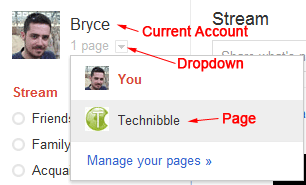
    When you visit the Create Page link and create a page, the page will be associated with the account that is currently logged in. To access your page from your account, there will be a drop down next to your name saying “1 Page”. Make sure you are logged into the account you want to associate the page with. Unlike Facebook pages, you cannot currently add any additional administrators to your account.
  • Be Careful When Switching Between Linked Accounts
    When using a Google+ account or page, it is not always obvious which one you are currently using. You will want to double check every time you are about to post something as you will probably not want to send a personal message out to all your clients and vice versa.

Beautify Your G+ URL

Once you create a G+ page, you will find that its URL is pretty long. For example, Technibbles G+ page URL is: https://plus.google.com/b/111951375001480014041/
Obviously, you don’t want to have write that long URL on any advertising so you can shorten it with a G+ specific URL shortner. I recommend gplus.to

Using gplus.to, I can change Technibbles page URL to http://gplus.to/technibble

So What Now?

© Technibble – A Resource for Computer Technicians to start or improve their Computer Business
To get started with your own computer business, check out our Computer Business Kit. Google+ Pages for Computer Businesses – What You Need To Know

image

Read more:

Computer Technicians Guide To The Apple Mac Boot Shortcuts

Authors: Bryce Whitty

Guest Post by Marco Rodi: Marco Rodi owns an IT Engineering university degree. He has his own computer repair business (OrdiRodi) that mainly does Apple Support.

In this article you will learn all the most important boot shortcuts on a Mac. We’ve all been there. The client is there, you boot their computer and the screen just hangs there. No OS. You sometimes see the grey apple logo, sometimes it’s all white and sometimes you see nothing at all. You absolutely need to know which key to press in order to repair the Mac. Enter the Apple Mac boot shortcuts.


First of all, you don’t have to use an Apple Keyboard to do these. Any regular USB PC keyboard will work as long as you keep in mind the following:
Option = ALT Key
Command = Windows Key

To make these boot shortcuts work, the computer needs to be shutdown and you need to press/hold these keys while booting the computer.

C

Sometimes, the Mac is not programmed to automatically boot from a CD. This allows you to boot directly from the CD.

Option

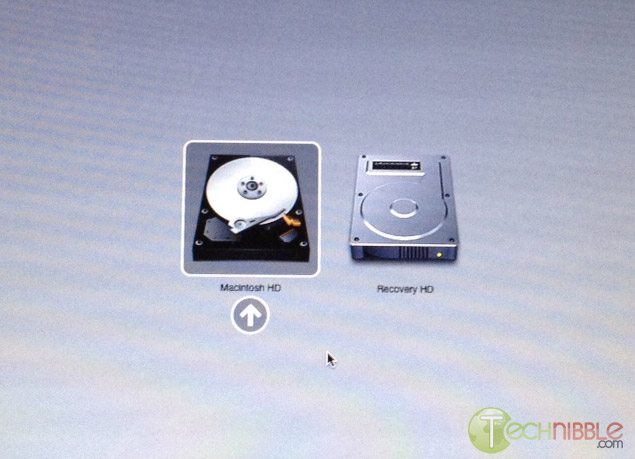
By far, the most useful shortcut that will tell if the computer has a hard drive failure or a motherboard corruption. When you hold option at start, it will detect all the bootable devices in the Mac such as the CD, Hard Drive, External USB and External FireWire. You can then choose which devices you want to boot from. This is perfect if you want to boot from an external USB/FireWire.
 

D

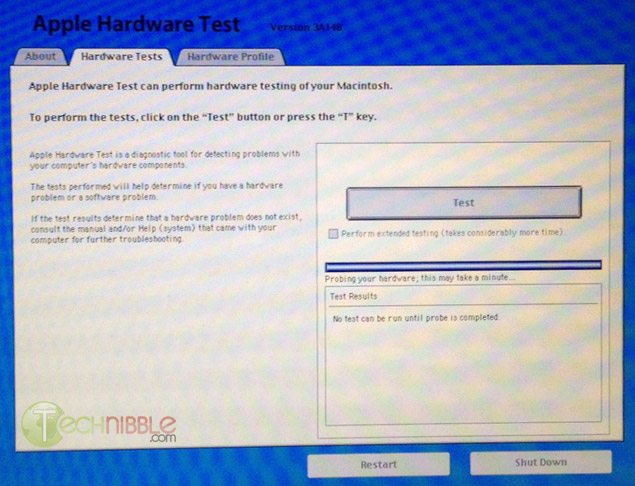
All Apple Computers come with an Hardware Test CD. When you hold D, the cd needs to be already inserted. It will boot Apple Hardware Test which is an incredible powerful tool that will make a precise diagnostic on your client’s computer about any form of hardware failure: RAM, hard drive, motherboard etc.
 

Option – Command – P – R

This combination will reset the NVRAM and PRAM of your client’s computer. What does it mean? It will reset all the default settings on the motherboard or built in features including: Serial Port Configuration, Clock, Volume, Double-Click time, Virtual Memory, RAM disk, Mouse Speed, Application Font, Alarm Clock, Monitor Color Depth, Startup Disk and Serial Printer location. This is often done if your client’s machine boots into a weird pink color. To do this NVRAM/PRAM reset, your need to hold the keys when you boot your client’s Mac. Hold down the keys until the computer restarts with the startup sound the second time.

Hold the mouse or trackpad button

This will eject all the removable media plugged to your Mac. (Cd, USB, Firewire etc.) This is perfect if the CD is stuck inside and the keyboard is not working or if the Mac tries to boot from an unknown external device.

Command-S

This will boot the machine in Single-User mode. It is a UNIX-like interface where you can enter many simple commands to troubleshoot the machine. This is mainly popular with the use of “fsck ” to check the computer disk permission.

Command-V

This starts the Mac in Verbose Mode. You will see all the descriptive text of all the boot steps, similar to Windows’s Safe Mode. If the computer freezes on startup, you can see where it will freeze.

T

This puts the Mac in Target Mode. It will transform the Mac into a giant Firewire external drive. You can access the files from another computer. Perfect if you need to repair a corrupted hard drive or backup files.


Shift

This will start the Mac on a safe boot. It will disable all the login items, all the non-default fonts, disable all the cache and it will force a directory check.

If you are still unable to enter the system or at least see the grey Apple logo at the beginning after using these shortcuts, the problem is most likely going to be a motherboard corruption.

Guest Post by Marco Rodi: Marco Rodi owns an IT Engineering university degree. He has his own computer repair business that mainly does Apple Support (OrdiRodi – http://www.ordirodi.com) located in Montreal. He works for Transat as an application support Engineer where he has to maintain all the software that makes the airplanes fly. He’s also an active bassist. (http://www.marcorodi.com)

© Technibble – A Resource for Computer Technicians to start or improve their Computer Business
To get started with your own computer business, check out our Computer Business Kit. Computer Technicians Guide To The Apple Mac Boot Shortcuts


image

Read more: