
How To Get More Calls From Your Computer Businesses Website

Authors: Bryce Whitty

In this day and age just about every Computer Business should have a website. Of course, most Computer Technicians already know this and set out to make their own website. Some of you may make use of a free website builder, some might start with a template and some of you may know how to make them from scratch. While many Computer Technicians have the technical skills to create their own website, most Computer Technicians don’t have the internet marketing skills to maximize turning website visitors into paying customers.

As we all know, getting traffic to your site is important and topics like SEO or choosing the right keywords deserve an entire article on their own. You might even be paying for Google Adwords or have an ad in a business directory to get traffic to your website but it is all wasted if you cannot convert the website viewers into paying customers.
When a visitor arrives on your website, a handful of events occur:

Is this what I want?
Once you have driven someone to your website, you need to make it obvious what you are about very quickly. What do you do? Where you are located? In the internet marketing world, they say that you only have 7 seconds to grab someone’s attention before they leave the site.
The solution to this is to have a headline saying what your business is about and/or a very short paragraph right up the top of the page. The headline can be as simple as saying "Los Angeles Computer Repair" since this answers the question of what you do and where you do it, which are the first two questions for any client searching for a Computer Technician will want to know. Now that you have their attention they will read the rest of the copy on the website.
The small paragraph can say something like "We are a Professional, Certified and Insured Computer Repair company operating in the Los Angeles area. We serve small and medium sized businesses as well as home offices". Again, this answers as many questions as quickly as possible to maintain their attention.

Now we have their attention..
We need to convey more information to let them know that we are what they are looking for, all while still maintaining their attention. We need to remember that at this point, most people that are searching for something wont read website copy, they will scan it.
In order to do this, we need to avoid big blocks of text and use bullet points instead. The best way to take advantage of the bullet points is to list your services in them. For example:

  • Laptop Repair
  • Virus and Spyware Removal
  • Desktop Repair
  • Data Recovery and Backup etc.

The client usually knows what they want. If they believe that they have a virus then they are going to be scanning for the page for the words "virus removal".
Once you tick that box in their mind, they are much more likely to continue reading your website.

Continue Answering Questions
So we have answered what we are, where we are and that we can remove their virus, the next questions they are probably going to ask is how much it costs. There is a lot of discussion on the Technibble forums on whether you should post your prices on your website or not but if you are targeting the home or small business market, I suggest you do.

Close The Deal
Now that we have answered their questions, lets close the deal by establishing some credibility. You can mention some certifications using their full names (Microsoft Certified Professional rather than MCP) and maybe some unobtrusive logos on the side of the page or some testimonials.

Call To Action
The client is now sold on us and we need to make the conversion. We need to ask for the sale. If we want the client to call us, we can write "Call 555-555-5555". If we want them to fill out a form stating their problem we would write "Tell us about your problem" or something similar. This needs to be obvious as the next step. We do not want to sidetrack them once we get to this point.
This is actually why I have always recommended Podnutz’s Tech Site Builder, it does all of this right of the box.

Where you can lose your visitor

  • Having too manage pages – Unless you have your visitors undivided attention (which we cannot assume), they are not very likely to go through all your pages. It is not uncommon to see Computer Technician website with Services on one page, Prices on a second page and Contact Information on a third.
    You might have seen a really long sales page on the internet at some point; this is because internet marketers know that visitors won’t go through your pages.
  • Distracting them from your main goal – Don’t distract your visitor from the main goal which is your phone number or your email form. We need to keep them on our page until they reach our contact details.
    I have seen Computer Technicians place Google Adsense ads on their site to generate money from their website. This is one of the worst things you can do because when a client comes to your site through your expensive advertising, they see your competitor’s ad on your Google Adsense block, clicks it and you make 30c for the click while your competitor gets the $100 repair job. Try not to have any links on your sales page that takes the visitor away from your site such as linking to the home page of your certification. If you must, open the link in a new window by adding target="blank" to the link.

Analyze how visitors use your site and make changes
You can also use a service like Clicktale which allows you to analyze your visitors in great detail including which links they clicked, how long they spent reading a certain area and even watching their mouse movements on your page. You may find that they become confused by your page, click on something that isn’t clickable, get stuck somewhere and leave. Once you know where any problems lie, you can fix them and may find that one technical issue was preventing you from getting many calls per day.
Clicktale has a free option that records 400 page views a month and then stops recording if you go over.

Conclusion
So, to rehash, a good landing page does the following really quickly:

  • What we are about
  • Where we are located
  • How much we cost
  • Establish some credibility (testimonials, certifications etc.)
  • How to get in contact with us.

© Technibble – A Resource for Computer Technicians to start or improve their Computer Business
To get started with your own computer business, check out our Computer Business Kit. How To Get More Calls From Your Computer Businesses Website

image

Read more:

How To Get More Calls From Your Computer Businesses Website

Authors: Bryce Whitty

In this day and age just about every Computer Business should have a website. Of course, most Computer Technicians already know this and set out to make their own website. Some of you may make use of a free website builder, some might start with a template and some of you may know how to make them from scratch. While many Computer Technicians have the technical skills to create their own website, most Computer Technicians don’t have the internet marketing skills to maximize turning website visitors into paying customers.

As we all know, getting traffic to your site is important and topics like SEO or choosing the right keywords deserve an entire article on their own. You might even be paying for Google Adwords or have an ad in a business directory to get traffic to your website but it is all wasted if you cannot convert the website viewers into paying customers.
When a visitor arrives on your website, a handful of events occur:

Is this what I want?
Once you have driven someone to your website, you need to make it obvious what you are about very quickly. What do you do? Where you are located? In the internet marketing world, they say that you only have 7 seconds to grab someone’s attention before they leave the site.
The solution to this is to have a headline saying what your business is about and/or a very short paragraph right up the top of the page. The headline can be as simple as saying "Los Angeles Computer Repair" since this answers the question of what you do and where you do it, which are the first two questions for any client searching for a Computer Technician will want to know. Now that you have their attention they will read the rest of the copy on the website.
The small paragraph can say something like "We are a Professional, Certified and Insured Computer Repair company operating in the Los Angeles area. We serve small and medium sized businesses as well as home offices". Again, this answers as many questions as quickly as possible to maintain their attention.

Now we have their attention..
We need to convey more information to let them know that we are what they are looking for, all while still maintaining their attention. We need to remember that at this point, most people that are searching for something wont read website copy, they will scan it.
In order to do this, we need to avoid big blocks of text and use bullet points instead. The best way to take advantage of the bullet points is to list your services in them. For example:

  • Laptop Repair
  • Virus and Spyware Removal
  • Desktop Repair
  • Data Recovery and Backup etc.

The client usually knows what they want. If they believe that they have a virus then they are going to be scanning for the page for the words "virus removal".
Once you tick that box in their mind, they are much more likely to continue reading your website.

Continue Answering Questions
So we have answered what we are, where we are and that we can remove their virus, the next questions they are probably going to ask is how much it costs. There is a lot of discussion on the Technibble forums on whether you should post your prices on your website or not but if you are targeting the home or small business market, I suggest you do.

Close The Deal
Now that we have answered their questions, lets close the deal by establishing some credibility. You can mention some certifications using their full names (Microsoft Certified Professional rather than MCP) and maybe some unobtrusive logos on the side of the page or some testimonials.

Call To Action
The client is now sold on us and we need to make the conversion. We need to ask for the sale. If we want the client to call us, we can write "Call 555-555-5555". If we want them to fill out a form stating their problem we would write "Tell us about your problem" or something similar. This needs to be obvious as the next step. We do not want to sidetrack them once we get to this point.
This is actually why I have always recommended Podnutz’s Tech Site Builder, it does all of this right of the box.

Where you can lose your visitor

  • Having too manage pages – Unless you have your visitors undivided attention (which we cannot assume), they are not very likely to go through all your pages. It is not uncommon to see Computer Technician website with Services on one page, Prices on a second page and Contact Information on a third.
    You might have seen a really long sales page on the internet at some point; this is because internet marketers know that visitors won’t go through your pages.
  • Distracting them from your main goal – Don’t distract your visitor from the main goal which is your phone number or your email form. We need to keep them on our page until they reach our contact details.
    I have seen Computer Technicians place Google Adsense ads on their site to generate money from their website. This is one of the worst things you can do because when a client comes to your site through your expensive advertising, they see your competitor’s ad on your Google Adsense block, clicks it and you make 30c for the click while your competitor gets the $100 repair job. Try not to have any links on your sales page that takes the visitor away from your site such as linking to the home page of your certification. If you must, open the link in a new window by adding target="blank" to the link.

Analyze how visitors use your site and make changes
You can also use a service like Clicktale which allows you to analyze your visitors in great detail including which links they clicked, how long they spent reading a certain area and even watching their mouse movements on your page. You may find that they become confused by your page, click on something that isn’t clickable, get stuck somewhere and leave. Once you know where any problems lie, you can fix them and may find that one technical issue was preventing you from getting many calls per day.
Clicktale has a free option that records 400 page views a month and then stops recording if you go over.

Conclusion
So, to rehash, a good landing page does the following really quickly:

  • What we are about
  • Where we are located
  • How much we cost
  • Establish some credibility (testimonials, certifications etc.)
  • How to get in contact with us.

© Technibble – A Resource for Computer Technicians to start or improve their Computer Business
To get started with your own computer business, check out our Computer Business Kit. How To Get More Calls From Your Computer Businesses Website

image

Read more:

Turbo-charge Your Computer Repair Websites Sales Potential

Authors: Bryce Whitty

Guest post by Jim who is member of the Technibble community.
Traffic is essential to getting people to your site, but it is only half the equation of making money from it. The other half of the equation is converting visits into contacts. Even if you can drive mass traffic, your site will only generate income when visitors contact you from it to buy your services or products.

The highest possible rate of conversions, (buyer-contacts resulting from visits), is the profit-potential of your website. This article provides techniques for improving conversion-rate.

BASICS

1. Provide reassurances

Anticipate consumers having a number of preconceived objections, which they want addressed before contacting you.

  • "Are you providing quality customer service?"
    Reviews from other satisfied customers.

    Positive comments from other satisfied customers are probably one of the single best selling points for your services. Research shows that there are a body of consumers who will not buy online unless the purchase is backed by relevant peer reviews. Reviews will reassure your visitors far more effectively than any statement you can make about your own business. Ensure you have legit reviews in as many prominent locations as possible.

  • "Do you know what you’re doing?"
    Trust-Symbols.

    Display symbols that demonstrate your legitimacy as a service. For example, if you are certified, ensure your certification is in prominent locations. Display other trust-symbols such as your professional and affiliate memberships, significant name-brands, company logos, professional partnerships, etc. Ensure these are clearly visible from as many locations on your site as possible, ideally from any location a visitor may be making a purchase decision from.

  • "What if something goes wrong?"
    Guarantees.

    Satisfaction, work quality, follow-up, due-diligence are all aspects visitors will look for. Ensure visitors can see their purchase will be backed-up with a specified level of after-sales support. One way to do this would be to use a graphic next to each product/service description to illustrate the sort of guarantee/assurance you provide for that particular service, ie "satisfaction guarantee", "service guarantee", "quality guarantee", "money-back guarantee".

2. Show the benefits of making the purchase.
Describing the service or product is not the same as selling it.

For example:

"John’s Malware Removal".

You get:

  • Professional, multi-stage virus removal using state-of-the-art tools
  • 10-point security check
  • 15-point System file-integrity check
  • Firewall testing and validation
  • A 30-point FREE speed and performance Tune-up included!
  • Windows, Java and Flash updates
  • Your choice of onsite or online: no driving, parking, unplugging or queuing!
  • OR, picked up and delivered to your door at no extra charge!
  • …Insert benefits of YOUR service here.
  • …Unique points that distinguish your service’s benefits from those of  your competition

3. Get the composition right

Try to avoid using paragraphs of text to describe a message that could just as easily be illustrated in either a few dot points or with images. Keep your sales message simple: visible as soon as the page loads, with no unnecessary reading required for its core concepts to embed.

  • Put the goodies at the top of the page.

    If the benefits of your service are submerged beneath a mountain of verbiage there’s a good chance they will not be communicated. If visitors are compelled by what they see as soon as the page loads, they may continue reading, or, ideally, contact you outright. If they are bored, because of irrelevant information at the outset, or if they don’t find what they need to know about you or your services quickly enough, you risk click-away.

  • Reduce clicks.

    The less clicks required for visitors to get their required information, the more likely your sales message will be impressed on them. Use a menu/page structure that allows visitors to zero-in on exactly the service they are looking for with a single click. Each time you put visitors in a position of having to read through information that is not what they are looking for, you risk creating disinterest and subsequent click-away: information-overload is not conducive to conversion. Maximise any and all opportunities to get visitors directly to (1) your sales message, and then, (2) your call to action.

2. CALLS TO ACTION

Once your sales message has been received, the next step is to tell your visitors what to do next. There is a subtle but important distinction between providing your phone number (or any other action you want them to engage in), hoping customers will use do it, and telling them to get on the phone and ring you. Now! The following method of implementing calls to action is about telling them what they need to do next, making it urgent, and offering an alternative

  • 1. Make the call to action clear and simple

    For many Techs, phone will be a preferred contact method. Each contact method will have its own merits, and which you choose will depend on your business model. The calls to action you implement may differ on a per-service basis.

    Examples: "Phone Now!", "Email Now!", "Buy Now!".

    Email will convert better if you guarantee a fast response time, by placing "Fast-response email system" – or similar – in close vicinity to the submit button. For those who have the staff, Live-Chat is also a viable call to action method, because of its perceived immediacy. For those with a shopfront, walk-in is also a viable action to call

  • 2. "Why shouldn’t I just go away and think about it, shop around?"

    Create a sense of urgency: offer incentives for acting NOW.

    The time between the customer picking up the phone/emailing immediately, while on your site, and next week, or never, is vital. A contact when they are at your site will likely lead to money in your bank account. A phone contact "later" may never happen, which is lost income. Creating urgency means providing information that compels the consumer to engage in the action you want at the time they are on your site. Examples:

    • Call today and ask for our Web Discount
    • Buy today and receive (…FREE!, [or]…at 50% off!)
    • Only 10 available at this price!
    • For a short time only!
    • First 20 customers receive … (deal, special, freebie)
    • … offer a reward/incentive for immediate contact
  • 3. Add BUY NOW (online) options

    Some consumers LOVE to shop online, preferring the immediacy of a few mouse clicks to typing emails or phoning and asking for products/services. To cater to these visitors, consider offering an immediate purchase, "BUY NOW", option.

    Ideally, a "BUY NOW" button is (1) attractive, and (2) in a context where all possible objections have been managed adjacent to it on the page, so that no doubt is left in the visitor’s mind that your service is safe to purchase from, AND, will fulfil their needs.

    "Secure Purchase" or "Buyer Protection" will encourage conversion, as will offering a discount, or another incentive for using BUY NOW.

  • 4. A 5-Second Rule
    Assume that you have 5 seconds to make an impression on your visitor once s/he lands on your site. If you are not using a centralised landing page for all your inbound links, this means that any page the visitor lands on should ideally have 5-second conversion potential.
    • Make the Call To Action a physically significant (large) item on the page
    • Make it stand out by using complimentary or high-contrast colours
    • Use a blank or open area around the item to draw attention to it
    • Map a path through the page that is quick and easy to follow, and clearly illustrates the benefits and urgency of responding to the Call to Action, and culminate with the action graphic standing out in size, contrast and position so that what they need to do is clear and simple.

Further reading:

Top 10 Converting Websites: The Similarities and Differences

10 techniques for an effective ‘call to action’

Call to Action Buttons: Examples and Best Practices

Global Advertising: Consumers Trust Real Friends and Virtual Strangers the Most

The Biggest Little Change I Ever Made – A 160% Revenue Increase with 1 Word Change

F-Shaped Pattern For Reading Web Content

Why your bounce rate is high and how to fix it – top 6 reasons why visitors immediately exit your website

© Technibble – A Resource for Computer Technicians to start or improve their computer business
To get started with your own computer business, check out our Computer Business Kit. Turbo-charge Your Computer Repair Websites Sales Potential

image

Read more:

10 Simple Steps to Get Started With Social Media

Authors: Bryce Whitty

Guest Post by Lisa Hendrickson, Owner of Call That Girl. Lisa has published her proven social media strategies in her latest eBook, "Call That Girl’s Guide to Social Media". Lisa has been a featured writer for Technibble in 2010 and is a contributor in the Business and Marketing forums.

Everyone is talking about social media lately and the craze doesn’t seem to be going away. If you’re not utilizing it in your business marketing plan, you might feel like you’re behind the times. Many people who are not using it, don’t know how to even get started. As it is one of the top marketing strategies I use for my business, I found it to be easy to learn, affordable and not something I needed to outsource. You can do it yourself and start seeing results in one day by following these 5 starter steps and these 5 action steps.

1.) Collect your contacts emails. Go through all of your emails, client databases, email accounts and create a generic list. An excel spreadsheet will work fine or use notepad.

2.) Create a LinkedIn profile (http://www.linkedin.com). It’s recommended you use your real name for your profile, not your business name. Fill your profile with your credentials and as much information as you are comfortable sharing. Most people on LinkedIn share most of their career highlights, past positions and skill sets. Of course there is more to using LinkedIn than just creating a profile, but this is a good start.

3.) If you have a website, add a blog page or sign up for a free blog like http://www.blogger.com.

4.) Start an email marketing program. Many popular email marketing companies have free 30 or 60 day trials. For 2011, I am using Constant Contact.

5.) Upload the emails you just collected to your email marketing program and LinkedIn profile. You will need a few contacts to build your network and to have people to send your email newsletter to.

Those are the 5 easy steps to get going, here is your action list.

1.) Write a blog about a simple value-add tip you know of about your industry that others would enjoy learning about. (Example: Tips for buying a new computer).

2.) Create a newsletter with a welcome message, a blog tip (the one you just blogged about) and offer a coupon or discount for services. Be sure to write a short paragraph about the blog and then in the newsletter, put in a hyperlink to the blog to encourage folks to go to your website or blog to finish reading the story. Remember to track the analytics of the newsletter.

3.) Join your local city and state groups on Linkedin. After you join these groups, be sure to introduce yourself to the group. After you have done that, post your blog link “Tips on buying a new computer” in a new discussion. A tip for being effective on LinkedIn is to make sure that your discussion is not pushy or gives the appearance of spamming the group. Try to peak the interest of the members with hopes they read it and remember your discussion later for if they need your services. It’s a good idea to use your professional signature with all discussion postings.
4.) Invite members of those discussion groups to your LinkedIn network. (These are all potential new clients as everyone on LinkedIn has a computer available to them). Many of the people in these groups have the potential to be commercial clients and of course, they are all residential clients.

5.) Attend local face to face networking events. Many of your LinkedIn groups will have free or low cost events. Be sure to watch for those and attend. Meet as many people as you can and when you get home, invite them to your LinkedIn network and add to your email marketing. Meeting new people in person is a very important factor to winning big with social media.

I hope these 10 steps will help you get started with social media. If you would like to learn more, my latest eBook will help you with step by step instructions.

Good luck!
– Lisa

© Technibble – A Resource for Computer Technicians to start or improve their computer business
To get started with your own computer business, check out our Computer Business Kit. 10 Simple Steps to Get Started With Social Media

image

Read more:

Giving Your Business The Best Possible Start In 2011

Authors: Bryce Whitty

A new year is upon us and most people have an idea of what they want to get done this year. For us Computer Technicians it might be to make more money, get more clients or spend more time with family. Whatever you are after, here are some ways to give 2011 a great start:

Set Your 2011 Goals
I dont really believe in New Year Resolutions because they tend to be broken. However, I do believe in setting measurable and achievable goals. The trick to reaching your business goals is to not only write down what the goal is, but to break it down into smaller bullet points with steps you need to take in order to achieve them. For example, your goal for 2011 might be to move your business away from doing break/fix residential work and moving towards maintenance work for businesses.
Its a good goal to have but its not very useful if you dont plan on how you are going to achieve it. It needs to be broken down into little bites that you can get done in a few days. Here is an example:

GOAL: Move my business from mostly residential clients to commercial clients
Decide on the maintenance plans:

  • Look at competitors plans
  • Ask the Technibble forums what they think of your plans (price, what you are offering, could anything come back and bite me?)

Software:

  • Try 30-day trials of various remote monitoring software
  • Purchase one of them and learn the ins-and-outs of it on your own machines
  • Setup your monitoring hardware and software in your workshop. Test it by creating problems on a test machine

Get Advertising Material Made:

  • Gather a handful of competitors advertising material, find parts on each one that you think looks great and make your own unique material based off the best parts
  • Find a graphic designer
  • Print off a very small amount

Prospects:

  • Decide on which businesses in your area you would liketo have as clients and rank them into A, B and C “grades” of desirability
  • Approach your “C grade” list of potential clients and try to sell the maintenance contracts to them. They will come up with questions that need to be answered in your advertising. This is why we wanted a small print run
  • Perfect your marketing pitch and material by approaching more C grade potential clients until many of them start signing up
  • Pitch the material that you perfected with your C grade clients to your more desirable A and B grade clients

The goal “Move my business from mostly residential clients to commercial clients” sounds like a huge task. However, if you write down your goals like this, they suddenly seem very doable.

Clean Up Your Business and Processes

  • Go through all of the stock you have and determine whether you need to throw any of it out, donate it or put it on eBay it if it could still be useful to someone. You may be surprised to find something in the back of your shelves that you really need to move before it loses too much value
  • Check that your backup systems are working
  • Get your inbox in order. Delete any old and unread emails (Friends Facebook status updates etc..). The same holds true to your work area. Remove the clutter and start the new year with a fresh start

Look At Your Finances

  • Is there anything better you could be doing with your earnings like putting it in a high interest bank account or reinvesting it back into the business?
  • Look at your bank statements and see if there are any paid services that you no longer use
  • Look at the current plans of your utilities like internet and phones. Its very likely that they have come out with a better deal than the one you are currently on, but they just dont tell you

Other quick ideas are updating your passwords, checking your answering machine message to see if the information is still current and testing your websites links.

Feel free to leave a comment with any ideas that I may have missed.

© Technibble – A Resource for Computer Technicians to start or improve their computer business
To get started with your own computer business, check out our Computer Business Kit. Giving Your Business The Best Possible Start In 2011

image

Read more:

Top 5 Ways To Get Backlinks To Your Business Website

Authors: Bryce Whitty

Guest Post by Bryan Vest: Bryan Vest is a web developer/SEO specialist who enjoys writing articles to help make techs websites succeed.

Search engines often use the number of links a website has from other sites as a major factor in your page ranking. Even Google’s description of their PageRank system says that, “Google interprets a link from page A to page B as a vote, by page A, for page B”.

Now before you start rushing out to spam as many links as you possibly can on every blog and forum you can possibly find, you need to know that not all links are created equal. For example, lets say you own a computer repair website. A link from another computer repair website will hold more weight with Google than a link from a home improvement website.

There are other contributing factors to the weight of a link, but we will start off with the basics. Now here are the top 5 ways to get backlinks. There are definitely way more ways out there you just have to be creative, but this will be the main 5 you will see just about everywhere.

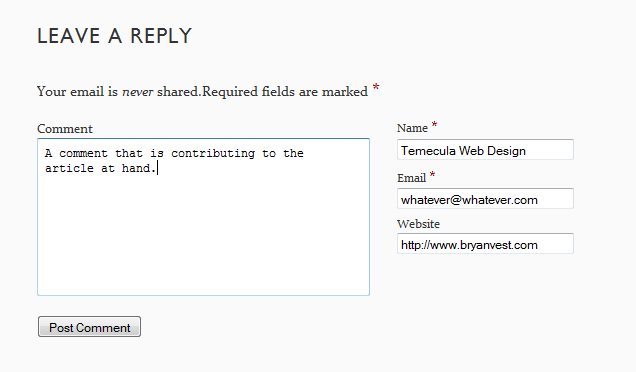
5. Blog Comments and Forum Signatures – There are a lot of “SEO experts” and web developers that believe that blog comments and Forum Signatures are the best way to get backlinks. However, these are beneficial, but “spam commenting” is not the way to go. If you can’t add something valuable to the blog post, or offer a different point of view, don’t comment. This will get you more damage than good in the end. A good way to get high quality backlinks from blogs without putting your link actually in the post is to put your name as the keyword you are targeting and your URL as the website. For example, I am currently working on a new site targeting “Temecula Web Design” here would be a good way to get a backlink that bloggers will approve of.

As you can see it will give you a nice link back to your site without causing the blog to look like its filled with spam.

4. Directory Links – Submitting your site to directories can help you. However, like blog comments not all directories are created equal. Some directories (paid or not paid) can give you a high quality backlinks (DMOZ, Yahoo, and Business.com). For free directories you will want to make sure that more than just the home page of the directory is indexed, and that the directory has been around for at least one year if you are interested in a high quality link. The common misconception is that Google ranks websites as a whole when in fact it ranks web pages. Knowing this if you submit your site and end up on page 200 with no ranking then that link will count for almost nothing.

3. Reciprocal Links – Partnering with sites that are directly related to the subject of your site can help you. The idea here is “You scratch my back, I will scratch your back”. This is when another site links to your site while you link to theirs. This however should be used in moderation. If you have to many reciprocal links, especially if they are not directly related to your site, can actually do more damage than good. This method may require some work since not a lot webmasters are willing to link to their competition. However, if you can find sites related that are not in direct competition with your site you can hit a gold mine of links.

2. Article Posts – Article posting has huge potential to launch your site to the top of Google in the event that one of your articles gets posted on a popular site. A popular way is to contact bloggers related to your subject and ask them if they would publish an article (with your anchor text backlinks). This will actually receive a great response because to bloggers well written and unique content is what they are all about. With some time this method could be like finding oil in your back yard. Not only will you have a link on the site you wrote the article for, but there are a lot of blogs out there that just copy content from other blogs. Generally those webmasters are to lazy to remove the backlinks giving you even more links from other sites. I myself have seen a high quality article go from 1 backlink to 12 in 1 month. The best part is that the sites you get those from are all relevant to your targeted keyword as well.

1. Blog With Quality Unique Contents – It is a well known fact that Google loves blogs! If your content is truly unique and well written you will naturally receive backlinks from other sites. This is the liquid gold of backlinking. Now this method requires the most work and will take the most time, but if you do it right and spend some time on it you can easily get 20 to 30 backlinks from a well written blog post. There links are almost always on relevant websites to since they are coming from webmasters that find your information useful to their viewers as well. Over time you will naturally receive high quality backlinks boosting you to the top of Google ranks with ease.

Guest Post by Bryan Vest of Temecula Web Design

© Technibble – A Resource for Computer Technicians to start or improve their computer business
To get started with your own computer business, check out our Computer Business Kit. Top 5 Ways To Get Backlinks To Your Business Website

image

Read more: