
Secure, real time access and control of any desktop application or content from your iPhone web browser. All you need is a desktop computer running Files2Phones — our iPhone software — and an iPhone.
{youtube}oR2hGlupOqQ{/youtube}Boston, MA (PRWEB) November 13, 2007 — 1stWorks, a real-time communications software company with solutions for secure multimedia conferencing, collaboration and content delivery, announced today the immediate availability of Files2Phones 2.0 — a powerful desktop application that enables your iPhone to function as a real time remote control for your computer — securely, encrypting your data in transit.
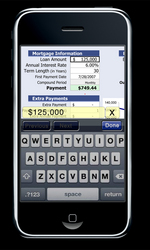
Any application or file type including documents, presentations, spreadsheets, CAD drawings, even custom applications found on your own desktop can now be viewed and controlled remotely from your iPhone. To set up Files2Phones (F2P), simply download the software and then drag and drop the local directories, applications or files you wish to access remotely into public, private or guest folders. The files are immediately added to your personal F2P directory at your personal .myf2p.com page – where they can be viewed and controlled using the iPhone's Safari browser. All display transfers use our patent pending compression technique for maximum efficiency and performance.
F2P creates an instantaneous image of your desktop PC or MAC right on your iPhone. If you have multiple monitors on your system, you can view them all. This remote iPhone application also includes the ability to launch a webcam on your desktop. This image can be viewed on your iPhone in either single shot or continuous view mode. Great for security when you are traveling or checking in to see the view from the desktop anytime, this remote desktop access from your iPhone allows you full control.
Want to use Skype to call your friends? Go ahead. Display your phone list, select the person to call and our Files2Phones iPhone software will make the connection for you.
Adding camera pictures to your online F2P directory is easy too. Simply take a picture with your iPhone camera and email it to your personal directory at your .myf2p.com page. Files2Phones will automatically add the image, in date and time sequence, to your published picture file. Keep your friends in the picture, easily with this iPhone application.
Your information is protected at all times. For security purposes, access to the files in the private and guest directories is managed by username and password, as well as, by time frame. All access requests and file transfers are recorded to a log file on your desktop computer, includ¬ing the name of the file or application accessed, a timestamp and the requesting IP address, port and connection type.
Interestingly, these same desktop and webcam display capabilities described above, delivering images instantly to your iPhone, also enable parents to remotely access the desktop to see what their children are viewing or doing in real time.
Files2Phones is available immediately by download for your free trial from http://www.f2p.com Additionally, licenses can be purchased online for $29.95 for 3 months or $99.95 for a year, with no hidden data or usage charges.
About 1stWorks Corp.:
1stWorks Corporation is a real-time software communications company with solutions for secure collaboration, conferencing, and multimedia content delivery — incorporating its patented data compression technology, Quantized Indexing. Ten thousand customers worldwide in more than 70 countries already use its hotComm software platform. 1stWorks was founded in 2000 by executives from several earlier successful companies and is located near Boston.
More information at http://www.1stworks.com
Corporate Contact:
Nigel Spicer
(508) 541-6781
{mos_fb_discuss:no_discuss}