New Oscilloscope Card from Strategic Test

Strategic Test releases 4-channel 100 MS/s 8-bit A/D oscilloscope card for PCI Express that can record 2 channels at 200 MS/s

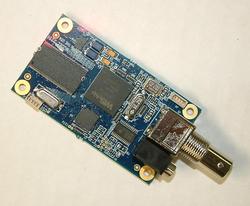
Woburn, MA (PRWEB) October 8, 2007 — Strategic Test Corp has announced the UF2e-2031 oscilloscope PCI Express card. The UF2e-2031 has four 100 MS/s 8-bit ADC's that are also able to operate in an interpolated mode to acquire two channels at 200 MS/s for increased versatility. Drivers for Microsoft Windows Vista, XP64, XP and Linux (RedHat, Fedora, SuSe, Sarge) are supplied with the card, as well as the SBench 5.3 oscilloscope program.

Key specifications include: 64 MSamples memory — expandable to 4 GSamples; continuous streaming to host PC > 120 MSamples/s; Effective Number of Bits > 7.2 LSB; Signal-to-Noise Ratio > 44.5 dB; Total Harmonic Distortion < -49.5 dB, and -3dB bandwidth > 90 MHz.

The UF2e-2031 oscilloscope card is best suited for applications that require cost-effective high-speed data acquisition and deep memory. Applications typically include RADAR, ultrasonics and communications.
The UF2e-2031 offers a wide range of triggering possibilities, including level, window, pulse-width, re-arm and double triggers, or with an external TTL trigger input. Trigger conditions can be set on multiple cards or systems combined with AND/OR logic, a feature often used in production test.

Like all UltraFast boards, the UF2e-2031 scope card can be customized through hardware options to best match the application:
'        Onboard memory: 32, 64, 128, 256, 512, 1024 or 2048 MegaSamples
'        Multiple Recording: memory segmentation
'        Gated Sampling: output clock controlled by external TTL signal
'        TimeBase : records time of trigger events or Gates
'        ABA Mode: slow-fast-slow recording on trigger
'        Star Hub: synchronization of up to 5 or 16 boards, or 5 to 16 PC's to a maximum or 271 boards. Can be used with Digitizer, AWG and Digital I/O boards to create mixed-mode systems
BaseXIO : adds 8 asynchronous digital I/O lines

Strategic Test provides the industry's most comprehensive software support with the following Software Development Kits available:
Windows Vista and XP64, XP, 2000, NT and 98
Linux drivers for RedHat, Suse, Fedora and Debian
MATLAB
LabVIEW
Agilent-VEE
LabWindows/CVI
DASYLab

Prices start at $6,990 with volume/OEM discounts available.

About Strategic Test
Strategic Test is a world leading supplier of PC instrument boards and has offices in the USA and Europe. The company's clients include global electronics, semiconductor, defense, telecommunications and medical instrument companies, government funded research labs and universities on five continents.

The first high-speed measurement board for PC's was designed in 1989. Today the product range consists of more than 200 Oscilloscope/ Digitizer, Arbitrary Waveform Generator, high-speed Digital I/O and Digital Pattern Generator boards in the industry standard PCI Express, PCI, 3U PXI and 6U CompactPCI formats.

Each product can be individually configured from a choice of more than eight hardware options design to address the needs of specific applications. Software Development Kits are available for Microsoft Windows (Vista, XP64, XP, 2000, NT), Linux (Redhat, Debian, Suse, Fedora, Sarge), LabVIEW, MATLAB, LabWindows/CVI, DASYLab, Agilent-VEE and Excel.

All products are supplied with two year hardware warranty and lifetime technical support and software updates.

Company Unveils New “Leaf” Networking Technology

Free software lets users share their XBox, digital media centers, PC's, printers, and other networked devices across the street or across the globe.

Tempe, AZ (PRWEB) October 8, 2007 — Leaf Networks, LLC of Tempe, AZ, a software company founded in 2005 by technology visionaries Dr. Jeff Capone and Pramod Immaneni, today unveiled the official public release of their "Leaf" network technology.    

News Image

Leaf technology offers to fill a void that is often a problem for typical home and business computer users — namely, the void between their private physical LAN network and it's devices, and remote users who aren't directly connected to their network but need to access those devices – be it a PC, Printer, even an XBox.

"Most people use one of two networks to access information and services, namely the public Internet and their private home or office local area network (LAN)," explains Dr. Jeff Capone, Founder and CEO of Leaf Networks. "For most users, the use of these networks has remained distinct."

However, as more devices are networked, there is an increasing interest in sharing these devices and services provided through them with users not connected to the LAN.

"Although VPN (virtual private network) technology has existed for some time, it has typically required the use of central servers, routers, and complicated software which simply isn't practical for your average home or business computer user," Dr. Capone continues.

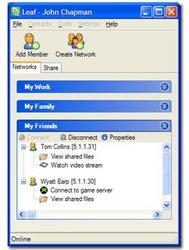
Not so any longer, says Leaf Networks. Their Leaf software, which resembles something a long the line of an instant messenger client, is bringing network and device sharing to the masses.

After a quick (and free) download of the Leaf software from the company's web site, users are free to create "networks" of Friends, Co-Workers, Family, and so on.

Next, users simply add other Leaf users to their networks — again, a process reminiscent of your favorite IM client — and in an instant are free to access, and to share, nearly any device attached to the other users' in-home or in-office network as well as to grant other users access to their own local devices.

The possibilities are truly endless as more and more consumer technology becomes "network attached" — from DLNA and DVR devices to game consoles, media centers, storage devices, and of course PC's, printers, and other peripherals. Any of these devices can be shared between users of Leaf almost instantly. Further, Leaf truly is "consumer friendly", requiring no knowledge of networking technology and allowing the typical, everyday user to begin using a Leaf network within minutes of downloading the software.

"The practical use of Leaf Networks is almost limitless," Dr. Capone says. "Users of Leaf Networks' service will be able to engage in activities outside of the constraints of their physical LAN environment."

"For example, you may want to save files on your PC to a co-worker's NAS (network attached storage device), watch a video off your home media center on your friend's TV, share a printer with a neighbor, save pictures of your family directly onto your parents' PC, play XBox head-to-head with a classmate, access important files from your home PC while on the road….all this and more is possible with Leaf Networks," Dr. Capone continues.

A New Technology
There are many products on the market today that allow you to stay connected to your files on your home PC or gain access to a remote PC, most notably, Avvenue, TubesNow and GoToMyPC.com. However, these applications do not allow you to share your networked devices with other users across the internet. Moreover, most of these products only allow you to publish your documents and do not allow you to push files out and save them on remote machines.

Likewise, There are many peer-to-peer products on the market today that offer new and exciting services for broadband users, namely, Nutella, Bitorrent, Skype, Avvenue, Joost and more. All of these applications create an overlay network using the internet, but are designed with a very specific application in mind. For example, a Bittorent network is designed for public file sharing and requires that multiple instance of the same file exist throughout the overlay network — not very useful if you want to share a Word document with a co-worker. Skype is designed for point-to-point voice calling and is not very useful if you want to play PC LAN games with multiple friends. Joost is designed for multicasting videos, but can not be used to remote desktop into a remote PC. Leaf Networks software creates a true personal local area network that is fully connect so any networked device or application can easily operate.

The unique, patent-pending technology used by Leaf Networks allows you to create your own personal networks without the need to configure firewalls or routers; that means no matter where you are – hot spot, hotel, café, work – you can still be in the network. Once your personal Leaf Network is formed, your network devices can be shared using one of many plug-ins offered by Leaf Networks. These plug-ins bridge network devices between two or more networks without the need to modify these networked devices. These devices see each other and can communicate directly, just like they were on the same local area network.

"The connection individual users have with members of their networks is a direct connection; there is no 'middleman' or intermediary service or device between users and the members of their networks," says Dr. Capone.

A Bright Future
Although only now announcing the first commercial release of Leaf, the product has been in beta for over nine months and has attracted tens of thousands of users who have provided valuable feedback prior to release of the product. The company is in talks with major device manufacturers and OEMs to embed Leaf technology into the next generation of networked devices including home routers, gateways, network-attached storage and digital media receivers.

About Leaf Networks:
Leaf Networks™ is the Global Virtual Network Provider that is changing the way people use networks and networked devices, such as game consoles, media centers and servers, printers and network storage devices. Leaf Networks offers consumers a free service that gives them the ability to easily form secure private networks and bring together networked devices with other members of their network. The free software can be downloaded from the company's website, located at www.leafnetworks.net.

Leaf Networks was founded in 2005 by Dr. Jeff Capone, CEO and Pramod Immaneni, CTO. The company's focus is the development and commercialization of its patent-pending "Leaf" network technology. The company is privately held and headquartered in Tempe, Arizona.


{mos_fb_discuss:no_discuss} 


NASBA

Originally an acronym for North American System Builder Association, NASBA is now called The Association of Channel Resellers. It represents system builders, solution providers, systems integrators and VARs. Membership is FREE.

The organization is featured The Force Field Podcast in Episode 35 – Partner With Your Vendors .

Contact:
Frank Raimondi, Executive Director, NASBA
15 82nd Dr.
Suite 250
Gladstone, OR 97027
Phone: 503-828-1924
Fax: 206-333-0880

e-mail: frank (at) nasba.com
web site: http://www.nasba.com
Become a member: http://www.nasba.com/members/members.php

Java.com Features First Bluetooth Mobile Bicycle Computer

Java.com, a division of Sun Microsystems, features the first Bluetooth Mobile Bicycle Computer, created by SoundOfMotion for mobile devices. "Stop lugging your cell phone as dead weight while cycling. Put it to work as a bicycle computer" said SoundOfMotion's founder. The innovative Bluetooth wireless motion sensor is at least 250 times more accurate than traditional cycling computers. It accurately measures speed and acceleration, and could measure torque and power without any additional sensors.

Vancouver, BC (PRWEB) October 5, 2007 — Java.com, a division of Sun Microsystems, features the first Bluetooth Mobile Bicycle Computer, created by SoundOfMotion for mobile devices.

Java.com is a wonderland of applications, games, animated greeting cards, screen savers, personal productivity products, and "infotainment" services. It's the ultimate go-to-market showcase for their applications, delivering over 25 million visitors a month. Java powers over 1.5 billion mobile devices.

The bicycle computer includes a Java Verified™ application for mobile devices and a specially designed Bluetooth wireless motion sensor, mounted on a wheel. The new cycling computer application offers many features not found in traditional bicycle computers, such as a large color display, travel data downloads and sound simulation. Priced at $69, first adopters can pre-order a Bluetooth wireless motion sensor for their bicycles at a significant discount. The mobile application is available for download from www.SoundOfMotion.com

The innovative Bluetooth wireless motion sensor is at least 250 times more accurate than traditional cycling computers and almost 2000 times better than GPS. This unique sensing technology accurately measures speed and acceleration, and could measure torque and power without any additional sensors.

Using the advantage of a large color display, common in many mobile phones, the application displays speed, acceleration, distance and time in large color digits, making it easy to read while pedaling in the sun or at night. Detailed travel data can be stored on a phone and uploaded to a computer.

One distinct safety feature of the device is a sound simulator. Cyclists often collide with cars and people on city streets because drivers and pedestrians just can't hear an approaching bicycle. Imagine, if a bicycle could sound like a horse, or a steam train?

Current sound themes simulate a motorcycle, horse and steam train. Like ringtones, users could also compose their own sounds. Riders could easily control the sound volume without taking their hands off the handle bar.

The sound simulation safety feature was originally created for commuters but quickly gains popularity among teens and tweens. Some BMX racers embrace the sounds of dirt bikes to create the effect of a real motocross race. At the same time the sound simulation technology allows audible control of speed and acceleration without looking at the display. Just listen to customized sounds corresponding to a range of speed and acceleration.

The Bluetooth mobile bicycle computer has been released for the North American markets. SoundOfMotion plans to deliver the device for European and Asian markets in 2008.

Sensoray Releases Small Format USB Frame Grabber

Latest USB frame grabber from Sensoray provides hardware video capture & compression in a small form factor.

Portland, OR (PRWEB) October 5, 2007 — Sensoray announced the newest addition to their USB video capture line of products, the 2251. The 2251 provides MPEG and JPEG video compression to Linux and Windows computers via a high speed USB connection. The 2251 accepts an NTSC or PAL composite analog video source. Adjustable resolution and bitrate selections allow the user to define their quality and storage requirements. Sensoray includes a Software Development Kit, SDK, with all of their 2251’s with support for Linux and Windows based computers. The included SDK supports multiple units per computer.

News Image
Motion Detection
The 2251 supports motion detection in three user programmable regions of interest. For each separate region of interest, the user can set up different levels of motion detection sensitivity. Within each of the regions of interest, motion can be further localized to a 16×16 pixel block.

Synchronous Audio:
The 2251 supports synchronous audio capture from a line level input.

Availability and Pricing:
The 2251 is available immediately with pricing starting at $226. Quantity price breaks are available.

About Sensoray:
Sensoray designs and manufactures OEM electronics for video imaging, data acquisition and machine control. Offering drivers for Windows or Linux, and live technical support, Sensoray is committed to helping ensure easy and rapid development. For more information, visit www.sensoray.com.


{mos_fb_discuss:no_discuss} 

NCH Software Releases MailBase Email Archiving Software

NCH Software announce the release of MailBase, a powerful free automatic email archiving utility for businesses supporting multiple email accounts.

Canberra, Australia (PRWEB) October 4, 2007 – NCH Software, specialists in business, audio and video software applications, announce the release of MailBase Email Archiver.

"With email being the most common form of communication between business the process of archiving emails is so important," said Stephanie Lee, marketing manager for NCH Software. "MailBase provides business with a free and comprehensive way of automatically archiving email to safe guard against the possibility of losing vital correspondence in the event of a crash or other unforeseen technical problem."

MailBase runs on a business' server and can support an unlimited number of email accounts. The software automatically creates storage folders for each email address and users can access their archived emails through a web panel from a web browser (such and FireFox or Internet Explorer).

Before an email is sent or received, MailBase creates a copy of it and stores it in the storage folder. Users can view all emails even if they have since deleted an inbox.

"MailBase is currently a free program," said Stephanie, "and it joins our other free business applications such as Express Invoice, Meo File Encryption, FileFort Backup Utility, our FTP clients and Eyeline Video Surveillance."

All of NCH Software's applications can be downloaded for free from www.nchsoftware.com and specialized business audio applications can be found at www.nch.com.au.

NCH Software is a leader in business, audio and video technology. Since 1993 our software development team has released more than 40 Windows, Mac, Linux, Palm and Pocket PC applications which are now leaders in their classes and have been awarded for software excellence. We continue to develop new programs for a growing number of platforms and solutions. Visit us at www.nchsoftware.com.

Holonyx Releases RESTORE Backup and Recovery Software into Open Source Community

Holonyx Inc. has released RESTORE, a Linux-based enterprise network backup and recovery solution for Windows, Novell NetWare, Mac OS X, Unix and Linux systems as an open source project.

Loveland, CO (PRWEB) October 4, 2007 — Holonyx Inc. has released RESTORE, a Linux-based enterprise network backup and recovery solution for Windows, Novell NetWare, Mac OS X, Unix and Linux systems. RESTORE is scalable to a complete backup solution for multiple workstations and servers in distributed network environments. RESTORE is also being released as an open source project.

News Image

"RESTORE delivers powerful administration, ease of use, and scalability to meet your backup and recovery needs today and grow with you to meet tomorrow's requirements," said Garret Acott, President of Holonyx.

RESTORE provides scheduled backups as well as the capability to back up computers in multiple physical locations. In addition, no client agent is required for RESTORE; the systems being backed up need only grant RESTORE secured access.

RESTORE also offers a unique feature to hosting providers – the ability to resell backup services along with their current web hosting services. Using RESTORE, resellers of the hosting provider can offer backup of local PC's or servers along with web hosting to their end-user customers. End-users will also be able to restore the files of their hosted websites should local copies become lost or damaged, and be able to select from multiple versions backed up at different points in time. Both of these backup and restore capabilities offer the hosting provider and resellers new revenue opportunities in addition to basic hosting and e-mail functionality they offer now.

Holonyx is placing RESTORE into the open source community and download packages are available at http://sourceforge.net/projects/restore Holonyx Ruffdogs technology division has long been a major player in the open source community and has contributed to numerous open source projects including SME Server, guilinux and MyPHPNuke.

Some of the features of RESTORE include:


  • Browser-based – Access your RESTORE system remotely from anywhere using the Internet. This allows users and administrators to run backups or check status at any time.
  • Heterogeneous Operating System Backup – Backup Linux, Unix, Mac OS X, Windows (95, 98, 2000, ME, NT, XP, Vista) and Novell NetWare.
  • Multiple Revisions – Restore from selected backups made at different points in time.
  • Incremental Backup – RESTORE will backup only the files that have been modified since the previous backup took place, optimizing disk space and bandwidth usage.
  • Security – Set up what you want your users and groups to access.
  • User-initiated restore – Users can restore their own files without IT involvement.
  • Access Backups via WebDAV- RESTORE provides a secure environment for accessing/editing/managing files on web-servers.
  • FTP Sites – Allows your company to backup websites and online storage.
  • Error Reporting and Notification – RESTORE will email the administrator and users of successful and failed backups.
  • MySQL support – Backup MySQL databases.

For more information on Restore, visit http://restore.holonyx.com/

About Holonyx
Holonyx Inc. is a business development technology corporation focusing on technology development, operations and manufacturing process improvement, and marketing services. Contact Holonyx at:
Holonyx Inc.
6865 Sherman Street
Loveland, CO 80538
Phone: 970-232-2050
Fax: 970-232-2050

www.holonyx.com

Email Troubleshooting: Back to Basics

Email has undergone a major transformation in the past decade . What began as a simple means to send a quick message has evolved into a business critical application.  This increased use of email as a primary communication method has placed an emphasis on maintaining the availability of this service to the users. One of the best methods for diagnosing problems with email is what I refer to as “getting back to the basics”.

    Getting back to the basics means separating the email application software from the protocol itself.  Application software can be either an MUA (Mail User Agent) such as Outlook or Thunderbird, or an MTA (Mail Transport Agent) such as Exchange or Postfix. We will concentrate on working with the underlying protocols only.  Troubleshooting  software beyond basic configuration (proper user name and password, correct mail server IP and port number, mailbox setup, etc.) is beyond the scope of this article.

    There are 3 main protocols we will deal with when troubleshooting email. SMTP (Simple Mail Transfer Protocol) is used to send email. The SMTP protocol “pushes” messages, whether it's from the desktop to the internal email server, or from one email server to another. It is important to keep in mind that this is a “best effort” or “store and forward” protocol which means that there is no guarantee of successful delivery. POP3 (Post Office Protocol 3) and IMAP (Internet Message Access Protocol) are used to retrieve email. POP3 and IMAP “pull” messages from an email server to the desktop. POP3 downloads the entire message to the desktop when an email is read. IMAP downloads only the email header information when a mail check is performed, the message itself is actually opened and read right on the mail server (making IMAP a bit more bandwidth friendly). Both of these protocols send login credentials to the mail server in clear text unless the secure version of the protocol (POP3S or IMAPS) is used. While there are other proprietary email protocols in use, we will concentrate on the aforementioned 3 which are considered the standards for internet email transport.

    The most important tip I can give is to pay very close attention to any error messages you may receive related to mail delivery. If a user states “I sent an email, but I got an error message back”, you need to tell that user to copy the error message down verbatim. Email error messages are usually very specific about what the problem is. Here's an example:

This is the Postfix program at host mail.mydomain.com.


I'm sorry to have to inform you that your message could not

be delivered to one or more recipients. It's attached below.


For further assistance, please send mail to <postmaster>


If you do so, please include this problem report. You can

delete your own text from the attached returned message.


         The Postfix program


<joeshmoe@budweiser.com>: host mail1.synacor.com[64.8.70.127] said: 553 sorry,

  your envelope recipient is in rejected. either it has been deactivated or

  does not exist (#5.7.1) (in reply to RCPT TO command)


    The above message comes from my mail server (mail.mydomain.com) and is telling me that my message to joeshmoe@budweiser.com could not be delivered. Specifically, the mail server for “budweiser.com” (mail1.synacor.com[64.8.70.127]) said that the recipient (joeshmoe) either doesn't exist or his account has been deactivated. Note the “553”, this is an SMTP reply code. Anything in the 500 range means “permanent error”, the 400 range means “temporary error/will try again”, and anything in the 200 range means “success/OK”.

    Troubleshooting sending (SMTP) errors is done on the command line using the SMTP commands. If you suspect a problem between the desktop and the internal mail server you should do this from the desktop, if the issue is suspected to be outside of your network you need do this from the mail server itself. We'll make a connection to the recipients mail server and attempt to send a message “by hand” using some basic SMTP commands and see what happens. If you are testing from the desktop, you already know what the mail server's IP of FQDN is, if you are testing from your internal mail server to an outside server, you need to look up the name or IP of the recipient's mail server. This can be done with “nslookup” (Windows) or the “dig” command (Linux). Once we know how to get to the recipient's server, we'll make a telnet connection to port 25 (SMTP), then we'll introduce ourselves (the “helo” or “ehlo” command), and finally we will send an email and see what type of reply codes we get. Open up a terminal or command prompt and let's get started!

Look up the mail server:

thughes@thughes:~$ dig mydomain.com mx
;; QUESTION SECTION:
;mydomain.com.                        IN      MX
;; ANSWER SECTION:
mydomain.com.         736     IN      MX      5 mail.mydomain.com.

Make a connection (telnet) to that mail server on port 25 :

thughes@thughes:~$ telnet mail.mydomain.com 25
Trying 73.42.65.188…
Connected to mail.mydomain.com.
Escape character is '^]'.
220 mail.mydomain.com at your service ESMTP NO UCE 
 

(notice the 220…that means OK)       

Now, introduce yourself by typing “ehlo <something>” (I typed “ehlo howdy!”):

Trying 74.41.65.188…
Connected to mail.mydomain.com.
Escape character is '^]'.
220 mail.mydomain.com at your service ESMTP NO UCE
ehlo howdy!
250-mail.mydomain.com
250-PIPELINING
250-SIZE 10240000
250-ETRN
250-STARTTLS
250 8BITMIME

If you get an error when using the “ehlo” (extended helo) command, the server probably doesn't support the extended version of the command so just use the standard “helo” command. Again, notice all the 250 codes, these mean that this server supports all of the listed options.

Let's send an email:

Type “mail from: <your email address>” (the “<” and “>” are necessary in this command)

Trying 74.41.65.188…
Connected to mail.mydomain.com.
Escape character is '^]'.
220 mail.mydomain.com at your service ESMTP NO UCE
ehlo test
250-mail.mydomain.com
250-PIPELINING
250-SIZE 10240000
250-ETRN
250-STARTTLS
250 8BITMIME
mail from: <thughes@fwpm.com>
250 Ok

(There's that 250 again)

Type “rcpt to: <recipient's email address>”

Trying 74.41.65.188…
Connected to mail.mydomain.com.
Escape character is '^]'.
220 mail.mydomain.com at your service ESMTP NO UCE
mail from: <thughes@someotherdomain.com>
250 Ok
rcpt to: <thughes@mydomain.com>
250 Ok

(250 again)

Now we need to add some data to the email, so type “data” and hit the “enter” key,  then type “SUBJECT:” (add a subject), hit “enter”, type “FROM:” (type the from address), hit “enter”, type “TO:” (type the to address), hit “enter” twice, and then type the body of your email. When you're done typing your message, hit the “.” key and you should get a message that the email was sent (“queued”) on the recipient's server, then type “quit”. All of the commands that I typed in the following example are in bold type:

Trying 74.41.65.188…
Connected to mail.mydomain.com.
Escape character is '^]'.
220 mail.mydomain.com at your service ESMTP NO UCE
mail from: <thughes@someotherdomain.com>
250 Ok
rcpt to: <thughes@mydomain.com>
250 Ok
data
354 End data with <CR><LF>.<CR><LF>
FROM: mickeymouse@donaldduck.com
TO: thughes@mydomain.com
SUBJECT: test email

This is a test email
.
250 Ok: queued as 56CBE3B018E
quit
221 Bye
Connection closed by foreign host.

This message was sent successfully (“250 Ok: queued as 56CBE3B018E”). If there was a problem, the reply code would have told me exactly what the problem was. You may also have noticed that when I typed in the “FROM:” field, I used an address other than the one that I used in the initial “mail from:” command, this is because the “FROM:” in the headers of the email do NOT have to match the original connecting (“envelope”) sender. This is how spammers spoof email (heh heh).

    Alright, delivery works, now we need to test mail retrieval. Let's do some POP command line magic next. First, we need to telnet to our internal mail server on port 110 (995 for POPS):

thughes@thughes:~$ telnet mail.mydomain.com 110
Trying 192.168.12.80…
Connected to mail.mydomain.com.
Escape character is '^]'.
+OK dovecot ready.

Now we need to authenticate by typing “user <username>”, hit “enter”, then type “pass <your password>” and hit “enter” again:

thughes@thughes:~$ telnet mail.fwpm.com 110
Trying 192.168.12.80…
Connected to mail.fwpm.com.
Escape character is '^]'.
+OK dovecot ready.
user thughes
+OK
pass *********
+OK Logged in.

We're in!  Now type “list” to see all the emails (they are listed numerically, the first number  is the message number, the second number is the message size), type “retr (message #)”  and hit “enter”, and your message will be displayed. Type “quit” to disconnect from the POP server.

    Finally, let's try email retrieval using IMAP. Telnet to the internal mail server on port 143 (993 for IMAPS) and log in by typing “a01 login <user name> <password>”:

thughes@thughes:~$ telnet mail.mydomain.com 143
Trying 192.168.12.80…
Connected to mail.mydomain.com.
Escape character is '^]'.
* OK dovecot ready.
a01 login thughes ********
a01 OK Logged in.

Next, lets list our mailboxes. Type “a02 list “” “*”” and hit “enter”:

ao2 list "" "*"
* LIST (\NoInferiors) "/" INBOX
* LIST (\NoInferiors \UnMarked) "/" "Trash"
* LIST (\NoInferiors) "/" "Ebay"
* LIST (\NoInferiors) "/" "Sent"
ao2 OK List completed.

Now we can enter a mailbox:

a02 select INBOX
* FLAGS (\Answered \Flagged \Deleted \Seen \Draft Junk $Label1 $Label2 $Label3 $Label4 $Label5 NonJunk)
* OK [PERMANENTFLAGS (\Answered \Flagged \Deleted \Seen \Draft Junk $Label1 $Label2 $Label3 $Label4 $Label5 NonJunk \*)] Flags permitted.
* 1142 EXISTS
* 3 RECENT
* OK [UNSEEN 1131] First unseen.
* OK [UIDVALIDITY 1157335433] UIDs valid
* OK [UIDNEXT 26939] Predicted next UID
a02 OK [READ-WRITE] Select completed.

Fetch the headers for the first email in the list:

ao2 fetch 1 all
* 1 FETCH (FLAGS (\Seen) INTERNALDATE "18-Aug-2006 09:43:33 -0400" RFC822.SIZE 21975 ENVELOPE ("Thu, 17 Aug 2006 13:06:55 -0400" "Official: Jul-Aug 2006 (ISC)2 Newsletter" (("(ISC)2 Management" NIL "management" "isc2.org")) (("(ISC)2 Management" NIL "management" "isc2.org")) (("(ISC)2 Management" NIL "management" "isc2.org")) ((NIL NIL "thughes" "mydomain.com")) NIL NIL NIL "<LYRIS-1619473-1789-2006.08.17-16.13.08–thughes#mydomain.com@isc16.isc2.org>"))
ao2 OK Fetch completed.

Read some mail:

ao2 fetch 1 body[text]

(This should show you the message body)

Close the connection by typing “ao2 logout”:

a02 logout
* BYE Logging out
a02 OK Logout completed.
Connection closed by foreign host.

   
    That's about it for command line troubleshooting using the basic protocols. The point of the preceding exercises is to confirm that mail can be sent and received. If you are successful using the command line to send/retrieve mail but it doesn't work when using applications such as Outlook or Thunderbird, you can now concentrate your efforts on troubleshooting the software application and configuration.

    The logs on your mail server can provide a wealth of information to aid you in diagnosing problems. Becoming proficient in reading the logs is one of the most important things you can do. Take a look at the mail logs and learn how to read them. Try to follow an email through the logs from the time it hit the server until it was delivered to the recipient.  

    Email headers are also a valuable source of information. You can view the complete headers in most email clients by choosing an option such as “view > all headers”, right clicking the email and choosing “view internet headers”, etc. The exact method depends on which client you are using, Google it if you can't figure out how. Headers are read from the bottom up (use the time stamps as a reference). Below is an example of a full set of headers (I added the comments in bold):

Return-Path: <apache@isc18.isc2.org>
 X-Original-To: thughes@fwpm.com
 Delivered-To: thughes@fwpm.com

This is my mail gateway delivering the message to my mail server:

 Received: from fw.fwpm.com (unknown [192.168.12.1])
by mail.fwpm.com (Postfix) with ESMTP id 280A23B019E
for <thughes@fwpm.com>; Mon,  1 Oct 2007 10:51:03 -0400 (EDT)

This is my mail gateway processing the mail internally:

 Received: from fw.fwpm.com (localhost [127.0.0.1])
by fw.fwpm.com (Postfix) with SMTP id 4E54FAC07F
for <thughes@fwpm.com>; Mon,  1 Oct 2007 11:08:13 -0400 (EDT)

This is the spam processing and scoring on my mail gateway (spamassassin):

(sender vscan@fw.fwpm.com)
 X-Spam-Checker-Version: mailDefender 3.1.3 (2006-06-01)
 X-Spam-Level: S
 X-Spam-Status: No, hits=1.9 reqd=5.0 tests=NO_REAL_NAME=0.55,
SPF_HELO_SOFTFAIL=0.1,SPF_SOFTFAIL=0.1,XD_DYNAMIC_IP=0.9, XD_MULTIPART=0.2
Bayes=0.5
 X-Spam-Report: *  0.9 XD_DYNAMIC_IP At least one relay is a dynamic IP *  0.6
NO_REAL_NAME From: does not include a real name *  0.2 XD_MULTIPART Email
contain several alternative views *  0.1 SPF_SOFTFAIL SPF: sender does not
match SPF record (softfail) *      [SPF failed: ] *  0.1 SPF_HELO_SOFTFAIL
SPF: HELO does not match SPF record (softfail) *      [SPF failed: ]

This is my mail gateway receiving the email from the sender's server:

 Received: from isc18.isc2.org (isc18.isc2.org [216.12.146.142]) (using TLSv1
with cipher DHE-RSA-AES256-SHA (256/256 bits)) (No client certificate
requested) by fw.fwpm.com (Postfix) with ESMTP id E5E2BAC07E for
<thughes@fwpm.com>; Mon,  1 Oct 2007 11:07:48 -0400 (EDT)

This is the sender's server receiving the mail from an internal process:

 Received: from isc18.isc2.org (isc18.isc2.org [127.0.0.1]) by isc18.isc2.org
(8.13.1/8.13.1) with ESMTP id l91F7mL0022786 for <thughes@fwpm.com>; Mon, 1
Oct 2007 10:07:48 -0500

Here's the message:

 Message-Id: <200710011507.l91F7mmV022784@isc18.isc2.org>
 Content-Transfer-Encoding: binary
 Content-Type: multipart/related; boundary="_———-=_1191251268227820"
 MIME-Version: 1.0
 X-Mailer: MIME::Lite 3.01 (F2.73; B3.07; Q3.07)
 Date: Mon, 1 Oct 2007 15:07:48 UT
 To: thughes@fwpm.com
 From: service@isc2.org
 Subject: (ISC)2: Confirmation of change to CISSP CPE Record
 X-AVAS-Signature: pfilter.pl Version 1.73
 X-AVAS-EmailID: 20070901-110749-7603
 Status: RO
 X-UID: 26809
 Content-Length: 761
 X-Keywords:
 X-Length: 3068
 
=== This is a system generated message from (ISC)2 ===

Dear T. Hughes:

This email message is blah…blah…blah.

    As you can see, the headers provide a detailed record of mail routing. You can use the time stamps at each hop to determine where any latency in delivery may be. Another trick is to use the header information to verify a spoofed email. If an email appears to come from somebody you know but looks suspicious, view the headers to determine the IP address of the original sending server. Perform a “whois” lookup on that IP address; if it comes back as registered to a Chinese or Eastern European domain (for example) you can be certain it is a spoof.

    Lastly, I want to comment about email security. Today's users tend to send anything (including very sensitive or personal information) via email without any thoughts of security or confidentiality. Email is not secure! As mentioned earlier, SMTP, POP3, and IMAP are all clear text protocols. This is akin to sending your snail mail on postcards instead of inside an envelope, safe from prying eyes. There are a few basic precautions you can take to secure your email. One would be to use POP3S and IMAPS to retrieve mail. Secondly, you should configure your mail server to support TLS (Transport Layer Security). TLS will allow encrypted SMTP communication with any recipient's server that also supports TLS. It should be noted that you must configure TLS to be optional, if the receiving server does not support TSL the communication will fall back to plain text.
Thirdly, I would suggest the use of an email encryption application (such as Zix mail) to ensure sensitive information is transmitted securely. Finally, user training is a must. Your users need to have a basic understanding of how email works. They need to know that it is neither secure (in it's default configuration) nor guaranteed to be delivered to the intended recipient.

    I hope you have found the information and tips in this article interesting and informative. Feel free to contact me if you if you have additional input or would like further information about the techniques I have presented.

Todd Hughes is a Network Security Analyst and long time Linux fan in the Upstate New York area. Send your Questions, comments or feedback to: thughes@fwpm.com.

Copyright  Todd Hughes  2007. Printed by permission.


{mos_fb_discuss:174} 

Fighting Back Against Scammers? Scammed.us Launches

Online scams are a huge problem today. There is a new solution for everyone who has been scammed. Scammed.us is a service that allows regular everyday people to post about how they were scammed. Whether paying for a service or product and not receiving it, or even if dishing out a lot of money to be part of a project and have yet to hear back from anyone.

(PRWEB) October 3, 2007 — Scammed.us is a new free service that allows members to create their own domain in order to make sure that others know of their unfortunate scam. Users simply register, file a report, and then create a sub domain such as scammersname.scammed.us. It is as simple as that.

Members use that free sub domain to let others know of the scammers that were involved. Users can put in specific details, names, addresses, and anything that the feel is helpful to let others know to stay away from those people.

Users of Scammed.us can use a variety of tools that will allow them to be more in depth with the scamming report. These include image hosting for screen shots, as well as photos proving they were scammed. They can provide live links so that when people click on it they know to stay away from that particular site.

Everyday, more and more people are using www.scammed.us as a way of letting the world know that if they plan on doing business with someone that they should check them out first. So far there are only a few scamming reports but this website is going to be huge, especially with the amount of online fraud that goes on in today's Internet. It is unfortunate that the Internet would need such a site such as Scammed.us, but there are always going to be crooks out there looking to make an easy buck.

This is not a website in for people to bash others they do not like. The reports must be filed honestly in order to make the most of this innovative website. If a member has been scammed it is a great idea to file there simply because when people do their research these days the scammers will be found at scammed.us. That means if someone were scammed by ABC freelance and a search is done on about ABC freelance, then chances are they will come up with a scam report about them. Once they read that, then they will reconsider giving any business to ABC freelance and the job will be done. Members will have successfully helped just one more person to save their money from a total scam. Sooner or later, with enough reports, the scammer will be out of business and users can sleep better knowing they made it happen.

Ever been scammed? Now there is a way to help others avoid scammers.